Minecraft version
Back to mods 
CurseForge · Minecraft mod
Project Workshop
Adds three workshop blocks for crafting, smelting, and brewing, with upgradeable storage that automatically refills crafting grids and supplies repeat brews.
Choose a version Pick your version below, then grab the matching file.
Quick answer
Which Project Workshop release should I use?
Latest stable file projectworkshop-1.20.1-1.8.5.jar
Game version 1.20.1
Loader Forge
Project Workshop projectworkshop-1.20.1-1.8.5.jar targets 1.20.1 with Forge. The project page does not say whether this file belongs on the client, dedicated server, or both. No extra mods listed for this file.
Where it goes
Is Project Workshop required on the client, server, or both?
The project page does not say whether this file belongs on the client, dedicated server, or both.
Client Source doesn’t say
Dedicated server Source doesn’t say
Loader for this release Forge
Required install it here Optional supported, not mandatory Not supported do not install here Source doesn’t say do not assume
The source does not explicitly classify this release as client-only or server-only.
What else does Project Workshop projectworkshop-1.20.1-1.8.5.jar need?
projectworkshop-1.20.1-1.8.5.jar. Change the file and its required mods may change too.
This file does not list any required mods. Do not add a library just because a different file uses it.
This file does not list any required or optional mods.
Before you install it
Add Project Workshop without breaking your instance.
Built for Project Workshop projectworkshop-1.20.1-1.8.5.jar. Pick another file and the loader, install side or required mods may change.
- 01
Stick to this file
Use projectworkshop-1.20.1-1.8.5.jar. It targets 1.20.1 with Forge; another release may have different loader, side or dependency requirements.
- 02
Bring the mods it needs
This file does not list any required mods. Do not add a library just because a different file uses it.
- 03
Put it on the correct side
The project page does not say whether this file belongs on the client, dedicated server, or both.
- 04
Pick the file you checked
Use the “Get this file” button beside projectworkshop-1.20.1-1.8.5.jar. It opens that exact file at the source.
About this project
What does Project Workshop add?
Project Workshop adds three blocks that bring crafting, smelting, brewing, and upgradeable storage together in your Minecraft workshop.
Project Table
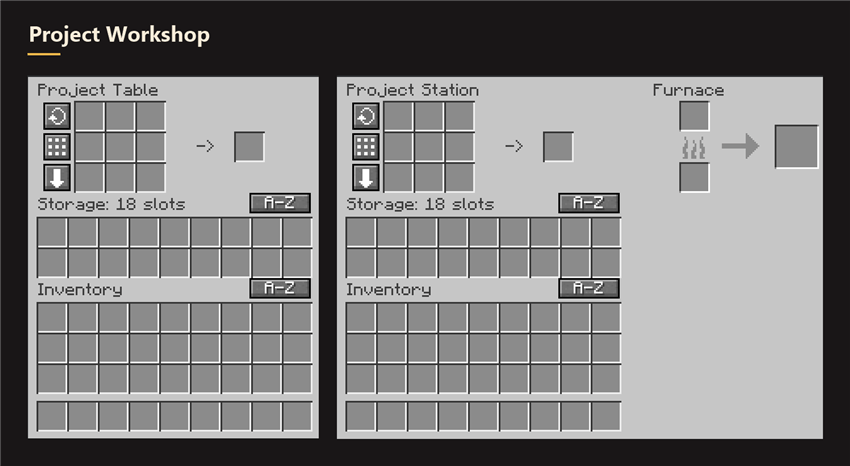
A workbench with a persistent 3×3 crafting grid and built-in storage. Items stay in the grid when you close the menu. After you take a crafting result, the table refills the grid from storage whenever it has all the missing ingredients for another craft.
Project Station
A workbench, furnace, and storage in one block. It refills its crafting grid from storage just like the Project Table. The furnace keeps smelting while the menu is closed, as long as the area stays loaded.
Brewing Station *NEW*
A brewing stand with three bottle slots, a reagent slot, a fuel slot, and its own storage. Set up a brew as you would at a vanilla brewing stand. Once you remove the finished bottles, the station can repeat the same brewing step if it has enough matching supplies in storage.
Storage upgrades and controls
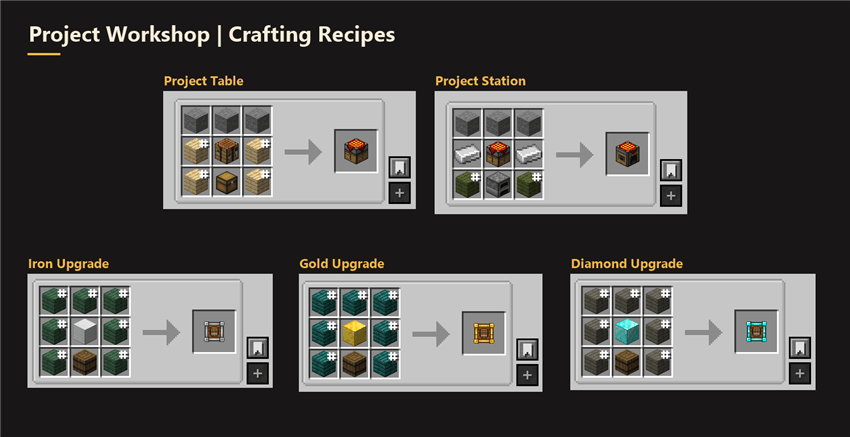
- Each block starts with 18 storage slots. Right-click the placed block with the Iron, Gold, and Diamond upgrades in that order to expand it to 27, 36, and 54 slots. Breaking the block drops its contents and installed upgrades.
- Shift-click a crafting ingredient, crafting result, furnace output, or potion bottle to move it directly into that block’s storage. A crafting result transfers only when the full batch fits.
Optional mod integrations
- JEI transfers ingredients from your inventory and workshop storage into the crafting grid. The Project Station also supports smelting recipe transfer.
- Crafting Tweaks adds grid controls. On the Project Table, Balance Grid also distributes matching ingredients from storage across occupied crafting slots.
- Inventory Essentials provides sorting support for workshop storage.
- Mouse Tweaks can use the standard inventory slots in the workshop menus.
JEI, Crafting Tweaks, and Inventory Essentials integrations are included in the 1.20.1 Forge, 26.3 NeoForge, and 26.3 Fabric builds. Mouse Tweaks can also be used with 26.3 Forge.
Supported versions
- Minecraft Java Edition 1.20.1 with Forge and Java 17
- Minecraft Java Edition 26.3 with Forge, NeoForge, or Fabric and Java 25. The Fabric build also requires Fabric API.
Project description from CurseForge.
Pick your setup
Project Workshop by Minecraft version and loader
Choose the version and loader you play, then open the matching release.
Minecraft version
1.20.1
1 loader buildCheck the dependencies, then try the file in a copied instance before changing a world you care about.
Recent files
Project Workshop versions and loaders
projectworkshop-1.20.1-1.8.5.jar
16 Nov 2026
Client Source doesn’t say Server Source doesn’t say Dependencies No extras listed Listed on Release listing
Check the 1.20.1 · Forge setup 1.20.1Forge release
projectworkshop-fabric-26.3-2.2.3.jar
16 Nov 2026
Client Source doesn’t say Server Source doesn’t say Dependencies No extras listed Listed on Release listing
Check the 26.3 · Fabric setup Fabric26.3 release
projectworkshop-26.3-2.2.3.jar
16 Nov 2026
Client Source doesn’t say Server Source doesn’t say Dependencies No extras listed Listed on Release listing
Check the 26.3 · Forge setup Forge26.3 release
projectworkshop-neoforge-26.3-2.2.3.jar
16 Nov 2026
Client Source doesn’t say Server Source doesn’t say Dependencies No extras listed Listed on Release listing
Check the 26.3 · NeoForge setup NeoForge26.3 release
projectworkshop-neoforge-26.3-2.1.3.jar
12 Nov 2026
Client Source doesn’t say Server Source doesn’t say Dependencies No extras listed Listed on Release listing
Check the 26.3 · NeoForge setup NeoForge26.3 release
projectworkshop-fabric-26.3-2.1.3.jar
12 Nov 2026
Client Source doesn’t say Server Source doesn’t say Dependencies No extras listed Listed on Release listing
Check the 26.3 · Fabric setup Fabric26.3 release
projectworkshop-26.3-2.1.3.jar
12 Nov 2026
Client Source doesn’t say Server Source doesn’t say Dependencies No extras listed Listed on Release listing
Check the 26.3 · Forge setup Forge26.3 release
projectworkshop-1.20.1-1.7.5.jar
12 Nov 2026
Client Source doesn’t say Server Source doesn’t say Dependencies No extras listed Listed on Release listing
Check the 1.20.1 · Forge setup 1.20.1Forge release
projectworkshop-1.20.1-1.7.4.jar
12 Nov 2026
Client Source doesn’t say Server Source doesn’t say Dependencies No extras listed Listed on Release listing
Check the 1.20.1 · Forge setup 1.20.1Forge release
Looking for an older file? The official CurseForge project page is in Resources.
 mod
CurseForge · Minecraft
Primitive Quarry
A low-cost, upgradeable surface quarry that gathers underground resources so you can reach the parts of Minecraft and your modpack you want to play sooner.
 mod
Modrinth · Minecraft
Belt Slot
Adds a dedicated belt utility slot for torches, totems, compasses, potions, spyglasses, and other supported items, with HUD, inventory, player rendering.
 mod
CurseForge · Minecraft
Belt Slot
Adds a dedicated belt utility slot for torches, totems, compasses, potions, spyglasses, and other supported items, with HUD, inventory, player rendering.