Minecraft version
Back to mods 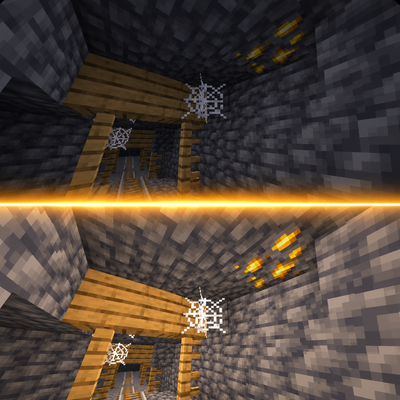
CurseForge · Minecraft mod
Shhh Brightness Toggle
A simple client-side brightness and fullbright mod for Minecraft 26.3. Lets you toggle brightness with a hotkey, adjust levels between 10% and 100%, and configure settings in-game without potion effects or particles.
Choose a version Pick your version below, then grab the matching file.
Quick answer
Which Shhh Brightness Toggle release matches Fabric?
Best match for your filters Shhh Brightness Toggle 1.0.0 (Fabric 26.1.2)
Game version 26.1.2
Loader Fabric
Shhh Brightness Toggle 1.0.0 (Fabric 26.1.2) targets 26.1.2 with Fabric. The project page does not say whether this file belongs on the client, dedicated server, or both. No extra mods listed for this file.
Where it goes
Is Shhh Brightness Toggle required on the client, server, or both?
The project page does not say whether this file belongs on the client, dedicated server, or both.
Client Source doesn’t say
Dedicated server Source doesn’t say
Loader for this release Fabric
Required install it here Optional supported, not mandatory Not supported do not install here Source doesn’t say do not assume
The source does not explicitly classify this release as client-only or server-only.
What else does Shhh Brightness Toggle 1.0.0 (Fabric 26.1.2) need?
Shhh Brightness Toggle 1.0.0 (Fabric 26.1.2) on Fabric. Every mod below is checked against that same setup.
This file does not list any required mods. Do not add a library just because a different file uses it.
This file does not list any required or optional mods.
Before you install it
Add Shhh Brightness Toggle without breaking your instance.
Built for Shhh Brightness Toggle 1.0.0 (Fabric 26.1.2) on Fabric. Pick another file and the loader, install side or required mods may change.
- 01
Stick to this file
Use Shhh Brightness Toggle 1.0.0 (Fabric 26.1.2). It targets 26.1.2 with Fabric; another release may have different loader, side or dependency requirements.
- 02
Bring the mods it needs
This file does not list any required mods. Do not add a library just because a different file uses it.
- 03
Put it on the correct side
The project page does not say whether this file belongs on the client, dedicated server, or both.
- 04
Pick the file you checked
Use the “Get this file” button beside Shhh Brightness Toggle 1.0.0 (Fabric 26.1.2). It opens that exact file at the source.
About this project
What does Shhh Brightness Toggle add?
Shhh Brightness Toggle
A simple, lightweight client-side brightness and fullbright mod for Minecraft 26.3 on Fabric.
Shhh Brightness Toggle lets you adjust world brightness with a hotkey or settings slider. Unlike older fullbright methods that apply a fake Night Vision effect (which spawns annoying potion swirl particles and clutters your HUD with a potion icon), this mod works directly with Minecraft's lightmap rendering. You get clear visibility in dark caves, ravines, and underwater without any potion clutter.
Features
- Toggle with a key: Press B (default) to turn fullbright on or off whenever you need it.
- Adjust brightness in steps: Use the Up and Down arrow keys (default) to change brightness between 10% and 100% in 10% steps.
- On-screen feedback: Shows your current brightness level when you change it. The message shifts from red at low brightness, to yellow at mid levels, to green at 100%. You can turn this off in the settings if you prefer plain text.
- No potion clutter: No potion swirls, no inventory status icons, and no screen flashing.
- Restores your normal brightness: When you turn the mod off, leave a world, disconnect from a server, or close the game, your original vanilla brightness setting is restored automatically.
- In-game config screen: If you have Mod Menu installed, you can open a settings screen with an on/off button, a slider, and a color toggle. Mod Menu is optional.
- Saves your preferences: Settings are saved in
.minecraft/config/shhh-brightness-toggle.json. If the file is ever corrupted or empty, it resets to safe defaults without crashing. - Client-side only: Runs entirely on your computer. It sends no network packets to servers and does not need to be installed on servers.
Default Controls
All three keys can be rebound in Options -> Controls -> Key Binds:
- Toggle Brightness: B
- Increase Brightness: Up Arrow
- Decrease Brightness: Down Arrow
Installation
- Install Fabric Loader for Minecraft 26.3.
- Put Fabric API into your
.minecraft/modsfolder. - Download
shhh-brightness-toggle-1.0.0+mc26.3.jarand put it into.minecraft/mods. - (Optional) Install Mod Menu if you want to use the in-game settings screen.
Compatibility and Server Rules
- Sodium and Iris: The mod hooks into lightmap rendering at the end of the method rather than replacing it. It is designed to work with Sodium and Iris, but has not been tested with every possible mod combination. Please report any issues on GitHub.
- Server Rules: Some multiplayer servers do not allow fullbright mods. Check the server rules before using this mod online. Use at your own risk.
Updating Between Versions
This mod hooks into Minecraft's internal lightmap extractor (LightmapRenderStateExtractor). In future Minecraft updates, Mojang may change how internal lighting works. Each new Minecraft version requires testing, and a new mod version will be published if necessary.
Author and License
- Author: RafayShhh
- GitHub: https://github.com/rafayshhh
- CurseForge: https://curseforge.com/members/rafayshhh
This project is licensed under the MIT License. Not an official Minecraft product. Not approved by or associated with Mojang or Microsoft.
Project description from CurseForge.
Pick your setup
Shhh Brightness Toggle by Minecraft version and loader
Choose the version and loader you play, then open the matching release.
Minecraft version
26.2
1 loader buildMinecraft version
26.1.2
1 loader buildCheck the dependencies, then try the file in a copied instance before changing a world you care about.
Recent files
Shhh Brightness Toggle versions and loaders
Shhh Brightness Toggle 1.0.0 (Fabric 26.1.2)
shhh-brightness-toggle-1.0.0-mc26.1.2.jar
14 Nov 2026
Client Source doesn’t say Server Source doesn’t say Dependencies No extras listed Listed on Release listing
Check the 26.1.2 · Fabric setup Fabric26.1.2 release
Shhh Brightness Toggle 1.0.0 (Fabric 26.2)
shhh-brightness-toggle-1.0.0-mc26.2.jar
14 Nov 2026
Client Source doesn’t say Server Source doesn’t say Dependencies No extras listed Listed on Release listing
Check the 26.2 · Fabric setup Fabric26.2 release
Shhh Brightness Toggle 1.0.0 (Fabric 26.3)
shhh-brightness-toggle-1.0.0-mc26.3.jar
12 Nov 2026
Client Source doesn’t say Server Source doesn’t say Dependencies No extras listed Listed on Release listing
Check the 26.3 · Fabric setup Fabric26.3 release
Looking for an older file? The official CurseForge project page is in Resources.