Minecraft version
Back to mods 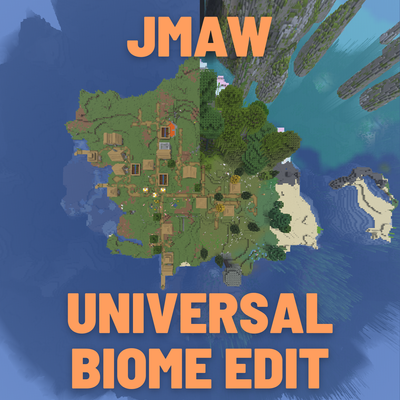
CurseForge · Minecraft mod
BiomeGenerationEdit
Take control of what generates in your world, delete biomes, swap one for another, make a biome cover most of the land, keep biomes apart, limit biomes to certain climates, set a terrain style for each world, all from a GUI in game. Supports modded biomes
Choose a version Pick your version below, then grab the matching file.
Quick answer
Which BiomeGenerationEdit release should I use?
Latest stable file JmawBiomeGenerationEdit-1.21.11.jar
Game version 1.21.11
Loader NeoForge
BiomeGenerationEdit JmawBiomeGenerationEdit-1.21.11.jar targets 1.21.11 with NeoForge. The project page does not say whether this file belongs on the client, dedicated server, or both. No extra mods listed for this file.
Where it goes
Is BiomeGenerationEdit required on the client, server, or both?
The project page does not say whether this file belongs on the client, dedicated server, or both.
Client Source doesn’t say
Dedicated server Source doesn’t say
Loader for this release NeoForge
Required install it here Optional supported, not mandatory Not supported do not install here Source doesn’t say do not assume
The source does not explicitly classify this release as client-only or server-only.
What else does BiomeGenerationEdit JmawBiomeGenerationEdit-1.21.11.jar need?
JmawBiomeGenerationEdit-1.21.11.jar. Change the file and its required mods may change too.
This file does not list any required mods. Do not add a library just because a different file uses it.
This file does not list any required or optional mods.
Before you install it
Add BiomeGenerationEdit without breaking your instance.
Built for BiomeGenerationEdit JmawBiomeGenerationEdit-1.21.11.jar. Pick another file and the loader, install side or required mods may change.
- 01
Stick to this file
Use JmawBiomeGenerationEdit-1.21.11.jar. It targets 1.21.11 with NeoForge; another release may have different loader, side or dependency requirements.
- 02
Bring the mods it needs
This file does not list any required mods. Do not add a library just because a different file uses it.
- 03
Put it on the correct side
The project page does not say whether this file belongs on the client, dedicated server, or both.
- 04
Pick the file you checked
Use the “Get this file” button beside JmawBiomeGenerationEdit-1.21.11.jar. It opens that exact file at the source.
About this project
What does BiomeGenerationEdit add?
Take control of what generates in your world, delete biomes, swap one for another, make a biome cover most of the land, keep biomes apart, limit biomes to certain climates, set a terrain style for each world, all from a GUI in game. Supports most modded biome mods.
There is also no dependencies needed.
As for what the actual mod can do, it is essientially anything thats related to biomes and terrain, you can do within a simple GUI.
The features are as listed below:
- Delete biomes, whole mods (
mod:*) or biome tags (#minecraft:is_ocean).
- Replace one biome with another, for example every dark forest becomes a cherry grove.
- Rates: give a biome a share of the world. Choose whether it counts everywhere, only the land, only inland (beaches stay), or only the water, so you can make islands one biome for example.
- Exclude biome pairs so they don't generate next to each other.
- Climate ranges: keep a biome inside a temperature, humidity, continentalness or erosion range.
- Terrain types per world: Islands, Archipelago, Tiny / Small / Big Biomes, No Oceans, No Rivers, Drylands, Flatlands, Highlands and Alpine, chosen on the Create New World screen.
- World preview: see a map of the world you are about to create, with your rules on or off.
- Presets: one click sets terrain and rules together, such as Cherry Blossom Islands or Desert Archipelago.
- Share codes and backups: copy your rules as a short code, import someone else's, and restore older versions automatically.
Check tab: shows which biome mods are installed, how each dimension is built, and warns about mistakes in your rules.
There are a few ways to reach the configuration menu:
Mods tab in game -> JmawBiomeGenerationEdit -> Config
When creating a new work, at the top right of the world creation screen you will see a compass, click this and it will bring you to the menu. This is the recommended option. As this is the only way to allow terrain changes to work(which are mainly involved with oceans, normal biome changes are still able to be done in any menu variation).
While in a world, press B, it will open up the same menu without the terrain being able to change. I personally would not recommend this but you can as once you change something, reload the world, and any new chunks generated will follow your parameters.
Rules belong to the world. The rules you set from the menu or the Create New World screen are the defaults that new worlds start with each world then keeps its own copy.
| Mod | Status |
|---|---|
| TerraBlender | Supported. Rules reach every region it adds. |
| Biomes O' Plenty | Tested in the Overworld and the Nether. |
| Oh The Biomes We've Gone | Tested. |
| Terralith | Biome rules tested. Its terrain is separate: choose the Default world type to keep it. |
Other biome mods should work if they add biomes through TerraBlender or a normal data pack. If something doesn't, open the Check tab, press Copy Report, and include it in your bug report.
The mod can run on the server alone and players will not need it. Rules live in
config/jmawbiomedeletion/biome_rules.json(defaults) and in each world'sjmawbiomedeletionfolder. To use a terrain type on a server, set it inserver.properties, for examplelevel-type=jmawbiomedeletion:islands.This mod has been in development for 5 months. In the curseforge discord someone requested a mod of this to be made. I have been busy with life but I have gotten around to publishing this. I also have other versions made, if you want these published and refined comment or contact me on discord "jmawmaw". As well as contacting me for any bugs or suggestions to add onto this are appreciated. I would love this to be all one needs with generation editing for the person I initially made this for.
Project description from CurseForge.
Pick your setup
BiomeGenerationEdit by Minecraft version and loader
Choose the version and loader you play, then open the matching release.
Check the dependencies, then try the file in a copied instance before changing a world you care about.
Recent files
BiomeGenerationEdit versions and loaders
JmawBiomeGenerationEdit-1.21.11.jar
JmawBiomeGenerationEdit-1.0.0.jar
13 Nov 2026
Client Source doesn’t say Server Source doesn’t say Dependencies No extras listed Listed on Release listing
Check the 1.21.11 · NeoForge setup NeoForge1.21.11 release
Looking for an older file? The official CurseForge project page is in Resources.
 mod
CurseForge + Modrinth · Minecraft
Asgard Shield: Reloaded
A Minecraft mod that adds giant swords and shields to the game. A re-make of the original Asgard Shield, made popular by the 1.5 modpack Hexxit.
 mod
CurseForge + Modrinth · Minecraft
Dungeon Train: A Lore-Rich Roguelite RPG Adventure
Adventure time inspired dungeon crawler on a train. Procedurally generated carriages on a infinite sable physics train. Rich narrative, with custom made mods for a completely unique experience.
 mod
CurseForge + Modrinth · Minecraft
Particle Rain
replaces the default weather with particle effects