Diorama Needed by Xaero's Map: 3D (Diorama) xaero-diorama-0.1.1+fabric-1.21.1
requiredMatching file found Matched file: Diorama 0.11.0 for 1.21-1.21.1
CurseForge · Minecraft mod
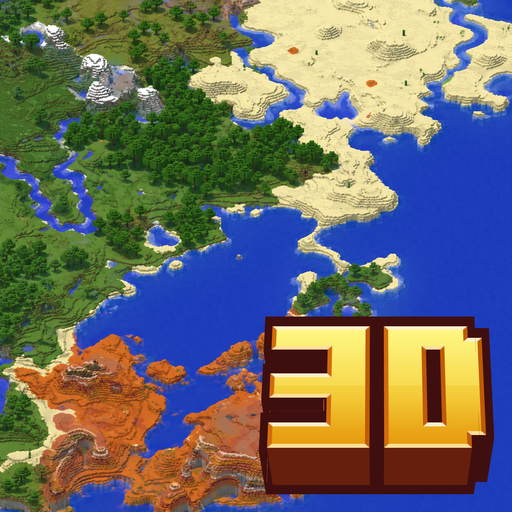
Use Diorama to draw Xaero's World Map as an angled 3D terrain you can still drag and zoom, with your waypoints on the ground they mark.
Quick answer
Xaero's Map: 3D (Diorama) xaero-diorama-0.1.1+fabric-1.21.1 targets 1.21.1 with Fabric. The project page does not say whether this file belongs on the client, dedicated server, or both. All 3 required mods have matching files.
Where it goes
The project page does not say whether this file belongs on the client, dedicated server, or both.
The source does not explicitly classify this release as client-only or server-only.
xaero-diorama-0.1.1+fabric-1.21.1. Change the file and its required mods may change too.
Install Diorama, Xaero's World Map, Fabric API first. We found matching files for this game-version and loader setup. 5 come through another mod in the chain.
5 extra mods were pulled in by other dependencies. Indented rows show who needs each one. We only count dependency files that match this setup. A file for another loader does not fill the gap.
Before you install it
Built for Xaero's Map: 3D (Diorama) xaero-diorama-0.1.1+fabric-1.21.1. Pick another file and the loader, install side or required mods may change.
Use xaero-diorama-0.1.1+fabric-1.21.1. It targets 1.21.1 with Fabric; another release may have different loader, side or dependency requirements.
Install Diorama, Xaero's World Map, Fabric API first. We found matching files for this game-version and loader setup. 5 come through another mod in the chain.
The project page does not say whether this file belongs on the client, dedicated server, or both.
Use the “Get this file” button beside xaero-diorama-0.1.1+fabric-1.21.1. It opens that exact file at the source.
About this project
Xaero's World Map, drawn as an angled 3D landscape by Diorama, with your waypoints, entity dots and the player arrow still on it.
Also available for JourneyMap.
The 3D button sits in the left column of the World Map. Press it and the map is drawn as terrain; press it again for Xaero's flat map. Dragging, zooming, the key bindings and ESC stay Xaero's own, and the minimap is untouched.
Waypoints are kept in step with Diorama: adding, moving, recolouring or deleting one on either side applies to the other. Manual and bed waypoints are mirrored.




Paid commissions for videos, streams and servers. Send me your idea: kuronami.mods@gmail.com

All Rights Reserved. Modpacks may include this addon without permission or credit.
Bugs and questions: comment on the CurseForge page, or DM @kuronami333 on X.
Project description from CurseForge.
Pick your setup
Choose the version and loader you play, then open the matching release.
Check the dependencies, then try the file in a copied instance before changing a world you care about.
Recent files
xaero-diorama-0.1.1-fabric-1.21.1.jar
21 Nov 2026
xaero-diorama-0.1.1-neoforge-26.2.jar
21 Nov 2026
xaero-diorama-0.1.1-neoforge-26.1.2.jar
21 Nov 2026
xaero-diorama-0.1.1-neoforge-1.21.8.jar
21 Nov 2026
xaero-diorama-0.1.1-neoforge-1.21.4.jar
21 Nov 2026
xaero-diorama-0.1.1-neoforge-1.21.11.jar
21 Nov 2026
xaero-diorama-0.1.1-forge-1.20.1.jar
21 Nov 2026
xaero-diorama-0.1.1-fabric-26.2.jar
21 Nov 2026
xaero-diorama-0.1.1-fabric-26.1.2.jar
21 Nov 2026
xaero-diorama-0.1.1-fabric-1.21.8.jar
21 Nov 2026
xaero-diorama-0.1.1-fabric-1.21.4.jar
21 Nov 2026
xaero-diorama-0.1.1-fabric-1.21.11.jar
21 Nov 2026
Looking for an older file? The official CurseForge project page is in Resources.
 mod
Farming automation mod with planters, machines, modules, and power gen.
 mod
Replace the enchanting system with a rune system. Find runes in the world and apply them to items
 mod
One Kick - Kick anything flying, anytime, anywhere.