Minecraft version
Back to mods 
CurseForge · Minecraft mod
cinematicafk
When the player is inactive for an extended period, the game automatically switches to a cinematic camera view and plays a sequence showcasing the surrounding scenery.
Choose a version Pick your version below, then grab the matching file.
Quick answer
Which cinematicafk release should I use?
Latest stable file cinematicafk-forge-1.20.1-2.0.0.jar
Game version 1.20.1
Loader Forge
cinematicafk-forge-1.20.1-2.0.0.jar targets 1.20.1 with Forge. The project page does not say whether this file belongs on the client, dedicated server, or both. No extra mods listed for this file.
Where it goes
Is cinematicafk required on the client, server, or both?
The project page does not say whether this file belongs on the client, dedicated server, or both.
Client Source doesn’t say
Dedicated server Source doesn’t say
Loader for this release Forge
Required install it here Optional supported, not mandatory Not supported do not install here Source doesn’t say do not assume
The source does not explicitly classify this release as client-only or server-only.
What else does cinematicafk-forge-1.20.1-2.0.0.jar need?
cinematicafk-forge-1.20.1-2.0.0.jar. Change the file and its required mods may change too.
This file does not list any required mods. Do not add a library just because a different file uses it.
This file does not list any required or optional mods.
Before you install it
Add cinematicafk without breaking your instance.
Built for cinematicafk-forge-1.20.1-2.0.0.jar. Pick another file and the loader, install side or required mods may change.
- 01
Stick to this file
Use cinematicafk-forge-1.20.1-2.0.0.jar. It targets 1.20.1 with Forge; another release may have different loader, side or dependency requirements.
- 02
Bring the mods it needs
This file does not list any required mods. Do not add a library just because a different file uses it.
- 03
Put it on the correct side
The project page does not say whether this file belongs on the client, dedicated server, or both.
- 04
Pick the file you checked
Use the “Get this file” button beside cinematicafk-forge-1.20.1-2.0.0.jar. It opens that exact file at the source.
About this project
What does cinematicafk add?
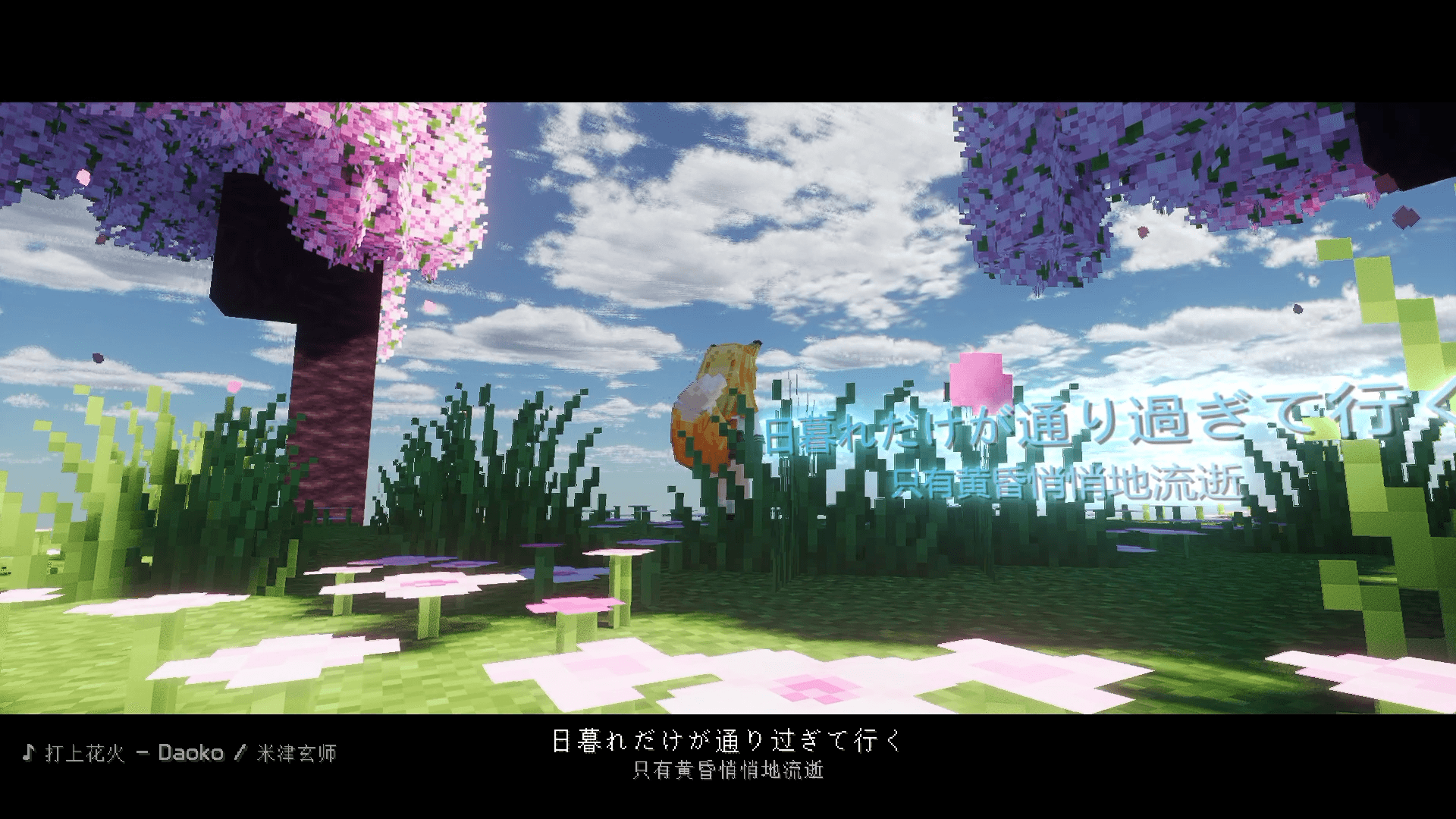
Pure client-side mod: After idling for a certain amount of time, the camera automatically switches to cinematic view—complete with letterbox black bars, procedurally generated camera movements, smooth transitions between shots, and integration with DangoMusic to display the current song and lyrics as subtitles. As long as you don’t move the keyboard or mouse, it will loop continuously until you interact with either input, at which point it smoothly transitions back to first-person view.
Installation
- Requires Forge 1.20.1 (47.x).
- Place
cinematicafk.jarinto themods/folder. - Optional: Install DangoMusic (
DangoMusic-forge.jar) as well to enable playback status and lyric display; the mod will still function without it, but there will be no subtitles and therequireMusicsetting will be ineffective.
By default, if DangoMusic is playing, the cinematic mode activates after 30 seconds of inactivity, with a “cooldown” of the final 10 seconds (seconds 20–30) showing an “idle countdown” at the top of the screen.
During the countdown, a prompt will also appear at the top of the screen suggesting “install shaders for optimal visuals” (countdownTip can be disabled).
In other words, no matter how long you’ve been idle, if no music is playing, the cinematic mode won’t activate. Conversely, as soon as music starts and you’ve already been idle for 30 seconds, it will first complete the 10-second countdown before switching over—it won’t cut to the cinematic view instantly.
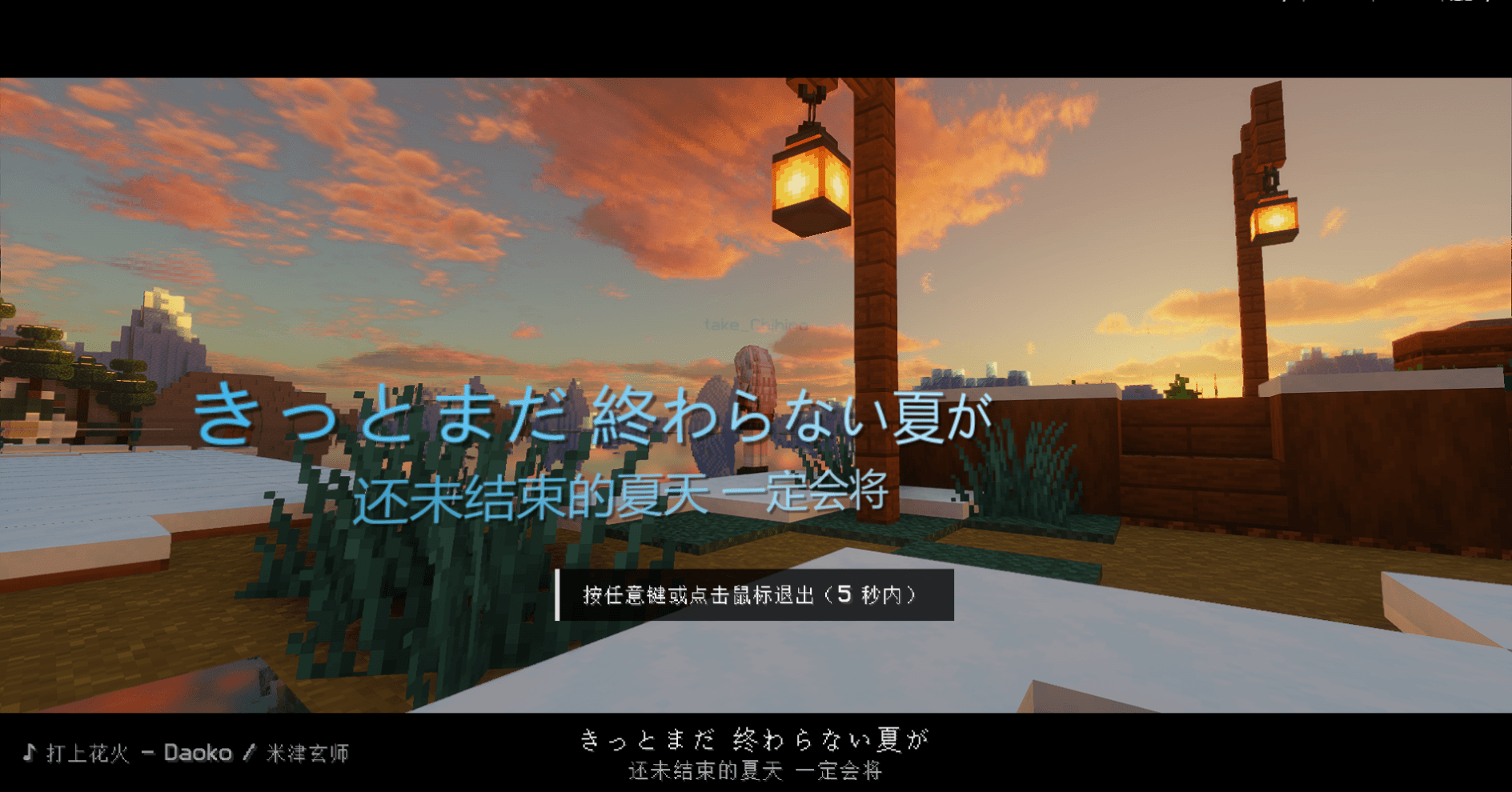
Minecraft 1.20.1 / Forge 47.x 纯客户端模组:挂机到一定时间后,镜头自动转成电影级视角 —— 遮幅黑边、程序化生成的运镜、镜头之间的平滑转场,并联动 DangoMusic 把当前歌曲和歌词当作字幕。只要不动键鼠就会一直循环放下去,直到你碰键盘或鼠标才平滑切回第一人称。
安装
- 需要 Forge 1.20.1(47.x)。
- 把
cinematicafk.jar丢进mods/。 - 可选:同时装 DangoMusic才会读取播放状态与歌词;不装也能正常使用,只是没有字幕
requireMusic无效。
客户端必装,服务器无效
使用
默认:DangoMusic 正在播放 的情况下挂机满 30 秒就进入;最后 10 秒(第 20–30 秒)屏幕上方显示「挂机倒计时」。
倒计时期间屏幕上方会顺带提示「建议安装光影,画面效果最佳」(countdownTip 可关)。
也就是说,挂机再久,只要没在放歌就不会进;反过来,歌一响起、且已经挂够 30 秒,也会先补满 10 秒倒计时再进,不会突然切走。
| 指令 | 作用 |
|---|---|
/cinematic now |
立即进入(不用等挂机) |
/cinematic stop |
立即退出 |
/cinematic status |
查看当前挂机时长 / 是否在电影视角 |
/cinematic fps |
打印刷新率、帧率上限、采样,以及最近一秒的帧时间区间(排查抖动用) |
/cinematic reload |
改完配置文件后热重载 |
退出方式:移动鼠标会弹出提示「按任意键或点击鼠标退出(5 秒内)」;在提示期间按任意键 / 点鼠标 / 把视角甩过 25° 就会退出(走黑场流程)。5 秒没动作提示自动收起、继续放。受伤立即退出。 切歌、暂停、被怪打、被水流推开都不会打断 —— 之前「进去一会儿就自己结束」就是被这些条件误触的,现在默认全关。
配置 config/cinematicafk.json
| 键 | 默认 | 说明 |
|---|---|---|
enabled |
true | 总开关 |
afkSeconds |
30 | 挂机多少秒后进入(进入时刻以这个为准) |
countdownSeconds |
10 | 进入前多少秒开始提示,0 = 不提示 |
requireMusic |
true | 只在 DangoMusic 正在播放时才自动进入(没装 DangoMusic 时不强制) |
exitOnInput |
true | 有键鼠操作就退出(唯一默认开启的退出条件) |
inputGraceMillis |
1500 | 刚进入后多少毫秒内忽略键鼠(防止敲命令的回车把刚进的状态顶掉) |
exitWhenMusicStops |
false | 音乐暂停/切歌就退出(切歌瞬间 DangoMusic 会短暂 LOADING,容易误退,默认关) |
exitOnDamage |
false | 受伤就退出,默认关 |
shotMinSeconds / shotMaxSeconds |
12 / 20 | 单个镜头时长范围 |
travelSeconds |
5 | 镜头之间巡航转场时长 |
scenicShots |
true | 穿插“只看风景”的机位(角色可能被挤出画面) |
countdownTip |
true | 倒计时时显示「建议安装光影」提示 |
exitPromptSeconds |
5 | 第一次碰键鼠只弹提示,这个时间内再碰一次才退出 |
exitOnDamage |
true | 受伤立即退出 |
cutDistance / cutYawDegrees |
8 / 70 | 超过这个距离或视角变化就用黑场剪辑(默认几乎所有中大型转场都走黑切) |
cutFadeSeconds / cutHoldSeconds |
0.22 / 0.28 | 黑场剪辑:淡出时长 / 全黑保持时长(总 ~0.72 秒,和开场节奏一致) |
lockFps / fpsLockMode |
false / stable | 锁帧开关与策略。默认关:镜头轨迹现在由绝对时间决定,帧率波动不会改变轨迹,改上限反而可能引入节奏突变 |
fpsLockMin / fpsLockMax |
30 / 240 | 锁帧范围 |
fadeSeconds / fadeHoldSeconds |
0.55 / 0.35 | 进出的淡入淡出时长 / 全黑保持时长 |
beatPunch |
0 | 跟鼓点的 FOV 冲击,单位是百分比(0.6 = FOV 缩 0.6%)。默认关:长焦镜头 FOV 只有 30° 时,0.6° 相当于画面边缘上下跳 20 像素,看起来就是剧烈抖动 |
baseFov |
70 | 基准 FOV,远景镜头会在它基础上压成长焦 |
fovScale |
1.0 | FOV 总倍率,调小更“压缩” |
maxShotDistance |
34 | 最远机位距离(会被视距自动限制) |
handheldShake |
0 | 手持漂移强度,默认完全静止;想要一点呼吸感调到 0.3 |
enterSeconds / exitSeconds |
2.5 / 1.4 | 进出电影视角的过渡时长 |
lowThirdPersonIntro |
true | 开场用低三视角(角色身后贴地仰拍),false = 直接从第一人称拉出去 |
introDistance / introHeight |
3.4 / 0.55 | 低三视角的距离与高度(高度相对脚底) |
letterbox / letterboxAspect |
true / 2.39 | 遮幅黑边与画幅比 |
hideVanillaHud |
true | 隐藏血条、物品栏、准星、Boss 条等 |
hideHand |
true | 隐藏第一人称手臂 |
hideChat |
true | 进入时临时隐藏聊天栏(退出自动恢复) |
hideDangoHud |
true | 进入时临时关掉 DangoMusic 自带歌词 HUD |
lyrics |
true | 歌词字幕 |
subtitleScale |
1.35 | 歌词字号放大倍数(1.0 = 原版字号) |
simplifiedChinese |
true | 字幕/曲名统一转简体(内置 OpenCC 裁剪表,繁体歌词不再混排) |
subtitleOutline |
true | 歌词描边 + 投影,亮背景上也看得清 |
前置dangomusic项目地址: https://github.com/Sorihiko/DangoMusic/releases
Project description from CurseForge.
Pick your setup
cinematicafk by Minecraft version and loader
Choose the version and loader you play, then open the matching release.
Check the dependencies, then try the file in a copied instance before changing a world you care about.
Recent files
cinematicafk versions and loaders
cinematicafk-forge-1.20.1-2.0.0.jar
20 Nov 2026
Client Source doesn’t say Server Source doesn’t say Dependencies No extras listed Listed on Release listing
Check the 1.20.1 · Forge setup 1.20.1Forge release
cinematicafk-forge-1.20.1-1.18.0.jar
13 Nov 2026
Client Source doesn’t say Server Source doesn’t say Dependencies No extras listed Listed on Release listing
Check the 1.20.1 · Forge setup 1.20.1Forge release
Looking for an older file? The official CurseForge project page is in Resources.
 mod
CurseForge · Minecraft
TLM Formation Tactics
Squad management, formation follow, tactical HUD and Black Hawk airdrop for Touhou Little Maid.
 mod
CurseForge · Minecraft
Wintery Atmosphere
Adds snow particles falling from snow blocks and powder snow blocks when there's air or transparent blocks underneath.
 mod
CurseForge · Minecraft
MicroArchitect
Create small decorations using blocks/items