GeckoLib Needed by My Dragons 0.7.1-Beta
requiredMatching file found Matched file: NeoForge 1.21.1 4.9.4
CurseForge · Minecraft mod
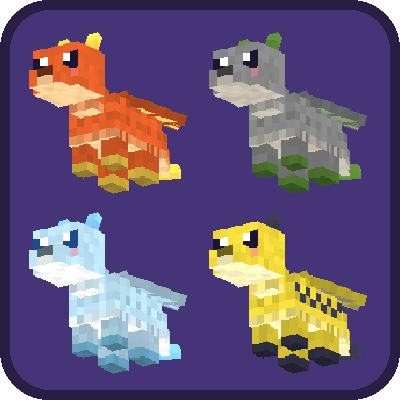
Cute shoulder dragons that never fight: hatch them, give them jobs, and automate your world from a campfire to a Dragon Reactor.
Quick answer
My Dragons 0.7.1-Beta targets 1.21.1 with NeoForge. The project page does not say whether this file belongs on the client, dedicated server, or both. All 1 required mods have matching files.
Where it goes
The project page does not say whether this file belongs on the client, dedicated server, or both.
The source does not explicitly classify this release as client-only or server-only.
My Dragons 0.7.1-Beta. Change the file and its required mods may change too.
Install GeckoLib first. We found matching files for this game-version and loader setup.
We only count dependency files that match this setup. A file for another loader does not fill the gap.
Before you install it
Built for My Dragons 0.7.1-Beta. Pick another file and the loader, install side or required mods may change.
Use My Dragons 0.7.1-Beta. It targets 1.21.1 with NeoForge; another release may have different loader, side or dependency requirements.
Install GeckoLib first. We found matching files for this game-version and loader setup.
The project page does not say whether this file belongs on the client, dedicated server, or both.
Use the “Get this file” button beside My Dragons 0.7.1-Beta. It opens that exact file at the source.
About this project
My Dragons adds small, friendly pet dragons that work for you. They hatch from eggs, follow you, ride on your shoulder and never get hurt. Your dragons never fight: they smelt, mine, farm, make power and build things.
Beta: this is the first public test version. Please back up your worlds, and expect some balance changes. Needs GeckoLib. Made for NeoForge 1.21.1.
Craft the Dragonkeeper's Journal and follow the first pages: collect Elemental Shards, build the Summoning Altar and hatch your first dragon.
Leave a comment with what happened and, if the game crashed, the crash report.
My Dragons is designed and directed by me (Jack23Tek). I build the code and much of the art with help from Claude and CHatGPT, AI assistants, and I test everything in game myself. This was a fun dream project to make and I hope everyone can enjoy it.
Project description from CurseForge.
Pick your setup
Choose the version and loader you play, then open the matching release.
Check the dependencies, then try the file in a copied instance before changing a world you care about.
Recent files
mydragons-0.7.1-beta.jar
14 Nov 2026
Looking for an older file? The official CurseForge project page is in Resources.
 mod
Adding more birds to your Minecraft world!
 mod
X gene mutations in minecraft...
 mod
MineColonies builders construct Create-powered farms that harvest, replant and send crops to your colony on their own.