Minecraft version
Back to mods 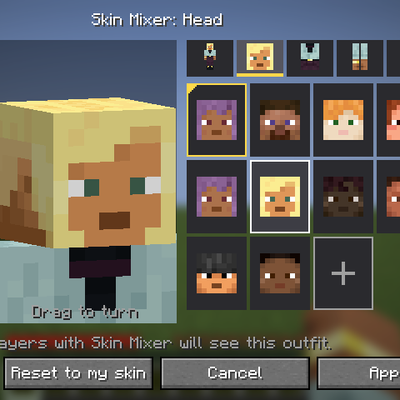
CurseForge · Minecraft mod
Skin Mixer
Mix and match the head, body, arms and legs of any skins into one outfit, live in game, with no skin editor needed.
Choose a version Pick your version below, then grab the matching file.
Quick answer
Which Skin Mixer release matches Forge?
Best match for your filters skin-mixer-forge-0.5.0+1.20.1.jar
Game version 1.20.1
Loader Forge
Skin Mixer skin-mixer-forge-0.5.0+1.20.1.jar targets 1.20.1 with Forge. The project page does not say whether this file belongs on the client, dedicated server, or both. No extra mods listed for this file.
Where it goes
Is Skin Mixer required on the client, server, or both?
The project page does not say whether this file belongs on the client, dedicated server, or both.
Client Source doesn’t say
Dedicated server Source doesn’t say
Loader for this release Forge
Required install it here Optional supported, not mandatory Not supported do not install here Source doesn’t say do not assume
The source does not explicitly classify this release as client-only or server-only.
What else does Skin Mixer skin-mixer-forge-0.5.0+1.20.1.jar need?
skin-mixer-forge-0.5.0+1.20.1.jar on Forge. Every mod below is checked against that same setup.
This file does not list any required mods. Do not add a library just because a different file uses it.
This file does not list any required or optional mods.
Before you install it
Add Skin Mixer without breaking your instance.
Built for Skin Mixer skin-mixer-forge-0.5.0+1.20.1.jar on Forge. Pick another file and the loader, install side or required mods may change.
- 01
Stick to this file
Use skin-mixer-forge-0.5.0+1.20.1.jar. It targets 1.20.1 with Forge; another release may have different loader, side or dependency requirements.
- 02
Bring the mods it needs
This file does not list any required mods. Do not add a library just because a different file uses it.
- 03
Put it on the correct side
The project page does not say whether this file belongs on the client, dedicated server, or both.
- 04
Pick the file you checked
Use the “Get this file” button beside skin-mixer-forge-0.5.0+1.20.1.jar. It opens that exact file at the source.
About this project
What does Skin Mixer add?
Skin Mixer
Mix and match the head, body, arms and legs of any skins into one outfit, right in game, with no skin editor needed.
Skin Mixer lets you change your skin without leaving the game. Take Kai's head, Steve's shirt, Zuri's arms and Alex's legs, see the result on a 3D preview, and press Apply. Other players who have the mod see your new outfit too.
New in 0.5.0
- Skin browser: look through players' skins and mob heads by category, with a search box, without leaving the game.
- Import your own PNG skins: drop skin files onto the menu and mix them like any other skin.
- Saved outfits: name your outfits, load them in any world, and press I to switch to the next one.
- Server config: server owners choose who can change outfits and which kinds of skins are allowed.
See the changelog for the full list.
Features
- Mix six parts: head, body, right arm, left arm, right leg and left leg can each come from a different skin.
- Live 3D preview: zooms in on the part you're editing and turns it towards you. Drag to turn it yourself.
- Try before you pick: hover a choice to see it on the preview, and click to keep it.
- Every default skin: Steve, Alex, Ari, Efe, Kai, Makena, Noor, Sunny and Zuri, plus your own skin.
- Add any player's skin: type a Minecraft username to add that player's current skin to your choices.
- Skin browser: browse famous players' skins and mob heads, preview them, then add them to your choices or wear them straight away. Mob heads can be worn as just a head.
- Imported skins: use your own PNG skins. 64×64 and old 64×32 skins both work, and slim arms are detected automatically.
- Saved outfits: save as many outfits as you like and switch between them with one key, in any world or server.
- Wide or slim arms: switch arm models at any time. Arms taken from the other model are resized to fit.
- One side or both: set an arm or leg on both sides at once, or each side on its own.
- Randomize: a random outfit made from the default skins, in one click.
- Multiplayer: players with the mod see each other's outfits, including imported skins, and the server remembers yours.
How to use it
Press U in game, or open Options → Skin Customization → Skin Mixer….
- Body map (left): your outfit laid flat. Click a part to edit it. The part you're editing is outlined in yellow.
- 3D preview (middle): your outfit as it will look in game.
- Tabs (top right): Whole outfit, Head, Body, Arms and Legs.
- Choices (right): that part of every skin. The gold corner marks your own skin and the blue corner marks imported skins.
- + card: add a skin by username (see Where to find skins). Right-click an added skin to remove it.
- Browse…: opens the skin browser. Pick a skin, then Add to my skins or Wear it (Wear the head for mob heads).
- Importing: drop PNG files onto the menu, or use Open skins folder and put them in
config/skinmixer/skins/. Add_slimor_wideto the end of a file name to choose its arm model yourself. - Outfits…: save the outfit you're making under a name, or load a saved one.
- Randomize, Reset to my skin, Cancel and Apply along the bottom.
U (open the mixer) and I (wear the next saved outfit) can be rebound in Minecraft's Controls menu, under Skin Mixer.
Where to find skins
The Browse… button has a list of skins to start with. Beyond that, any Minecraft player's skin can be added by typing their username on the + card. To find usernames:
- NameMC trending skins: click a skin to see the players wearing it, then type any of their names.
- NameMC new skins: the latest skins people are wearing.
- MC Heads: preview a player's skin before adding it. Swap
Notchin the address for any username.
These sites aren't affiliated with Skin Mixer. The mod always fetches skins from Mojang, so you get the player's current skin.
You can also download a skin as a PNG from any skin site and import it.
Commands
| Command | Who | What it does |
|---|---|---|
/skinmixer reset |
Anyone | Puts your real skin back |
/skinmixer reset <players> |
Operators | Puts those players' real skins back |
/skinmixer reload |
Operators | Reloads the server config |
Server config
Server owners can change these in config/skinmixer-server.json and apply them with /skinmixer reload:
| Setting | Default | What it does |
|---|---|---|
operatorsOnly |
false |
Only operators can change their outfit. Anyone can still reset to their own skin. |
allowAddedSkins |
true |
Skins added by username can be worn. |
allowImports |
true |
Imported PNG skins can be worn. |
importsPerMinute |
5 |
How many new imported skins one player can send per minute. |
maxStoredSkins |
500 |
The most imported skins the server keeps. Ones nobody wears are cleared on start. |
logChanges |
true |
Logs every outfit change and import to the server log. |
The menu turns red when an outfit isn't allowed on the server you're on.
Known limits in 0.5.0
- Players without the mod see your real skin, not your outfit.
- Added skins follow their player. If that player changes their skin, your outfit changes too. Adding and browsing skins needs an internet connection.
- A part's two layers move together. The overlay (hat, jacket, sleeves, trousers) always comes with its part.
- Your current outfit is per world. Each server and each singleplayer world keeps its own outfit for you. Saved outfits work everywhere.
- Player heads (items and blocks) still show the real skin.
- Before Minecraft 1.19.3 the game only has Steve and Alex as default skins, so those are the only two built in. Adding, browsing and importing skins work on every version.
Planned
These are the ideas I most want to add. Nothing here is promised yet, and the order may change.
- A full overhaul of the menu
- Mixing the overlay separately, for example one skin's jacket over another's shirt
- Finer parts: face, hat, shoes and gloves
- Recolouring a part so pieces from different skins match
- Original outfits made for the mod
- Sharing an outfit with a short code
- Letting players without the mod see your outfit too
Ideas and bug reports are welcome.
Installation
- Install it on your client to use the menu, and on the server so other players see your outfit and it's remembered.
- The mod is optional on both sides. Players without it can join a server that has it, and you can join a server without it. On a server without the mod, only you see your outfit.
- Updating from 0.1.0: update the server and every player. Players on 0.1.0 and 0.5.0 see each other's normal skins. Your outfit from 0.1.0 still loads.
- Fabric: needs Fabric Loader 0.19.5 or newer and Fabric API.
- Forge / NeoForge: no other mods needed.
Supported versions
- Fabric: 1.16.5, 1.18.2, 1.19.2, 1.20.1, 1.21.1, 1.21.4, 1.21.11, 26.1.2, 26.2, 26.3
- NeoForge: 1.21.1, 1.21.4, 1.21.11, 26.1.2, 26.2, 26.3
- Forge: 1.16.5, 1.18.2, 1.19.2, 1.20.1
The features are the same on every version and loader.
FAQ
Does it change my real Minecraft skin? No. Your account's skin stays the same. The outfit only shows in game, to players who have the mod.
Does it include any skin files? No. It uses the default skins already in your game and fetches added skins from Mojang, the same way the game loads player heads.
Where do my imported skins go on a server? The server keeps one copy of each imported skin in the world folder and sends it to other players with the mod, so they see it without having the file.
What happens if I remove the mod? You go back to your real skin. Nothing else changes.
Can I use this in my modpack? Yes. Skin Mixer is released under the MIT License: you can use it, modify it, redistribute it and include it in modpacks, as long as the license notice stays with it.
Project description from CurseForge.
Pick your setup
Skin Mixer by Minecraft version and loader
Choose the version and loader you play, then open the matching release.
Minecraft version
26.2
2 loader buildsMinecraft version
26.1.2
2 loader buildsMinecraft version
1.21.11
2 loader buildsMinecraft version
1.21.4
2 loader buildsMinecraft version
1.21.1
2 loader buildsMinecraft version
1.20.1
2 loader buildsMinecraft version
1.19.2
2 loader buildsMinecraft version
1.18.2
2 loader buildsMinecraft version
1.16.5
2 loader buildsCheck the dependencies, then try the file in a copied instance before changing a world you care about.
Recent files
Skin Mixer versions and loaders
skin-mixer-forge-0.5.0+1.20.1.jar
skin-mixer-forge-0.5.0-1.20.1.jar
17 Nov 2026
Client Source doesn’t say Server Source doesn’t say Dependencies No extras listed Listed on Release listing
Check the 1.20.1 · Forge setup 1.20.1Forge release
skin-mixer-forge-0.5.0+1.19.2.jar
skin-mixer-forge-0.5.0-1.19.2.jar
17 Nov 2026
Client Source doesn’t say Server Source doesn’t say Dependencies No extras listed Listed on Release listing
Check the 1.19.2 · Forge setup Forge1.19.2 release
skin-mixer-forge-0.5.0+1.18.2.jar
skin-mixer-forge-0.5.0-1.18.2.jar
17 Nov 2026
Client Source doesn’t say Server Source doesn’t say Dependencies No extras listed Listed on Release listing
Check the 1.18.2 · Forge setup Forge1.18.2 release
skin-mixer-forge-0.5.0+1.16.5.jar
skin-mixer-forge-0.5.0-1.16.5.jar
17 Nov 2026
Client Source doesn’t say Server Source doesn’t say Dependencies No extras listed Listed on Release listing
Check the 1.16.5 · Forge setup 1.16.5Forge release
skin-mixer-forge-0.1.0+1.20.1.jar
skin-mixer-forge-0.1.0-1.20.1.jar
14 Nov 2026
Client Source doesn’t say Server Source doesn’t say Dependencies No extras listed Listed on Release listing
Check the 1.20.1 · Forge setup 1.20.1Forge release
skin-mixer-forge-0.1.0+1.19.2.jar
skin-mixer-forge-0.1.0-1.19.2.jar
14 Nov 2026
Client Source doesn’t say Server Source doesn’t say Dependencies No extras listed Listed on Release listing
Check the 1.19.2 · Forge setup Forge1.19.2 release
skin-mixer-forge-0.1.0+1.18.2.jar
skin-mixer-forge-0.1.0-1.18.2.jar
14 Nov 2026
Client Source doesn’t say Server Source doesn’t say Dependencies No extras listed Listed on Release listing
Check the 1.18.2 · Forge setup Forge1.18.2 release
skin-mixer-forge-0.1.0+1.16.5.jar
skin-mixer-forge-0.1.0-1.16.5.jar
14 Nov 2026
Client Source doesn’t say Server Source doesn’t say Dependencies No extras listed Listed on Release listing
Check the 1.16.5 · Forge setup 1.16.5Forge release
Looking for an older file? The official CurseForge project page is in Resources.
 mod
CurseForge · Minecraft
Classic Achievements
Restores the classic look of Minecraft's achievement interface, with new additions and quality-of-life improvements. Brings back the nostalgic feel of the old days while making achievements more convenient to use.
 mod
CurseForge · Minecraft
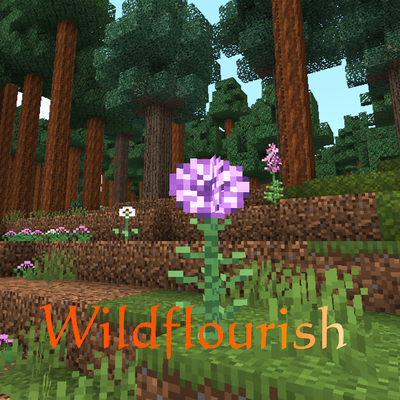
Wildflourish – Flowers & Plants
Adds a beautiful variety of new flowers, wildflowers, plants, flowering bushes, trees, and a unique pine forest biome!
 mod
CurseForge · Minecraft
Umas Luches
This mod includes a great experience for Umamusume fans, including cool plushies with a gacha machine, each with sounds and achievements, and a nice decoration for your server or world.