Minecraft version
Back to mods 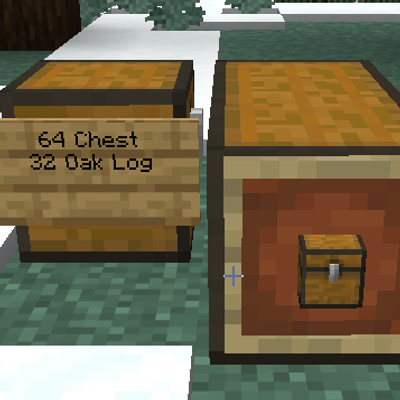
CurseForge · Minecraft mod
autosign
Auto-labelling signs Place a sign on a container and click Done without typing anything. The sign fills in with up to four lines, most common item first
Choose a version Pick your version below, then grab the matching file.
Quick answer
Which autosign release should I use?
Latest stable file autosign-1.0.0.jar
Game version 26.3
Loader Fabric
autosign-1.0.0.jar targets 26.3 with Fabric. The project page does not say whether this file belongs on the client, dedicated server, or both. No extra mods listed for this file.
Where it goes
Is autosign required on the client, server, or both?
The project page does not say whether this file belongs on the client, dedicated server, or both.
Client Source doesn’t say
Dedicated server Source doesn’t say
Loader for this release Fabric
Required install it here Optional supported, not mandatory Not supported do not install here Source doesn’t say do not assume
The source does not explicitly classify this release as client-only or server-only.
What else does autosign-1.0.0.jar need?
autosign-1.0.0.jar. Change the file and its required mods may change too.
This file does not list any required mods. Do not add a library just because a different file uses it.
This file does not list any required or optional mods.
Before you install it
Add autosign without breaking your instance.
Built for autosign-1.0.0.jar. Pick another file and the loader, install side or required mods may change.
- 01
Stick to this file
Use autosign-1.0.0.jar. It targets 26.3 with Fabric; another release may have different loader, side or dependency requirements.
- 02
Bring the mods it needs
This file does not list any required mods. Do not add a library just because a different file uses it.
- 03
Put it on the correct side
The project page does not say whether this file belongs on the client, dedicated server, or both.
- 04
Pick the file you checked
Use the “Get this file” button beside autosign-1.0.0.jar. It opens that exact file at the source.
About this project
What does autosign add?
Autosign
A Fabric mod for Minecraft 26.3 that labels your storage for you. Put a sign or an item frame on a container and it shows what's inside, updating as items go in and out.
Features
Auto-labelling signs
Place a sign on a container and click Done without typing anything. The sign fills in with up to four lines, most common item first:
- Counts are shortened (
340,1.2k,12k,1.5M), and the count comes first so long item names never hide it. - Item names show in each player's own language.
- An empty container shows
Empty. - Works with every sign type: wall signs, standing signs on top of a container, hanging signs underneath, and wall hanging signs beside one.
- Your dye colour and glow ink are kept.
- Writing your own text turns the sign back into a normal sign, and the mod never overwrites it. Clear the text to make it automatic again.
Auto item frames
Hang an empty item frame on a container and it shows the most common item inside.
- The item shown is a display copy only. Breaking or punching the frame never drops it, so there's no way to duplicate items.
- Punching the item out, or putting your own item into an empty one, turns it back into a normal frame.
Click-through
Right-click a sign or item frame on a container to open the container directly.
- Sneak and right-click to edit the sign or rotate the frame.
- Dye, glow ink and honeycomb still apply to signs.
- Empty normal item frames still take an item with a plain right-click.
- Signs with command click actions (adventure maps) are left alone.
Supported containers
Chests (double chests count as one, and update when you add or remove a half), trapped chests, barrels, shulker boxes, hoppers, droppers, dispensers, furnaces, smokers, blast furnaces, brewing stands, crafters, and most modded containers.
Installation
- Install Fabric Loader 0.20.1 or newer for Minecraft 26.3.
- Put
autosign-1.0.0.jarand Fabric API in your.minecraft/modsfolder.
Servers: the mod runs entirely on the server. Install it there and players can join without it.
Configuration
Settings are in config/autosign.json, which is created on first launch:
| Option | What it does |
|---|---|
autoSigns |
Blank signs on containers label themselves |
autoItemFrames |
Empty item frames on containers show the top item |
clickThroughSigns |
Right-clicking a sign on a container opens the container |
clickThroughItemFrames |
Right-clicking an item frame on a container opens the container |
Turning off autoSigns or autoItemFrames freezes existing labels, and they catch up the next time their container changes after you turn it back on.
Commands
Operators (permission level 2) can change settings in-game:
/autosignshows the current settings/autosign <option> <true|false>changes a setting and saves it, e.g./autosign clickThroughSigns false/autosign reloadreloads the file after editing it by hand
Project description from CurseForge.
Pick your setup
autosign by Minecraft version and loader
Choose the version and loader you play, then open the matching release.
Check the dependencies, then try the file in a copied instance before changing a world you care about.
Recent files
autosign versions and loaders
autosign-1.0.0.jar
14 Nov 2026
Client Source doesn’t say Server Source doesn’t say Dependencies No extras listed Listed on Release listing
Check the 26.3 · Fabric setup Fabric26.3 release
Looking for an older file? The official CurseForge project page is in Resources.
 mod
CurseForge + Modrinth · Minecraft
VO: Creative Fly Speed
Allows players to adjust their flight speed in Creative and Spectator modes with dynamic mouse-scroll tuning, sprint momentum, and anti-rubberbanding.
 mod
CurseForge + Modrinth · Minecraft
VO: Bed Chat Hider
Bed Chat Hider is a client-only Fabric mod that adds a simple "Hide Chat" / "Show Chat" toggle button next to the "Leave Bed" button while sleeping.
 mod
CurseForge + Modrinth · Minecraft
VO: Better Dogs
Enhances vanilla wolves with unique personalities (Aggressive, Pacifist, Normal), smarter AI, safety behaviors, and combat improvements.