Minecraft version
Back to mods 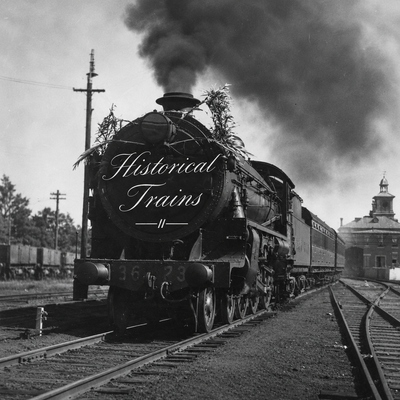
CurseForge · Minecraft mod
Historical Trains
Bring the golden age of steam railways to Minecraft with driveable 1930s locomotives, passenger and freight trains, realistic controls, and historical railway infrastructure!
Choose a version Pick your version below, then grab the matching file.
Quick answer
Which Historical Trains release should I use?
Latest stable file historical_trains-0.1.0.jar
Game version 1.20.1
Loader Forge
Historical Trains historical_trains-0.1.0.jar targets 1.20.1 with Forge. The project page does not say whether this file belongs on the client, dedicated server, or both. No extra mods listed for this file.
Where it goes
Is Historical Trains required on the client, server, or both?
The project page does not say whether this file belongs on the client, dedicated server, or both.
Client Source doesn’t say
Dedicated server Source doesn’t say
Loader for this release Forge
Required install it here Optional supported, not mandatory Not supported do not install here Source doesn’t say do not assume
The source does not explicitly classify this release as client-only or server-only.
What else does Historical Trains historical_trains-0.1.0.jar need?
historical_trains-0.1.0.jar. Change the file and its required mods may change too.
This file does not list any required mods. Do not add a library just because a different file uses it.
This file does not list any required or optional mods.
Before you install it
Add Historical Trains without breaking your instance.
Built for Historical Trains historical_trains-0.1.0.jar. Pick another file and the loader, install side or required mods may change.
- 01
Stick to this file
Use historical_trains-0.1.0.jar. It targets 1.20.1 with Forge; another release may have different loader, side or dependency requirements.
- 02
Bring the mods it needs
This file does not list any required mods. Do not add a library just because a different file uses it.
- 03
Put it on the correct side
The project page does not say whether this file belongs on the client, dedicated server, or both.
- 04
Pick the file you checked
Use the “Get this file” button beside historical_trains-0.1.0.jar. It opens that exact file at the source.
About this project
What does Historical Trains add?
🚂 Historical Trains
Experience the Golden Age of Railways!
Travel back to the golden age of steam-powered transportation!
Historical Trains brings the atmosphere of 1930s–1950s railways into Minecraft, transforming the familiar minecart experience into a historical railway adventure.
Take control of powerful steam locomotives, transport passengers and cargo, build railway networks, and operate your own trains across the Minecraft world.
🚂 Features
Authentic Steam Locomotives
- Drive a classic coal-powered steam locomotive.
- Realistic acceleration, braking, and reversing.
- Coal and water consumption.
- Steam whistles, exhaust effects, and animated driving wheels.
- Driver controls and an informative cab display.
Passenger & Freight Transportation
- Passenger coaches with seating for two.
- Transport players and mobs.
- Boxcars with 27 inventory slots.
- Open freight wagons with 18 inventory slots.
- Connect and disconnect wagons using coupling pins.
- Build trains with up to 16 connected vehicles.
Historical Railway Infrastructure
- Functional railway switches and turnouts.
- Mechanical semaphore signals.
- Railway station platforms.
- Track occupancy and obstruction detection.
- Speed restrictions for curves and slopes.
Detailed Historical Models
- Custom 3D locomotives and rolling stock.
- Original textures inspired by early 20th-century railways.
- Animated locomotive mechanisms and signal arms.
- Designed with Blockbench.
🎮 How to Play
- Place your steam locomotive on an existing Minecraft railway.
- Place passenger or freight wagons behind it.
- Connect the vehicles using a coupling pin.
- Supply the locomotive with coal or charcoal and water.
- Board the locomotive and start your journey!
Train Controls
| Key | Action |
|---|---|
| R | Increase regulator |
| B | Apply brakes |
| V | Reverse direction (when stopped) |
| H | Sound the whistle |
Controls can be customized in Minecraft settings.
⚙️ Compatibility
- Minecraft: 1.20.1
- Mod Loader: Forge
- Java: 17
- Languages: English & Turkish
- Multiplayer: Dedicated-server support
The mod works with existing Minecraft rails and preserves vanilla minecarts.
Dedicated-server tests have been completed. Full two-player synchronization testing is still in progress.
🏭 A New Era of Transportation
Whether you're building a bustling industrial city, recreating historical railway networks, or developing a 1930s–1940s roleplay world, Historical Trains brings the age of steam to your Minecraft experience.
Build your railway. Fire up your locomotive. Make history.
Source Code: https://github.com/ZeorezDev/historical-railways
Version: 0.1.0
Project description from CurseForge.
Pick your setup
Historical Trains by Minecraft version and loader
Choose the version and loader you play, then open the matching release.
Check the dependencies, then try the file in a copied instance before changing a world you care about.
Recent files
Historical Trains versions and loaders
historical_trains-0.1.0.jar
historical_railways-0.1.0.jar
15 Nov 2026
Client Source doesn’t say Server Source doesn’t say Dependencies No extras listed Listed on Release listing
Check the 1.20.1 · Forge setup 1.20.1Forge release
Looking for an older file? The official CurseForge project page is in Resources.
 mod
CurseForge · Minecraft
My Base
This mod adds the option for colonies, overhauls and modifies the entire Minecraft world, and introduces features such as recruiting soldiers, having colonists, and more.
 mod
CurseForge + Modrinth · Minecraft
[VSE]Visual Set Edit
This mod lets you edit custom set effects through a visual GUI with intuitive operations.
 mod
CurseForge · Minecraft
Flux Networks Ultimate Addon
Flux Networks Ultimate Addon