Minecraft version
Back to mods 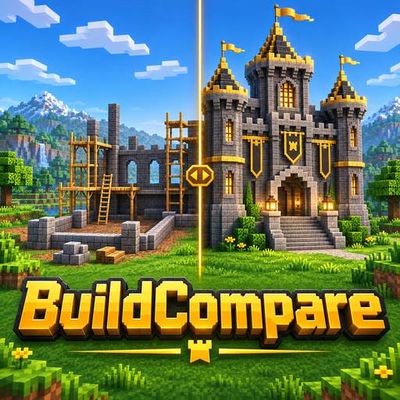
CurseForge · Minecraft mod
BuildCompare
Capture real before-and-after views of your builds, save precise viewpoints and reveal the changes with an interactive comparison slider.
Choose a version Pick your version below, then grab the matching file.
Quick answer
Which BuildCompare release should I use?
Latest stable file buildcompare-fabric-26.3.jar
Game version 26.3
Loader Fabric
buildcompare-fabric-26.3.jar targets 26.3 with Fabric. The project page does not say whether this file belongs on the client, dedicated server, or both. No extra mods listed for this file.
Where it goes
Is BuildCompare required on the client, server, or both?
The project page does not say whether this file belongs on the client, dedicated server, or both.
Client Source doesn’t say
Dedicated server Source doesn’t say
Loader for this release Fabric
Required install it here Optional supported, not mandatory Not supported do not install here Source doesn’t say do not assume
The source does not explicitly classify this release as client-only or server-only.
What else does buildcompare-fabric-26.3.jar need?
buildcompare-fabric-26.3.jar. Change the file and its required mods may change too.
This file does not list any required mods. Do not add a library just because a different file uses it.
This file does not list any required or optional mods.
Before you install it
Add BuildCompare without breaking your instance.
Built for buildcompare-fabric-26.3.jar. Pick another file and the loader, install side or required mods may change.
- 01
Stick to this file
Use buildcompare-fabric-26.3.jar. It targets 26.3 with Fabric; another release may have different loader, side or dependency requirements.
- 02
Bring the mods it needs
This file does not list any required mods. Do not add a library just because a different file uses it.
- 03
Put it on the correct side
The project page does not say whether this file belongs on the client, dedicated server, or both.
- 04
Pick the file you checked
Use the “Get this file” button beside buildcompare-fabric-26.3.jar. It opens that exact file at the source.
About this project
What does BuildCompare add?
BuildCompare
See how far your builds have come.
BuildCompare captures real before-and-after views of your creations and lets you compare them with a draggable divider.
Save the view
Open BuildCompare from your inventory and choose Save View. The mod saves a clean screenshot and its precise camera position, direction, field of view and perspective.
Line up the after shot
Select a saved comparison and choose Guide for compact alignment information while you move. Return to the original view, then choose Capture After. If the views differ, you can align them further or explicitly continue.
Reveal the transformation
Open Compare and drag the gold divider to reveal either screenshot. Both images keep their proportions. Export a PNG using the current divider position to create a static before-and-after image.
Keep a local gallery
Rename comparisons, view their saved details and remove the ones you no longer need. Screenshots and viewpoint information stay on your computer; nothing is uploaded automatically.
Matching the camera helps comparisons, but changes in lighting, weather or visual effects can still make the two images look different.
Project description from CurseForge.
Pick your setup
BuildCompare by Minecraft version and loader
Choose the version and loader you play, then open the matching release.
Check the dependencies, then try the file in a copied instance before changing a world you care about.
Recent files
BuildCompare versions and loaders
buildcompare-fabric-26.3.jar
15 Nov 2026
Client Source doesn’t say Server Source doesn’t say Dependencies No extras listed Listed on Release listing
Check the 26.3 · Fabric setup Fabric26.3 release
Looking for an older file? The official CurseForge project page is in Resources.
 mod
CurseForge · Minecraft
Variant Barrels [Fabric | Forge]
Barrels for all wood types.
 mod
CurseForge · Minecraft
Quiet Please
Mute music track by track: turn any song in your modpack down or off, build your own playlist, skip songs and keep favorites.
 mod
CurseForge · Minecraft
Cobblemon Utility Items (No recipes)
Same items as Cobblemon Utility Items (IVs, EVs, level, shiny, Alpha, fossils and more) but with no crafting recipes, for packs that bring their own. NeoForge and Fabric.