MaLiLib Needed by SchematicHUD
requiredMatching file found Matched file: malilib-fabric-26.3-0.30.2.jar
CurseForge · Minecraft mod
Keep your Litematica materials visible while building! Enjoy smooth scrolling, a movable HUD, and customizable settings. Press P to pin and O to toggle. By James S. © 2026. No redistribution without written permission.
Quick answer
SchematicHUD targets 26.3 with Fabric. The project page does not say whether this file belongs on the client, dedicated server, or both. 1 required mod needs a matching file.
Where it goes
The project page does not say whether this file belongs on the client, dedicated server, or both.
The source does not explicitly classify this release as client-only or server-only.
SchematicHUD. Change the file and its required mods may change too.
Install MaLiLib, Mod Menu, Litematica, Text Placeholder API and 1 more first, but 1 required mod has no matching file for this setup. Do not mix loader builds to force a match. 2 come through another mod in the chain.
2 extra mods were pulled in by other dependencies. Indented rows show who needs each one. We only count dependency files that match this setup. A file for another loader does not fill the gap.
Before you install it
Built for SchematicHUD. Pick another file and the loader, install side or required mods may change.
Use SchematicHUD. It targets 26.3 with Fabric; another release may have different loader, side or dependency requirements.
Install MaLiLib, Mod Menu, Litematica, Text Placeholder API and 1 more first, but 1 required mod has no matching file for this setup. Do not mix loader builds to force a match. 2 come through another mod in the chain.
The project page does not say whether this file belongs on the client, dedicated server, or both.
Use the “Get this file” button beside SchematicHUD. It opens that exact file at the source.
About this project
Ever get halfway through building a huge Litematica schematic, only to realize you have to keep opening the material list to check what blocks you still need?
That's exactly why I made SchematicHUD.
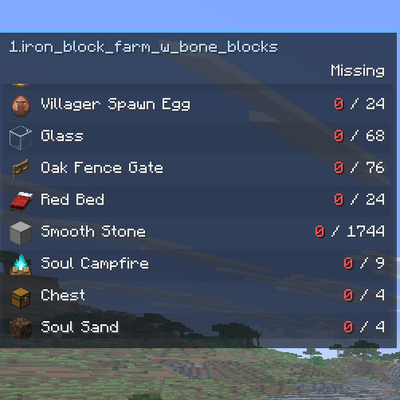
SchematicHUD puts your Litematica material list right on your screen, so you can keep an eye on what you need without constantly switching menus. Whether you're working on a castle, a massive base, or a detailed survival build, your materials stay where you can easily see them.
The HUD displays how many of each material you have compared to how many you need.
Available / Needed
For example: 24 / 64
The colors make it easy to see how you're doing:
-🔴 Red: You don't have any of the required material.
-🟠 Orange: You have less than half of what you need.
-🟡 Yellow: You have at least half, but still need more.
-🟢 Green: You have everything required!
When you have the full amount, the entire count turns green.
-Pinned material list: Keep your Litematica material list on screen while you build.
-Automatic scrolling: Long lists scroll up and down automatically, so you can see every material without taking up your entire screen.
-Adjustable scroll speed: Choose how quickly the list moves, or turn automatic scrolling off.
-Movable HUD: Drag the HUD header to put it wherever you like.
-Schematic name display: See which schematic your material list belongs to. If Litematica labels it "Unnamed," SchematicHUD can use the schematic's filename instead.
-Load and unload controls: Pin or remove a schematic directly from Litematica's Manage Loaded Schematics screen.
There are two ways to put your material list on the screen:
-Press P while your Litematica material list is open.
-Click the Pin HUD button on the Litematica material list screen.
That's it! Your material list will appear on your screen while you build.
You can change how SchematicHUD looks and behaves through Mods → SchematicHUD → Configure.
Adjust the scrolling speed, end pauses, HUD size, panel width, visible rows, row height, background opacity, and colors to make it fit your screen.
SchematicHUD is a client-side Fabric mod. It requires:
Minecraft Java Edition 26.3
-Java 25 or newer
-Fabric Loader 0.19.5 or newer
-Fabric API 0.165.0+26.3
-Litematica 0.29.1
-MaLiLib 0.30.2
-Mod Menu 21.0.0 or newer
All four mod dependencies are required and must be installed separately. They are not bundled with SchematicHUD.
SchematicHUD is an independent project created by James S. It is not affiliated with or endorsed by Mojang, Microsoft, Fabric, Litematica, MaLiLib, or Mod Menu.
Portions of the source code and documentation were developed with generative-AI assistance. The mod does not use generative AI while running in Minecraft.
SchematicHUD's license and third-party notices are included with the project. Third-party software remains under its own respective licenses.
Thanks for checking out SchematicHUD! I hope it makes your next big build a little easier.
Redistribution of SchematicHUD's original proprietary material is not permitted without prior written permission from the author, except where rights are granted by applicable third-party licenses or required by law. This restriction does not apply to Litematica, MaLiLib, or any other third-party component, which remains governed by its respective license.
Project description from CurseForge.
Pick your setup
Choose the version and loader you play, then open the matching release.
Check the dependencies, then try the file in a copied instance before changing a world you care about.
Recent files
schematic-hud-1.0.5.jar
16 Nov 2026
Looking for an older file? The official CurseForge project page is in Resources.
 mod
Readable item, fluid, gas and energy pipes for Minecraft, with filters right at the port and channel-based tesseracts. For Fabric and NeoForge.
 mod
Mail for players who are offline: /mail send name text, /mail read, /mail clear. You are told about new mail when you join.
 mod
Five skills (Mining, Woodcutting, Farming, Combat, Exploring) that level with what you do and give real perks. /skills opens a chest menu.