Minecraft version
Back to mods 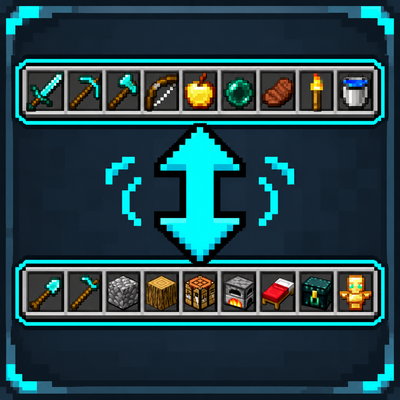
CurseForge · Minecraft mod
Dual Hotbar Swap
Adds a visible second hotbar with customizable keybinds to instantly swap entire rows or individual slots. Añade una segunda hotbar visible con controles configurables para intercambiar filas completas o casillas individuales al instante.
Choose a version Pick your version below, then grab the matching file.
Quick answer
Which Dual Hotbar Swap release should I use?
Latest stable file DualHotbarSwap-1.0.0-26.3.jar
Game version 26.3
Loader NeoForge
Dual Hotbar Swap DualHotbarSwap-1.0.0-26.3.jar targets 26.3 with NeoForge. The project page does not say whether this file belongs on the client, dedicated server, or both. No extra mods listed for this file.
Where it goes
Is Dual Hotbar Swap required on the client, server, or both?
The project page does not say whether this file belongs on the client, dedicated server, or both.
Client Source doesn’t say
Dedicated server Source doesn’t say
Loader for this release NeoForge
Required install it here Optional supported, not mandatory Not supported do not install here Source doesn’t say do not assume
The source does not explicitly classify this release as client-only or server-only.
What else does Dual Hotbar Swap DualHotbarSwap-1.0.0-26.3.jar need?
DualHotbarSwap-1.0.0-26.3.jar. Change the file and its required mods may change too.
This file does not list any required mods. Do not add a library just because a different file uses it.
This file does not list any required or optional mods.
Before you install it
Add Dual Hotbar Swap without breaking your instance.
Built for Dual Hotbar Swap DualHotbarSwap-1.0.0-26.3.jar. Pick another file and the loader, install side or required mods may change.
- 01
Stick to this file
Use DualHotbarSwap-1.0.0-26.3.jar. It targets 26.3 with NeoForge; another release may have different loader, side or dependency requirements.
- 02
Bring the mods it needs
This file does not list any required mods. Do not add a library just because a different file uses it.
- 03
Put it on the correct side
The project page does not say whether this file belongs on the client, dedicated server, or both.
- 04
Pick the file you checked
Use the “Get this file” button beside DualHotbarSwap-1.0.0-26.3.jar. It opens that exact file at the source.
About this project
What does Dual Hotbar Swap add?
English
Dual Hotbar Swap turns the bottom row of your inventory into a visible secondary hotbar, allowing you to quickly switch between tools, weapons, building materials, and other items without opening your inventory.
Features
- Displays the bottom nine inventory slots directly above the vanilla hotbar.
- Swap all nine slots between both hotbars.
- Swap only the currently selected hotbar slot with its corresponding secondary slot.
- Automatically adjusts health, armor, hunger, and experience indicators.
- Toggle the secondary hotbar HUD independently of the swapping functionality.
- Uses existing inventory slots without adding new storage.
Controls
All keybinds are customizable in Minecraft's Controls menu.
| Keybind | Default |
|---|---|
| Swap both hotbars | Unassigned |
| Swap selected slot | Unassigned |
| Toggle second hotbar HUD | Unassigned |
Compatibility
- Minecraft 26.3 — NeoForge.
- Client-side only.
- No additional mods required.
- No server installation required.
- Includes its own hotbar swapping functionality, so BarSwap is not required.
- Compatible by design with Offhand Cycler.
Español
Dual Hotbar Swap convierte la última fila del inventario en una segunda hotbar visible, permitiéndote alternar rápidamente entre herramientas, armas, materiales de construcción y otros objetos sin abrir el inventario.
Características
- Muestra las nueve casillas inferiores del inventario sobre la hotbar original.
- Intercambia ambas barras completas.
- Intercambia únicamente la casilla seleccionada con su correspondiente casilla superior.
- Ajusta automáticamente los indicadores de vida, armadura, hambre y experiencia.
- Permite ocultar o mostrar la segunda hotbar sin desactivar el intercambio.
- No añade nuevas casillas al inventario.
Controles
| Control | Tecla predeterminada |
|---|---|
| Intercambiar ambas hotbars | Sin asignar |
| Intercambiar casilla seleccionada | Sin asignar |
| Mostrar u ocultar segunda hotbar | Sin asignar |
Compatibilidad
Exclusivo del cliente. Requiere NeoForge, pero no necesita mods adicionales ni instalación en el servidor. No requiere BarSwap y está diseñado para funcionar junto a Offhand Cycler.
Project description from CurseForge.
Pick your setup
Dual Hotbar Swap by Minecraft version and loader
Choose the version and loader you play, then open the matching release.
Check the dependencies, then try the file in a copied instance before changing a world you care about.
Recent files
Dual Hotbar Swap versions and loaders
DualHotbarSwap-1.0.0-26.3.jar
15 Nov 2026
Client Source doesn’t say Server Source doesn’t say Dependencies No extras listed Listed on Release listing
Check the 26.3 · NeoForge setup NeoForge26.3 release
Looking for an older file? The official CurseForge project page is in Resources.
 mod
CurseForge + Modrinth · Minecraft
Sophisticated Storage
Storage mod with multiple tiers and functional upgrades
 mod
CurseForge + Modrinth · Minecraft
Sophisticated Core
Library mod for Sophisticated mods
 mod
CurseForge + Modrinth · Minecraft
Reliquary Reincarnations
Many magical items to help you in your minecraft world