Minecraft version
Back to mods 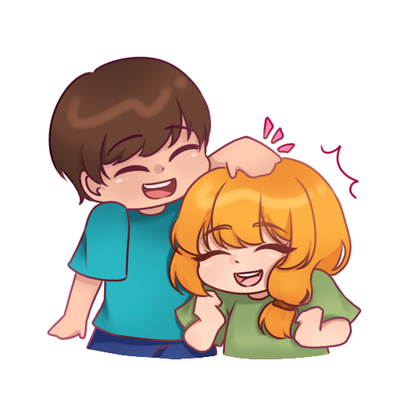
CurseForge · Minecraft mod
Player Interaction
Interact with other players: hold hands, hug, give head pats and more!
Choose a version Pick your version below, then grab the matching file.
Quick answer
Which Player Interaction release matches 26.2 Forge?
Best match for your filters Player Interaction 1.0.0 (Forge 26.2)
Game version 26.2
Loader Forge
Player Interaction 1.0.0 (Forge 26.2) targets 26.2 with Forge. The project page does not say whether this file belongs on the client, dedicated server, or both. No extra mods listed for this file.
Where it goes
Is Player Interaction required on the client, server, or both?
The project page does not say whether this file belongs on the client, dedicated server, or both.
Client Source doesn’t say
Dedicated server Source doesn’t say
Loader for this release Forge
Required install it here Optional supported, not mandatory Not supported do not install here Source doesn’t say do not assume
The source does not explicitly classify this release as client-only or server-only.
What else does Player Interaction 1.0.0 (Forge 26.2) need?
Player Interaction 1.0.0 (Forge 26.2) on 26.2 Forge. Every mod below is checked against that same setup.
This file does not list any required mods. Do not add a library just because a different file uses it.
This file does not list any required or optional mods.
Before you install it
Add Player Interaction without breaking your instance.
Built for Player Interaction 1.0.0 (Forge 26.2) on 26.2 Forge. Pick another file and the loader, install side or required mods may change.
- 01
Stick to this file
Use Player Interaction 1.0.0 (Forge 26.2). It targets 26.2 with Forge; another release may have different loader, side or dependency requirements.
- 02
Bring the mods it needs
This file does not list any required mods. Do not add a library just because a different file uses it.
- 03
Put it on the correct side
The project page does not say whether this file belongs on the client, dedicated server, or both.
- 04
Pick the file you checked
Use the “Get this file” button beside Player Interaction 1.0.0 (Forge 26.2). It opens that exact file at the source.
About this project
What does Player Interaction add?
Player Interaction
Interact with other players: hold hands, hug, give head pats and more!
Player Interaction adds hand-animated interactions between players. Look at another player, press a key, pick an action from the menu, and both players' models move together.
✨ Interactions
- 🤗 Hug: hug the player in front of you
- 🤝 Hold Hand: walk around holding hands
- ✋ Head Pat: pat the other player's head
- 🎒 Piggyback: carry the other player on your back
- 💪 Carry: carry the other player in your arms
- 💇 Pull Hair: grab the other player by the hair and drag them along
- 🔗 Drag Neck: grab the other player by the neck and drag them along the ground behind you
🎮 How to use
- Stand close to another player (within about 2.5 blocks) and look at them.
- Press I (you can rebind it in Controls → Player Interaction).
- Pick an action from the menu.
Stopping an interaction
- Sneak (Shift) to stop. For Hug, Hold Hand and Head Pat, either player can sneak to stop.
- For Pull Hair and Drag Neck, the player being dragged can mash A / D to break free.
- The interaction also ends if the players get too far apart, change dimensions, or one of them dies.
Some actions can't start if a block is in the way or if you can't see the other player.
📦 Supported versions
Every version below is available for Fabric, Forge and NeoForge:
- 1.20.1
- 1.21 – 1.21.1
- 1.21.11
- 26.1
- 26.2
- 26.3
Note: The mod was originally made for 1.21.1. The other versions were ported with help from Claude Opus 5.5. If you find a bug on another version, please report it.
Requirements
- Fabric: requires Fabric API
- The mod must be installed on both the server and every client.
🔌 Compatibility
- Emotecraft / playerAnimator: while an emote is playing, this mod steps aside automatically so the player model doesn't break.
🌐 Languages
- English
- ไทย (Thai)
👥 Credits
- Asamikafune: Animation / Coding
- Christerria Dreamer: Art
Project description from CurseForge.
Pick your setup
Player Interaction by Minecraft version and loader
Choose the version and loader you play, then open the matching release.
Minecraft version
26.2
3 loader buildsMinecraft version
26.1.2
3 loader buildsMinecraft version
1.21.11
3 loader buildsMinecraft version
1.21.1
3 loader buildsMinecraft version
1.20.1
3 loader buildsCheck the dependencies, then try the file in a copied instance before changing a world you care about.
Recent files
Player Interaction versions and loaders
Player Interaction 1.0.0 (Forge 26.2)
playerinteraction-1.0.0-26.2-forge.jar
16 Nov 2026
Client Source doesn’t say Server Source doesn’t say Dependencies No extras listed Listed on Release listing
Check the 26.2 · Forge setup Forge26.2 release
Looking for an older file? The official CurseForge project page is in Resources.
 mod
CurseForge · Minecraft
Best in Pack
Which food, armor, weapon, tool and fuel is the best in your modpack? Press B to see every item from every mod ranked by its real stats.
 mod
CurseForge · Minecraft
MissingRecipeJEI
View broken and disabled recipes directly in JEI to instantly identify missing mods, items, or empty tags in your modpack.
 mod
CurseForge · Minecraft
EyeOfStructure
Item like eye of ender but player can use that to search structure