Minecraft version
Back to mods 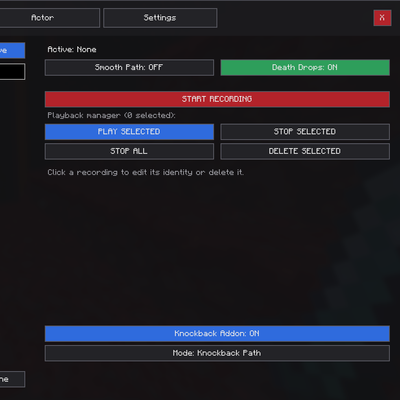
CurseForge · Minecraft mod
Motion Capture Gui
A GUI-powered Minecraft motion capture mod. Record and save player movements and actions, then replay recordings individually or launch multiple selected recordings together with one click. Customize character models, names, skins, and playback settings.
Choose a version Pick your version below, then grab the matching file.
Quick answer
Which Motion Capture Gui release matches Fabric?
Best match for your filters Mocap-FABRIC-1.21.11-1.5.jar
Game version 1.21.11
Loader Fabric
Motion Capture Gui Mocap-FABRIC-1.21.11-1.5.jar targets 1.21.11 with Fabric. The project page does not say whether this file belongs on the client, dedicated server, or both. No extra mods listed for this file.
Where it goes
Is Motion Capture Gui required on the client, server, or both?
The project page does not say whether this file belongs on the client, dedicated server, or both.
Client Source doesn’t say
Dedicated server Source doesn’t say
Loader for this release Fabric
Required install it here Optional supported, not mandatory Not supported do not install here Source doesn’t say do not assume
The source does not explicitly classify this release as client-only or server-only.
What else does Motion Capture Gui Mocap-FABRIC-1.21.11-1.5.jar need?
Mocap-FABRIC-1.21.11-1.5.jar on Fabric. Every mod below is checked against that same setup.
This file does not list any required mods. Do not add a library just because a different file uses it.
This file does not list any required or optional mods.
Before you install it
Add Motion Capture Gui without breaking your instance.
Built for Motion Capture Gui Mocap-FABRIC-1.21.11-1.5.jar on Fabric. Pick another file and the loader, install side or required mods may change.
- 01
Stick to this file
Use Mocap-FABRIC-1.21.11-1.5.jar. It targets 1.21.11 with Fabric; another release may have different loader, side or dependency requirements.
- 02
Bring the mods it needs
This file does not list any required mods. Do not add a library just because a different file uses it.
- 03
Put it on the correct side
The project page does not say whether this file belongs on the client, dedicated server, or both.
- 04
Pick the file you checked
Use the “Get this file” button beside Mocap-FABRIC-1.21.11-1.5.jar. It opens that exact file at the source.
About this project
What does Motion Capture Gui add?
🎬 Motion Capture (Mocap) – Modified Fork
Record. Customize. Replay. Create.
Record player movements, actions and interactions, then replay them in your world. Build reusable recorded characters, populate your world with player-like actors and make cinematic scenes without needing multiple players.
This fork adds a full in-game GUI (Studio, Actor, Settings), per-recording character customization and Smooth Path movement smoothing.
✨ Features
🎥 Studio – recording workspace
- Start, stop and save recordings; record several at once
- Searchable, scrollable recording library with multi-select
- ▶ Play any recording from its list entry, PLAY SELECTED, STOP SELECTED, STOP ALL
- See which recordings are playing
- Delete one or many recordings (with confirmation)
🪪 Identity editor – per recording
Customize how a recording plays back without touching the recording itself:
- Display name
- Skin – another player's skin, local PNG file (file picker + skins folder button), MineSkin or a direct PNG link
- Character – play as any supported mob
- Health – custom health value
- Scale – make a playback character smaller or bigger (0.0625–16)
🎭 Actor – character selection
- Browse and search entities, apply them as the playback character
- Name and skin options, baby variants, reset modifiers
⚙️ Settings – everything in-game
- Searchable, scrollable settings with descriptions, toggles, value cycling and reset-to-default
- Groups: Recording, Playback, Smooth Path, Advanced
- Includes drop-inventory-on-death, invulnerability, entity filters and more
🛤️ Smooth Path
Smooths recorded position and rotation during playback – works on existing recordings, never changes the original data, and doesn't blend across teleports.
🎞️ Recording & playback
Records movement, swings, item use, equipment, block actions, containers, sleeping, damage and death, nearby entities, potion effects and more. Playback supports speed control, offsets, rotation, scaling, mirroring and multiple simultaneous recordings.
🧩 Scenes & commands
Scenes and advanced modifiers are command-based (/mocap scenes, /mocap playback, /mocap settings, /mocap help). There is no visual timeline editor.
📌 Requirements
| Minecraft | 1.21.11 |
| Loader | Fabric 0.18.4+ |
| Java | 21 |
| Fabric API | Required |
❤️ Credits & License
Modified fork of Motion Capture by mt1006 – original repository, licensed under LGPL-3.0-only. The original code remains under its license; see the included LICENSE file. All credit for the original mod goes to mt1006.
Project description from CurseForge.
Pick your setup
Motion Capture Gui by Minecraft version and loader
Choose the version and loader you play, then open the matching release.
Check the dependencies, then try the file in a copied instance before changing a world you care about.
Recent files
Motion Capture Gui versions and loaders
Mocap-FABRIC-1.21.11-1.5.jar
24 Nov 2026
Client Source doesn’t say Server Source doesn’t say Dependencies No extras listed Listed on Release listing
Check the 1.21.11 · Fabric setup Fabric1.21.11 release
Mocap-fabric-1.21.11.jar
16 Nov 2026
Client Source doesn’t say Server Source doesn’t say Dependencies No extras listed Listed on Release listing
Check the 1.21.11 · Fabric setup Fabric1.21.11 release
Looking for an older file? The official CurseForge project page is in Resources.
 mod
CurseForge · Minecraft
Pigeon Express
Send letters and item parcels with carrier pigeons, a searchable address book, and personal medieval mailboxes.
 mod
CurseForge · Minecraft
PolyglotTooltip (Multi Language Search)
Adds extra translated name lines to tooltips and improves cross-language search in supported mod UIs.
 mod
CurseForge · Minecraft
Storage Scanner
Scan nearby chests and barrels and view their contents in screen