Minecraft version
Back to mods 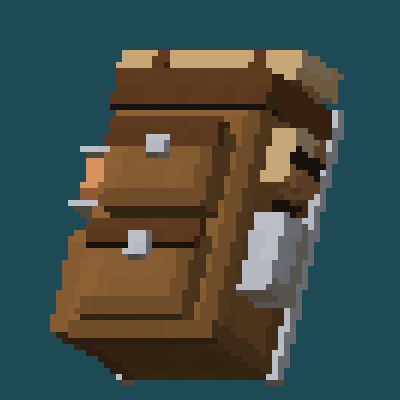
CurseForge · Minecraft mod
Haul & Hoard
Backpacks worn in their own slot: six tiers, five designs each, 18 upgrades in three tiers, and room for a pet on top.
Choose a version Pick your version below, then grab the matching file.
Quick answer
Which Haul & Hoard release should I use?
Latest stable file Haul & Hoard 0.4.0 (Forge 1.20.1)
Game version 1.20.1
Loader Forge
Haul & Hoard 0.4.0 (Forge 1.20.1) targets 1.20.1 with Forge. The project page does not say whether this file belongs on the client, dedicated server, or both. No extra mods listed for this file.
Where it goes
Is Haul & Hoard required on the client, server, or both?
The project page does not say whether this file belongs on the client, dedicated server, or both.
Client Source doesn’t say
Dedicated server Source doesn’t say
Loader for this release Forge
Required install it here Optional supported, not mandatory Not supported do not install here Source doesn’t say do not assume
The source does not explicitly classify this release as client-only or server-only.
What else does Haul & Hoard 0.4.0 (Forge 1.20.1) need?
Haul & Hoard 0.4.0 (Forge 1.20.1). Change the file and its required mods may change too.
This file does not list any required mods. Do not add a library just because a different file uses it.
This file does not list any required or optional mods.
Before you install it
Add Haul & Hoard without breaking your instance.
Built for Haul & Hoard 0.4.0 (Forge 1.20.1). Pick another file and the loader, install side or required mods may change.
- 01
Stick to this file
Use Haul & Hoard 0.4.0 (Forge 1.20.1). It targets 1.20.1 with Forge; another release may have different loader, side or dependency requirements.
- 02
Bring the mods it needs
This file does not list any required mods. Do not add a library just because a different file uses it.
- 03
Put it on the correct side
The project page does not say whether this file belongs on the client, dedicated server, or both.
- 04
Pick the file you checked
Use the “Get this file” button beside Haul & Hoard 0.4.0 (Forge 1.20.1). It opens that exact file at the source.
About this project
What does Haul & Hoard add?
Backpacks that are real equipment. Wear one in its own slot, open it with a key, set it down in your base, and build it up with upgrades. No other mods needed. Works on dedicated servers.
Backpacks
- Six tiers: Leather (27 slots), Copper (36), Iron (54), Gold (72), Diamond (96) and Netherite (120). Upgrading a tier keeps everything inside.
- Five designs per tier: Classic, Expedition, Hardcase, Strongbox and Relic. Switch any time from the backpack screen. The design shows on the item, on your back and on the placed block.
- Its own backpack slot: it does not use the chest slot, so a chestplate or elytra still fits. The slot is on the survival inventory and the creative inventory tab.
- Open it with B, or right-click a held backpack. Wear it by sneak + right-clicking in the air. Place it by sneak + right-clicking a block. Hoppers work on placed backpacks.
- Custom interface: search box, sort button, fill meter, and a storage grid that scrolls on small windows.
Upgrades
Craft Upgrade Bases, then each upgrade from a base. Right-click an installed upgrade to open its settings. Every upgrade has three tiers: surround it with four gold ingots for tier II, then four diamonds for tier III.
- Pickup, Magnet, Void, Restock, Deposit, Filter: move items in and out for you, each with its own item filter.
- Feeding: eats from the backpack when you are hungry and skips harmful food.
- Compression: packs nine of an item into its block form when that can be undone.
- Experience and Repair: bank experience orbs in the backpack and spend them mending your gear.
- Tool Swapper: hands you the best tool when you start mining, and from tier II the best weapon when you attack.
- Protection: a dropped backpack cannot burn or blow up. Tier III keeps it on your back when you die.
- Inception and Storage Expansion: backpacks inside backpacks, and extra rows of storage.
- Crafting: a 3x3 crafting grid inside the backpack.
- Furnace, Blast Furnace and Smoker: cook inside the backpack while you carry it or while it is placed.
Pets ride along
While wearing a backpack, sneak + right-click your own tamed wolf, cat or parrot with an empty hand and it rides on top of the pack. Sneak + right-click a block to set it down.
Safe for servers
A backpack item only carries an id. Its contents live in the world save and are only changed by the server, so dropping, placing or breaking a backpack cannot duplicate or lose items. Slot counts, placing, automation, pet riding and individual upgrades can all be changed or switched off in the server config.
Requirements
Minecraft 1.20.1, Forge 47 or newer. Needed on both the client and the server.
Not in yet
Stack, Auto-Smelting, Stonecutter, Brewing, Tank and Battery upgrades, a colour picker, and admin tools are planned but not in this version.
Project description from CurseForge.
Pick your setup
Haul & Hoard by Minecraft version and loader
Choose the version and loader you play, then open the matching release.
Check the dependencies, then try the file in a copied instance before changing a world you care about.
Recent files
Haul & Hoard versions and loaders
Haul & Hoard 0.4.0 (Forge 1.20.1)
haulhoard-1.20.1-0.4.0.jar
17 Nov 2026
Client Source doesn’t say Server Source doesn’t say Dependencies No extras listed Listed on Release listing
Check the 1.20.1 · Forge setup 1.20.1Forge release
Looking for an older file? The official CurseForge project page is in Resources.
 mod
CurseForge + Modrinth · Minecraft
Sophisticated Storage
Storage mod with multiple tiers and functional upgrades
 mod
CurseForge + Modrinth · Minecraft
Sophisticated Core
Library mod for Sophisticated mods
 mod
CurseForge + Modrinth · Minecraft
Sophisticated Storage Create Integration
Full Featured Sophisticated Storage on Create Contraptions