Minecraft version
Back to mods 
CurseForge · Minecraft mod
PackSwitchSB
A client-side tool to disable forced server resource packs, mix textures from multiple packs, and resize held items.
Choose a version Pick your version below, then grab the matching file.
Quick answer
Which PackSwitchSB release should I use?
Latest stable file PackSwitchSB-1.0.0-26.2.jar
Game version 26.2
Loader Fabric
PackSwitchSB-1.0.0-26.2.jar targets 26.2 with Fabric. The project page does not say whether this file belongs on the client, dedicated server, or both. No extra mods listed for this file.
Where it goes
Is PackSwitchSB required on the client, server, or both?
The project page does not say whether this file belongs on the client, dedicated server, or both.
Client Source doesn’t say
Dedicated server Source doesn’t say
Loader for this release Fabric
Required install it here Optional supported, not mandatory Not supported do not install here Source doesn’t say do not assume
The source does not explicitly classify this release as client-only or server-only.
What else does PackSwitchSB-1.0.0-26.2.jar need?
PackSwitchSB-1.0.0-26.2.jar. Change the file and its required mods may change too.
This file does not list any required mods. Do not add a library just because a different file uses it.
This file does not list any required or optional mods.
Before you install it
Add PackSwitchSB without breaking your instance.
Built for PackSwitchSB-1.0.0-26.2.jar. Pick another file and the loader, install side or required mods may change.
- 01
Stick to this file
Use PackSwitchSB-1.0.0-26.2.jar. It targets 26.2 with Fabric; another release may have different loader, side or dependency requirements.
- 02
Bring the mods it needs
This file does not list any required mods. Do not add a library just because a different file uses it.
- 03
Put it on the correct side
The project page does not say whether this file belongs on the client, dedicated server, or both.
- 04
Pick the file you checked
Use the “Get this file” button beside PackSwitchSB-1.0.0-26.2.jar. It opens that exact file at the source.
About this project
What does PackSwitchSB add?
Three tools in one small client-side mod:
- 🚫 Disable any forced server pack, like the Hypixel SkyBlock texture pack.
- 🎨 Mix textures from multiple packs, item by item, or turn off single textures and a pack's UI.
- 🗡️ Change your held items: make them smaller or bigger and change your swing speed.
No Fabric API needed. Nothing to install on the server. Works on Hypixel and any other server.
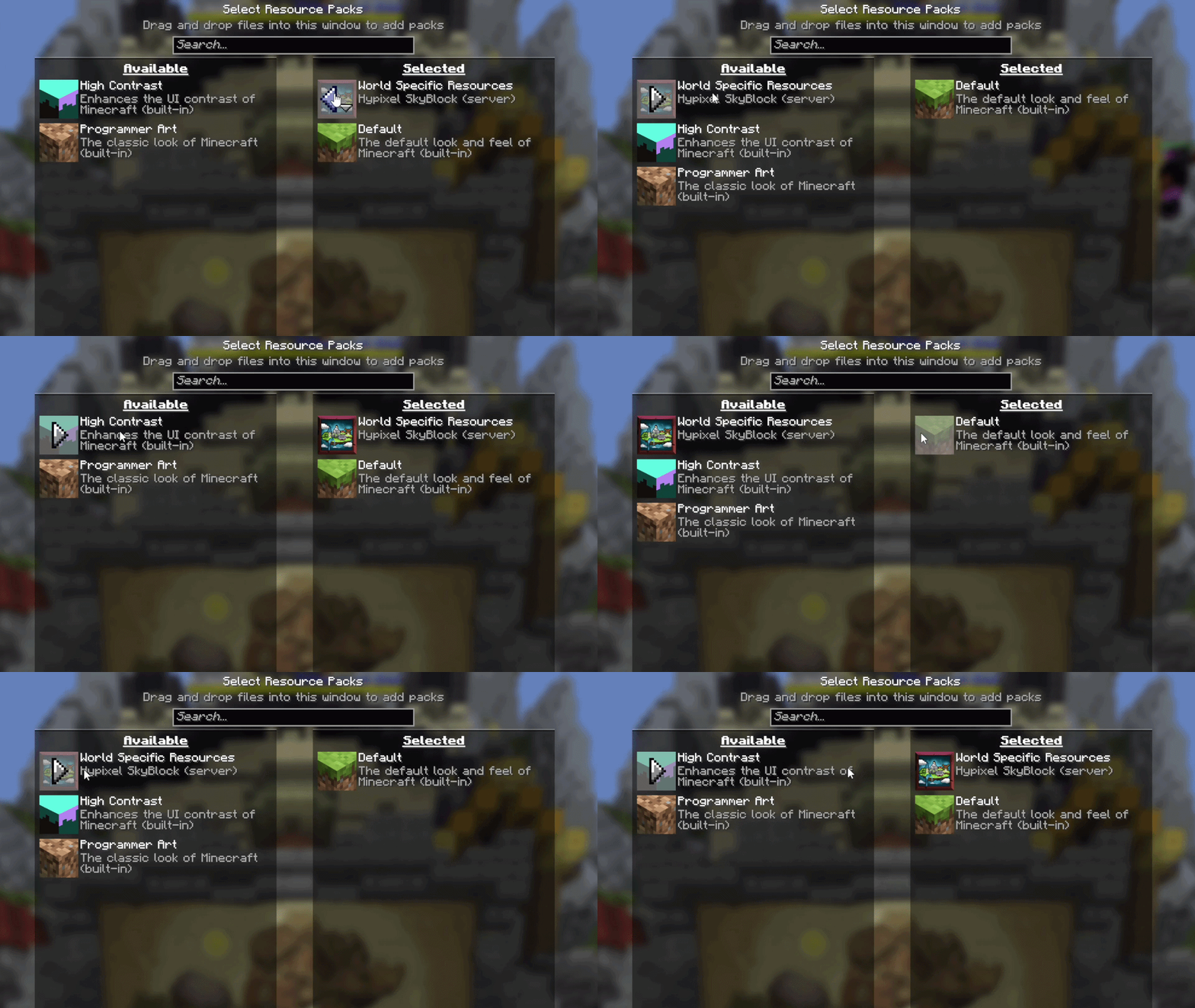
🚫 Disable or remove forced server resource packs
Hypixel SkyBlock, or any other server, forcing a texture pack on you? NoForcedPacks puts it in your normal Options → Resource Packs list. Move it off and it stays off, across rejoins and restarts. Your own packs are never touched.
🎨 Mix and combine textures from multiple packs
Why choose one pack when you can take the best parts of all of them? Open Individual Textures and, item by item:
- Pick which pack's texture you see. Hypixel's sword with FurSky's armor and another pack's pickaxe? Do it. Every loaded pack that textures that item is an option.
- Pick between variants. If a pack ships several looks for one item, choose one. Starred versions keep their own look.
- Turn a single texture off. Set any item to Vanilla and leave the rest of the pack alone.
- Turn off just a pack's UI. UI off for… hides a pack's HUD, inventory and menu backgrounds, tooltips, title screen and SkyBlock menu icons, while its item and armor textures stay.
- Search by name. Type
Aspect of the Voidand jump straight to it. Filter by pack, or Rescan after the server sends a new one.
Your worn armor follows your choice too (dye colors kept), and tooltips from a turned-off pack fall back to vanilla instead of magenta boxes.
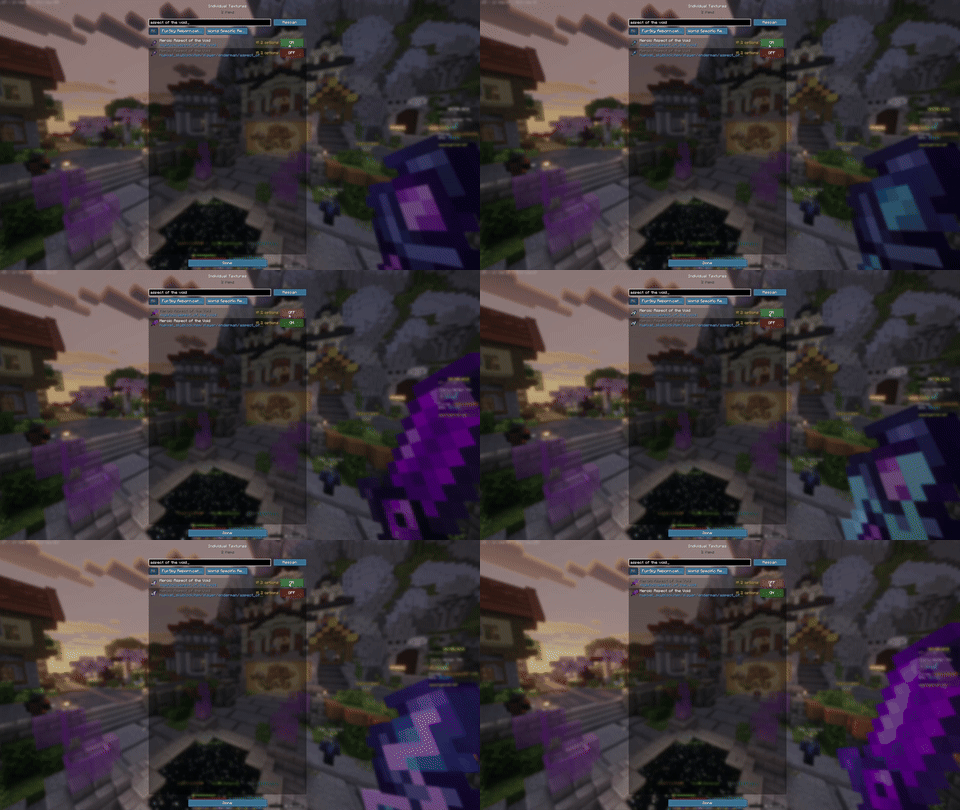
🗡️ Smaller held items and custom swing speed
Open Held items at the bottom of the Individual Textures screen:
- Item size, 10% to 200%. Shrink the item in your hand so it stops blocking your view, or make it huge.
- Swing speed, 5% to 200%. Slow your swing animation right down or speed it up.
- Test swing lets you try it without hitting anything, and your hand stays visible while you adjust.
It only changes what you see. Attacks, mining and what the server gets are exactly the same, and other players see you as usual.
🔧 How to use
- Install Fabric Loader and drop mod into your
modsfolder. That's it, no Fabric API. - Join a server. Its pack loads as normal.
- Whole pack off: Options → Resource Packs, move the server pack to the left.
- Textures, UI and held items: open Individual Textures from
- the TXT Packs button in the pause menu,
- the Individual textures button on the Resource Packs screen, or
- a key of your choice (Options → Controls → Key Binds, unbound by default so it never clashes with other mods).
Everything you choose is saved across reconnects and restarts.
Project description from CurseForge.
Pick your setup
PackSwitchSB by Minecraft version and loader
Choose the version and loader you play, then open the matching release.
Check the dependencies, then try the file in a copied instance before changing a world you care about.
Recent files
PackSwitchSB versions and loaders
PackSwitchSB-1.0.0-26.2.jar
17 Nov 2026
Client Source doesn’t say Server Source doesn’t say Dependencies No extras listed Listed on Release listing
Check the 26.2 · Fabric setup Fabric26.2 release
Looking for an older file? The official CurseForge project page is in Resources.
 mod
CurseForge · Minecraft
Extraordinary Energy : Modern Core
Core Mod for Extraordinary Energy Modern
 mod
CurseForge · Minecraft
Police - GTACRAFT
This mod adds a wanted system just like in GTA!
 mod
CurseForge · Minecraft
CC:RT Continued (CC Tweaked Addon)
Unofficial update of the CC:RT mod to version 1.20.1 (Forge) and 1.21.1 (NeoForge)