Minecraft version
Back to mods 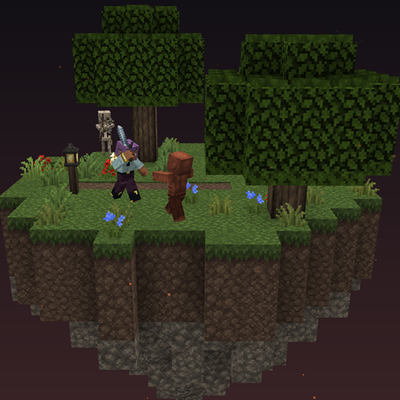
CurseForge · Minecraft mod
SVR Menus
Animated title, pause, world and loading screens: a 3D floating island behind the title menu, worlds shown as islands, your own skin on the create-world screen, and a camera that flies between them. Client-side.
Choose a version Pick your version below, then grab the matching file.
Quick answer
Which SVR Menus release should I use?
Latest stable file SVR Menus 0.1.2 (Fabric 1.21.1)
Game version 1.21.1
Loader Fabric
SVR Menus 0.1.2 (Fabric 1.21.1) targets 1.21.1 with Fabric. The project page does not say whether this file belongs on the client, dedicated server, or both. No extra mods listed for this file.
Where it goes
Is SVR Menus required on the client, server, or both?
The project page does not say whether this file belongs on the client, dedicated server, or both.
Client Source doesn’t say
Dedicated server Source doesn’t say
Loader for this release Fabric
Required install it here Optional supported, not mandatory Not supported do not install here Source doesn’t say do not assume
The source does not explicitly classify this release as client-only or server-only.
What else does SVR Menus 0.1.2 (Fabric 1.21.1) need?
SVR Menus 0.1.2 (Fabric 1.21.1). Change the file and its required mods may change too.
This file does not list any required mods. Do not add a library just because a different file uses it.
This file does not list any required or optional mods.
Before you install it
Add SVR Menus without breaking your instance.
Built for SVR Menus 0.1.2 (Fabric 1.21.1). Pick another file and the loader, install side or required mods may change.
- 01
Stick to this file
Use SVR Menus 0.1.2 (Fabric 1.21.1). It targets 1.21.1 with Fabric; another release may have different loader, side or dependency requirements.
- 02
Bring the mods it needs
This file does not list any required mods. Do not add a library just because a different file uses it.
- 03
Put it on the correct side
The project page does not say whether this file belongs on the client, dedicated server, or both.
- 04
Pick the file you checked
Use the “Get this file” button beside SVR Menus 0.1.2 (Fabric 1.21.1). It opens that exact file at the source.
About this project
What does SVR Menus add?
SVR Menus gives Minecraft's menus their own look without layout files or menu editors. The vanilla buttons stay (and so do other mods' buttons). The mod restyles them and builds a live 3D scene around them.
Features
- Title screen
- An ivory sidebar with the pack logo; the buttons slide in one after another.
- Behind it, a floating island built from real blocks, with a fight frozen in mid-swing, while the camera slowly circles it.
- The modpack version shows faintly in the bottom-left corner.
- Worlds and servers as islands
- Each world is an island made from the chunk you last played in, arranged in a ring.
- A top-down map preview, game mode and details, sorting, favourites (★) and search sit in a side panel.
- Servers work the same way, with their ping.
- Create world
- Three figures in your own skin pick the game mode: Survival (sword and shield, armour), Creative (flying with a dirt block) and Hardcore (two swords, just hit).
- Click one and it acts: the Survival figure swings, the Creative one places blocks, the Hardcore one recovers from the hit.
- Loading
- Starting a world: the camera flies off the island, then the real terrain of your save drops into place and the camera descends to your character.
- Joining a server: the camera flies up into the sky while it connects.
- Save & quit: the game picture shrinks away and a "Saving" card appears, instead of a plain text screen.
- Pause screen: no blur; the camera orbits your character in third person.
Configuration
config/svr_menus.json: colours (#AARRGGBB), orbit speed and distance, and a hide list of buttons by translation key.config/svr_menus/logo.pngreplaces the built-in logo.config/svr_menus/scene.nbt(a structure-block file) replaces the built-in island.
Compatibility
- Requires: Fabric API.
- Client-side only. Servers do not need it.
- Use instead of FancyMenu-style menu mods. Both restyle the same screens.
- Part of the Savaru mod suite.
說明(繁體中文)
SVR Menus 不用版面檔、不用選單編輯器,就讓 Minecraft 的選單有自己的樣子。原版按鈕(以及其他模組的按鈕)都保留,模組只負責換外觀,並在按鈕周圍建出一個即時的 3D 場景。
功能
- 標題畫面
- 象牙白側欄放模組包 Logo,按鈕依序滑入。
- 後方是用真實方塊建成的浮空島,上面定格著一場戰鬥,鏡頭緩緩繞著它轉。
- 模組包版本淡淡地顯示在左下角。
- 世界與伺服器變成島嶼
- 每個世界都是一座島,用你最後遊玩的那塊區塊建成,排成一圈。
- 側欄有俯視地圖預覽、遊戲模式與詳細資料、排序、我的最愛(★)和搜尋。
- 伺服器清單也一樣,會顯示延遲。
- 建立世界
- 三個穿著你自己皮膚的人物代表遊戲模式:生存(劍盾、盔甲)、創造(拿著泥土飛在空中)、極限(雙劍、剛被擊中)。
- 點一下就會動:生存揮劍、創造放方塊、極限受擊後站穩。
- 載入畫面
- 進入世界:鏡頭從島上飛離,存檔裡真實的地形一塊塊落下,鏡頭再降到你的角色身上。
- 連線伺服器:連線時鏡頭飛向天空。
- 儲存並離開:遊戲畫面縮小,跳出「儲存遊戲中」卡片,取代原本的純文字畫面。
- 暫停畫面:不模糊,鏡頭以第三人稱繞著你的角色轉。
設定
config/svr_menus.json:顏色(#AARRGGBB)、環繞速度與距離、要隱藏的按鈕(以翻譯鍵指定)。config/svr_menus/logo.png:取代內建 Logo。config/svr_menus/scene.nbt(結構方塊檔):取代內建浮空島。
相容性
- 需要 Fabric API。
- 只裝在客戶端,伺服器不用裝。
- 請勿與 FancyMenu 這類選單模組同時使用,兩者會改同一批畫面。
- 隸屬 Savaru 模組系列。
Project description from CurseForge.
Pick your setup
SVR Menus by Minecraft version and loader
Choose the version and loader you play, then open the matching release.
Check the dependencies, then try the file in a copied instance before changing a world you care about.
Recent files
SVR Menus versions and loaders
SVR Menus 0.1.2 (Fabric 1.21.1)
svr-menus-0.1.2.jar
20 Nov 2026
Client Source doesn’t say Server Source doesn’t say Dependencies No extras listed Listed on Release listing
Check the 1.21.1 · Fabric setup Fabric1.21.1 release
SVR Menus 0.1.1
svr-menus-0.1.1.jar
18 Nov 2026
Client Source doesn’t say Server Source doesn’t say Dependencies No extras listed Listed on Release listing
Check the 1.21.1 · Fabric setup Fabric1.21.1 release
SVR Menus 0.1.0
svr-menus-0.1.0.jar
17 Nov 2026
Client Source doesn’t say Server Source doesn’t say Dependencies No extras listed Listed on Release listing
Check the 1.21.1 · Fabric setup Fabric1.21.1 release
Looking for an older file? The official CurseForge project page is in Resources.
 mod
CurseForge · Minecraft
Savaru's Chat
A modern Fabric chat overhaul with animated speech bubbles, player avatars, channels, mentions, timestamps, emoji support, item sharing, and party integration.
 mod
CurseForge · Minecraft
Savau's Trading
A server-authoritative player marketplace, quick-sell, and secure direct-trading system with Savaru Inv and Numismatic Overhaul integration.
 mod
CurseForge · Minecraft
Savaru's Dungeonology
A Savaru roguelike dungeon system with level-gated entries, difficulty tiers, dungeon objectives, rule-card buffs, party runs, external dungeon integration, and Affixology-linked rewards.