Minecraft version
Back to mods 
CurseForge · Minecraft mod
Cobblemon Multi Battle
3-in-1 Cobblemon mod: Player Gyms with clone trainers, Elo Ranked battles with spectating, and an in-game Team Builder. Each module can be disabled. Highly configurable with a full Admin tool.
Choose a version Pick your version below, then grab the matching file.
Quick answer
Which Cobblemon Multi Battle release should I use?
Latest stable file cobblemon-multi-battle-1.1.1+1.21.1.jar
Game version 1.21.1
Loader Fabric
Cobblemon Multi Battle cobblemon-multi-battle-1.1.1+1.21.1.jar targets 1.21.1 with Fabric. The project page does not say whether this file belongs on the client, dedicated server, or both. No extra mods listed for this file.
Where it goes
Is Cobblemon Multi Battle required on the client, server, or both?
The project page does not say whether this file belongs on the client, dedicated server, or both.
Client Source doesn’t say
Dedicated server Source doesn’t say
Loader for this release Fabric
Required install it here Optional supported, not mandatory Not supported do not install here Source doesn’t say do not assume
The source does not explicitly classify this release as client-only or server-only.
What else does Cobblemon Multi Battle cobblemon-multi-battle-1.1.1+1.21.1.jar need?
cobblemon-multi-battle-1.1.1+1.21.1.jar. Change the file and its required mods may change too.
This file does not list any required mods. Do not add a library just because a different file uses it.
This file does not list any required or optional mods.
Before you install it
Add Cobblemon Multi Battle without breaking your instance.
Built for Cobblemon Multi Battle cobblemon-multi-battle-1.1.1+1.21.1.jar. Pick another file and the loader, install side or required mods may change.
- 01
Stick to this file
Use cobblemon-multi-battle-1.1.1+1.21.1.jar. It targets 1.21.1 with Fabric; another release may have different loader, side or dependency requirements.
- 02
Bring the mods it needs
This file does not list any required mods. Do not add a library just because a different file uses it.
- 03
Put it on the correct side
The project page does not say whether this file belongs on the client, dedicated server, or both.
- 04
Pick the file you checked
Use the “Get this file” button beside cobblemon-multi-battle-1.1.1+1.21.1.jar. It opens that exact file at the source.
About this project
What does Cobblemon Multi Battle add?
Cobblemon Multi Battle
Player Gyms · Ranked Elo · Pokémon Team Builder
Three independent modules in one Fabric mod. Build your own gym and challenge player clones, compete in ranked singles or doubles, and plan complete Pokémon teams without leaving Minecraft. Enable only the modules your server needs. Most gameplay rules, rewards and limits can be configured in game or in the server config files.
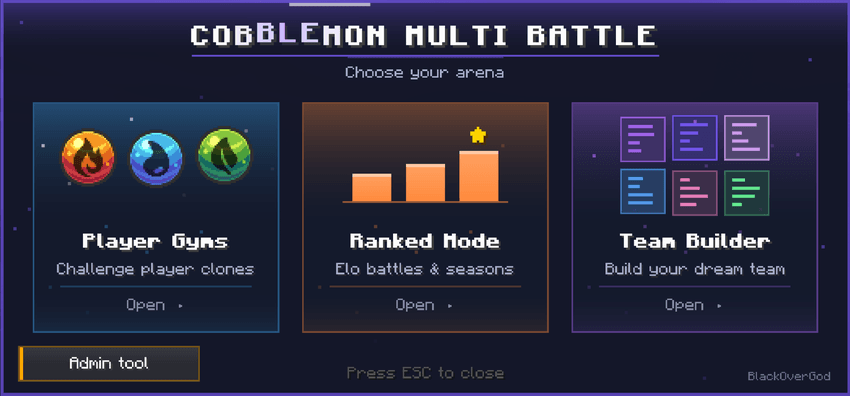
| Player Gyms | Ranked Elo | Team Builder |
|---|---|---|
| 18 gym types and player clones | Singles, doubles and seasons | Free 6v6 and ranked teams |
| Gym rewards and a vault | Ranks, rewards and live spectating | EVs, IVs, moves and matchups |
| Owner-controlled teams | Custom arenas and bans | Share teams and export to Showdown |
Run one module, two modules or all three. Turn them on or off in Admin tool → Modules or through the config options gymEnabled, rankedEnabled and teamBuilderEnabled. Disabled modules are greyed out in the main menu.
Features at a glance
- Player Gyms: Choose from 18 Pokémon types, save a team, place a trainer clone with your skin, and let other players challenge it.
- Ranked: Elo-based 1v1 singles and 2v2 doubles, rank-dependent battle intros, results, seasons, rewards and matchmaking.
- Team Builder: Build, edit, compare and share teams with full Pokémon details, type analysis and Showdown export.
- Spectate: Watch running ranked battles in a Pokémon-style live battle interface.
- Admin controls: Configure modules, arenas, players, bans, economy commands, cooldowns and emergency switches without restarting for normal changes.
- Five languages: English, German, Spanish, Brazilian Portuguese and Simplified Chinese, selected by the Minecraft language.
For players
Module 1: Player Gyms
Get your Gym Mirror and choose a type
Open Player Gyms from the main menu. The Gym Mirror cannot be crafted. Operators can give mirrors to players, and servers may optionally grant one free mirror to new players.
Right-click the mirror in the air, then select one of the 18 Pokémon types. If you want to change your type later, send a request to an operator. The gym keeps its existing type until an operator approves the change.
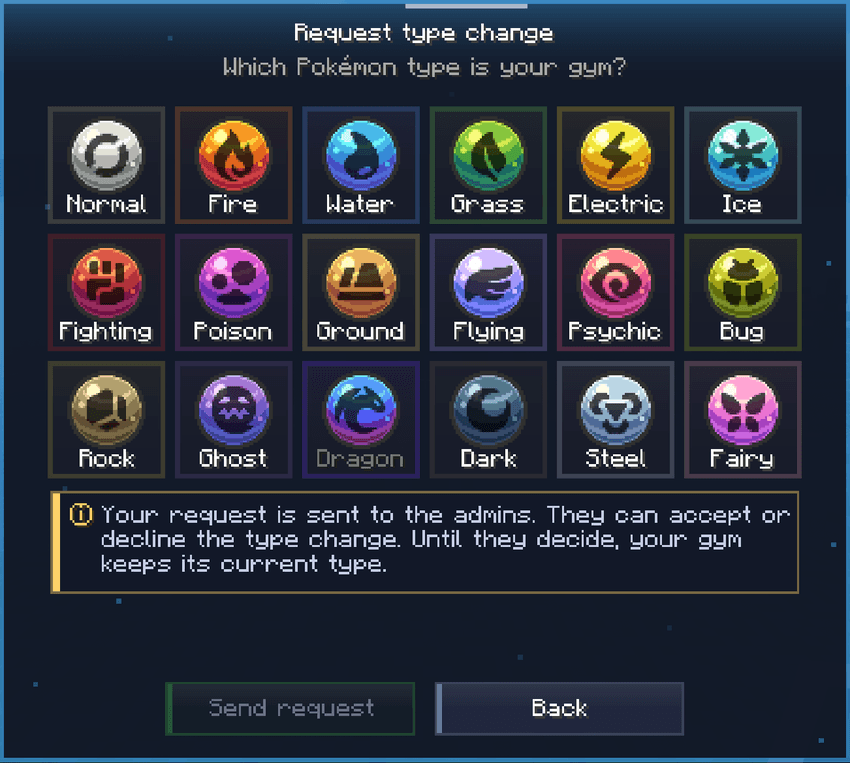
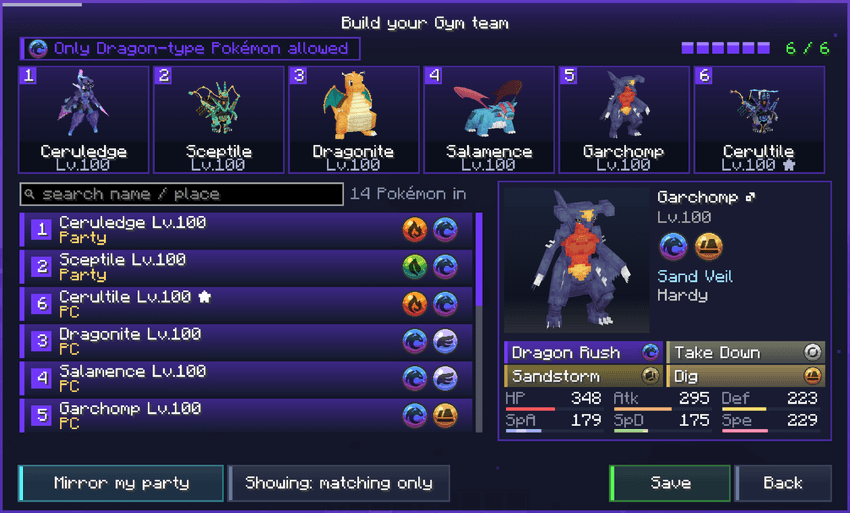
Build your gym team
Choose up to six Pokémon from your party or PC, or use Mirror my party to copy your current party. Every team member must match the gym's type as its primary or secondary type. The mod saves battle copies, including held items; it does not duplicate Pokémon into your inventory.
The editor includes a search, Pokémon selection, 3D previews and a team overview.
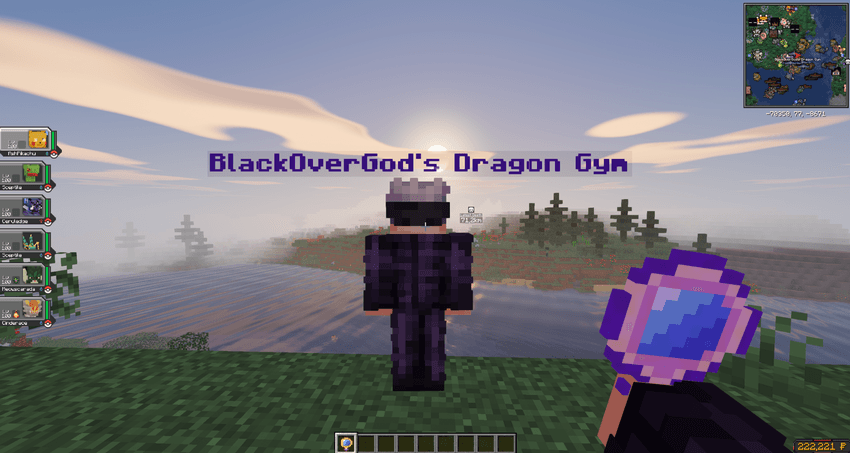
Place and manage your clone
Right-click a block with the mirror to place your trainer clone. It uses your player skin and your saved Pokémon team. The mirror is consumed on placement. After the configurable take-back cooldown (2 hours by default), you can retrieve the clone and place it somewhere else. Retrieving it asks for confirmation.
The Your Gym screen shows its team, owner, location, status and vault balance. You can edit the team, request a type change and manage the clone from the same interface.
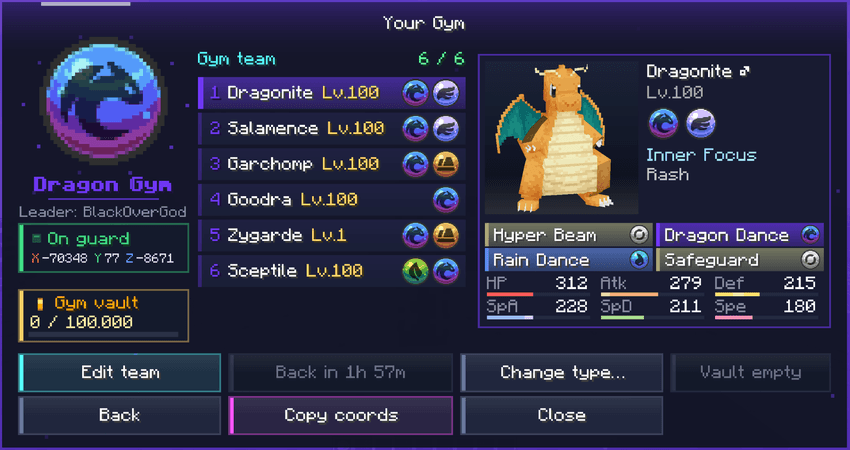
Find and challenge gyms
Press I (the default key) for All Gyms. Filter by type, sort the list, see gym owners and online status, check available rewards and teleport when the server allows it. Right-click a clone to start a challenge.
- Challenge cooldown: 2 hours per player and gym by default; individual gyms can have their own settings.
- Between-gym cooldown:
nextGymCooldownMinutescan prevent immediately challenging another gym; disabled by default. - Optional rules: Require the owner to be online, permit or block self-challenges, and allow or disable gym teleportation.
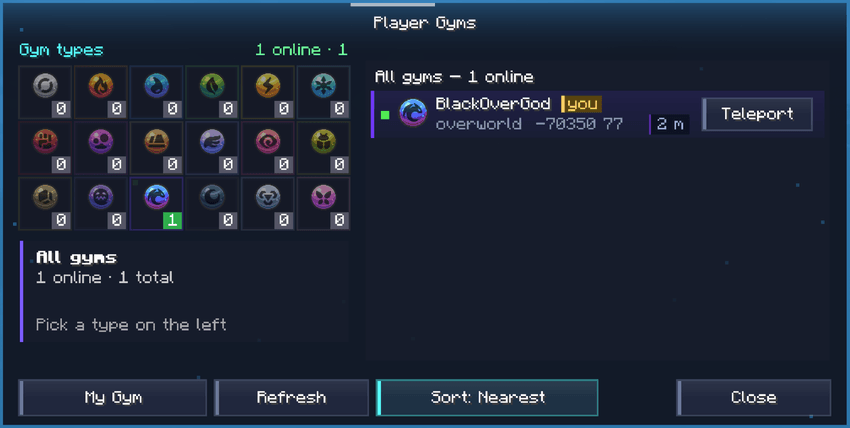
Gym rewards and vault
Operators can assign a one-time reward per gym as an item held in hand or a server command. Each challenger can receive that reward once per gym, but can keep battling for fun.
| Event | Default value |
|---|---|
| Clone defeats a challenger | 5,000 added to the gym vault |
| Challenger defeats a clone | 10,000 to the challenger |
| Maximum vault balance | 100,000 |
| Vault collection cooldown | 3 days |
| Challenger win-money cooldown | 2 hours across all gyms |
Values are adjustable by the server. The global challenger payout cooldown prevents farming many gyms in a short period.
Module 2: Ranked Elo
Join a ranked battle
Open Ranked Mode, select your team and enter a queue. Matchmaking uses Elo and the ranked arenas configured by the server.
| Format | Default Pokémon per player |
|---|---|
| Singles 1v1 | 3 |
| Doubles 2v2 | 4 |
Ranked battle level is 100 by default, and the server can configure team sizes, forced level, maximum Elo gap, matchmaking time and cooldown between matches.
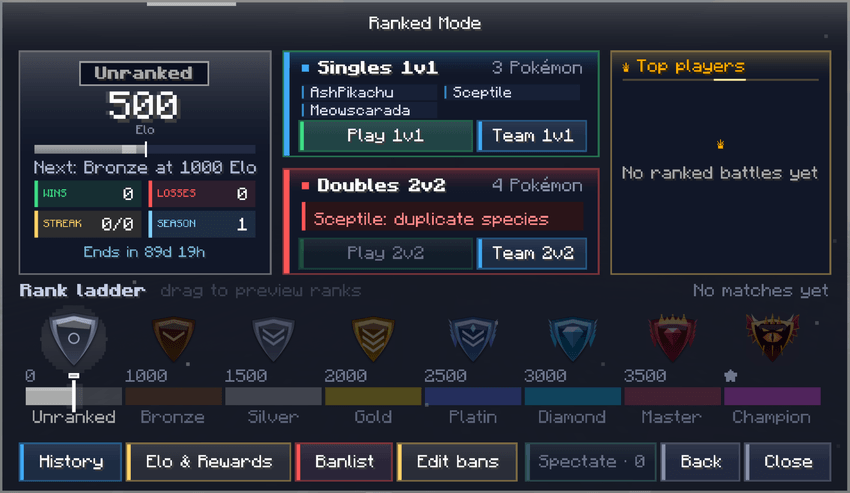
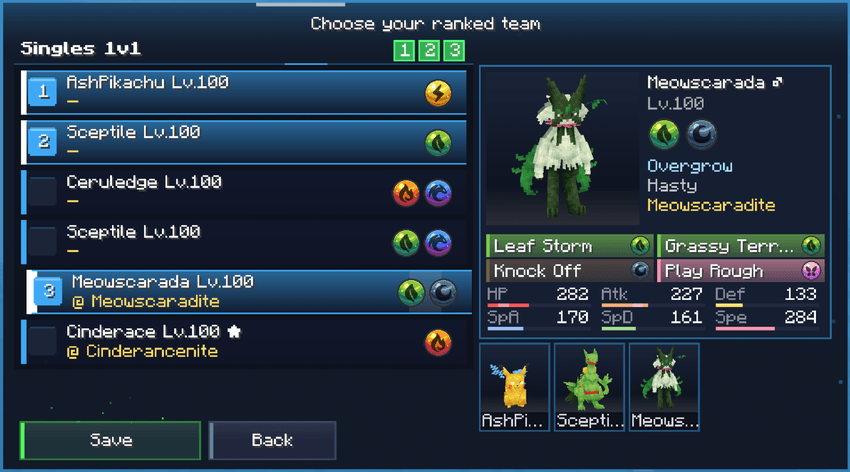
Pick your Pokémon and their order before entering the queue. Ranked bans and team rules apply to the selected team.
Rank-based cinematic intro
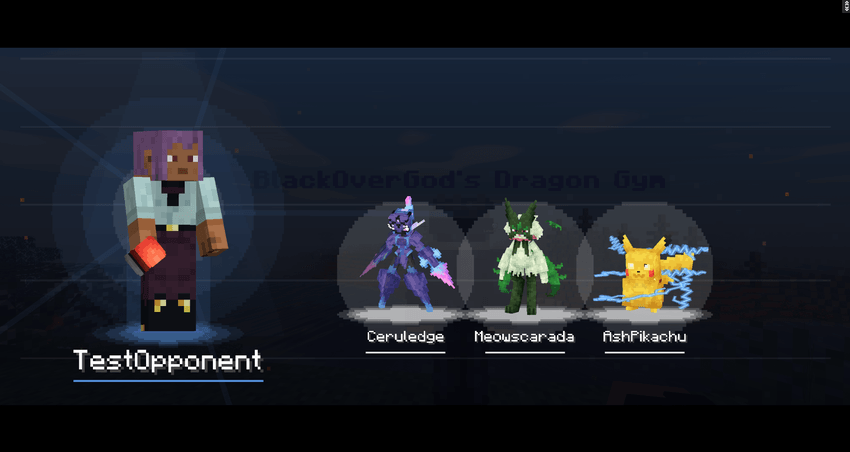
Each ranked battle begins with an intro that changes according to the opponent's rank. First you see a trainer silhouette and threat gauge. The trainer is revealed, throws Poké Balls and their Pokémon appear as silhouettes before spotlights reveal them one at a time. Their rank and Elo are then shown.
The atmosphere becomes more intense at higher ranks: quiet blue waves at lower ranks, then dust, golden sparks and heat haze, and finally embers, lightning, screen shake and Champion aura rings. Each stage has its own sound effects.
Turn timer and live spectating
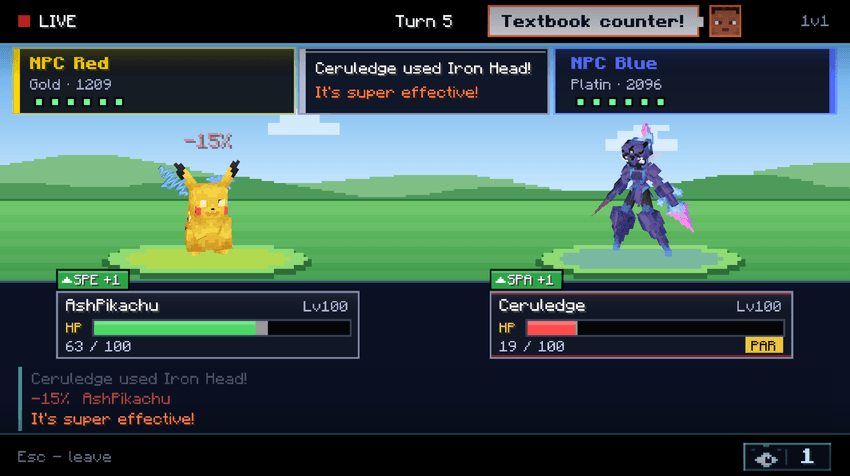
Ranked has a turn timer of 60 seconds by default, adjustable from 10 to 600 seconds. A bar shows the remaining time and a warning tick plays near the end. When time runs out, the turn is skipped, not forfeited.
Open Spectate to watch a ranked match live in a Pokémon-style battle view. It shows HP cards, battle log, moves, status and environmental effects, trainer quotes and the number of viewers. Server owners can disable spectating.
Elo, ranks and rewards
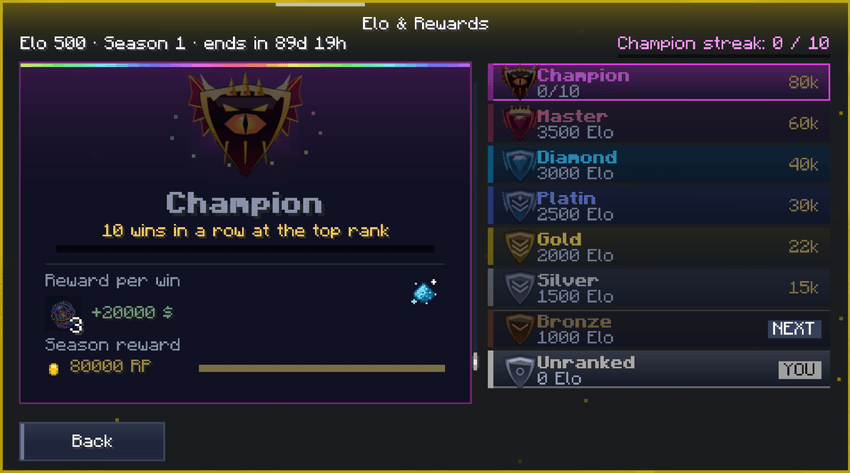
Ranks: Unranked → Bronze → Silver → Gold → Platin → Diamond → Master → Champion.
Champion requires a win streak at the highest rank (10 wins by default). Elo calculations can use a K-factor, loser protection, minimum gain per win and a win-streak bonus. The Elo & Rewards screen shows rank requirements and rewards.
After each battle, the result screen shows the winner, loser, both teams, animated Elo changes and any rank change. Win rewards are paid automatically, and a server broadcast announces the result.
Forfeit or disconnect: The player loses Elo and receives a configurable ranked ban. When a player disconnects, their opponent receives no Elo and no reward. The GUI warns about penalties, and operators are notified about repeat forfeits.
Seasons, battle history and leaderboard
- History: View your own recent battles and recent battles of other players, including both teams, Elo changes and recent form.
- Seasons: Seasons end after a configurable number of days or months, or manually. Elo resets and final standings are archived.
- Season rewards: Claim these manually from the ranked rewards menu. Normal ranked win rewards are automatic.
- Leaderboard: See ranks, medals, win streaks and the rewards for each rank.
Ranked rules and banlist
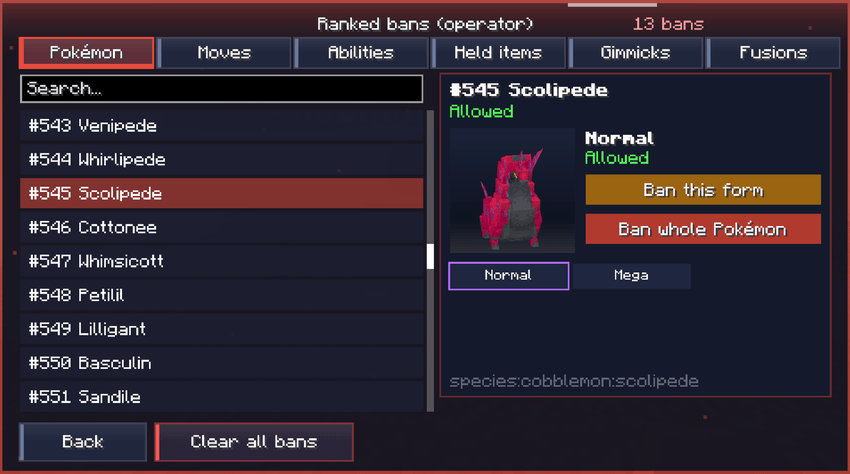
Everyone can read the ranked banlist. Authorized players can edit bans for Pokémon species, individual forms, moves, abilities, held items, Mega Evolution, Tera, Z-Moves, Dynamax and fusions. Held items from custom items or datapacks can be selected with Item in hand.
Healing and revive bag items are blocked in ranked by default (configurable). Held items are not dropped as battle loot.
Module 3: Pokémon Team Builder
Build and manage your teams
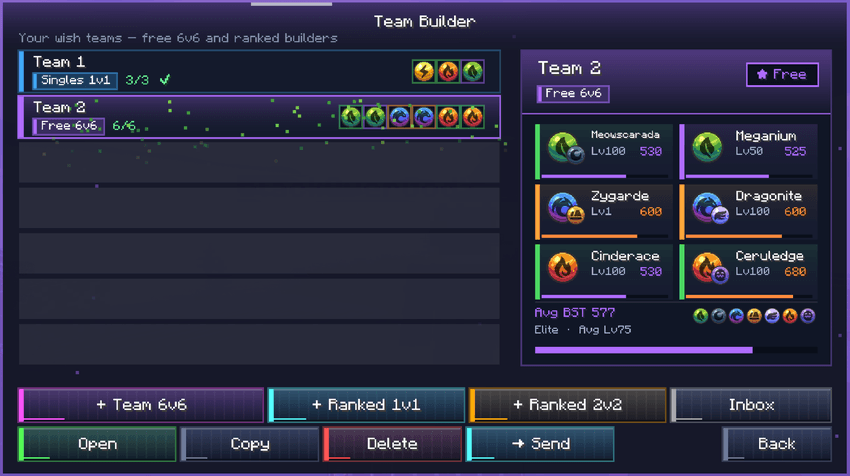
Create teams without leaving Minecraft. Choose Free 6v6 or a ranked team for 1v1 or 2v2. The home screen lets you open, copy, delete and share teams, with an overview of the members and their stats.
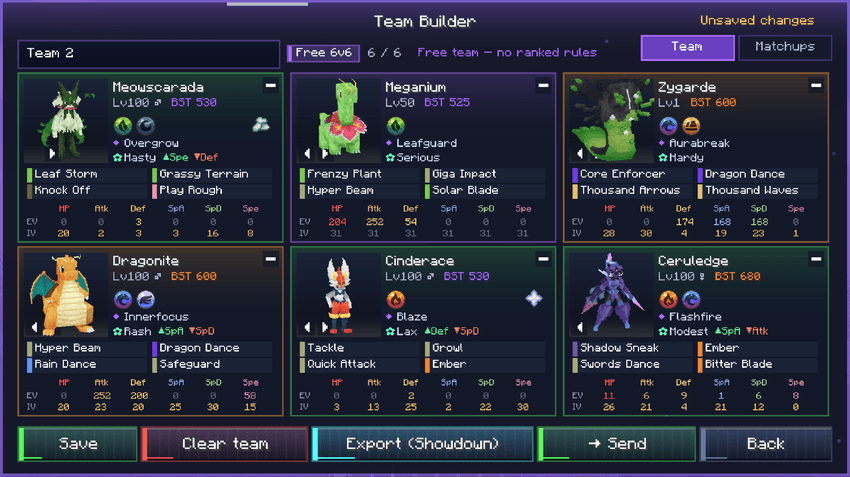
A full team view shows all six Pokémon with their types, moves, nature, ability and stat information. Save your edits, export a team as Pokémon Showdown text or send it to another player.
Add Pokémon to your team
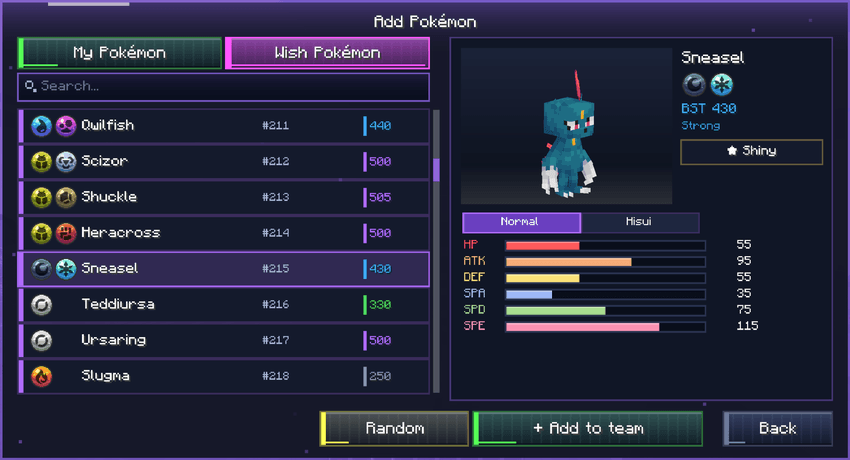
Select Pokémon you own or use the Wish Pokémon list to plan a team. Search the available Pokémon, inspect a 3D model, see base stats, choose a form and add the Pokémon to your team.
Edit stats, moves and details
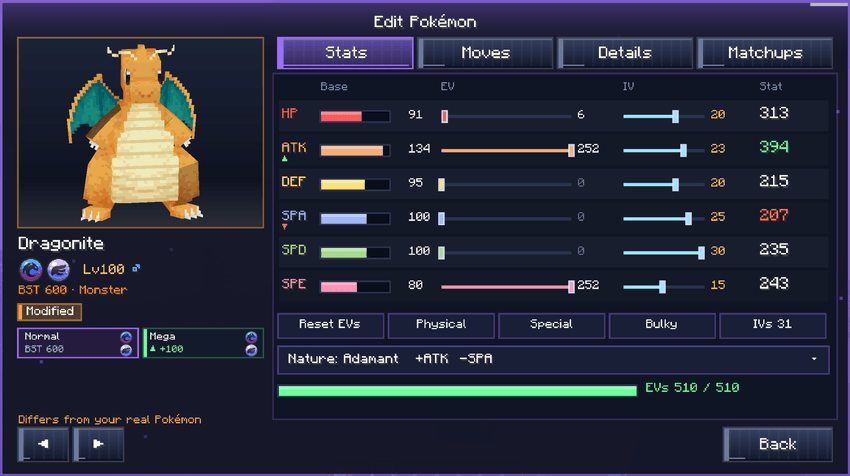
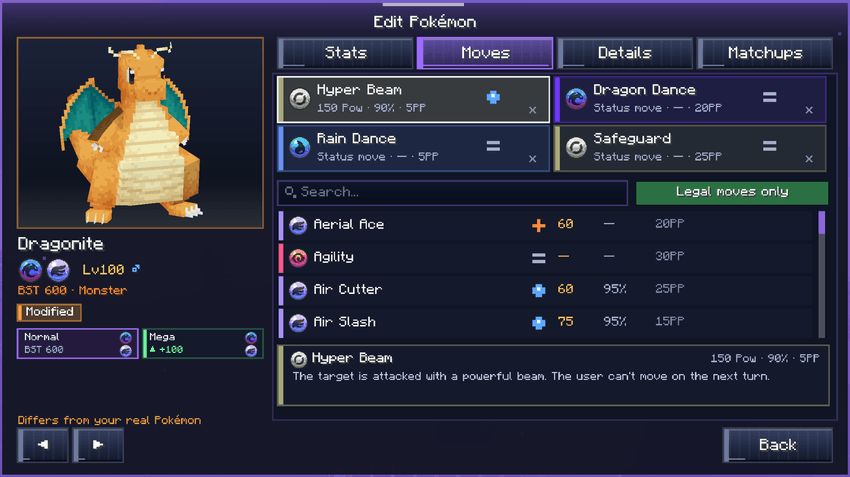
The built-in editor covers moves, ability, nature, held item, level, gender, forms/Mega, shiny, EVs and IVs. EV allocation supports a maximum of 510 EVs. Changing a form updates the displayed stats with animated bars.
Stats and EVs/IVs: Adjust spreads, inspect final stats and use stat presets.
Moves: Search moves, view power, accuracy and PP, and select move sets. The editor includes move descriptions and legality checks.
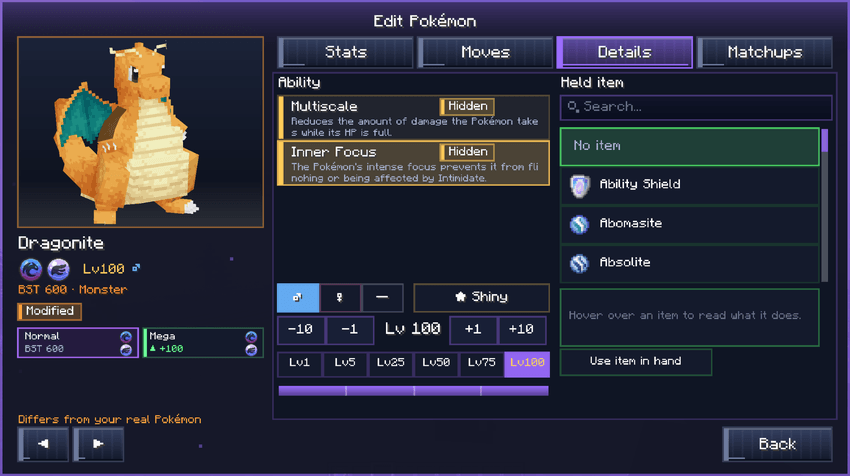
Details: Set abilities, held items and other Pokémon details. Custom items can be selected from the available items.
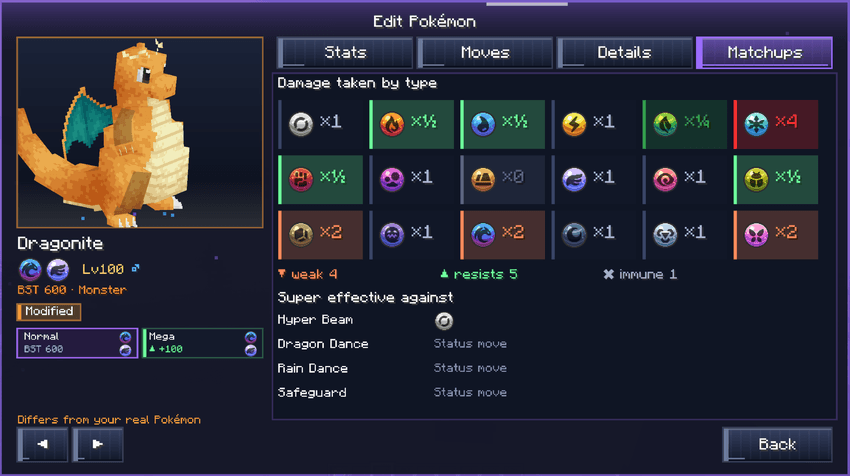
Check matchups and team coverage
The Matchups tab shows a Pokémon's damage multipliers by type, weaknesses, resistances, immunities and the moves most likely to threaten it.
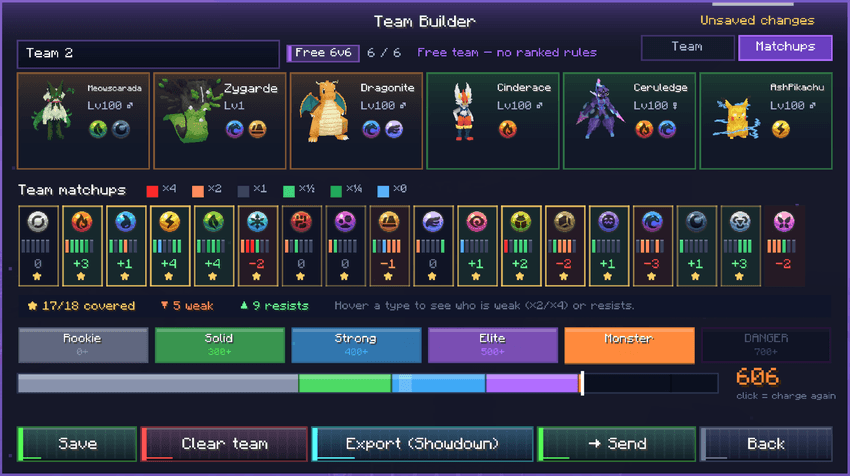
For a complete team, the builder summarizes type coverage, weaknesses, resistances and team strength. A power meter gives a quick overview before you save, export or share.
Share teams and check ranked legality
- Ranked check: Each Pokémon can show Allowed or Banned in ranked; the team indicates when it is ready for ranked.
- Team sharing: Send a team to an online player. They receive it in an inbox and can accept or decline. Pokémon they do not own arrive as Wish Pokémon, not inventory copies.
- Export: Copy teams as Showdown text.
- Power feedback: Hover and click animations reflect a Pokémon's strength through auras, particles and sounds.
- Search: Includes a few hidden Easter eggs.
For server owners
Requirements and installation
Install the mod on the server and on every connecting client.
| Component | Requirement |
|---|---|
| Minecraft Java Edition | 1.21.1 |
| Mod loader | Fabric |
| Fabric Loader | 0.17.2+ |
| Fabric API | Required |
| Cobblemon | 1.8.x |
| Java | 21 |
| Mega Showdown | Optional, supported |
Initial setup
- Install the required mods on the server and all clients; start the server.
- As an operator, open Cobblemon Multi Battle → Admin tool.
- Open Modules and enable Player Gyms, Ranked and/or Team Builder.
- Configure gym rules, clones, cooldowns, rewards and teleportation.
- Configure ranked arenas, player coordinates, matchmaking, bans, seasons and reward commands.
- Run
/multibattle checkbefore opening the modes to players. It checks for missing ranked arenas, unknown worlds and unknown reward items. The same validation also runs at server startup.
Admin tool (operator permission level 2)
| Area | Controls |
|---|---|
| Gyms | Search and filter gyms; inspect wins, losses, vault and status; enable/disable gyms, remove clones and set per-gym rewards and cooldowns |
| Requests | Approve or deny gym type-change requests |
| Gym settings | Clone AI strength (0–5), forced level, Mega/Tera/Z-Moves/Dynamax, vault, teleport, owner rules and cooldowns |
| Ranked settings | Elo rules, queue, team sizes, battle level, turn timer, spectating, seasons, rank rewards and bag items |
| Modules | Switch the three modules on or off independently |
| Players & Perms | Set player Elo, clear bans and cooldowns, allow trusted users to edit ranked bans |
| Seasons | End one or several seasons, triggering the relevant resets and rewards |
| Animations | Preview ranked intro, winner/loser and spectator animations |
| Emergency OFF | Separate emergency controls for Player Gyms and Ranked |
Most everyday changes take effect in game and are saved to the server config. For manual configuration, see the files below.
Economy and rewards
Rewards are issued through configurable server commands, so you can integrate the economy and reward systems your server uses. Both the Admin tool and config expose relevant settings:
- Money reward name and command (CobbleDollars is the example/default integration).
- Reward item and display name for ranked wins.
- Season reward name and command.
- Rank-specific rewards, Elo thresholds and permission-plugin suffix commands.
- Gym vault gain, challenger payouts, collection caps and cooldowns.
Test every command with small rewards before enabling it publicly. New installations use neutral defaults; updates preserve existing server-defined values and add defaults only for new options.
Configuration files and commands
| File | Used for |
|---|---|
config/cobblemon-multi-battle.json |
Player Gyms and Team Builder settings |
config/cobblemon-multi-battle-ranked.json |
Ranked rules, arenas, ranks, seasons, rewards, music and commands |
Both config files contain comments explaining the options. Values are checked against valid ranges on load.
| Command | Action |
|---|---|
/multibattle give |
Give Gym Mirrors |
/multibattle reload |
Reload configuration without a restart |
/multibattle season end |
End the ranked season manually |
/multibattle check |
Validate arenas, worlds and reward items |
The old /mirrortrainers command remains available as an alias.
Performance and data safety
- Asynchronous, atomic saves: Changes are written without blocking gameplay; a
.bakcopy of data files is created at startup. - Damaged files preserved: Invalid data is retained with a
.corrupt-<time>suffix instead of being overwritten silently. - No server tick loops for the mod's gameplay features; data is saved when it changes.
- On-demand lists: Menus request lists when opened.
- Background clone-skin loading: Skins are cached on disk and do not block the server thread.
- Limited caches and cleanup: Caches are size-limited; old cooldowns and seasons are cleaned up.
For a safe launch, test arena locations, queues, disconnect penalties, reward commands, gym vault payouts and season endings with test players. Keep backups before major server changes and use the independent emergency switches if a module needs to be stopped.
Languages
English · German · Spanish · Portuguese (Brazil) · Chinese (Simplified)
The interface follows each player's Minecraft language setting.
FAQ
Does every client need the mod?
Yes. Install Cobblemon Multi Battle on both the server and clients.
Can I use only one module?
Yes. Player Gyms, Ranked and Team Builder can each be disabled in Admin tool → Modules or the config.
Can I use my own currency and reward items?
Yes. Configure names, items and server commands in game or in the config files.
Will an update reset my settings?
Existing values are preserved. Only new options receive defaults.
How do I get a Gym Mirror?
An operator can give one with /multibattle give or the Admin tool. A server can also enable a one-time free mirror for new players.
Do gym teams duplicate my Pokémon?
No. They use saved copies for battles. No additional Pokémon are put into your inventory.
What happens if the ranked turn timer runs out?
The turn is skipped. It does not count as a forfeit.
What if I disconnect or forfeit during ranked?
You lose Elo and receive a configurable ranked ban. A disconnecting player's opponent receives neither Elo nor rewards.
Do I have to claim rewards manually?
Ranked win rewards are automatic. Season rewards are claimed from the rewards menu after a season ends.
Can I share a team with a friend?
Yes. Send it to an online player through Team Builder; they can accept or decline it in their inbox.
License
All Rights Reserved. Copyright BlackOverGod.
You may play the mod, link to its official download page in modpacks or on servers, and show it in videos or livestreams. You may not modify, reupload, redistribute or host copies of the mod files without permission. Linking to the official download does not grant permission to bundle the JAR.
Created by BlackOverGod.
Project description from CurseForge.
Pick your setup
Cobblemon Multi Battle by Minecraft version and loader
Choose the version and loader you play, then open the matching release.
Check the dependencies, then try the file in a copied instance before changing a world you care about.
Recent files
Cobblemon Multi Battle versions and loaders
cobblemon-multi-battle-1.1.1+1.21.1.jar
Cobblemon-Multi-Battle-1.1.1.jar
20 Nov 2026
Client Source doesn’t say Server Source doesn’t say Dependencies No extras listed Listed on Release listing
Check the 1.21.1 · Fabric setup Fabric1.21.1 release
cobblemon-multi-battle-1.1.0+1.21.1.jar
cobblemon-multi-battle-1.1.0-1.21.1.jar
20 Nov 2026
Client Source doesn’t say Server Source doesn’t say Dependencies No extras listed Listed on Release listing
Check the 1.21.1 · Fabric setup Fabric1.21.1 release
cobblemon-multi-battle-1.0.2+1.21.1.jar
cobblemon-multi-battle-1.0.2-1.21.1.jar
19 Nov 2026
Client Source doesn’t say Server Source doesn’t say Dependencies No extras listed Listed on Release listing
Check the 1.21.1 · Fabric setup Fabric1.21.1 release
cobblemon-multi-battle-1.0.1+1.21.1.jar
cobblemon-multi-battle-1.0.1-1.21.1.jar
19 Nov 2026
Client Source doesn’t say Server Source doesn’t say Dependencies No extras listed Listed on Release listing
Check the 1.21.1 · Fabric setup Fabric1.21.1 release
cobblemon-multi-battle-1.0.0+1.21.1.jar
cobblemon-multi-battle-1.0.0-1.21.1.jar
18 Nov 2026
Client Source doesn’t say Server Source doesn’t say Dependencies No extras listed Listed on Release listing
Check the 1.21.1 · Fabric setup Fabric1.21.1 release
Looking for an older file? The official CurseForge project page is in Resources.
 mod
CurseForge · Minecraft
MITE: Modern ITE
An addon for MITE: Modern with tougher mobs and bosses, expanded equipment, gems, Wither Treasures and configurable progression.
 mod
CurseForge · Minecraft
MITE: Modern
A challenging MITE R196-inspired survival overhaul with progression, nutrition, tiered crafting, farming and an underworld for Minecraft 1.21.1 NeoForge.
 mod
CurseForge · Minecraft
AOSO GRAVES
When you die, your things rest in a grave where you fell, with your experience, and only you can open it. A soul compass leads you back to it, and you can design your own grave.