Minecraft version
Back to mods 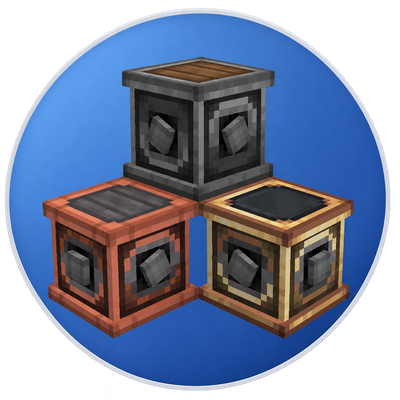
CurseForge · Minecraft mod
Create: Connected to Encased
All of Connected's additions in Encased Variants
Choose a version Pick your version below, then grab the matching file.
Quick answer
Which Create: Connected to Encased release should I use?
Latest stable file create-connected-to-encased-0.1.22-beta.2.jar
Game version 1.21.1
Loader NeoForge
Create: Connected to Encased create-connected-to-encased-0.1.22-beta.2.jar targets 1.21.1 with NeoForge. The project page does not say whether this file belongs on the client, dedicated server, or both. No extra mods listed for this file.
Where it goes
Is Create: Connected to Encased required on the client, server, or both?
The project page does not say whether this file belongs on the client, dedicated server, or both.
Client Source doesn’t say
Dedicated server Source doesn’t say
Loader for this release NeoForge
Required install it here Optional supported, not mandatory Not supported do not install here Source doesn’t say do not assume
The source does not explicitly classify this release as client-only or server-only.
What else does Create: Connected to Encased create-connected-to-encased-0.1.22-beta.2.jar need?
create-connected-to-encased-0.1.22-beta.2.jar. Change the file and its required mods may change too.
This file does not list any required mods. Do not add a library just because a different file uses it.
This file does not list any required or optional mods.
Before you install it
Add Create: Connected to Encased without breaking your instance.
Built for Create: Connected to Encased create-connected-to-encased-0.1.22-beta.2.jar. Pick another file and the loader, install side or required mods may change.
- 01
Stick to this file
Use create-connected-to-encased-0.1.22-beta.2.jar. It targets 1.21.1 with NeoForge; another release may have different loader, side or dependency requirements.
- 02
Bring the mods it needs
This file does not list any required mods. Do not add a library just because a different file uses it.
- 03
Put it on the correct side
The project page does not say whether this file belongs on the client, dedicated server, or both.
- 04
Pick the file you checked
Use the “Get this file” button beside create-connected-to-encased-0.1.22-beta.2.jar. It opens that exact file at the source.
About this project
What does Create: Connected to Encased add?
About
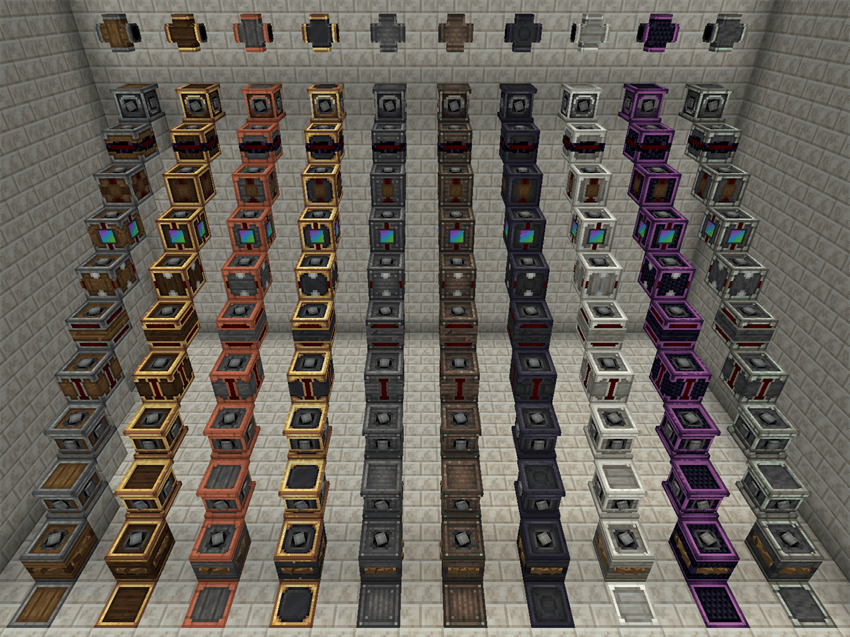
Bring Create: Encased’s casing families to Create: Connected!
With both mods installed, matching casing variants are available for these components, shown from top to bottom:
- Cross Connector
- Brass Gearbox (Configurable Gearbox)
- Brake
- Freewheel Clutch
- Centrifugal Clutch
- Overstress Clutch
- Inverted Gearshift
- Inverted Clutch
- Six-Way Gearbox
- Parallel Gearbox
- Encased Chain Cogwheel
*Cross Connectors also support matching removable casing covers.
This mod unlocks Chromatic Compound and restores its original conversion methods: exposure to light produces Refined Radiance, while dropping it into the void produces Shadow Steel. Their casing families are available without Create: Extended.
Crafting Flavors
Crafted Flavor - enabled by default
Craft components directly using their respective casings. Supported Encased components follow their original Create recipes with the matching casing substituted. Sheet recasing remains available.
Encased Flavor
Turn off Crafted Flavor to follow Create: Encased’s recasing approach: craft the base component, then change its casing using the appropriate sheet.
Both flavors support recasing through crafting, Deployers, and Encased’s Recaser tool. Clutches and gearshifts can also be converted back and forth between standard and inverted versions within the same casing family.
Component Toggles
Gearboxes, Cross Connectors, and Encased Chain Cogwheels share a rotation-transmission toggle. Each clutch type, the Inverted Gearshift, and the Brake has its own toggle, so you can choose which components are available.
Project description from CurseForge.
Pick your setup
Create: Connected to Encased by Minecraft version and loader
Choose the version and loader you play, then open the matching release.
Check the dependencies, then try the file in a copied instance before changing a world you care about.
Recent files
Create: Connected to Encased versions and loaders
create-connected-to-encased-0.1.22-beta.2.jar
20 Nov 2026
Client Source doesn’t say Server Source doesn’t say Dependencies No extras listed Listed on Release listing
Check the 1.21.1 · NeoForge setup 1.21.1NeoForge release
create-connected-to-encased-0.1.22-beta.1.jar
19 Nov 2026
Client Source doesn’t say Server Source doesn’t say Dependencies No extras listed Listed on Release listing
Check the 1.21.1 · NeoForge setup 1.21.1NeoForge beta
Looking for an older file? The official CurseForge project page is in Resources.
 mod
CurseForge + Modrinth · Minecraft
ColoredWater
Colored water to decorate colorfully. And cauldrons!
 mod
CurseForge · Minecraft
Create: Stellaris and Orbitals
Pilotable multi-block spaceships, holographic star maps, 5 tiers of space suits, magnetic boots, and planetary disasters for Create.
 mod
CurseForge · Minecraft
Aki's Radio - Adventure (Extra)
Music expansion pack for Aki's Radio - Adventure