Minecraft version
Back to mods 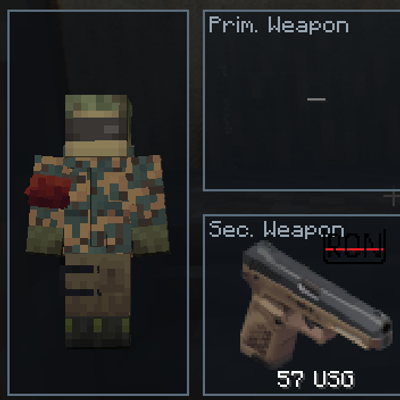
CurseForge · Minecraft mod
WAR Loadout
Team-based loadout and shop mod most for TACZ: pick a side, choose weapons, armor and attachments, buy gear with money, and redeploy from a respawn menu.
Choose a version Pick your version below, then grab the matching file.
Quick answer
Which WAR Loadout release matches 1.20.1 Forge?
Best match for your filters WarLoadout-1.4.0.jar
Game version 1.20.1
Loader Forge
WAR Loadout WarLoadout-1.4.0.jar targets 1.20.1 with Forge. The project page does not say whether this file belongs on the client, dedicated server, or both. No extra mods listed for this file.
Where it goes
Is WAR Loadout required on the client, server, or both?
The project page does not say whether this file belongs on the client, dedicated server, or both.
Client Source doesn’t say
Dedicated server Source doesn’t say
Loader for this release Forge
Required install it here Optional supported, not mandatory Not supported do not install here Source doesn’t say do not assume
The source does not explicitly classify this release as client-only or server-only.
What else does WAR Loadout WarLoadout-1.4.0.jar need?
WarLoadout-1.4.0.jar on 1.20.1 Forge. Every mod below is checked against that same setup.
This file does not list any required mods. Do not add a library just because a different file uses it.
This file does not list any required or optional mods.
Before you install it
Add WAR Loadout without breaking your instance.
Built for WAR Loadout WarLoadout-1.4.0.jar on 1.20.1 Forge. Pick another file and the loader, install side or required mods may change.
- 01
Stick to this file
Use WarLoadout-1.4.0.jar. It targets 1.20.1 with Forge; another release may have different loader, side or dependency requirements.
- 02
Bring the mods it needs
This file does not list any required mods. Do not add a library just because a different file uses it.
- 03
Put it on the correct side
The project page does not say whether this file belongs on the client, dedicated server, or both.
- 04
Pick the file you checked
Use the “Get this file” button beside WarLoadout-1.4.0.jar. It opens that exact file at the source.
About this project
What does WAR Loadout add?
WAR Loadout is a team-based loadout and shop system for PvP servers running TACZ (Forge 1.20.1). Players choose a team, build a loadout and redeploy in seconds. Features
- Custom teams: create as many teams as you need (up to 12) with any chat color and display name. Blue and red are included by default. * Optional team selection: turn team selection off and everyone gets access to all weapons and attachments. The team is no longer shown in the menus. * Loadout menu: primary and secondary weapons, helmet, armor, plates, backpack, vest, mask and grenades, all picked in a clean GUI.
* Shop: items can have a price. Players earn money for kills and unlock gear permanently, with sorting by price.
* Paid attachments: every attachment is bought separately for each weapon, and can be limited to specific guns or teams.
* Respawn menu: after death the menu opens and the player is sent to their team’s spawn. Soft respawn is optional. It cancels the death screen, still counts the kill, restores the player instantly and keeps them protected while the menu is open.
* Custom Layout Editor: easily build and customize your own gear slots and categories directly in-game using an intuitive visual GUI editor (/loadout editGUI) with live item migration and stable unique identifiers. * Per-world config: all settings are stored in the world’sserverconfigfolder.
Languages: Ukrainian, Russian and English.
Main commands
| Command | What it does |
|---|---|
/loadout setspawn <blue/red> <1-2> |
Save a team spawn point at your position |
/loadout add <category> [team] [name] |
Add the item in your hand to a loadout category |
/loadout remove <category> [team] |
Remove an item from a category |
/loadout list |
List the configured presets |
/loadout setprice <category> <price> |
Set the shop price of the held item |
/loadout addatt <TYPE> [gun_id] |
Add the held attachment, optionally for one gun |
/loadout delatt <TYPE> [gun_id] |
Remove an attachment, optionally for one gun |
/loadout setattprice <TYPE> <price/default> |
Set the price of the held attachment |
/loadout money <player> <add/set> <temp/perm> <amount> |
Manage player money |
/loadout open <players> |
Open the menu for selected players |
/loadout respawnmenu <true/false> |
Toggle the menu after death |
/loadout softrespawn <true/false> |
Toggle soft respawn |
/loadout reload |
Reload configs |
/loadout team add <id> <color> [name] |
Create a team or update its color and name |
/loadout team remove <id> |
Remove a team (its presets are kept but hidden) |
/loadout team list |
List teams |
/loadout teamselect <true/false> |
Turn team selection on or off |
/loadout setspawn <team/all> <1-2> |
Save a spawn for a team, or for everyone when team selection is off |
/loadout editGUI |
Open GUI editor |
Project description from CurseForge.
Pick your setup
WAR Loadout by Minecraft version and loader
Choose the version and loader you play, then open the matching release.
Check the dependencies, then try the file in a copied instance before changing a world you care about.
Recent files
WAR Loadout versions and loaders
WarLoadout-1.4.0.jar
27 Nov 2026
Client Source doesn’t say Server Source doesn’t say Dependencies No extras listed Listed on Release listing
Check the 1.20.1 · Forge setup 1.20.1Forge release
WarLoadout-1.3.0.jar
21 Nov 2026
Client Source doesn’t say Server Source doesn’t say Dependencies No extras listed Listed on Release listing
Check the 1.20.1 · Forge setup 1.20.1Forge beta
loadout-1.2.9.jar
loadout-1.2.9-beta.jar
19 Nov 2026
Client Source doesn’t say Server Source doesn’t say Dependencies No extras listed Listed on Release listing
Check the 1.20.1 · Forge setup 1.20.1Forge beta
Looking for an older file? The official CurseForge project page is in Resources.
 mod
CurseForge · Minecraft
FastValus
Server-side anti-lag utility featuring death-drop-safe item sweeps, wall-safe item & XP clumping, per-chunk entity limiting, and Entity + TileEntity lag diagnostics.
 mod
CurseForge · Minecraft
Control Plus
With name and key recognition modes, it adds a powerful search bar to the control menu and a keyboard indicator panel showing which assignment is assigned to which key.
 mod
CurseForge · Minecraft
Build Blueprint
See any build as see-through ghost blocks in your world, with a materials list, layers and build copying.