Minecraft version
Back to mods 
CurseForge · Minecraft mod
Shuu's Hit/Damage Indicator
Adds a damage indicator to Minecraft; when you take damage, it will show you the relative location to where the enemy was when they hit you.
Choose a version Pick your version below, then grab the matching file.
Quick answer
Which Shuu's Hit/Damage Indicator release should I use?
Latest stable file shuuhitindication-fabric-1.20.1-1.0.0.jar
Game version 1.20.1
Loader Fabric
Shuu's Hit/Damage Indicator shuuhitindication-fabric-1.20.1-1.0.0.jar targets 1.20.1 with Fabric. The project page does not say whether this file belongs on the client, dedicated server, or both. No extra mods listed for this file.
Where it goes
Is Shuu's Hit/Damage Indicator required on the client, server, or both?
The project page does not say whether this file belongs on the client, dedicated server, or both.
Client Source doesn’t say
Dedicated server Source doesn’t say
Loader for this release Fabric
Required install it here Optional supported, not mandatory Not supported do not install here Source doesn’t say do not assume
The source does not explicitly classify this release as client-only or server-only.
What else does Shuu's Hit/Damage Indicator shuuhitindication-fabric-1.20.1-1.0.0.jar need?
shuuhitindication-fabric-1.20.1-1.0.0.jar. Change the file and its required mods may change too.
This file does not list any required mods. Do not add a library just because a different file uses it.
This file does not list any required or optional mods.
Before you install it
Add Shuu's Hit/Damage Indicator without breaking your instance.
Built for Shuu's Hit/Damage Indicator shuuhitindication-fabric-1.20.1-1.0.0.jar. Pick another file and the loader, install side or required mods may change.
- 01
Stick to this file
Use shuuhitindication-fabric-1.20.1-1.0.0.jar. It targets 1.20.1 with Fabric; another release may have different loader, side or dependency requirements.
- 02
Bring the mods it needs
This file does not list any required mods. Do not add a library just because a different file uses it.
- 03
Put it on the correct side
The project page does not say whether this file belongs on the client, dedicated server, or both.
- 04
Pick the file you checked
Use the “Get this file” button beside shuuhitindication-fabric-1.20.1-1.0.0.jar. It opens that exact file at the source.
About this project
What does Shuu's Hit/Damage Indicator add?
Shuu's Customizable Hit Indicator

A damage indicator that shows you the approximate position of the enemy you are getting hit from.
Features
Customizability
This mod is very customizable through a custom UI that can be found in the bottom left corner of the pause menu:

You can then adjust values as you see fit:

There are many options for hit indicators; I recommend clicking through and viewing them all!.
Visualizer
Then, you can also visualize what the indicator looks like on your screen:

For Modders
Adding more hit indicator textures is super easy. In the class HitIndicatorTextures.java, there is a function called registerTexture; use this to add textures. Make sure to load your mod after this one, and run this function in your mod initialization. This will hook it in, and will later cache the name with the texture.
Note on AI
This project only used tab completion AI, and AI for research. This mod was not slopped, and was made by a human.
Low quality AI PRs will be denied.
Project description from CurseForge.
Pick your setup
Shuu's Hit/Damage Indicator by Minecraft version and loader
Choose the version and loader you play, then open the matching release.
Check the dependencies, then try the file in a copied instance before changing a world you care about.
Recent files
Shuu's Hit/Damage Indicator versions and loaders
shuuhitindication-fabric-1.20.1-1.0.0.jar
19 Nov 2026
Client Source doesn’t say Server Source doesn’t say Dependencies No extras listed Listed on Release listing
Check the 1.20.1 · Fabric setup Fabric1.20.1 release
shuuhitindication-forge-1.20.1-1.0.0.jar
19 Nov 2026
Client Source doesn’t say Server Source doesn’t say Dependencies No extras listed Listed on Release listing
Check the 1.20.1 · Forge setup 1.20.1ForgeNeoForge release
Looking for an older file? The official CurseForge project page is in Resources.
 mod
CurseForge · Minecraft
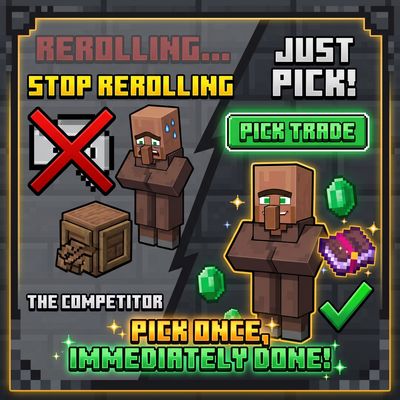
Not Trade Cycling ,but pick
Stop rerolling villagers. Just pick. Open a new villager’s trade screen, press Pick trade, and choose any 2 trades its profession can offer (enchanted books at max level included). They replace the villager’s starting trades.
 mod
CurseForge · Minecraft
Toggle X-ray
Press F6 to instantly toggle X-Ray on/off — see all ores and valuable blocks through terrain with zero configuration.
 mod
CurseForge · Minecraft
IE Conveyor Refinements
A tiny mod to brush-up IE conveyors. right-click to pick up items, improve rendering.