Minecraft version
Back to mods 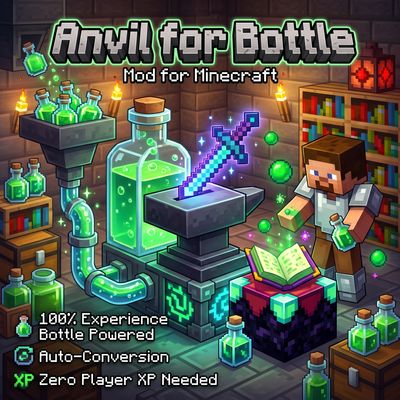
CurseForge · Minecraft mod
Anvil Enchanting Table for Bottle
Anvil for Bottle removes the need for player XP levels when repairing, combining, renaming, or enchanting items! Instead, power your workstation directly with Bottles o' Enchanting —manually or fully automated with hoppers.
Choose a version Pick your version below, then grab the matching file.
Quick answer
Which Anvil Enchanting Table for Bottle release should I use?
Latest stable file Fabric1.20.1AnvilForBottle1.1.0.jar
Game version 1.20.1
Loader Fabric, Quilt
Anvil Enchanting Table for Bottle Fabric1.20.1AnvilForBottle1.1.0.jar targets 1.20.1 with Fabric, Quilt. The project page does not say whether this file belongs on the client, dedicated server, or both. No extra mods listed for this file.
Where it goes
Is Anvil Enchanting Table for Bottle required on the client, server, or both?
The project page does not say whether this file belongs on the client, dedicated server, or both.
Client Source doesn’t say
Dedicated server Source doesn’t say
Loader for this release Fabric, Quilt
Required install it here Optional supported, not mandatory Not supported do not install here Source doesn’t say do not assume
The source does not explicitly classify this release as client-only or server-only.
What else does Anvil Enchanting Table for Bottle Fabric1.20.1AnvilForBottle1.1.0.jar need?
Fabric1.20.1AnvilForBottle1.1.0.jar. Change the file and its required mods may change too.
This file does not list any required mods. Do not add a library just because a different file uses it.
This file does not list any required or optional mods.
Before you install it
Add Anvil Enchanting Table for Bottle without breaking your instance.
Built for Anvil Enchanting Table for Bottle Fabric1.20.1AnvilForBottle1.1.0.jar. Pick another file and the loader, install side or required mods may change.
- 01
Stick to this file
Use Fabric1.20.1AnvilForBottle1.1.0.jar. It targets 1.20.1 with Fabric, Quilt; another release may have different loader, side or dependency requirements.
- 02
Bring the mods it needs
This file does not list any required mods. Do not add a library just because a different file uses it.
- 03
Put it on the correct side
The project page does not say whether this file belongs on the client, dedicated server, or both.
- 04
Pick the file you checked
Use the “Get this file” button beside Fabric1.20.1AnvilForBottle1.1.0.jar. It opens that exact file at the source.
About this project
What does Anvil Enchanting Table for Bottle add?
Key Features
100% Experience Bottle Powered: Uses Bottles o' Enchanting and an internal XP buffer instead of the player's own XP levels. Zero player XP required!
Bottle Anvil (
bottle_anvil):Supports all standard vanilla Anvil mechanics: repairing items with materials, combining items/enchanted books, and renaming items.
Retains the vanilla 40-level "Too Expensive!" cap in Survival mode.
Zero-Waste XP Deduction: Converts required levels into exact XP points. Leftover XP from consumed bottles is automatically saved into the block's internal XP buffer so not a single XP point is wasted.
Bottle Enchanting Table:
- Enchant tools, weapons, armor, and books using Bottles o' Enchanting instead of player XP levels.
Auto-Conversion Overflow Mechanic (
> 50Bottles):Whenever the XP fuel slot holds more than 50 Bottles o' Enchanting, excess bottles are automatically converted into internal stored XP at 7 XP per bottle (without cluttering the slot with empty glass bottles).
Total Available XP =
Stored XP + (Fuel Slot Bottles × 7).
Full Automation Support:
- Compatible with Hoppers and item pipes—automatically feed Bottles o' Enchanting into the fuel slot to continuously fill the internal XP buffer.
Real-Time GUI Feedback:
- Clearly displays exact XP cost, equivalent bottle count, internal stored XP, and total available XP.
Project description from CurseForge.
Pick your setup
Anvil Enchanting Table for Bottle by Minecraft version and loader
Choose the version and loader you play, then open the matching release.
Minecraft version
1.20.1
2 loader buildsMinecraft version
1.19.2
2 loader buildsMinecraft version
1.18.2
2 loader buildsCheck the dependencies, then try the file in a copied instance before changing a world you care about.
Recent files
Anvil Enchanting Table for Bottle versions and loaders
Fabric1.20.1AnvilForBottle1.1.0.jar
20 Nov 2026
Client Source doesn’t say Server Source doesn’t say Dependencies No extras listed Listed on Release listing
Check the 1.20.1 · Fabric setup Fabric1.20.1Quilt release
Fabric1.19.2AnvilForBottle1.1.0.jar
20 Nov 2026
Client Source doesn’t say Server Source doesn’t say Dependencies No extras listed Listed on Release listing
Check the 1.19.2 · Fabric setup Fabric1.19.2Quilt release
Fabric1.18.2AnvilForBottle1.1.0.jar
20 Nov 2026
Client Source doesn’t say Server Source doesn’t say Dependencies No extras listed Listed on Release listing
Check the 1.18.2 · Fabric setup Fabric1.18.2Quilt release
Fabric26.3AnvilForBottle1.1.0.jar
20 Nov 2026
Client Source doesn’t say Server Source doesn’t say Dependencies No extras listed Listed on Release listing
Check the 26.3 · Fabric setup FabricQuilt26.3 release
Looking for an older file? The official CurseForge project page is in Resources.
 mod
CurseForge + Modrinth · Minecraft
Runeborn | Soulslike RPG progression
A soulslike RPG overhaul: earn runes, level eight attributes at Ember Shrines, wield 74 scaling armaments and hunt seven Sovereigns.
 mod
CurseForge · Minecraft
GregSingularity Core
Custom GregTech progression for GregSingularity, including a field bloomery, planetary ore processing, piloted rockets and JEI integration on Minecraft 1.20.1 Forge.
 mod
CurseForge · Minecraft
Mineral Process
Mineral Process is an addon mod designed to work with Mechanical Power (Create) and General Mechanics (Mekanism).