Fabric API Needed by Easy Full Brightness Toggle 1.1.0 - Fabric 26.2
requiredMatching file found Matched file: [26.2] Fabric API 0.161.0+26.2

CurseForge · Minecraft mod
Toggle full brightness with one key - no torches, no night vision needed.
Quick answer
Easy Full Brightness Toggle 1.1.0 - Fabric 26.2 targets 26.2 with Fabric. The project page does not say whether this file belongs on the client, dedicated server, or both. All 1 required mods have matching files.
Where it goes
The project page does not say whether this file belongs on the client, dedicated server, or both.
The source does not explicitly classify this release as client-only or server-only.
Easy Full Brightness Toggle 1.1.0 - Fabric 26.2 on 26.2 Fabric. Every mod below is checked against that same setup.
Install Fabric API first. We found matching files for this game-version and loader setup.
We only count dependency files that match this setup. A file for another loader does not fill the gap.
Before you install it
Built for Easy Full Brightness Toggle 1.1.0 - Fabric 26.2 on 26.2 Fabric. Pick another file and the loader, install side or required mods may change.
Use Easy Full Brightness Toggle 1.1.0 - Fabric 26.2. It targets 26.2 with Fabric; another release may have different loader, side or dependency requirements.
Install Fabric API first. We found matching files for this game-version and loader setup.
The project page does not say whether this file belongs on the client, dedicated server, or both.
Use the “Get this file” button beside Easy Full Brightness Toggle 1.1.0 - Fabric 26.2. It opens that exact file at the source.
About this project
Warning: This mod is a cheat. Full brightness gives you an unfair advantage (seeing ores, mobs and players in the dark). Many servers do not allow it – only use it on servers where the rules explicitly permit it, otherwise you risk a ban.
Toggle full brightness with one key - no torches, no night vision needed.
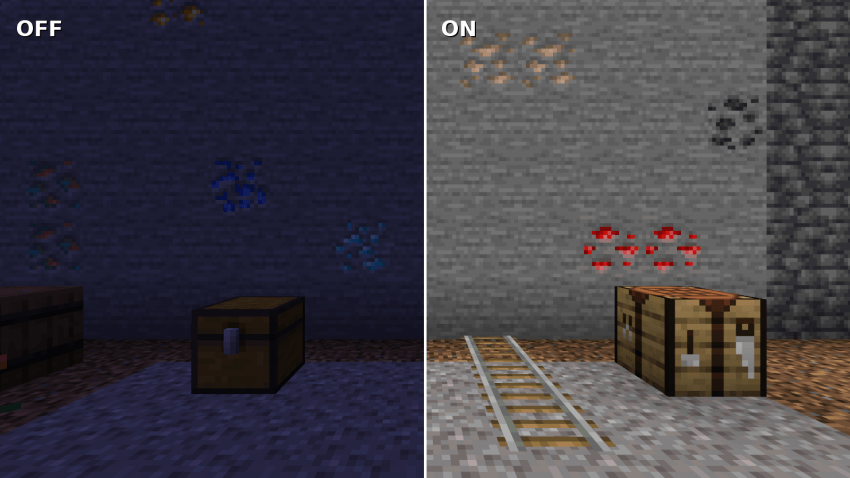
options.txt is never changed.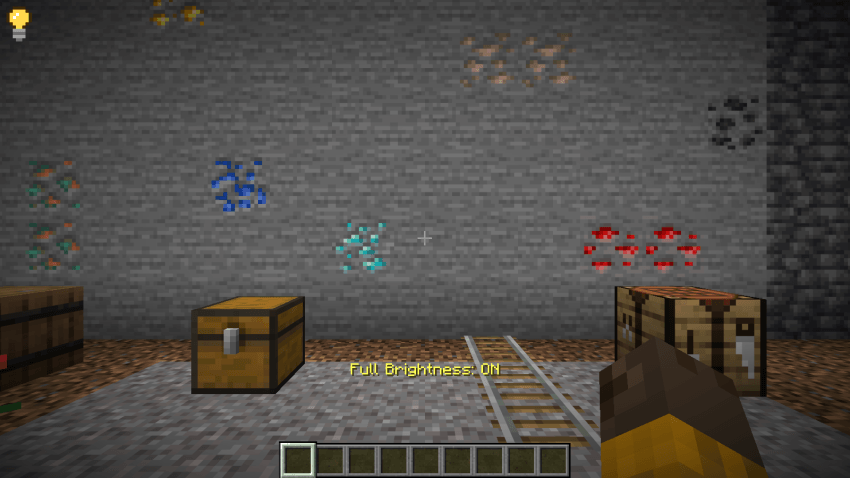
Tip: Press F1 to hide the HUD (including the bulb icon) for clean screenshots – full brightness stays on.
Fabric versions require Fabric API.
Project description from CurseForge.
Pick your setup
Choose the version and loader you play, then open the matching release.
Check the dependencies, then try the file in a copied instance before changing a world you care about.
Recent files
easy-full-brightness-toggle_1.1.0_fabric_26.2.jar
19 Nov 2026
Looking for an older file? The official CurseForge project page is in Resources.
 mod
Changes Jukeboxes to loop music discs, without breaking redstone contraptions
 mod
Dogfight in 30+ flyable jets, WWII warbirds and helicopters, then take warships and submarines to sea. F-22, F-35, Spitfire, Apache, a sailing Nimitz carrier, air refuelling and a campaign. (Formerly known as Fighter Jets Overhaul)
 mod
Adds compact, easy-to-type command shortcuts for gamemodes, teleportation, items, time, weather, healing, and custom aliases.