Minecraft version
Back to mods 
CurseForge · Minecraft mod
Hitra
Adds customizable floating health bars, damage numbers and status effect icons.
Choose a version Pick your version below, then grab the matching file.
Quick answer
Which Hitra release matches 1.12.2 Forge?
Best match for your filters hitra-1.0.0.jar
Game version 1.12.2
Loader Forge
hitra-1.0.0.jar targets 1.12.2 with Forge. The project page does not say whether this file belongs on the client, dedicated server, or both. No extra mods listed for this file.
Where it goes
Is Hitra required on the client, server, or both?
The project page does not say whether this file belongs on the client, dedicated server, or both.
Client Source doesn’t say
Dedicated server Source doesn’t say
Loader for this release Forge
Required install it here Optional supported, not mandatory Not supported do not install here Source doesn’t say do not assume
The source does not explicitly classify this release as client-only or server-only.
What else does hitra-1.0.0.jar need?
hitra-1.0.0.jar on 1.12.2 Forge. Every mod below is checked against that same setup.
This file does not list any required mods. Do not add a library just because a different file uses it.
This file does not list any required or optional mods.
Before you install it
Add Hitra without breaking your instance.
Built for hitra-1.0.0.jar on 1.12.2 Forge. Pick another file and the loader, install side or required mods may change.
- 01
Stick to this file
Use hitra-1.0.0.jar. It targets 1.12.2 with Forge; another release may have different loader, side or dependency requirements.
- 02
Bring the mods it needs
This file does not list any required mods. Do not add a library just because a different file uses it.
- 03
Put it on the correct side
The project page does not say whether this file belongs on the client, dedicated server, or both.
- 04
Pick the file you checked
Use the “Get this file” button beside hitra-1.0.0.jar. It opens that exact file at the source.
About this project
What does Hitra add?
This mod adds customizable floating health bars, damage numbers and status icons. You can change their colors, size and visibility, adjust animations and set different bar styles for different mobs.
AI usage disclaimer: This mod was developed with AI-agent assistance using this agent workflow. The project owner reviewed the work during development.
Health bars and Target Focus
By default, bars appear over injured mobs and the mob you're aiming at. Choose injured-only, targeted-only or always-visible bars. You can switch bars on or off separately for ordinary mobs, bosses, other players and yourself. Set how far away bars appear and how many can be on screen. When the limit is reached, your target gets a slot first, followed by the nearest eligible mobs.
- Add names or health values. Division marks start at 20 HP intervals. Choose a different interval for bosses, or let the spacing increase automatically when the marks get crowded.
- Choose a solid fill or a health-color gradient. You can change the colors at full, half and low health.
- Adjust how long the damage trail holds and how quickly it shrinks. Consecutive hits extend the same trail. A separate setting controls how long the empty bar lingers after a fatal hit.
- Tune how much Target Focus dims the other bars, or require the target's own bar to be visible before the others fade.
Reading the damage trail
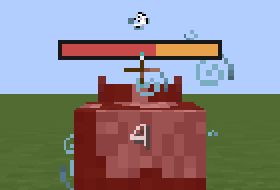
The white 4 is the damage from this hit. The red part of the bar is the cow's remaining health. The amber part is the health it just lost. By default, the amber segment holds for half a second, then shrinks back to the red edge.
Damage, critical hits and healing
Each confirmed hit you deal gets its own floating number, including arrows and reliably attributed secondary damage. The number rises from the hit location when known, or from the mob's upper body otherwise. It stays behind as the mob moves. Damage includes absorption consumed by the hit. A blocked hit that takes no health or absorption produces no number.
- Adjust number size, color, lifetime and decimal places. By default, 4.6 damage displays as 4.6, 10.9 as 11, and 0.03 as
<0.1. You can change the whole-number cutoff or disable it. - With Critworks, confirmed critical hits have their own color and size. Toggle the brief pop and flash independently.
- Enable healing numbers to see how much health your own Instant Health splash potion actually restored. Natural regeneration updates the bar quietly.
Status effects
Icons above the bar show active effects. Put harmful effects first, prioritize a particular effect, or filter the row to show only the effects you care about. Choose the icon size, spacing and maximum row length. An optional +N shows how many more effects are hidden by the row limit.
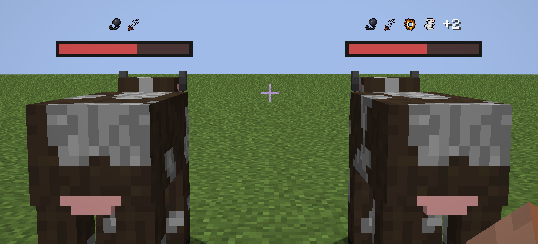
Both cows have the same first two effects. The right cow has six effects in total. Four fit on its bar, and +2 counts the others.
If your pack defines custom statuses with Statusworks, eligible applications of the same status share one icon. You can show its stack count when the status permits it. Debuff outlines are optional and start off.
Threat and taunts
With Threatworks, aim at a supported mob to see how close you are to taking aggro when Threatworks can estimate the threshold. The meter fills toward the takeover threshold for your current distance. When available, a tick shows the current target's threat on the same scale.
 Approaching aggro. You're close to pulling the mob away from its current target.
 Targeting you. The mob has turned its attention to you.
 Active taunt. Someone has taunted the mob. This square can appear alongside the red one when the mob is also targeting you.
Prefer a warning without a meter? Turn the meter off and enable the brief High threat message. You can also enable a raw threat score for the mob under your crosshair or a countdown for an active taunt.
Make it fit your pack
Open /hitrasettings to preview bars, status icons and normal and critical damage numbers while you change colors, scale, spacing or animation. Basic and Advanced sections reset independently. Under Health Bars > Advanced, search by name or full ID to give a particular entity type its own settings. For example, keep ordinary mobs compact and give a boss a wider bar with health divisions.
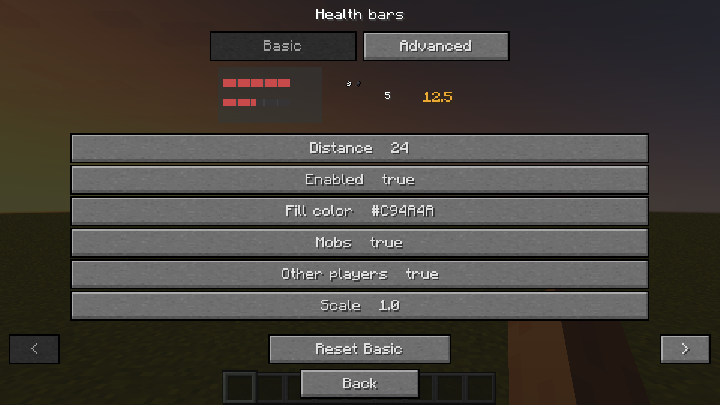
Change Fill color to see both sample bars update as you type.
Install Hitra on both the server and the clients for multiplayer. By default, other players can see your health. Your status icons require both server permission and an opt-in from the viewer. If the server hides an opponent's health, Hitra also hides damage and healing numbers against that opponent. Hits on mobs still show normally.
Wondering why an indicator is missing? Enable player diagnostics, aim at the entity and run /hitrainspect for an explanation. Operators can enable their own diagnostics and use /hitra debug <player> to check delivery. Both tools start off and respect the server's privacy settings.
Hitra runs on Cleanroom with its bundled MixinBooter (12.1 or newer). The Hitra README lists companion versions, the server configuration file and the policy reload command.
Project description from CurseForge.
Pick your setup
Hitra by Minecraft version and loader
Choose the version and loader you play, then open the matching release.
Check the dependencies, then try the file in a copied instance before changing a world you care about.
Recent files
Hitra versions and loaders
hitra-1.0.0.jar
20 Nov 2026
Client Source doesn’t say Server Source doesn’t say Dependencies No extras listed Listed on Release listing
Check the 1.12.2 · Forge setup Forge1.12.2 release
Looking for an older file? The official CurseForge project page is in Resources.
 mod
CurseForge · Minecraft
TofuCraftReload
This mod is a remake of Old Mod TofuCraft made by tsuteto. add soybean As a new all-purpose food!
 mod
CurseForge + Modrinth · Minecraft
Tips Extension
A functional and aesthetic extension for the Tips mod on Minecraft 1.12.2, adding pause menu support and customizable breathing effects.
 mod
CurseForge · Minecraft
Retro Weathered Structure Compass
A compass that points to the nearest structure of your choice, modded structures included.