Curios API Optional for Create: Pocket Link - Phone & Tablet Create: Pocket Link 0.9.0 (NeoForge 1.21.1)
optionalMatching file found Matched file: curios-neoforge-9.6.1-1.21.1.jar
CurseForge · Minecraft mod
A brass tablet for Create: phone numbers, messages and photos, calls through Simple Voice Chat, and keyboard keys that drive Redstone Links.
Quick answer
Create: Pocket Link - Phone & Tablet Create: Pocket Link 0.9.0 (NeoForge 1.21.1) targets 1.21.1 with NeoForge. The project page does not say whether this file belongs on the client, dedicated server, or both. All 1 required mods have matching files.
Where it goes
The project page does not say whether this file belongs on the client, dedicated server, or both.
The source does not explicitly classify this release as client-only or server-only.
Create: Pocket Link 0.9.0 (NeoForge 1.21.1). Change the file and its required mods may change too.
Install Create first. We found matching files for this game-version and loader setup. 10 come through another mod in the chain.
10 extra mods were pulled in by other dependencies. Indented rows show who needs each one. We only count dependency files that match this setup. A file for another loader does not fill the gap.
Before you install it
Built for Create: Pocket Link - Phone & Tablet Create: Pocket Link 0.9.0 (NeoForge 1.21.1). Pick another file and the loader, install side or required mods may change.
Use Create: Pocket Link 0.9.0 (NeoForge 1.21.1). It targets 1.21.1 with NeoForge; another release may have different loader, side or dependency requirements.
Install Create first. We found matching files for this game-version and loader setup. 10 come through another mod in the chain.
The project page does not say whether this file belongs on the client, dedicated server, or both.
Use the “Get this file” button beside Create: Pocket Link 0.9.0 (NeoForge 1.21.1). It opens that exact file at the source.
About this project
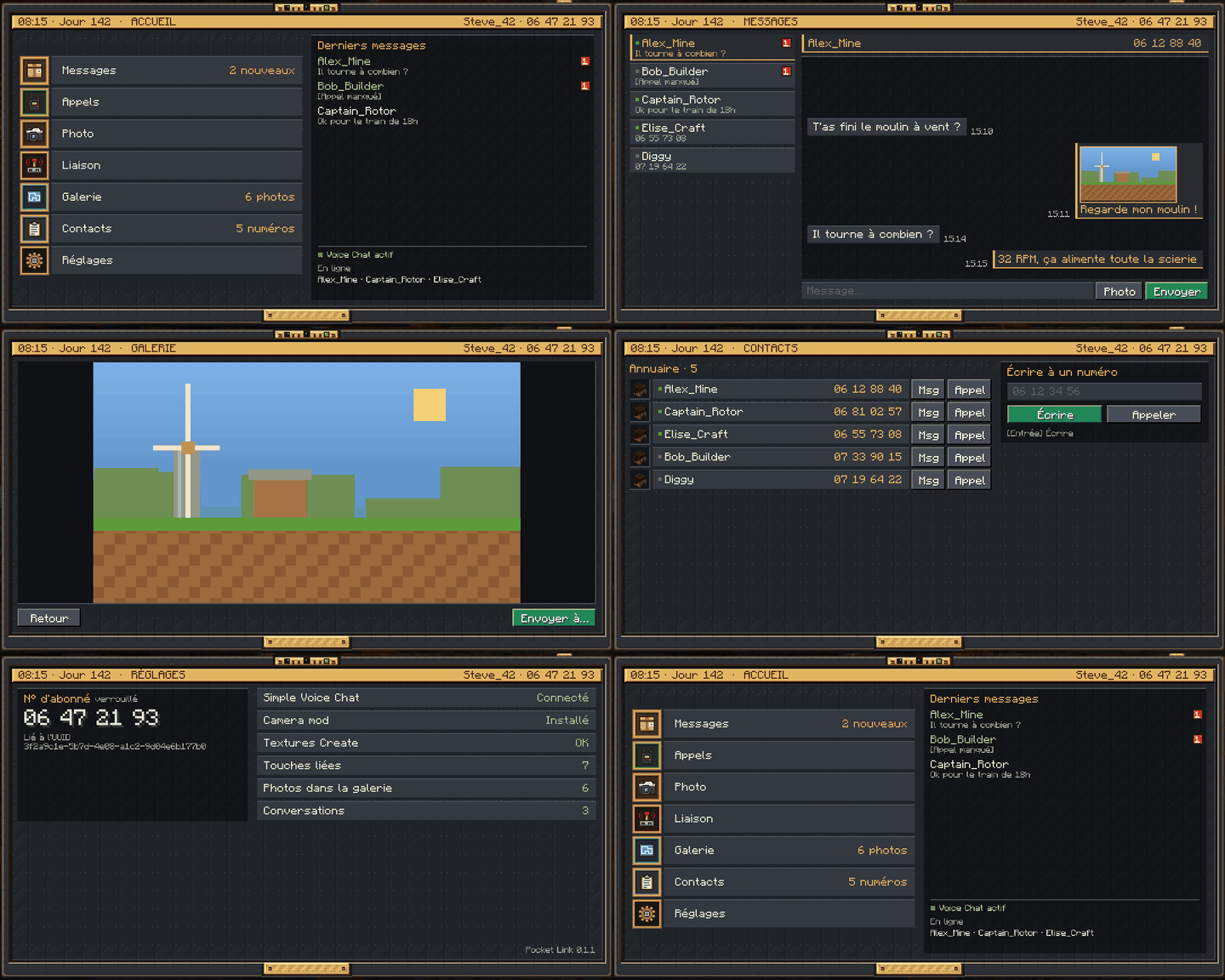
Right-click the Link Tablet (or press N with it in your inventory or Curios belt slot) and you get your own phone number. From there, it's your world's pocket computer, styled after Create's own brass interfaces.
| 💬 Messages | Text any player, even offline. Send photos, GIFs and screenshots. |
| 📞 Voice & video calls | One-to-one or group calls through Simple Voice Chat, with your camera on if you like. |
| 📸 Photo | Free photos, no extra mod. Walk around while you aim, and switch views: eyes, back, front or front 45° for group shots. |
| 🎵 Music | Your own MP3/Ogg files or web radios, shared live with the players around you. |
| ⌨️ Link | Turn your keyboard into a Redstone Link typewriter for real Create contraptions. |
| 📵 Signal Jammer | A block that cuts the network around it, for server owners and builders. |
A new tablet only has Settings and the Store. Install the apps you want and uninstall the rest. Uninstalling never deletes anything: your messages, photos and contacts come back as soon as you reinstall.
💬 Messages
Write to your contacts or to any number you type. Messages wait for offline players, and unread counters show on the home screen. Attach photos, GIFs and screenshots.
👥 Contacts
Nobody is in your book until you are given their number. Stand next to a player and give yours, or add a number someone told you. Each contact shows their skin's face and whether they are online, and can have their own ringtone.
📞 Calls
Voice calls through Simple Voice Chat, one-to-one or in a group (up to 8 by default; invite more during the call). Turn your camera on and the others see what your tablet sees, or your face with the front camera.
📸 Photo
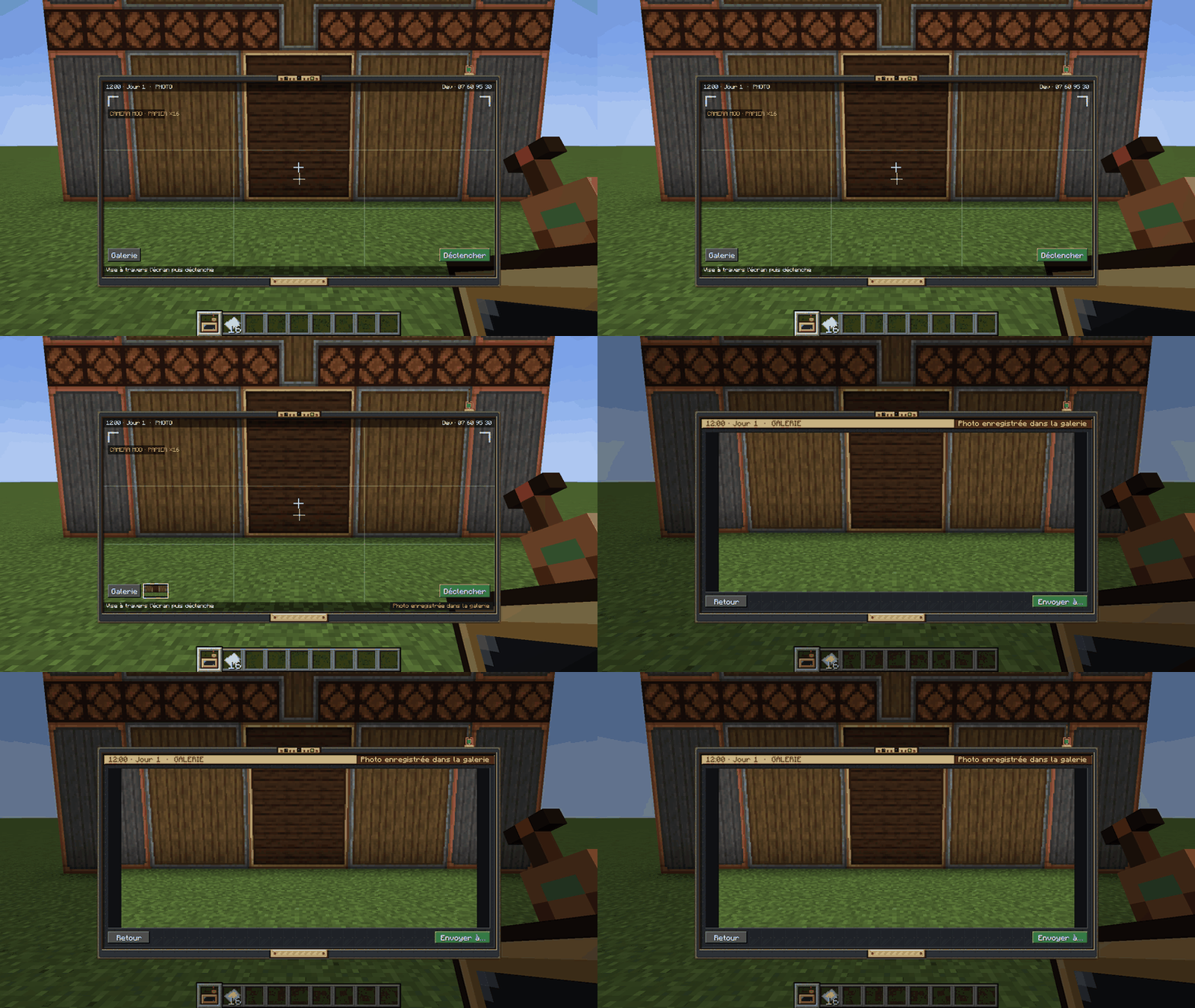
The screen becomes a viewfinder. You keep walking while you aim, and you drag on the screen to turn your head. Pick a view: Eyes, Back (like F5), Front, or Front 45° left / right for group photos. Scroll to move the camera from 1.5 to 12 blocks away.
🖼️ Gallery
Your photos, the ones you received, your game screenshots, and pictures or GIFs imported from your computer. Print a photo for one sheet of paper as a real Exposure photograph or Camera mod picture, or hang it as an Immersive Paintings painting (when those mods are installed).
🎵 Music
Play your own MP3 and Ogg files (folder createpad_musique) or web radios, searched by name or genre. With Simple Voice Chat, press Share and the players around you hear it. Anyone can mute your music without muting your voice.
⌨️ Link
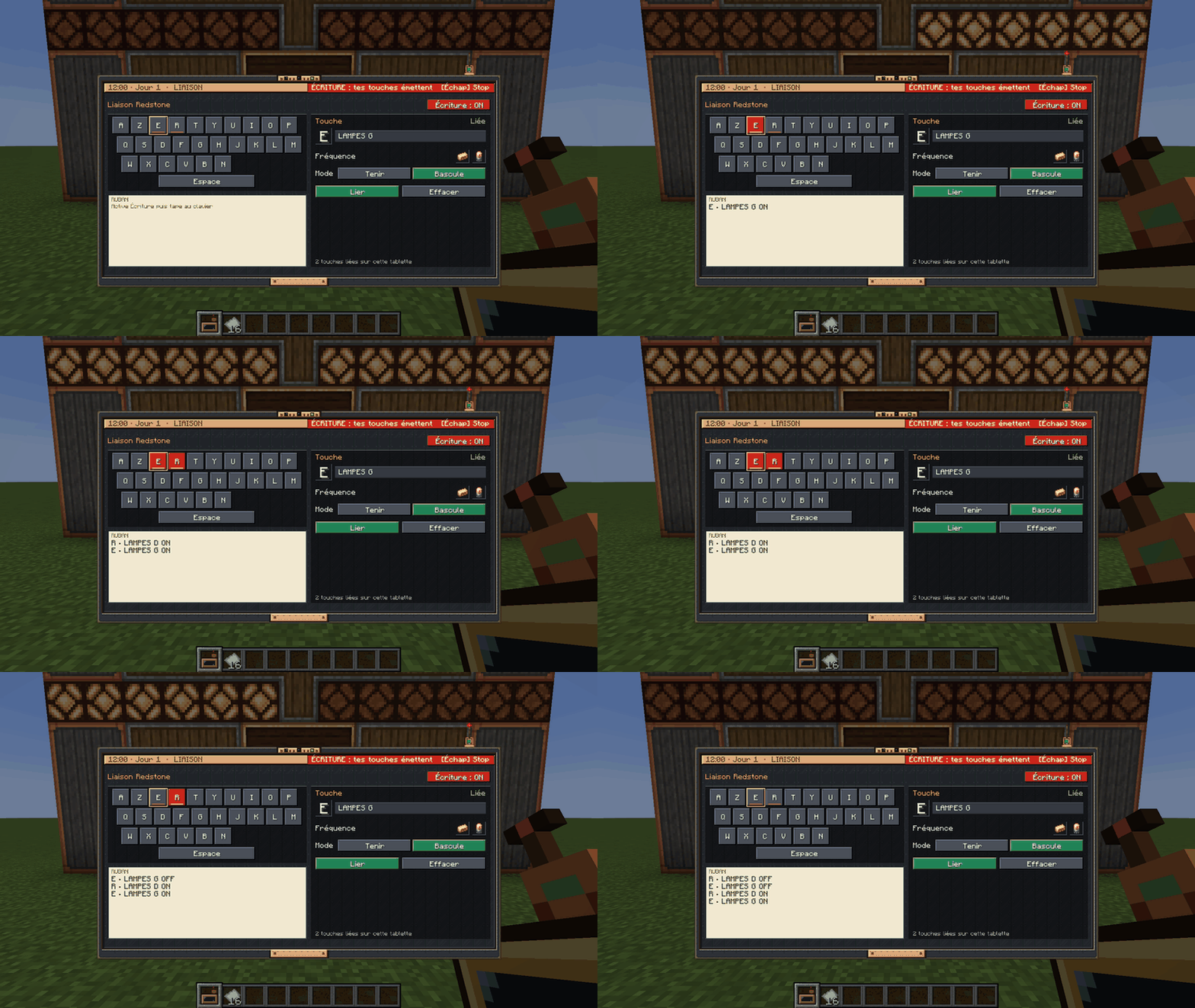
A Redstone Link typewriter. Bind letter keys (A to Z, space) to a pair of frequency items, choose hold or toggle, then turn writing mode on: your keyboard drives real Create Redstone Link receivers, like a Linked Controller. Shift + right-click (or Shift + N) opens it directly.
🚉 Stations
A pocket departure board for the stations you have visited: next trains, where they go, when they arrive, read from Create's own schedules. Press Notify me and you get a notification when your train pulls in.
📐 Schematics
Your saved schematics with the materials each one needs next to what you carry, like the Schematicannon checklist.
🐍 Snake
Because why not. Eat brass cogs, don't bite your tail.
⚙️ Settings
Your number, the shell colour, the wallpaper, notifications and music.
A Brouilleur block for server owners and builders (creative or /give only, no recipe). Set its radius from 1 to 64 blocks with Create's value box. Inside the zone, tablets have no network: no messages, calls, photos, shared music or Link keys, and the tablet's antenna goes dark. Messages sent to a jammed player are kept and arrive when they leave the zone.
🎵 Music Jammer: same idea, but it only cuts shared music. Put one at the spawn or in a library: nobody shares music there and music from outside isn't heard, while messages and calls keep working.
.ogg files in createpad_sons. Give a contact their own ringtone./createpad signalements.| Brass Sheet | Glass Pane | Brass Sheet |
| Electron Tube | Linked Controller | Electron Tube |
| Andesite Casing | Brass Casing | Andesite Casing |
Project description from CurseForge.
Pick your setup
Choose the version and loader you play, then open the matching release.
Check the dependencies, then try the file in a copied instance before changing a world you care about.
Recent files
pocketlink-1.21.1-0.9.0.jar
29 Nov 2026
pocketlink-1.21.1-0.8.1.jar
27 Nov 2026
pocketlink-1.21.1-0.8.0.jar
27 Nov 2026
pocketlink-1.21.1-0.7.0.jar
27 Nov 2026
pocketlink-1.21.1-0.6.0.jar
27 Nov 2026
pocketlink-1.21.1-0.5.3.jar
27 Nov 2026
pocketlink-1.21.1-0.5.2.jar
26 Nov 2026
pocketlink-1.21.1-0.5.1.jar
26 Nov 2026
pocketlink-1.21.1-0.5.0.jar
26 Nov 2026
pocketlink-1.21.1-0.4.0.jar
26 Nov 2026
pocketlink-1.21.1-0.3.1.jar
26 Nov 2026
pocketlink-1.21.1-0.3.0.jar
26 Nov 2026
Looking for an older file? The official CurseForge project page is in Resources.
 mod
Craft gunpowder early with easy survival recipes, and bounce around in Slime Boots that cancel fall damage.
 mod
Toxic air you have to survive: gas masks with filters that wear out, air tanks, powered air scrubbers, sealed clean rooms and real airlocks.
 mod
A Research Funnel turns Create's output into FTB team research points, quests and unlocks.