Fabric API Needed by Murllo's Beacons murllos-beacon-1.2.7.jar
requiredMatching file found Matched file: [26.3] Fabric API 0.166.2+26.3

CurseForge · Minecraft mod
A mod that totally overhauls Minecraft's beacon mechanics.
Quick answer
Murllo's Beacons murllos-beacon-1.2.7.jar targets 26.3 with Fabric. The project page does not say whether this file belongs on the client, dedicated server, or both. All 1 required mods have matching files.
Where it goes
The project page does not say whether this file belongs on the client, dedicated server, or both.
The source does not explicitly classify this release as client-only or server-only.
murllos-beacon-1.2.7.jar on 26.3. Every mod below is checked against that same setup.
Install Fabric API first. We found matching files for this game-version and loader setup. 1 comes through another mod in the chain.
1 extra mod was pulled in by another dependency. Indented rows show who needs each one. We only count dependency files that match this setup. A file for another loader does not fill the gap.
Before you install it
Built for Murllo's Beacons murllos-beacon-1.2.7.jar on 26.3. Pick another file and the loader, install side or required mods may change.
Use murllos-beacon-1.2.7.jar. It targets 26.3 with Fabric; another release may have different loader, side or dependency requirements.
Install Fabric API first. We found matching files for this game-version and loader setup. 1 comes through another mod in the chain.
The project page does not say whether this file belongs on the client, dedicated server, or both.
Use the “Get this file” button beside murllos-beacon-1.2.7.jar. It opens that exact file at the source.
About this project

Now the Beacon takes advantage of 100% of all the blocks you use when creating the pyramid, and knows exactly which they are, with its range now being directly affected by the pyramid's composition, with each type of block giving a different boost to the beacon.
The UI was totally redesigned. Now, there is a new pause button, that stops instantly any effects from the beacon until you unpause it. To pick an effect, first, click on the effect you want, then select the level, put the price required in the payment slot, then confirm.
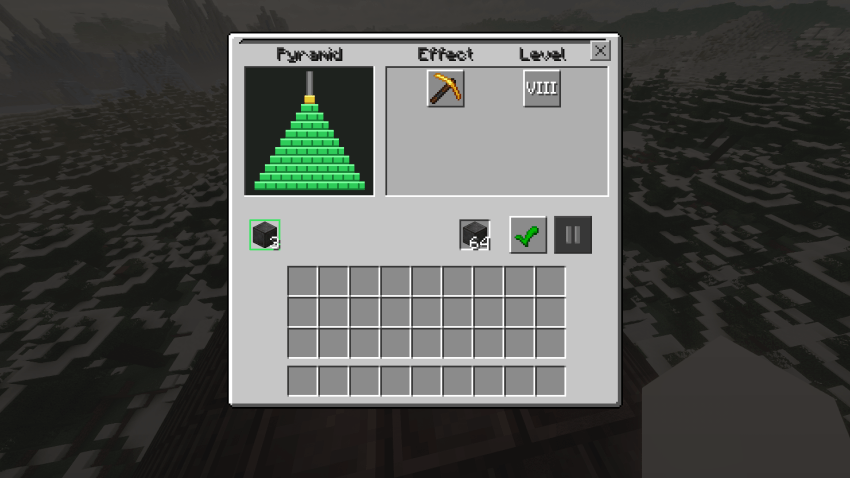
The UI also shows you exactly how many levels of the pyramid are actually activated, as well as how many blocks of each are being used, and how many blocks of radius the beacon is going to have.
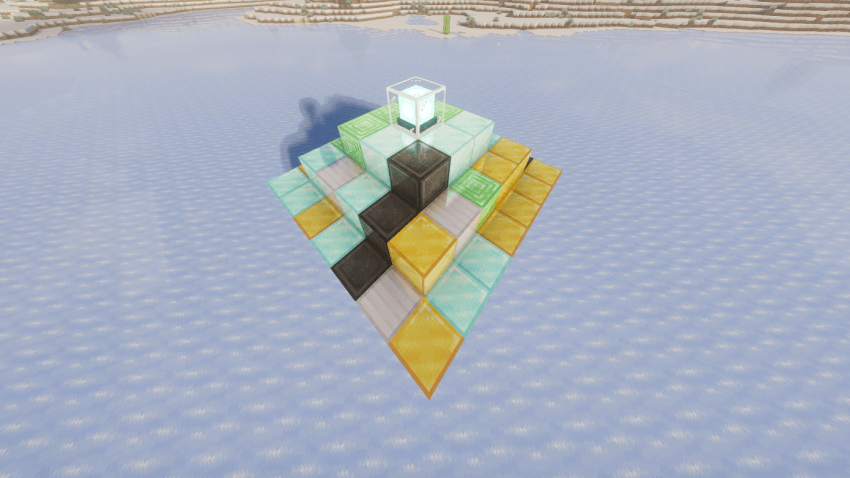
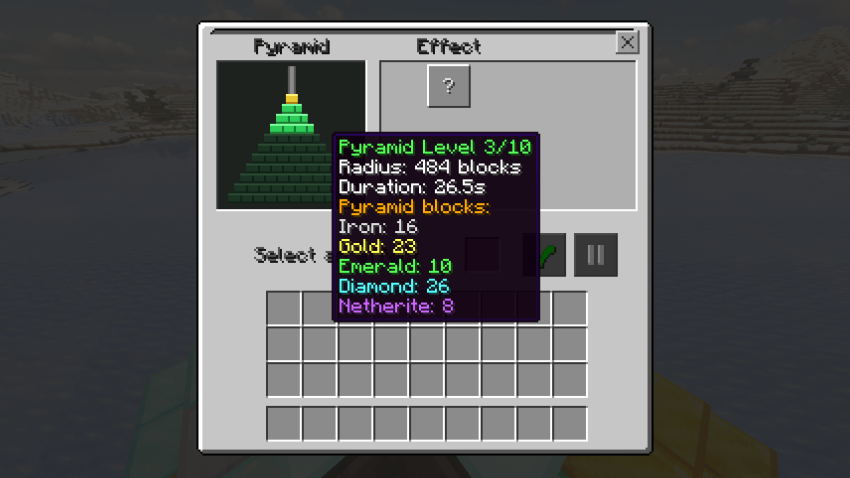
Now, the beacon gives more effects: Saturation, Luck and Night Vision, which are capable of being activated when building higher level pyramids.
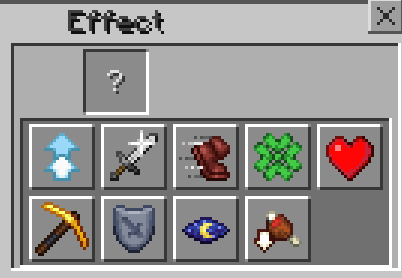
The blocks used in the creation of the pyramid DO NOT matter when unlocking its effects. The only way to unlock more effects is through increasing the pyramid size/height.
The player also has the option to renade the effect from the beacon if he does not want it anymore, by going in the inventory and cancelling the effect by the "x" that appears besides the beacon effect. To regain the effect, the player must go to whitin at least 100 blocks from the beacon.
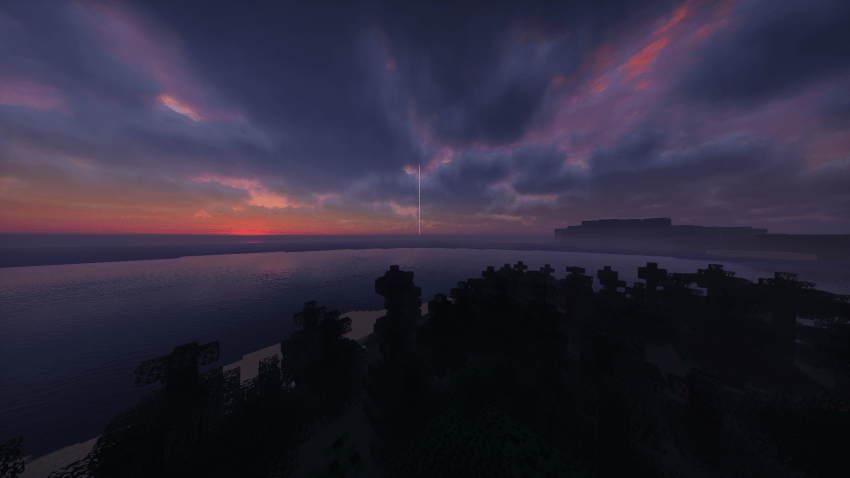
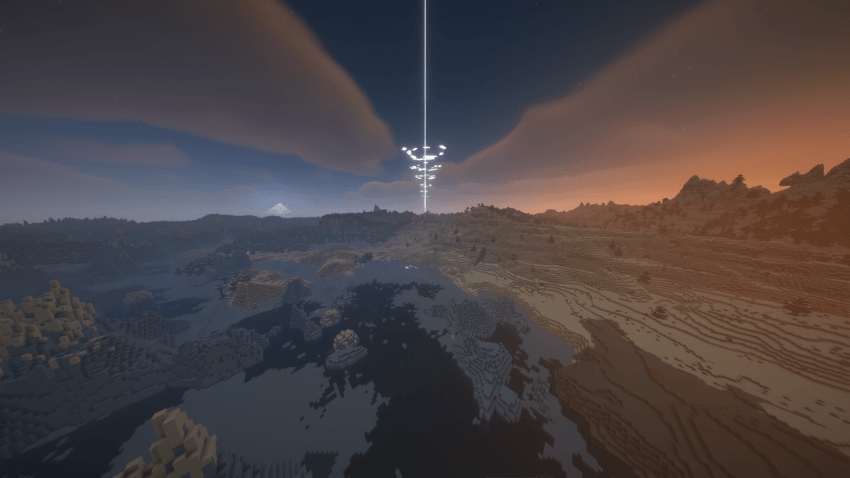
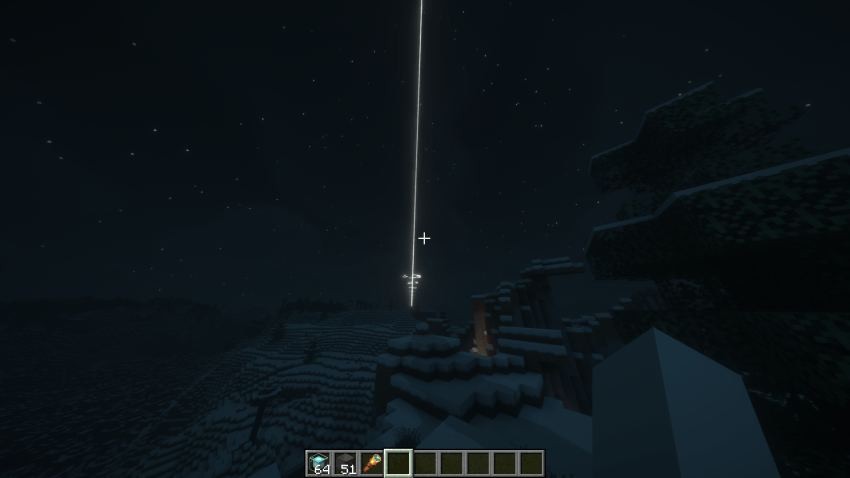
Now, you can see the beacon beam from ANY distance. 100, 1000, 10000 or 100000 blocks from it, it doesn't matter. Compatible with shaders, Voxy, Distant Horizons, etc. You can customize the beam's width and whether or not you want the infinite beam range in the mod's settings through the mod menu. (Mod Menu mod required).
Screenshot of the beacon beam from 10,000 blocks away with no clouds.
Screenshot of the beacon beam from 50,000 blocks away with clouds activated.
Screenshot of the beacon beam from 100,000 blocks away with clouds activated.
The higher the level of the effect you want, the more you pay. its simple. In the first levels, you can pay with Iron Ingots, then gold, then emeralds, and, suddenly you need blocks, then, you can only use diamonds and netherite. Once you pay, the beacon stays functional until the pyramid is altered.
Prices for First Level Effects:

Prices for Mid Level Effects:
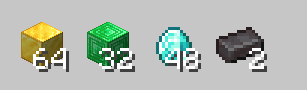
Prices for High Level Effects:

A full level 10 beacon (which is the max size) has 1770 blocks, which is almost a full chest of blocks. The mod has implemented a mechanic that allows you to hold the block you want to place, and right-click the beacon, so it automatically places the block in the next required position. For larger quantities, you can hold shift and right-click, so it places an entire stack/your entire hand of blocks in the beacon, automatically and quickly assembling it.
The mod should be compatible with everything: Iris, Vitrail, Sodium, etc. (as well as LOD mods, like DH and Voxy, like was said before). Compatibility with other beacon changing mods is not guaranteed, and the mod "Better Beacon Placement" is not necessary, since this mod already has its own beacon placement mechanics.
Multiplayer is also compatible (LAN and servers), with all the features, including the sound effects, visual effects and long range beam, working.
Some known bugs involve the LODs from Voxy and Distant Horizons. Even though they work with the mod, because of the missing integration between them, the long distance beam will actually render in front of the LODs from these mods, so, in case there is a beacon active from far away, and LODs from a moutain, the beam will actually appear in front of the mountain, like shown in the print below.
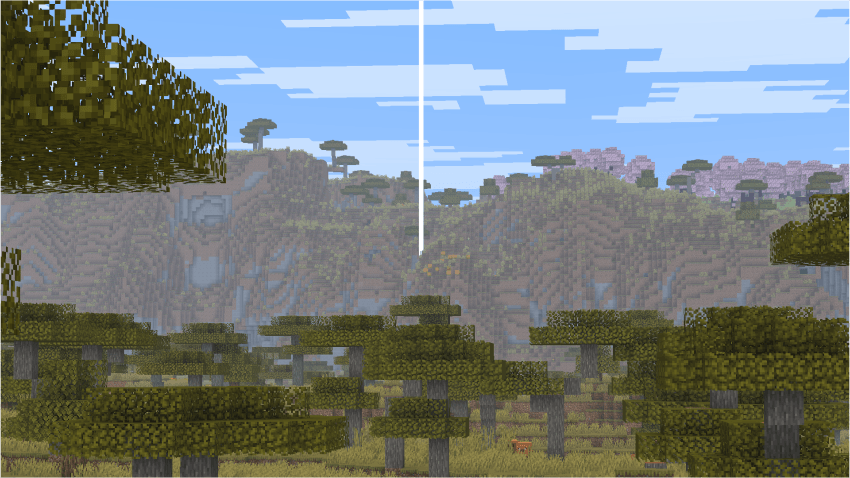
The fix is possible, however, the technical costs and maintenence to keep the 3 mods compatible at all times would probably not be worth it.
It's also worth mentioning that the mod is compatible with other mods that add different blocks that can be used in the beacon pyramid, like steel blocks (for example). In the interface, all these outside blocks are counted as "strange blocks" (this line of the interface only appears when there is already an outside mod block in the pyramid). More details in the section below.
Shader compatibility is complicated, since each shader treats in a different way the parameters the mod uses to render the beam and clouds, however, in a overall analysis, all shaders should be sufficiently compatible with the mod (the one I personally recommend is Bliss Shaders, which was the one I used the most during the mod creation, and consequently fine tuned the most). More information are in the section below.
In the mod menu (through Mod Menu mod) you can change the condition of long distance beam, as well as its size when far away (so it doesn't flicker in your screen's resolution). You can also change the clouds' bloom with shaders (so you can adjust how much they glow, or if they will glow at all), as well as disabling the clouds if you will. The mod's settings screen's UI is below.
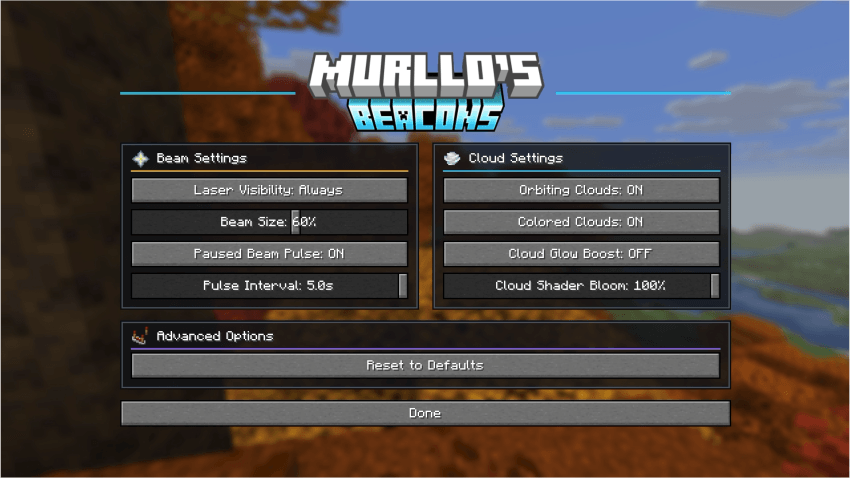
The mod changes some settings of the game's vanilla renderer, so the beam is always lit up and white, even if behind clouds or in the world fog. It also changes some parameters of the effects, like capping the FOV change from the Speed effect, so you can actually play with the maximum speed the beacon allows without your FOV becoming unfeasible. The mod does the same with the mining animation to the haste effect (after Haste VI, the breaking animation freezes), so the mining animation speed is capped at its maximum value, where it still happens.
The render method applied to make the beam always visible is the same mojang used in the vanilla version, but this time, without limit. The method basically consists in taking the beam's origin and projecting in the screen the exact location the beam must be, without actually "rendering" it. So it's basically an illusion. Several formulas and equations are used to calculate the exact position of the beam to replicate it with its exact apparent size/angular size in the screen. In practice, the beam just "expands" as you go farther from it, so it maintains the same size in your screen, even if you are millions of blocks outwards. The specific angular size of the beacon in your screen can be adjusted in the mod's settings screen.
The mod uses logarithmic, linear, and exponential formulas all over it to calculate how the sound and visual effects behave when the beacon is activated and deactivated, with the objetive to provide the most immersive experience when using the features. One example of this formula is that, players far away from the beacon (but within its effect radius) can hear the activation sound of the block, but much deeper and "away" than players who are closer to it. The duration of the effect is also calculated using logarithmic formulas, so it becomes a function of the beacon radius (so the bigger the beacon radius, the bigger the duration of the effect will be).
When added to the pyramid composition, each block has an increment in the beacon's range radius, with the following values:
Iron Block: 0.3 block increase
Gold Block: 1.3 block increase
Emerald Block: 2.3 blocks increase
Diamond Block: 14 blocks increase
Netherite Block: 50 blocks increase
Strange Blocks: 1 block increase.
(a strange block is any block from a mod or data pack that meets the criteria/has the minecraft tag
minecraft:beacon_base_blocks
and is present in the pyramid).
The value is calculated and then rounded to the nearest integer. The minimum value to the beacon radius is 10, so the final radius value is going to be 10 + (sum of all the blocks' contributions). So with the worst beacon, a 3x3 iron one, you get a radius of 10 + (9*0.3) = 12.7, that gets rounded up to 13 blocks.
The clouds of the beacon have a purpose, that is to identify the beacon's pyramid height from far away. Each level in the pyramid adds a new cloud layer, with a level 1 pyramid only getting the first one (and smallest) and a level 10/maximum pyramid, has 10 cloud layers, with the highest one being at around 10 thousand blocks height, and with 100 blocks in thickness. The clouds' height is interpolated linearly in between 0 and 20000 radius from the beacon, ranging from 1500 to 100000 blocks in height, and then interpolated linearly again from 100000 to 500000 blocks height for beacons ranging from 20000 to the limit radius (~81000 blocks for the full netherite beacon).
The clouds colors are directly taken from the immediate beam color in the cloud's exact height, that means that if you have a beam color that is in a certain range, any cloud ring in that same range will get that beam color. If you manage to sectionize your beam, you can apply different colors to different cloud rings. Because of the RGB limit on java, different colors from white are naturally darker and so have a bloom effect way lower, which may cause some strange effects in some shaders, or make the clouds disappear completely at night. To solve this, there is an experimental feature in the mod's menu that creates a second layer of bloom in front of each cloud, so it can become brighter and more satured, however, this option may cause some incompatibilities and wrong colors with some shaders, like Photon Shaders. Without this setting, colored clouds can appear normally when it is day (because the clouds can reflect the sunlight normally), like shown below.
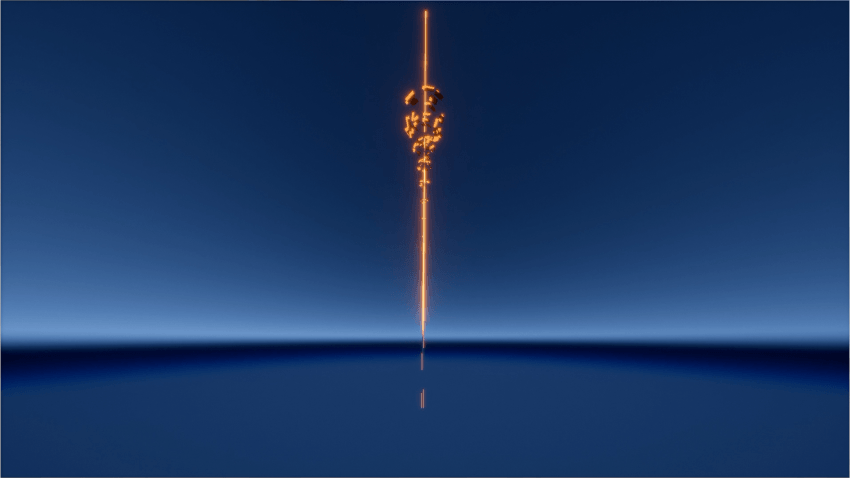
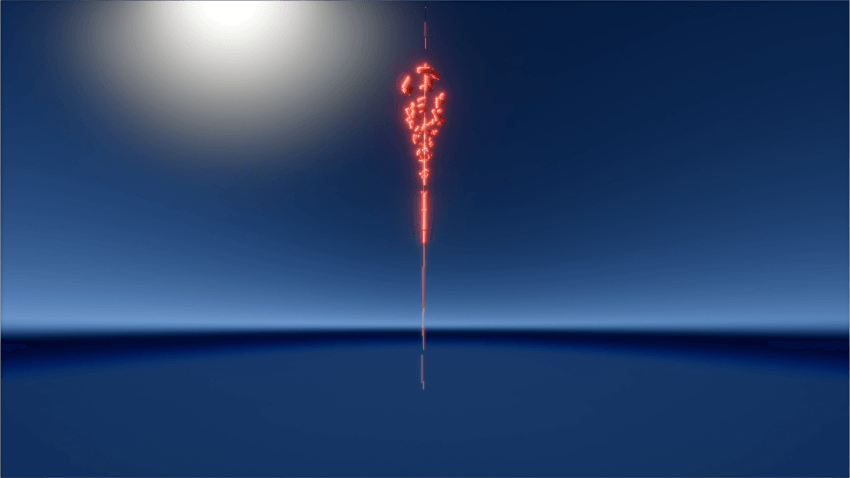
When the beacon beam changes color, the clouds gradually change from the innerest to the mos outer clouds, and from the lower ring to the most higher one, to match the beam's color.
Project description from CurseForge.
Pick your setup
Choose the version and loader you play, then open the matching release.
Check the dependencies, then try the file in a copied instance before changing a world you care about.
Recent files
24 Nov 2026
23 Nov 2026
23 Nov 2026
22 Nov 2026
21 Nov 2026
21 Nov 2026
21 Nov 2026
21 Nov 2026
21 Nov 2026
Looking for an older file? The official CurseForge project page is in Resources.
 mod
Checks installed mods for available updates
 mod
HUD:A lightweight Jade alternative ,effect timmer ,Target Info,Saturation and Coordinates Monitor ,Waila,HWYLA,show Horse speed and jump stats,death location,Death Finder
 mod
Breed faster Happy Ghasts, boost flight speed with Speed Potions or Snowballs, and inspect mount stats with a Book and Quill.