Fabric API Needed by Entity Slicer 1.9.1
requiredMatching file found Matched file: [1.20.1] Fabric API 0.92.12+1.20.1
CurseForge · Minecraft mod
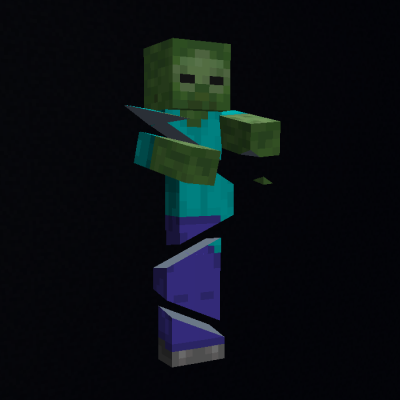
Sword and axe hits leave glowing marks, and finishing blows split mobs along the path of your swing.
Quick answer
Entity Slicer 1.9.1 targets 1.20.1 with Fabric. The project page does not say whether this file belongs on the client, dedicated server, or both. All 1 required mods have matching files.
Where it goes
The project page does not say whether this file belongs on the client, dedicated server, or both.
The source does not explicitly classify this release as client-only or server-only.
Entity Slicer 1.9.1. Change the file and its required mods may change too.
Install Fabric API first. We found matching files for this game-version and loader setup.
We only count dependency files that match this setup. A file for another loader does not fill the gap.
Before you install it
Built for Entity Slicer 1.9.1. Pick another file and the loader, install side or required mods may change.
Use Entity Slicer 1.9.1. It targets 1.20.1 with Fabric; another release may have different loader, side or dependency requirements.
Install Fabric API first. We found matching files for this game-version and loader setup.
The project page does not say whether this file belongs on the client, dedicated server, or both.
Use the “Get this file” button beside Entity Slicer 1.9.1. It opens that exact file at the source.
About this project
Entity Slicer adds directional visual effects to sword and axe combat. Move your view sideways, up, down, or diagonally as you strike to change the cut. Swords leave blue marks and axes leave orange marks. Marks move with the mob and fade after about four seconds.
A finishing blow can split the mob into textured pieces that scatter and disappear. Recent strikes from the same player can add more cut directions. The effects preserve normal damage and loot, and ranged kills and indirect damage use the usual death behavior.
Install Fabric Loader 0.17.2 or later and Fabric API 0.92.6 or later for Minecraft 1.20.1. Use Java 17 and place the Entity Slicer JAR in your mods folder. For multiplayer, install Entity Slicer on the server and on each client that should see the effects.
Entity Slicer recognizes vanilla swords and axes and modded weapons that use the same item types. Datapacks can add weapons to the arc_slice:swords and arc_slice:axes item tags. Mobs with unsupported custom renderers keep their normal death animation and show a slash effect.
Entity Slicer 為近戰加入方向性的斬擊特效。揮劍或劈斧時轉動視角即可改變切割方向。劍留下藍色刀痕,斧留下橙色刀痕。刀痕會跟隨生物移動,約四秒後淡去。致命一擊會沿斬擊方向切開模型,保留原有傷害和掉落物。
安裝需要 Minecraft Java 1.20.1、Java 17、Fabric Loader 0.17.2 以上,以及對應 Minecraft 1.20.1 的 Fabric API 0.92.6 以上版本。多人遊戲由伺服器判定斬擊,客戶端安裝後可看見特效。
Project description from CurseForge.
Pick your setup
Choose the version and loader you play, then open the matching release.
Check the dependencies, then try the file in a copied instance before changing a world you care about.
Recent files
arc-slice-1.9.1.jar
26 Nov 2026
arc-slice-1.1.0.jar
21 Nov 2026
Looking for an older file? The official CurseForge project page is in Resources.
 mod
Edit Minecraft creative tabs with drag-and-drop, multi-select, smart sorting, and datapack-driven compatibility.
 mod
Compatibility addon between Dynamic Trees and VanillaBackport
 mod
This is an add-on module that requires 'Xiaoxiang Cultivatio' Once installed, a few ordinary cultivators will be strengthened into 'Prodigies'.