Mod Menu Optional for Quark's Emotes 1.0.2 for Fabric 1.21.11
optionalMatching file found Matched file: v17.0.1 for 1.21.11

CurseForge · Minecraft mod
Play 42 emotes from a radial wheel, with favorites and search.
Quick answer
Quark's Emotes 1.0.2 for Fabric 1.21.11 targets 1.21.11 with Fabric. The project page does not say whether this file belongs on the client, dedicated server, or both. All 1 required mods have matching files.
Where it goes
The project page does not say whether this file belongs on the client, dedicated server, or both.
The source does not explicitly classify this release as client-only or server-only.
Quark's Emotes 1.0.2 for Fabric 1.21.11. Change the file and its required mods may change too.
Install Fabric API first. We found matching files for this game-version and loader setup. 1 comes through another mod in the chain.
1 extra mod was pulled in by another dependency. Indented rows show who needs each one. We only count dependency files that match this setup. A file for another loader does not fill the gap.
Before you install it
Built for Quark's Emotes 1.0.2 for Fabric 1.21.11. Pick another file and the loader, install side or required mods may change.
Use Quark's Emotes 1.0.2 for Fabric 1.21.11. It targets 1.21.11 with Fabric; another release may have different loader, side or dependency requirements.
Install Fabric API first. We found matching files for this game-version and loader setup. 1 comes through another mod in the chain.
The project page does not say whether this file belongs on the client, dedicated server, or both.
Use the “Get this file” button beside Quark's Emotes 1.0.2 for Fabric 1.21.11. It opens that exact file at the source.
About this project
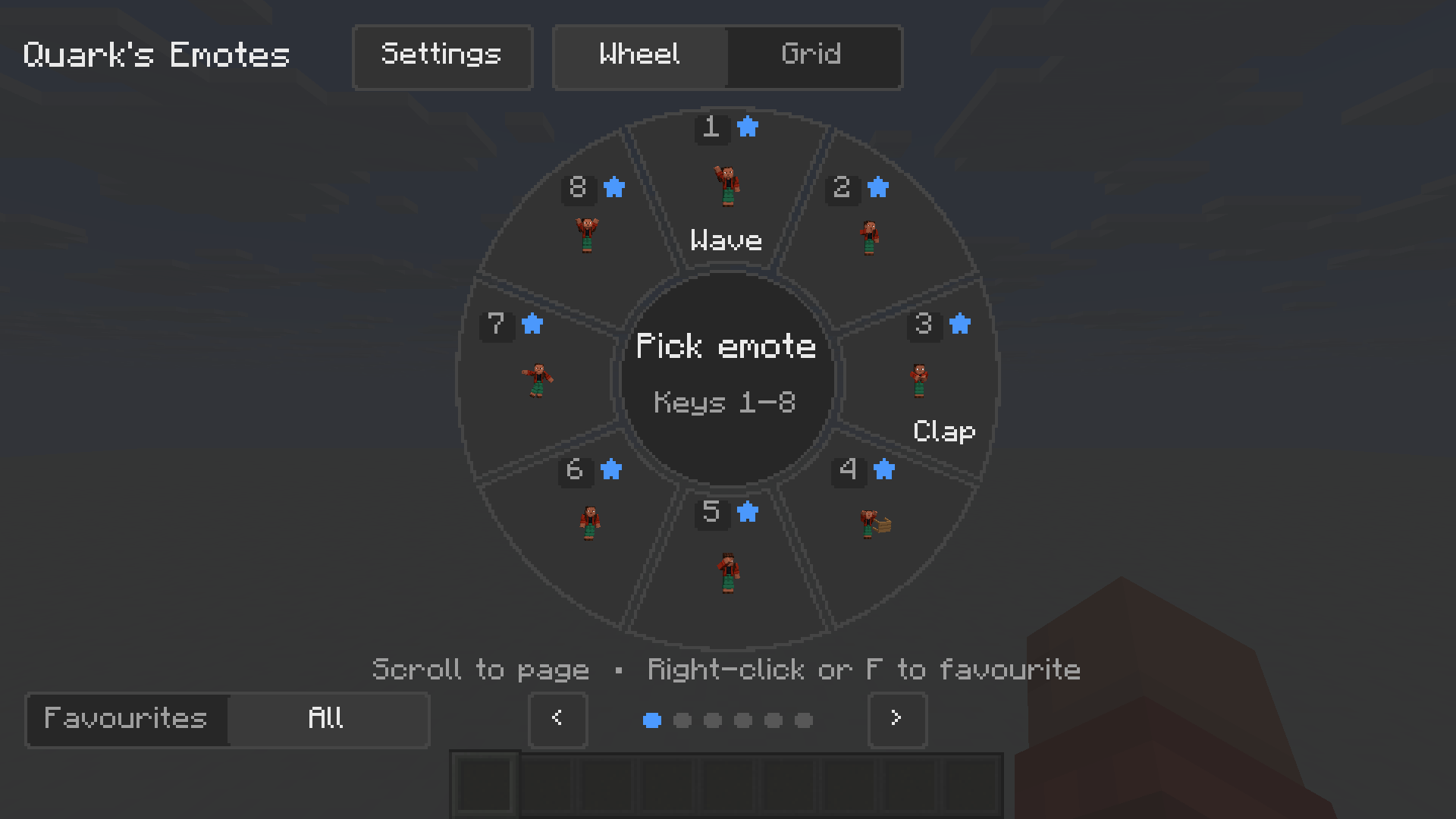
Press B, pick an emote from the wheel, and your player waves, dances, flips or salutes.
42 emotes with a six-page wheel, favorites and a searchable grid. Add your own emotes with a resource pack, and share them with nearby players when the server has the mod too.
Including wave, clap, dab, floss, backflip, spin, worm, sword salute, guitar, drums, push-ups, sit, sleep, meditate and default dance. 
Six pages with favorites. Press 1–8 to pick an emote, F to favorite it, and the arrow keys or PgUp/PgDn to flip pages.
Browse every emote in a grid, search by name, and filter by category (Greetings, Reactions, Dances, Poses, Fun, Favourites). 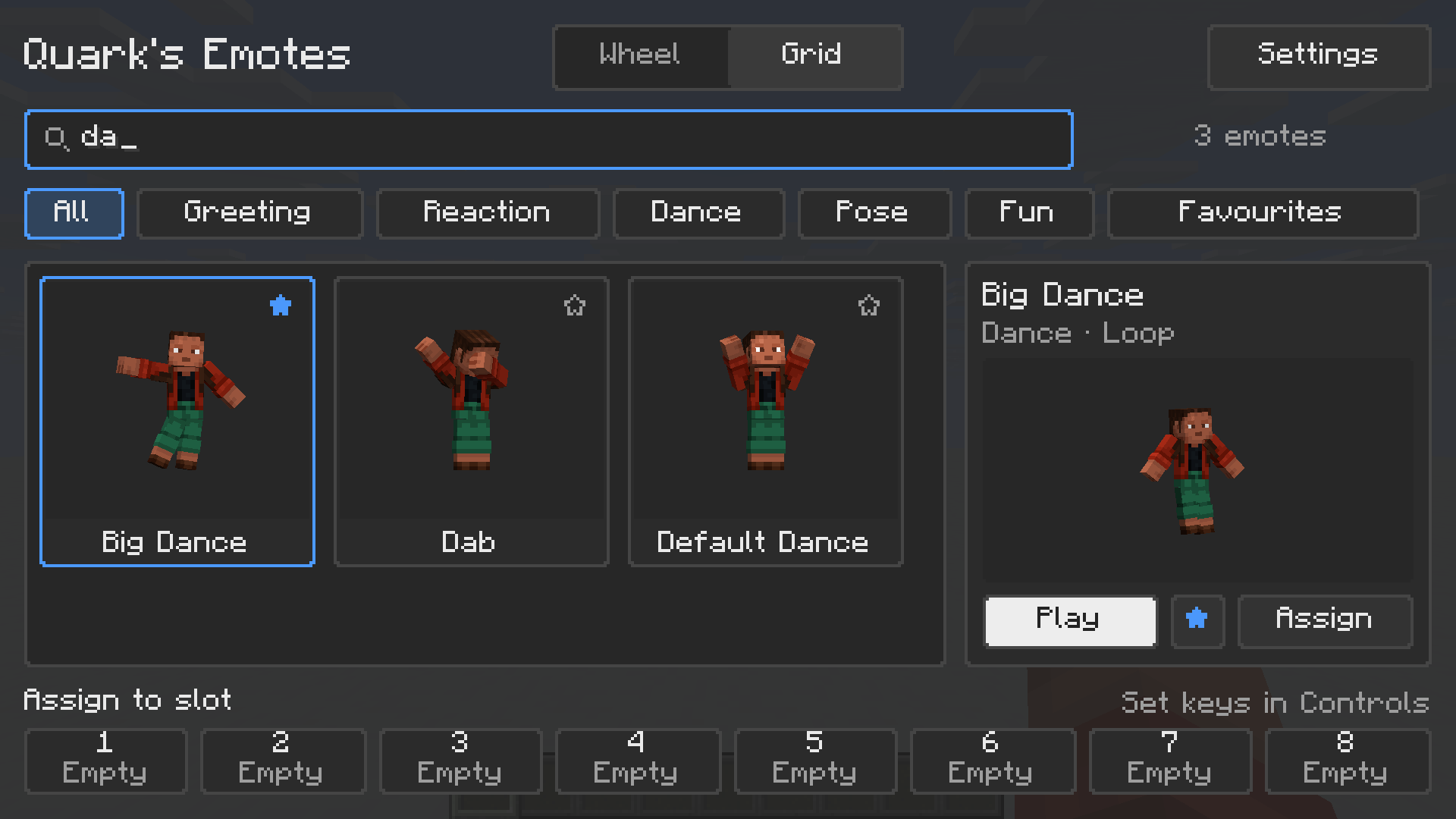
Props such as the sword follow your arms while you emote. 
Works with Steve and Alex skins. Sit and sleep hold until you move or cancel, looping emotes loop smoothly, and players who arrive in the middle of an emote see it from the right point.
With the mod on the server, your emotes are relayed to nearby players who also have the mod. On a vanilla server, emotes still play for you, and a one-time message tells you they're only visible to you.
Add emotes with a resource pack: put a Bedrock animation JSON at assets/<namespace>/emotes/<name>.animation.json (or assets/<namespace>/emotes/<name>/<name>.animation.json), and it gets the ID <namespace>:<name>. You can also drop files into config/quarkos_emotes/emotes/. Press F3+T to reload. Players only see emotes they have locally, so viewers need the same pack. Format guide: docs/ANIMATION_FORMAT.md
config/quarkos_emotes.jsonDoes this need to be on the server? No, but it helps. Without it on the server, emotes play only for you. With it on the server, nearby players who also have the mod see your emotes.
Does it work with shaders, Sodium or other mods? Untested so far. Please report what you find.
Can I use it in a modpack? Yes, it's MIT licensed, use it in any modpack.
Found a bug? Open an issue at https://github.com/QuarkOS/quarkos-emotes/issues
Made by Emilio Schwaiger / QuarkOS. Blockato (emote animation). Licensed under MIT.
Project description from CurseForge.
Pick your setup
Choose the version and loader you play, then open the matching release.
Check the dependencies, then try the file in a copied instance before changing a world you care about.
Recent files
quarkos_emotes-fabric-1.0.2-1.21.11.jar
21 Nov 2026
quarkos_emotes-fabric-1.0.2-26.3.jar
21 Nov 2026
quarkos_emotes-forge-1.0.2-1.21.11.jar
21 Nov 2026
quarkos_emotes-forge-1.0.2-1.21.1.jar
21 Nov 2026
quarkos_emotes-fabric-1.0.2-1.21.1.jar
21 Nov 2026
quarkos_emotes-fabric-1.0.0-1.21.11.jar
21 Nov 2026
quarkos_emotes-fabric-1.0.0-26.3.jar
21 Nov 2026
quarkos_emotes-forge-1.0.0-1.21.11.jar
21 Nov 2026
quarkos_emotes-forge-1.0.0-1.21.1.jar
21 Nov 2026
quarkos_emotes-fabric-1.0.0-1.21.1.jar
21 Nov 2026
Looking for an older file? The official CurseForge project page is in Resources.
 mod
Fantasy mod bringing you Unicorns, Two Seater Riding, Horse Whistle and more!
 mod
Port of OpenBlocks Elevator.
 mod
Provides vanilla JEI recipes on servers without JEI installed.