Minecraft version
Back to mods 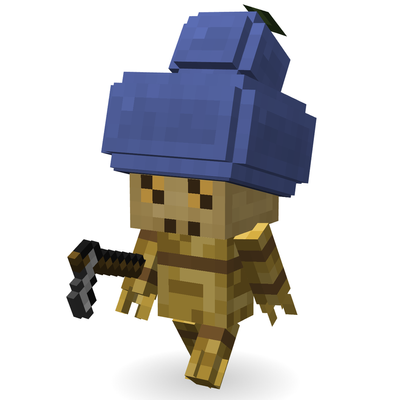
CurseForge · Minecraft mod
Calabash
Plant a calabash and bring the gourds of wuxia and myth into Minecraft. Medicine flasks, sealing calabashes, calabash puppets…
Choose a version Pick your version below, then grab the matching file.
Quick answer
Which Calabash release matches 26.2 Forge?
Best match for your filters Calabash 0.2.0 (Forge 26.2)
Game version 26.2
Loader Forge
Calabash 0.2.0 (Forge 26.2) targets 26.2 with Forge. The project page does not say whether this file belongs on the client, dedicated server, or both. No extra mods listed for this file.
Where it goes
Is Calabash required on the client, server, or both?
The project page does not say whether this file belongs on the client, dedicated server, or both.
Client Source doesn’t say
Dedicated server Source doesn’t say
Loader for this release Forge
Required install it here Optional supported, not mandatory Not supported do not install here Source doesn’t say do not assume
The source does not explicitly classify this release as client-only or server-only.
What else does Calabash 0.2.0 (Forge 26.2) need?
Calabash 0.2.0 (Forge 26.2) on 26.2 Forge. Every mod below is checked against that same setup.
This file does not list any required mods. Do not add a library just because a different file uses it.
This file does not list any required or optional mods.
Before you install it
Add Calabash without breaking your instance.
Built for Calabash 0.2.0 (Forge 26.2) on 26.2 Forge. Pick another file and the loader, install side or required mods may change.
- 01
Stick to this file
Use Calabash 0.2.0 (Forge 26.2). It targets 26.2 with Forge; another release may have different loader, side or dependency requirements.
- 02
Bring the mods it needs
This file does not list any required mods. Do not add a library just because a different file uses it.
- 03
Put it on the correct side
The project page does not say whether this file belongs on the client, dedicated server, or both.
- 04
Pick the file you checked
Use the “Get this file” button beside Calabash 0.2.0 (Forge 26.2). It opens that exact file at the source.
About this project
What does Calabash add?
Calabash
Plant a calabash, and grow the magic gourds of Chinese myth right in your Minecraft world.
Why calabashes?
The calabash (bottle gourd) is one of the oldest crops people ever grew. It started out in Africa and spread across Asia and the Americas with early farmers. Archaeologists in Zhejiang, China dug up calabash seeds that are 7,000 years old. Before pottery was common, a dried gourd was just what you used as a water bottle, a bowl or a ladle.
In Chinese culture the calabash is the thing that holds stuff, sometimes a lot more than it should:
- A world inside a gourd. An old story tells of a medicine seller who hung a gourd outside his shop and hopped inside it every evening. Inside was a whole palace. Doctors have used the gourd as their sign ever since.
- The demon-catching gourd. In Journey to the West, the demon Silver Horn has a gourd that sucks you in if you answer when he calls your name.
- Good luck. "Hulu" (calabash) sounds like "fulu" (fortune and prosperity), and a vine full of seeds stands for a big family.
This mod starts from one seed and builds all of that into the game, bit by bit.
1. Growing calabashes
How it grows
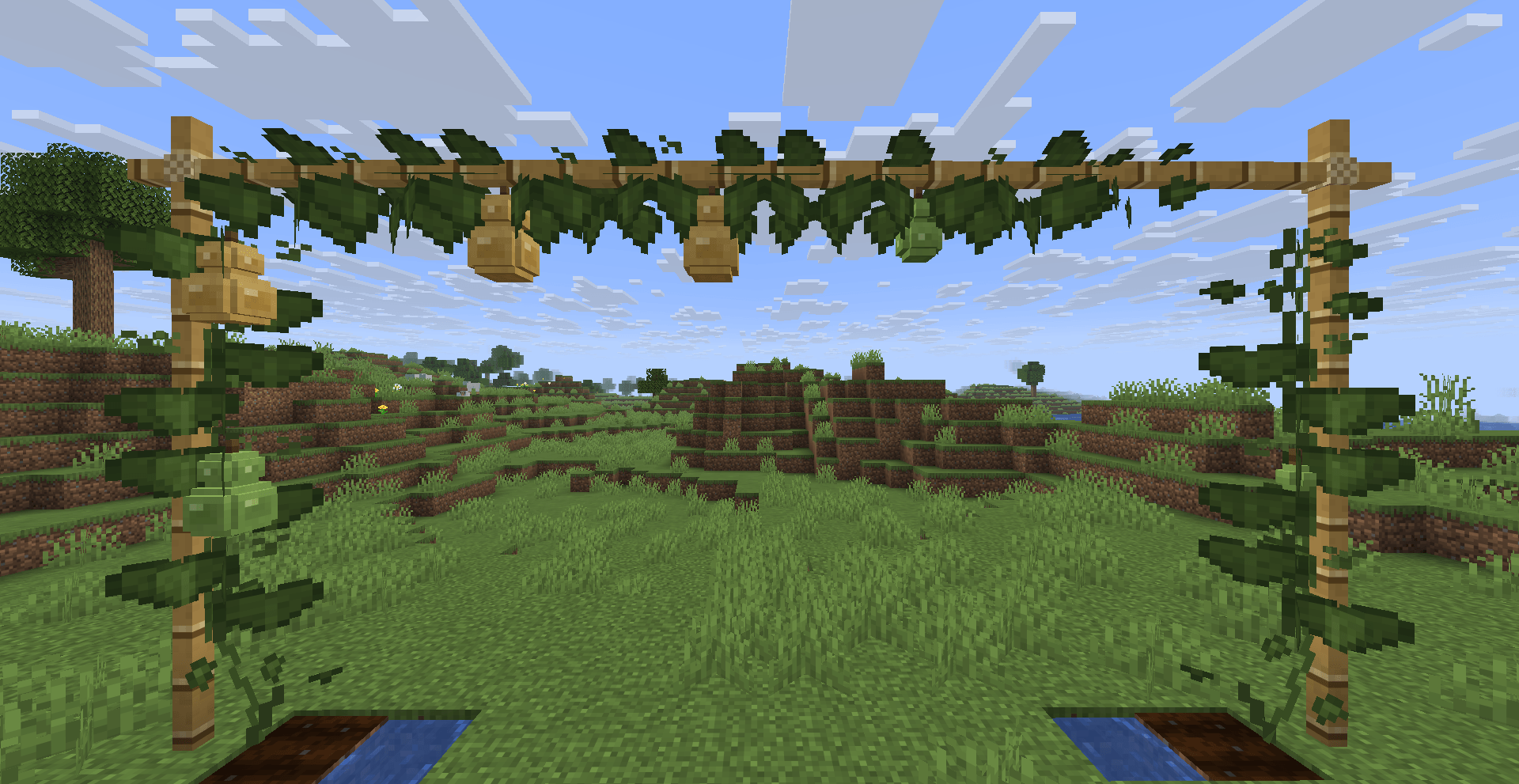
Real calabash vines climb anything they can grab: fences, poles, trellises. Farmers build a frame overhead so the gourds hang down from above. The mod works the same way.
- Plant Calabash Seeds on farmland. The stem goes through 8 growth stages.
- Climb a wall. Once the stem is fully grown, it starts a vine up the wall next to it, so leave a wall beside your farmland.
- Keep climbing, one block at a time, up to 8 blocks. Past 4 blocks it slows down a bit. Bone meal helps.
- Climb poles too. Fences, walls, iron bars, chains, bamboo, lightning rods and end rods all work, and the vine wraps tightly around them.
- Go across the ceiling. When the vine hits something above it, it turns and grows sideways along the ceiling, and the gourds hang down. That's a proper calabash trellis. The ceiling can be the bottom of a block, or fences/bamboo laid sideways.
Calabashes like the sun: vines need a light level of at least 9 to grow.
Flowers and fruit
Each vine segment goes leaves → white flower → small green gourd → medium → large → ripe yellow calabash.
Fruit doesn't crowd together: a plant only fruits on odd or even segments, so neighbouring segments never flower at the same time. Break the vine at the root or in the middle and everything above it falls off, ceiling part included.
Harvesting
| How | What you get |
|---|---|
| Right-click a ripe calabash with an empty hand | A Calabash. The vine stays and fruits again |
| Use shears on a green gourd | A Small Calabash. The vine goes back to flowering |
| Break the vine | Seeds, plus the fruit if there is one |
Young calabash is a common vegetable in China, and you can eat the Small Calabash here too.
Calabash Pith
Put a Small Calabash in a crafting grid to get 3 Calabash Pith. Eat it raw if you have to, or cook it in a furnace, smoker or campfire for Baked Calabash Pith, which fills you up like a baked potato.
- 4 Pith make a fluffy Block of Calabash Pith. Falling onto it only does 20% of the damage.
- 8 gold nuggets around 1 Pith make Golden Calabash Pith, about as good as a golden carrot. 4 of them make a Block of Golden Calabash Pith (and you can split it back). Golden Pith repairs the Demon-Quelling Calabash, and the gold block expands your Realm Calabash island (more on that below).
Where to find seeds
- Wild Calabash grows on grass in jungles, bamboo jungles and savannas. Its home really is the African savanna. Break it for seeds, or use shears / Silk Touch to take the whole plant home as decoration.
- Small chance when you break vanilla vines.
- Wandering Traders sell them for 1 emerald.
- Sometimes in jungle temple and village chests.
Server admins can turn each of these on or off in the config.
2. Dried calabashes
Drying
Real gourds take months to dry out. Here you just smoke them: put a Calabash in a smoker or campfire to get a Dried Calabash. A Small Calabash becomes a Dried Small Calabash.
Decoration
All four kinds of calabash can be placed on the ground and turned to face any of the four directions. They're round 3D models, and they look nice on a table, a window sill or in a corner.
16 colours
Craft a Dried Calabash with any dye to colour it. You can recolour it any time. People in China have painted and wood-burned designs on gourds for ages, and now you can line up a whole rainbow of them.
Calabash Lanterns
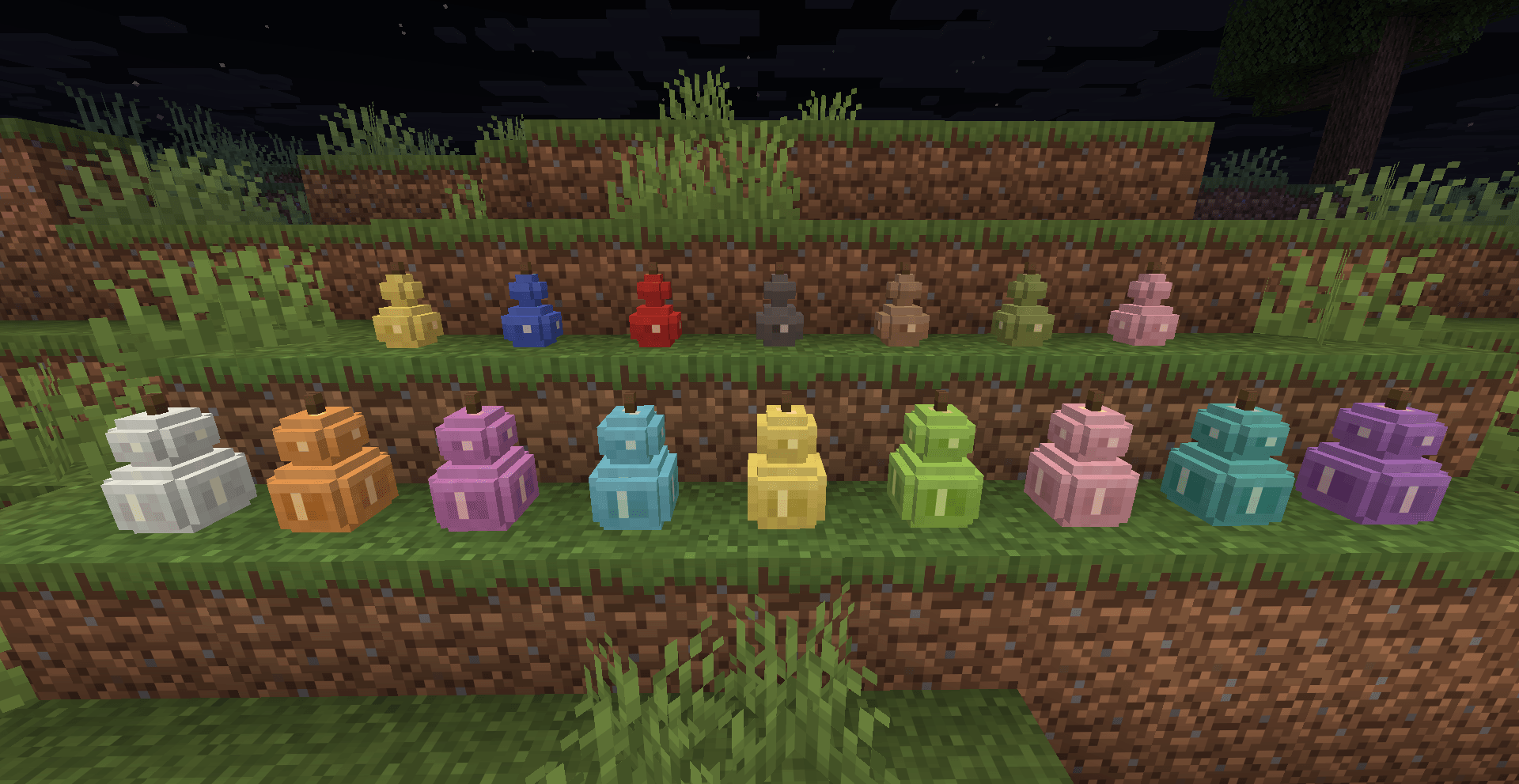
Dried Calabash + Torch = Calabash Lantern (or a Small Calabash Lantern from the small one).
Real calabash lamps have patterns carved into the shell so light shines out through the cuts. These do too. The big one gives light level 15, the small one 12. Put them on the ground or hang them from the ceiling like a lantern. They keep the colour of the gourd you used and can be dyed later.
Dried Bamboo
Smoke bamboo to get Dried Bamboo. You can place it in any of three directions like a chain, and tie up to three pieces across each other in one block, with a bit of rope where they cross. Build a bamboo frame and let your vines climb it. That's how a calabash trellis should look.
3. Calabash Flask
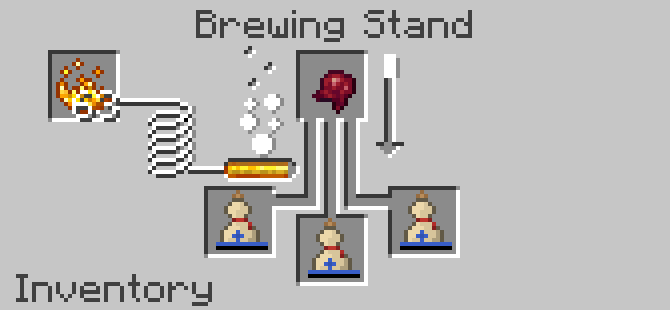
In old China, traveling doctors always had a medicine gourd on their belt. It's sealed tight, it doesn't break, and it's light. Basically a perfect potion bottle.
Crafting
Dried Calabash (any colour) + wooden button (the cork) + string = Calabash Flask. It takes the colour of the gourd, and you can dye it later without touching what's inside.
16 sips in one flask
One flask holds 16 servings of the same potion. Each sip uses one, and the bar in your inventory shows the potion's colour.
- Water: use it on a water source to fill it with 16 servings of water.
- Milk: use it on a cow, mooshroom or goat for 16 servings of milk. Each sip clears your effects like a milk bucket.
- Top up: click the flask with a matching potion in your inventory to pour one in.
Brewing a whole flask at once
Put a flask of water or a potion where the glass bottle goes in a Brewing Stand and brew like normal. The whole flask gets brewed at once: extend it, power it up, turn it into something else. That's 16 sips per batch.
4. Talisman Desk
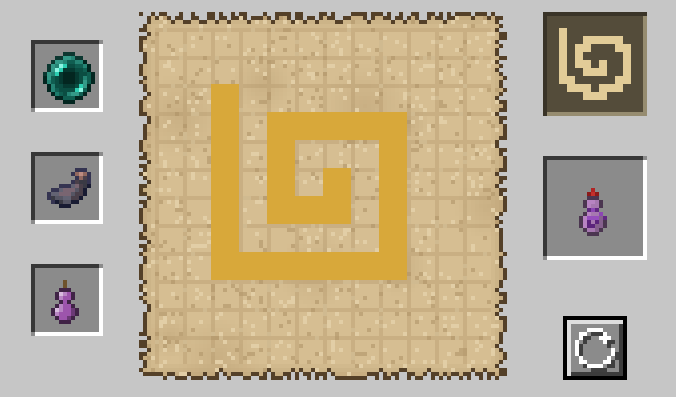
In the old stories, a normal gourd only turns into a magic treasure once someone paints a talisman on it. The three magic calabashes here (Sealing Calabash, Demon-Quelling Calabash and Realm Calabash) are all made by drawing a talisman yourself at the Talisman Desk.
Making the desk
Paper, ink sac and planks: paper, ink sac, paper on top, planks below in the shape of a little table. Easy to make right at the start.
Drawing a talisman
Open the desk. On the left are three slots: a key item, an ink sac and a dried calabash. In the middle is an old paper canvas, and the top right shows the talisman you need to draw.
- The key item decides which treasure you're making, and the matching talisman shows up top right.
- Hold left-click to draw on the canvas, right-click to erase. The redraw button wipes it clean.
- It doesn't have to be perfect. Position and size don't matter, as long as every stroke is there and the shape is roughly right. Get it right and the ink turns gold, and the treasure appears in the output slot.
- Like a crafting table, the materials are only used up when you take the result.
| Treasure | Key item | Talisman | Gourd |
|---|---|---|---|
| Sealing Calabash | Ender Pearl | Swirl, spiraling inward | Dried Small Calabash |
| Demon-Quelling Calabash | Eye of Ender | Thunder, a zigzag lightning bolt | Dried Calabash |
| Realm Calabash | Compass | 回, a square inside a square | Dried Calabash |
The treasure comes out the same colour as the gourd you used, and all three can be dyed later.
5. Sealing Calabash: "If I call your name, will you answer?"
In Journey to the West, Silver Horn calls out the Monkey King's name, and the moment he answers he gets sucked into the gourd.
The Sealing Calabash is inspired by that gourd.
How to use
- Use it on a mob to suck it in.
- Use it on a block to let it out there.
Everything about the mob is kept: health, name, villager trades, pet owner, all of it. A filled gourd glows like an enchanted item, and the tooltip tells you what's inside and how much health it has left. Great for moving villagers, shifting animals around or taking your pets on a trip.
Rules
- One mob per gourd.
- Hostile mobs have to be below a quarter of their health first. Friendly mobs go right in.
- Players and bosses (Ender Dragon, Wither, Warden, Elder Guardian and so on) can't be caught.
- Other people's pets are off-limits by default. Servers can allow it in the config.
Call its name
Rename the Sealing Calabash in an anvil to exactly the same name as the target mob, then use it. It gets sucked in no matter how much health it has. Just like the book: I called your name, and you answered.
6. Demon-Quelling Calabash
The Sealing Calabash catches demons. The Demon-Quelling Calabash squashes them. It has a red cord around its waist and a thunder talisman carved on it.
How to use
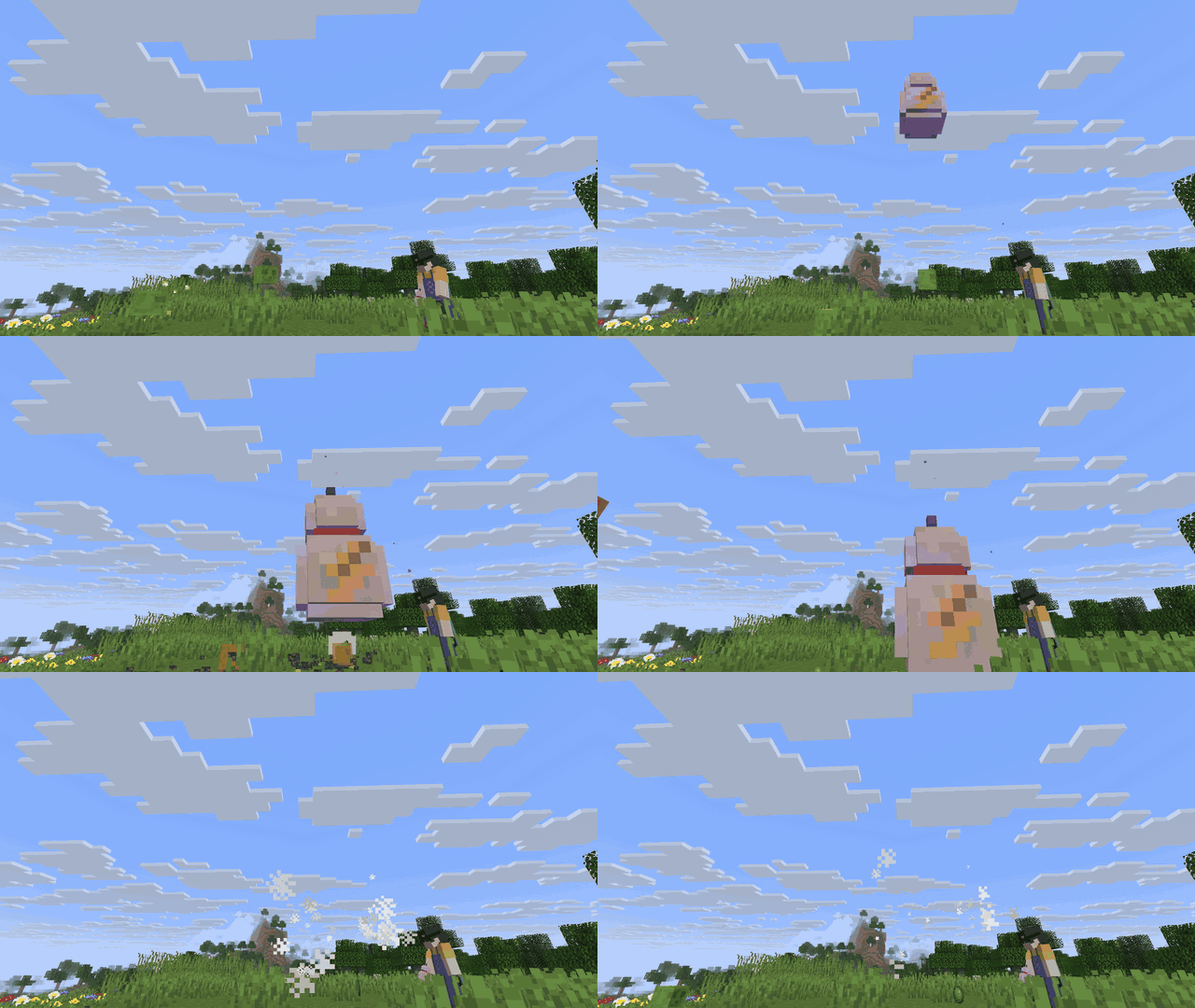
Right-click to throw it. Like an Eye of Ender, it flies on its own to the nearest hostile mob within 32 blocks and hovers over its head. Then it turns into a giant 5-block-tall calabash and slams down.
- The main target takes 16 damage. Other hostile mobs within 3.5 blocks take 8 and get knocked back.
- It only hurts hostile mobs. Animals, villagers and teammates are safe.
- Afterwards it drops where it landed so you can pick it up. With Loyalty, it flies back to you like a trident.
- 15-second cooldown, 64 durability. Takes Loyalty, Unbreaking and Mending, and you can repair it with Golden Calabash Pith in an anvil.
7. Realm Calabash: a world inside a gourd
Remember the medicine seller who hopped into his gourd? The Realm Calabash is a home you can carry around.
Getting in
Place it on the ground and it pops up from a small gourd into one taller than you. Right-click it to go inside.
Inside is a black void with a 9×9 island floating in it. The whole island is made of fluffy Block of Calabash Pith, with a glowing Calabash Mouth in the middle. Build a house, farm, put chests down, whatever you like. You just can't build past the edge of the island.
Getting out
- Right-click the Calabash Mouth to go back outside next to the gourd.
- Or just jump off the edge. You won't die, you just end up outside.
Take your home with you
Break the gourd and it remembers what's inside. Put it down somewhere else, go in, and it's the same island with all your stuff still in the chests. Every new Realm Calabash you craft is a new island. Great if you like to wander around and never settle down.
Expanding the island
Right-click the Calabash Mouth with a Block of Golden Calabash Pith to grow the island by one ring on each side. The 1st expansion costs 1 block, the 2nd costs 2, and so on. You can feed them in a few at a time. Up to 12 expansions, taking the island from 9×9 all the way to 33×33.
Safety
- The Realm Calabash is blast-proof, can't be pushed by pistons, and the Wither and Ender Dragon can't break it. Players can still mine it.
- If someone breaks the gourd while you're inside, you get tipped out where it used to be.
- You can't put a Realm Calabash inside a Realm Calabash. No gourd-ception.
8. Hulusi
The hulusi is a traditional instrument from Yunnan, played by the Dai and other peoples: a gourd air chamber with a few bamboo pipes sticking out of it. It sounds soft and flowing, a bit like a mountain stream.
The recipe is close to the real thing: 1 Dried Small Calabash + 3 Dried Bamboo. It takes the colour of the gourd.
The hulusi is how you boss your Calabash Puppets around:
- Call your puppets: right-click to play. Your puppets within 32 blocks drop what they're doing and follow you for a minute. Play again while they follow and they make their new home where you're standing. Handy for moving them to a new farm.
- Pick storage chests: sneak + right-click a chest, barrel or shulker box with the hulusi. Green sparkles mean it's marked as preferred (double chests get both halves; click again to unmark, and it puffs smoke). When puppets drop off their harvest, they fill marked chests in range first.
9. Calabash Puppet
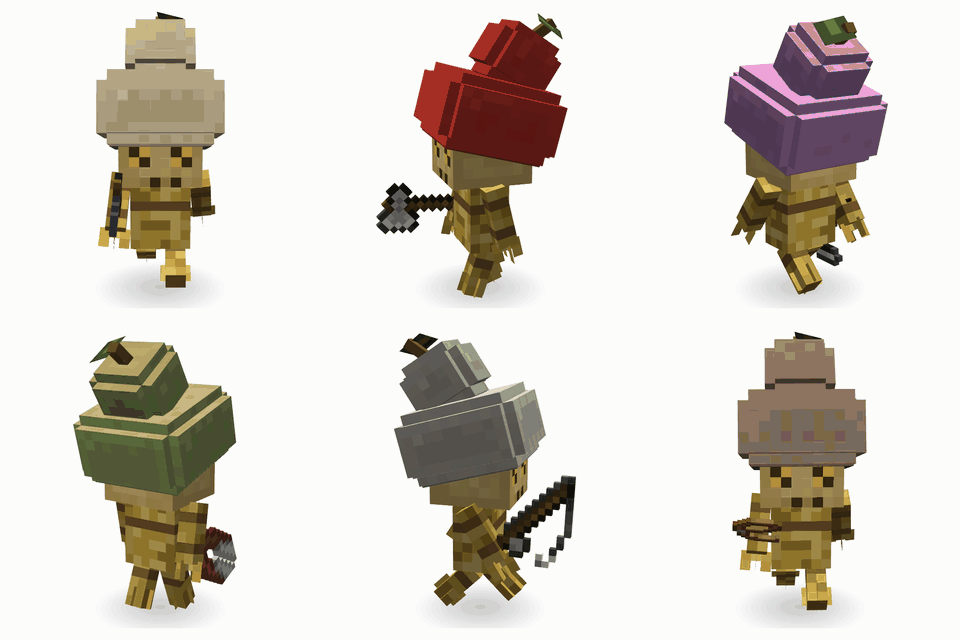
Old tales say little guardian spirits can be born from a gourd. The Calabash Puppet is our own take on that: a body and limbs of tied-up straw, a burlap face with cross-stitched eyes that glow amber, and a floppy calabash hat on its head.
Waking one up
Same idea as snow golems and iron golems:
Hay Bale at the bottom → Carved Pumpkin (or Jack o'Lantern) on top → Dried Calabash on top of that
The moment you place the gourd, the three blocks become a Calabash Puppet. Its hat is the colour of the gourd you used, so pick any of the 16. Where the hay bale was is its "home", and it hangs around there.
Puppets are helpers only, they don't fight. They fill the gap in vanilla where nobody does farm work for you outside of villages.
Jobs: main hand sets the job, off hand narrows it down
Right-click a puppet with a tool and it takes it in its main hand. The tool decides its job. Empty off hand means it does everything that job covers. Give it a sample in the off hand (a log, a stone, a seed) and it only does that one thing. A herder takes feed from chests near its home. Sneak + right-click with an empty hand and it gives you back its tool, materials and everything it's carrying. Right-click it with a Dried Calabash (plain or dyed) to swap its hat; you get the old one back.
| Job | Main hand | Off hand | What it does |
|---|---|---|---|
| Gardener | Hoe | Empty, or one crop | Harvests and replants ripe crops near home. Also picks melons and pumpkins off their stems and ripe calabashes off the vine. Leaves the bottom block of bamboo, sugar cane and cactus |
| Herder | Lead | Empty, or 1 feed item | Feeds nearby animals so they breed (only with that feed if you gave one), and stops once there are enough (12 by default). Takes feed from its bag and nearby chests, and stops when it runs out |
| Lumberjack | Axe | Empty, or one log type | Chops down nearby natural trees from the bottom up like you would (only that log type if given), then replants a sapling. Works with tree-felling mods too. Won't touch your wooden house |
| Miner | Pickaxe | Empty, or one block | Digs natural stone and ores downward under its home (only that block if given), like a little quarry. Leaves stairs so it can walk back up |
| Leveler | Shovel | Empty, one block, or a pickaxe | Shaves down raised ground around home layer by layer. Give it a block (like sand) and it only digs that. Give it a pickaxe and it digs stone too. Leaves your buildings and trees alone |
| Fisher | Fishing rod | Empty | Walks to nearby water and catches something every 30 to 60 seconds |
| Shepherd | Shears | Empty, or wool / a dye | Shears grown sheep near home (only that colour if given) and keeps the wool |
| Medic | Calabash Flask | Empty | Walks over and gives you a sip when you're missing that effect or it's about to run out. With a Healing potion, it also heals you and other puppets when you're hurt |
Puppets open fence gates and wooden doors and close them behind themselves, so your animals stay in. If a pen has no gate, herders and shepherds can feed and shear over the fence. Harvest goes into the puppet's bag first, then into a chest or barrel near home. Digging speed depends on the tool, from wood (slowest) to netherite (fastest), and Efficiency, Fortune, Silk Touch and Unbreaking all work. Tools wear out normally. Give it something it can't use and it puffs smoke and clicks at you.
The Medic ties the flask and the puppet together. Give it a flask of Night Vision and you'll never run out in a mine again. Give it Healing and it's your own little pocket doctor.
10. Everything in the mod
| Type | Items |
|---|---|
| Crops | Calabash Seeds, Calabash Vine, Wild Calabash |
| Food & materials | Calabash, Small Calabash, Dried Calabash, Dried Small Calabash, Calabash Pith, Baked Calabash Pith, Golden Calabash Pith, Dried Bamboo |
| Blocks | Block of Calabash Pith, Block of Golden Calabash Pith, Talisman Desk |
| Decoration | Calabash ornaments (16 colours), Calabash Lanterns and Small Calabash Lanterns (16 colours, can hang), Dried Bamboo frames |
| Tools | Calabash Flask, Hulusi |
| Treasures | Sealing Calabash, Demon-Quelling Calabash, Realm Calabash (all dyeable) |
| Mobs | Calabash Puppet |
Every calabash item is a 3D model in your hand: you hold the gourd upright, the flask has a cork and a rope, and the Sealing Calabash has its red stopper and purple cord.
Modpacks
Feel free to use Calabash in your modpacks, no need to ask! A link back to this page is always nice but not required.
Just please don't reupload the mod files to other sites. Link to this page instead.
Start with one seed. Watch the vine climb the wall, flower, and turn from green to gold. Dry it, paint it, light it up, fill it with potions, turn it into a magic treasure, and finally wake up a little helper in a calabash hat to look after the farm for you.
What's in the gourd? Plant one and find out.
Project description from CurseForge.
Pick your setup
Calabash by Minecraft version and loader
Choose the version and loader you play, then open the matching release.
Minecraft version
26.2
3 loader buildsMinecraft version
26.1.2
3 loader buildsMinecraft version
26.1.1
3 loader buildsMinecraft version
26.1
3 loader buildsMinecraft version
1.21.11
3 loader buildsMinecraft version
1.21.1
3 loader buildsCheck the dependencies, then try the file in a copied instance before changing a world you care about.
Recent files
Calabash versions and loaders
Calabash 0.2.0 (Forge 26.2)
calabash-forge-26.2-0.2.0.jar
21 Nov 2026
Client Source doesn’t say Server Source doesn’t say Dependencies No extras listed Listed on Release listing
Check the 26.2 · Forge setup Forge26.2 release
Looking for an older file? The official CurseForge project page is in Resources.
 mod
CurseForge · Minecraft
Enderberry :teleport Iron Golem ,animals or villagers, yourself ,alternative to Carry On,return safe location '
temporary alternative to Carry On ,recall bed,home command. allows players to bind and teleport animals, villagers, and aquatic creatures to desired locations, simplifying mob logistics.move mobs,portable mob,relocate,pick up
 mod
CurseForge · Minecraft
Instantly Destroy Tree :Clear Path for Horse Riding
Cut tree fastor than Treecapitator or Lumberjack , efficient terraforming. Like VeinMiner, our Demolish Axe instantly removes trees. It offers fast logging with zero wait. Leaving zero items,Clear Obstacles,Instant Break,Fast Logging
 mod
CurseForge · Minecraft
Corail Tombstone
Keeps safe your inventory items in graves on death with many features for better survivability and exploration, in a medieval fantasy atmosphere related to the decorative graves & the haunting souls