Minecraft version
Back to mods 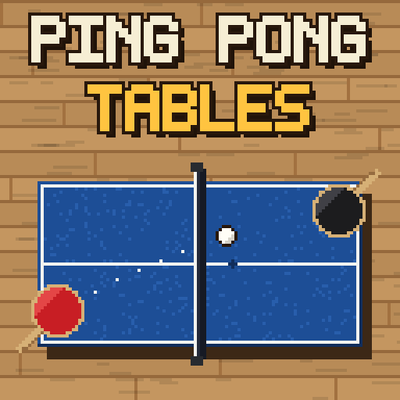
CurseForge · Minecraft mod
Ping Pong Tables 🏓
Ping. Pong. Point! Real table tennis on a 3 x 5 or big 4 x 7 table: move your paddle with the mouse or swing it for real in VR, play singles or doubles against friends or bots, and dye the tables and paddles any colour.
Choose a version Pick your version below, then grab the matching file.
Quick answer
Which Ping Pong Tables 🏓 release should I use?
Latest stable file pingpong-forge-1.0.1+mc1.20.1.jar
Game version 1.20.1
Loader Forge
Ping Pong Tables 🏓 pingpong-forge-1.0.1+mc1.20.1.jar targets 1.20.1 with Forge. The project page does not say whether this file belongs on the client, dedicated server, or both. No extra mods listed for this file.
Where it goes
Is Ping Pong Tables 🏓 required on the client, server, or both?
The project page does not say whether this file belongs on the client, dedicated server, or both.
Client Source doesn’t say
Dedicated server Source doesn’t say
Loader for this release Forge
Required install it here Optional supported, not mandatory Not supported do not install here Source doesn’t say do not assume
The source does not explicitly classify this release as client-only or server-only.
What else does Ping Pong Tables 🏓 pingpong-forge-1.0.1+mc1.20.1.jar need?
pingpong-forge-1.0.1+mc1.20.1.jar. Change the file and its required mods may change too.
This file does not list any required mods. Do not add a library just because a different file uses it.
This file does not list any required or optional mods.
Before you install it
Add Ping Pong Tables 🏓 without breaking your instance.
Built for Ping Pong Tables 🏓 pingpong-forge-1.0.1+mc1.20.1.jar. Pick another file and the loader, install side or required mods may change.
- 01
Stick to this file
Use pingpong-forge-1.0.1+mc1.20.1.jar. It targets 1.20.1 with Forge; another release may have different loader, side or dependency requirements.
- 02
Bring the mods it needs
This file does not list any required mods. Do not add a library just because a different file uses it.
- 03
Put it on the correct side
The project page does not say whether this file belongs on the client, dedicated server, or both.
- 04
Pick the file you checked
Use the “Get this file” button beside pingpong-forge-1.0.1+mc1.20.1.jar. It opens that exact file at the source.
About this project
What does Ping Pong Tables 🏓 add?
Ping Pong Tables
Real table tennis in Minecraft, played on the table itself, not in a menu. Take on a friend, team up for doubles, or play the bots on Easy, Medium or Hard.
Take a seat and the camera drops in behind your end of the table. The ball arcs over the net, kisses the table with a pok, and comes at you. Get your paddle in its way and push through it: a gentle touch drops it short, a hard push sends it skidding off the far end, and catching it off-centre angles it away from your opponent. Every bounce, net cord and miss is real physics, and everyone standing round the table watches the same rally.
Features
- Two tables: the Ping Pong Table (3 x 5 blocks) and the Large Ping Pong Table (4 x 7) for longer rallies.
- Singles or doubles. Any seat can be a player or a bot, so play one on one, you and a friend against two bots, or sit back and watch four bots go at it.
- Bots on Easy, Medium or Hard. They read the ball, move their paddles, go for the lines and make mistakes like anyone else. They hit with exactly the same controls you do.
- Mouse play: the mouse moves your paddle around your end of the table, and how you push it decides the shot.
- VR play with Vivecraft: the paddle is in your hand. Swing it for real and feel every hit through the controller.
- Proper rules: games to 11 (win by two), serves in twos, lets, doubles serving right half to right half, partners hitting in turn, and one game, best of 3 or best of 5.
- Dye any table to any of the sixteen colours. Tables start out tournament blue.
- Seventeen paddles: the classic red-and-black, and one in every dye colour. Hold your favourite when you sit down and that's the one you play with.
- A scoreboard in the top right corner for players and anyone watching close by, with what to do next while you play.
- Sounds for every paddle hit, bounce, net cord and ball skittering away across the floor.
Getting started
| Item | Recipe |
|---|---|
| Ping Pong Table | 3 string on top, 3 planks in the middle, a stick in each bottom corner |
| Large Ping Pong Table | 3 string on top, 3 planks in the middle, a log in each bottom corner |
| Paddle (red and black) | Any planks, a stick, red dye and black dye |
| Coloured Paddle | Any planks, a stick and a dye |
| Re-colour a paddle | Any paddle and a dye |
The tables are in the Functional Blocks creative tab and the paddles in Tools & Utilities.
Place a table and it runs away from you, its near end centred on the block you click. It needs 3 x 5 (or 4 x 7) free blocks. Right-click it with a dye to colour the top.
How to play
- Hold the paddle you want to play with and right-click the table.
- Choose Singles or Doubles, One game, Best of 3 or Best of 5, and the bots' level.
- Press Sit here on a seat. Press Add bot on any others, or just press Start match: bots take every empty seat.
| Control | Does |
|---|---|
| Mouse left / right | Moves your paddle across your end of the table |
| Mouse forward / back | Moves your paddle towards / away from the net |
| Paddle in the ball's path | Sends it back gently |
| Push the mouse forward as the ball reaches the paddle | Hits it harder: faster and deeper (too hard and it's long) |
| Ball off-centre on the paddle, or a sideways sweep as you hit | Aims it left or right |
| Left click | Tosses the ball up to serve. Then hit it as it comes down |
| Sneak | The table menu: paddle speed, camera distance, leave your seat |
You move the paddle yourself; only its height follows the ball, since a mouse has just two directions. Your character walks along behind it. Your paddle only hits when it's your turn and the ball has bounced on your side, so you can't spoil a point by touching it early.
Playing in VR
With Vivecraft 1.3 or newer, sit at a table and the paddle is in your hand, going exactly where your controller goes.
- Swing through the ball to hit it. The harder you swing, the harder it goes.
- Turn the paddle's face to aim. Either face hits, so forehands and backhands both work.
- The controller buzzes every time you make contact.
- To serve, the ball sits in your other hand: pull a trigger to toss it up, then swing.
- Pick which hand holds the paddle in the table menu (Main hand or Off hand).
The headset stays your camera and you move as you normally do. Nobody seated at a table can break it while a match is on, so a wild swing into it is safe.
The rules
- First to 11 points, won by two. Each player serves two points in a row, then one each from 10-all.
- A serve bounces on the server's side first, then the receiver's. If it clips the net and still lands in, it's a let: serve again.
- In doubles the serve goes from the server's right half to the receiver's right half, the serve passes round all four players, and partners take turns to hit.
- A ball that goes out, into the net, or bounces twice on your side is your opponent's point.
- Leave mid-match and a bot takes your seat. Wander off for long and a bot takes over too. If every player leaves, the match ends.
Versions
| Loader | Minecraft | Needs |
|---|---|---|
| Forge | 1.20.1 | Forge 47 or newer |
| Fabric | 1.20.1 | Fabric Loader 0.14.21+, Fabric API |
| NeoForge | 1.21.1 | NeoForge 21.1 or newer |
| Fabric | 1.21.1 | Fabric Loader 0.16+, Fabric API |
| NeoForge | 26.1, 26.2, 26.3 | One file for all three, full releases only |
| Fabric | 26.1, 26.2, 26.3 | One file for all three, full releases only; Fabric Loader 0.18.4+, Fabric API |
Install it on both the server and every client. It works in single player and on multiplayer servers.
Good to know
- Vivecraft is optional. Ping Pong Tables plays the same with the mouse without it.
- Your paddle speed, camera distance and VR paddle hand are your own settings, kept in
config/pingpong-client.properties. - You're welcome to use it in modpacks.
Also by FunkyMonkey95
If you like this, try Pool Table, Foosball Table, Darts and Pinball Machines.
Project description from CurseForge.
Pick your setup
Ping Pong Tables 🏓 by Minecraft version and loader
Choose the version and loader you play, then open the matching release.
Minecraft version
26.2
2 loader buildsMinecraft version
26.1.2
2 loader buildsMinecraft version
26.1.1
2 loader buildsMinecraft version
26.1
2 loader buildsMinecraft version
1.21.1
2 loader buildsMinecraft version
1.20.1
2 loader buildsCheck the dependencies, then try the file in a copied instance before changing a world you care about.
Recent files
Ping Pong Tables 🏓 versions and loaders
pingpong-forge-1.0.1+mc1.20.1.jar
pingpong-forge-1.0.1-mc1.20.1.jar
29 Nov 2026
Client Source doesn’t say Server Source doesn’t say Dependencies No extras listed Listed on Release listing
Check the 1.20.1 · Forge setup 1.20.1Forge release
pingpong-neoforge-1.0.1+mc1.21.1.jar
pingpong-neoforge-1.0.1-mc1.21.1.jar
29 Nov 2026
Client Source doesn’t say Server Source doesn’t say Dependencies No extras listed Listed on Release listing
Check the 1.21.1 · NeoForge setup 1.21.1NeoForge release
pingpong-neoforge-26-1.0.1.jar
29 Nov 2026
Client Source doesn’t say Server Source doesn’t say Dependencies No extras listed Listed on Release listing
Check the 26.3 · NeoForge setup NeoForge26.126.1.126.1.2 release
pingpong-fabric-26-1.0.1.jar
29 Nov 2026
Client Source doesn’t say Server Source doesn’t say Dependencies 1 required · 1 unchecked Listed on Release listing
Check the 26.3 · Fabric setup Fabric26.126.1.126.1.2 release
pingpong-fabric-1.0.1+mc1.20.1.jar
pingpong-fabric-1.0.1-mc1.20.1.jar
29 Nov 2026
Client Source doesn’t say Server Source doesn’t say Dependencies 1 required · 1 unchecked Listed on Release listing
Check the 1.20.1 · Fabric setup Fabric1.20.1 release
pingpong-fabric-1.0.1+mc1.21.1.jar
pingpong-fabric-1.0.1-mc1.21.1.jar
29 Nov 2026
Client Source doesn’t say Server Source doesn’t say Dependencies 1 required · 1 unchecked Listed on Release listing
Check the 1.21.1 · Fabric setup Fabric1.21.1 release
pingpong-fabric-1.0.0+mc1.21.1.jar
pingpong-fabric-1.0.0-mc1.21.1.jar
21 Nov 2026
Client Source doesn’t say Server Source doesn’t say Dependencies 1 required · 1 unchecked Listed on Release listing
Check the 1.21.1 · Fabric setup Fabric1.21.1 release
pingpong-fabric-1.0.0+mc1.20.1.jar
pingpong-fabric-1.0.0-mc1.20.1.jar
21 Nov 2026
Client Source doesn’t say Server Source doesn’t say Dependencies 1 required · 1 unchecked Listed on Release listing
Check the 1.20.1 · Fabric setup Fabric1.20.1 release
pingpong-fabric-26-1.0.0.jar
21 Nov 2026
Client Source doesn’t say Server Source doesn’t say Dependencies 1 required · 1 unchecked Listed on Release listing
Check the 26.3 · Fabric setup Fabric26.126.1.126.1.2 release
pingpong-forge-1.0.0+mc1.20.1.jar
pingpong-forge-1.0.0-mc1.20.1.jar
21 Nov 2026
Client Source doesn’t say Server Source doesn’t say Dependencies No extras listed Listed on Release listing
Check the 1.20.1 · Forge setup 1.20.1Forge release
pingpong-neoforge-26-1.0.0.jar
21 Nov 2026
Client Source doesn’t say Server Source doesn’t say Dependencies No extras listed Listed on Release listing
Check the 26.3 · NeoForge setup NeoForge26.126.1.126.1.2 release
pingpong-neoforge-1.0.0+mc1.21.1.jar
pingpong-neoforge-1.0.0-mc1.21.1.jar
21 Nov 2026
Client Source doesn’t say Server Source doesn’t say Dependencies No extras listed Listed on Release listing
Check the 1.21.1 · NeoForge setup 1.21.1NeoForge release
Looking for an older file? The official CurseForge project page is in Resources.
 mod
CurseForge + Modrinth · Minecraft
RPG Items Tiers
Adds a tier-quality system, item leveling, runic table for reroll attributes and more!
 mod
GitHub · Minecraft
modpacks-ch-github-test
Disposable public fixture for testing the Modpacks.ch GitHub catalogue flow
 mod
CurseForge · Minecraft
Heritage Hens
Chickens with genes. Breed them, collect the egg colors and hatch the eggs. About 1 in 40 chicks comes out golden.