Minecraft version
Back to mods 
CurseForge · Minecraft mod
Field Note's Menus
menu library for my modpack
Choose a version Pick your version below, then grab the matching file.
Quick answer
Which Field Note's Menus release should I use?
Latest stable file fieldnotes_menus-neoforge-1.21.1-1.1.0.jar
Game version 1.21.1
Loader NeoForge
Field Note's Menus fieldnotes_menus-neoforge-1.21.1-1.1.0.jar targets 1.21.1 with NeoForge. The project page does not say whether this file belongs on the client, dedicated server, or both. No extra mods listed for this file.
Where it goes
Is Field Note's Menus required on the client, server, or both?
The project page does not say whether this file belongs on the client, dedicated server, or both.
Client Source doesn’t say
Dedicated server Source doesn’t say
Loader for this release NeoForge
Required install it here Optional supported, not mandatory Not supported do not install here Source doesn’t say do not assume
The source does not explicitly classify this release as client-only or server-only.
What else does Field Note's Menus fieldnotes_menus-neoforge-1.21.1-1.1.0.jar need?
fieldnotes_menus-neoforge-1.21.1-1.1.0.jar. Change the file and its required mods may change too.
This file does not list any required mods. Do not add a library just because a different file uses it.
This file does not list any required or optional mods.
Before you install it
Add Field Note's Menus without breaking your instance.
Built for Field Note's Menus fieldnotes_menus-neoforge-1.21.1-1.1.0.jar. Pick another file and the loader, install side or required mods may change.
- 01
Stick to this file
Use fieldnotes_menus-neoforge-1.21.1-1.1.0.jar. It targets 1.21.1 with NeoForge; another release may have different loader, side or dependency requirements.
- 02
Bring the mods it needs
This file does not list any required mods. Do not add a library just because a different file uses it.
- 03
Put it on the correct side
The project page does not say whether this file belongs on the client, dedicated server, or both.
- 04
Pick the file you checked
Use the “Get this file” button beside fieldnotes_menus-neoforge-1.21.1-1.1.0.jar. It opens that exact file at the source.
About this project
What does Field Note's Menus add?

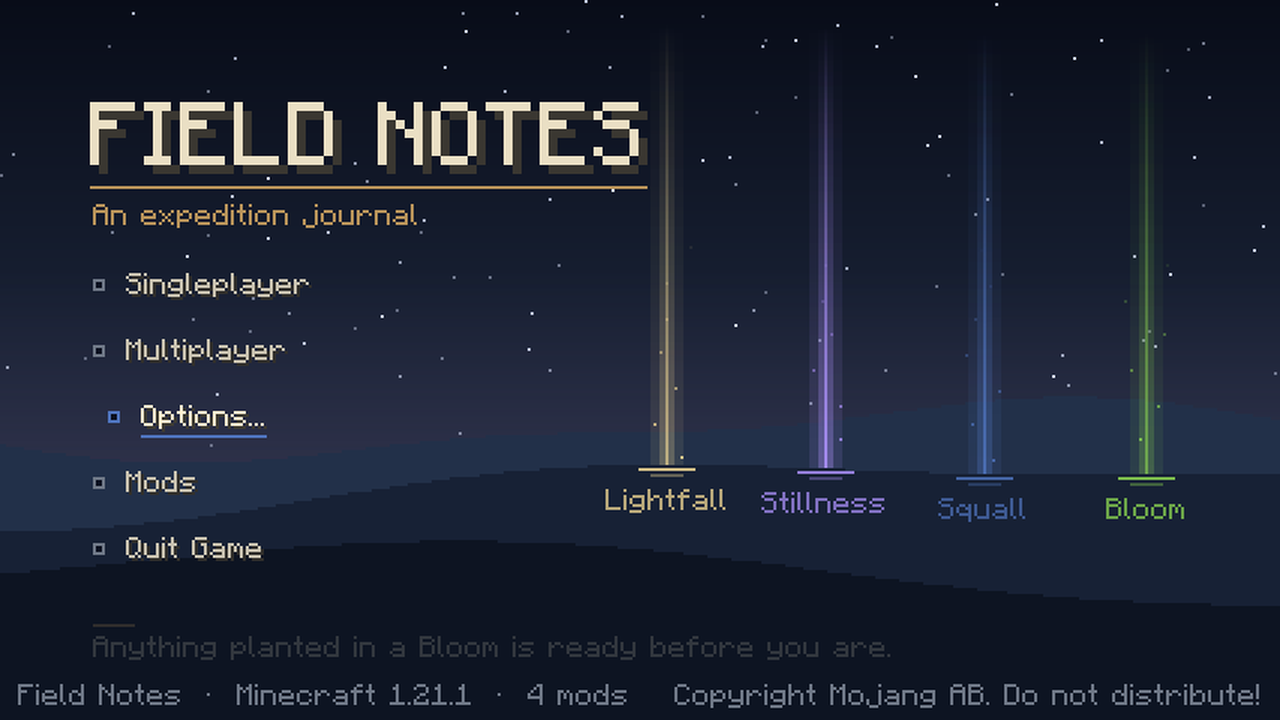
This is the look of the Field Notes modpack outside the world. It was made for that pack, and it works on its own if you just like the style.
What it changes
- Title screen. A dusk landscape with four columns of light on the horizon, and the menu written down the left like a page of notes. If you have a world, the top line continues the one you played last.
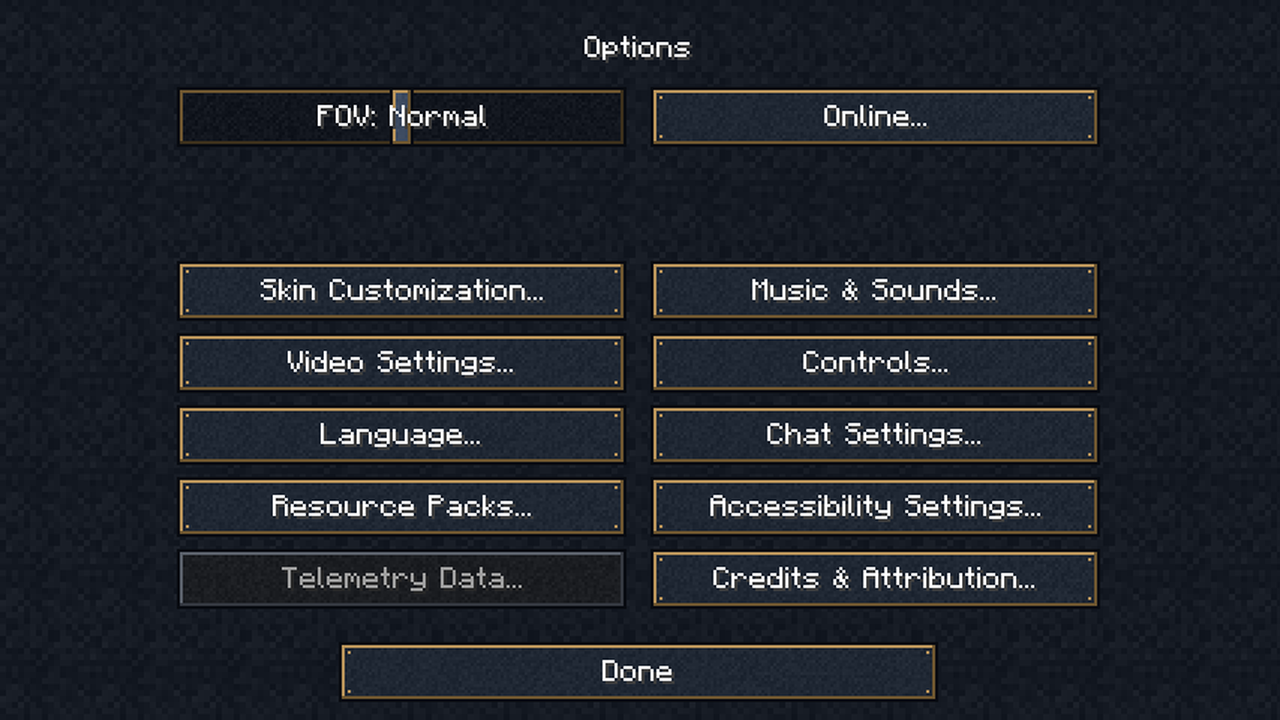
- Menu skin. Buttons, sliders, text boxes, backgrounds and dividers become dark canvas with brass edges, so the options, pause and world screens all match.
- Pause menu. A small header with the day count and the biome you are standing in.
- Tooltips. Dark with a brass border.
Good to know
- Client only. Servers do not need it and will ignore it.
- It replaces the vanilla title screen. Mods that add their own buttons to the vanilla title screen will not show them here; the Mods list is still one of the entries.
- Screens that draw their own buttons keep their own look.
- No settings and no commands.
Project description from CurseForge.
Pick your setup
Field Note's Menus by Minecraft version and loader
Choose the version and loader you play, then open the matching release.
Check the dependencies, then try the file in a copied instance before changing a world you care about.
Recent files
Field Note's Menus versions and loaders
fieldnotes_menus-neoforge-1.21.1-1.1.0.jar
22 Nov 2026
Client Source doesn’t say Server Source doesn’t say Dependencies No extras listed Listed on Release listing
Check the 1.21.1 · NeoForge setup 1.21.1NeoForge release
fieldnotes_menus-neoforge-1.21.1-1.0.0.jar
21 Nov 2026
Client Source doesn’t say Server Source doesn’t say Dependencies No extras listed Listed on Release listing
Check the 1.21.1 · NeoForge setup 1.21.1NeoForge release
Looking for an older file? The official CurseForge project page is in Resources.
 mod
CurseForge · Minecraft
BLib: Resurrection
Cloned with permission. Continuation of the Blib Library. Dependency of AVP mods.
 mod
CurseForge · Minecraft
ProjectE Addon (TTO Tweaks)
ProjectE Addon (TTO Tweaks) is a addon for ProjectE and Transmutation Table Overhaul that adds missing quality-of-life features to the both mods.
 mod
CurseForge + Modrinth · Minecraft
Dynamic Trees - BetterEnd
Compatibility addon between Dynamic Trees and BetterEnd