Minecraft version
Back to mods 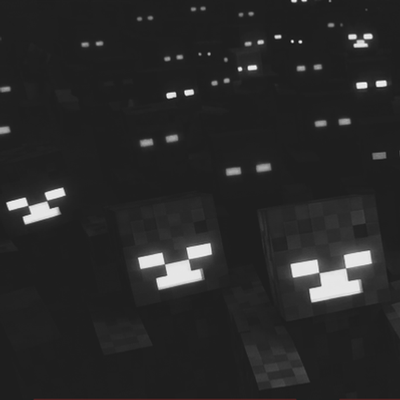
CurseForge · Minecraft mod
Zombie Tide
Inspired by the periodic assault mechanic in the game *7 Days to Die*, Zombie Tide introduces "zombie horde" events.
Choose a version Pick your version below, then grab the matching file.
Quick answer
Which Zombie Tide release should I use?
Latest stable file enik_zombietide-0.2.141.jar
Game version 1.21.1
Loader NeoForge
Zombie Tide enik_zombietide-0.2.141.jar targets 1.21.1 with NeoForge. The project page does not say whether this file belongs on the client, dedicated server, or both. No extra mods listed for this file.
Where it goes
Is Zombie Tide required on the client, server, or both?
The project page does not say whether this file belongs on the client, dedicated server, or both.
Client Source doesn’t say
Dedicated server Source doesn’t say
Loader for this release NeoForge
Required install it here Optional supported, not mandatory Not supported do not install here Source doesn’t say do not assume
The source does not explicitly classify this release as client-only or server-only.
What else does Zombie Tide enik_zombietide-0.2.141.jar need?
enik_zombietide-0.2.141.jar. Change the file and its required mods may change too.
This file does not list any required mods. Do not add a library just because a different file uses it.
This file does not list any required or optional mods.
Before you install it
Add Zombie Tide without breaking your instance.
Built for Zombie Tide enik_zombietide-0.2.141.jar. Pick another file and the loader, install side or required mods may change.
- 01
Stick to this file
Use enik_zombietide-0.2.141.jar. It targets 1.21.1 with NeoForge; another release may have different loader, side or dependency requirements.
- 02
Bring the mods it needs
This file does not list any required mods. Do not add a library just because a different file uses it.
- 03
Put it on the correct side
The project page does not say whether this file belongs on the client, dedicated server, or both.
- 04
Pick the file you checked
Use the “Get this file” button beside enik_zombietide-0.2.141.jar. It opens that exact file at the source.
About this project
What does Zombie Tide add?
Overview
A periodic zombie horde mod inspired by 7 Days to Die: At regular intervals, swarms of zombies will lock onto you (or villagers) at dusk and pursue relentlessly. They will disperse at sunrise, but any zombies that remain will add to the pressure of the next wave.
Features
- Periodic Zombie Hordes: Includes both player-targeted and villager-targeted hordes; configurable settings for intervals, horde size, spawn radius, and wave pacing.
- Accumulation System: Surviving zombies from a previous wave can carry over to the next (supports three modes: cumulative, previous-wave-only, or no carry-over).
- Biome-Specific Spawning: Desert → Husks; Swamps → Drowned/Zombies; Other biomes → Zombies. Additionally, there is a 5% chance for any spawned zombie to be a zombie villager.
- Comprehensive Alerts: Includes dawn reminders, on-screen titles and alarms at dusk, dispersal sound effects at sunrise, and wave-specific background music (audible only to the targeted player).
- In-Game Settings Menu: Features 6 tabs (Player / Villager / Spawning & Performance / World Rules / Alerts / HUD) with real-time updates and a full-page background image; the mod’s cover art and current version number are displayed in the bottom-left corner.
- HUD: Displays "DAY X" in the top-left corner, with the ability to show information regarding zombie hordes targeting nearby villagers.
- Administrative Commands:
/zombietide(requires OP Level 2).
概述
一个受《7 Days to Die》启发的周期性尸潮模组:每隔一段时间,成群的僵尸会在黄昏锁定你(或村民)穷追不舍;撑到日出它们会退散,没清掉的会变成下一波额外的压力。
特性
- 周期性尸潮:玩家尸潮与村民尸潮;间隔、数量、半径、分批节奏均可配置
- 血债系统:上一波幸存的僵尸会累积到下一波(累积制 / 只记上波 / 不结转三种模式)
- 按生物群系生成:沙漠→尸壳、沼泽→溺尸/僵尸、其他→僵尸,另有 5% 概率僵尸村民
- 完整警告:清晨提醒、黄昏触发标题与警报、日出四散音效、波次背景音乐(仅触发者能听到)
- 游戏内设置页:6 个标签页(玩家 / 村民 / 生成性能 / 世界规则 / 警告提示 / HUD),即时生效,带整页壁纸;左下角显示模组封面与当前运行版本号
- HUD:左上角
DAY X,可显示附近村民的尸潮信息 - 管理命令:
/zombietide(OP Level 2)
Project description from CurseForge.
Pick your setup
Zombie Tide by Minecraft version and loader
Choose the version and loader you play, then open the matching release.
Check the dependencies, then try the file in a copied instance before changing a world you care about.
Recent files
Zombie Tide versions and loaders
enik_zombietide-0.2.141.jar
29 Nov 2026
Client Source doesn’t say Server Source doesn’t say Dependencies No extras listed Listed on Release listing
Check the 1.21.1 · NeoForge setup 1.21.1NeoForge release
enik_zombietide-0.1.70.jar
22 Nov 2026
Client Source doesn’t say Server Source doesn’t say Dependencies No extras listed Listed on Release listing
Check the 1.21.1 · NeoForge setup 1.21.1NeoForge release
enik_zombietide-0.1.69.jar
22 Nov 2026
Client Source doesn’t say Server Source doesn’t say Dependencies No extras listed Listed on Release listing
Check the 1.21.1 · NeoForge setup 1.21.1NeoForge release
Looking for an older file? The official CurseForge project page is in Resources.
 mod
CurseForge + Modrinth · Minecraft
Goety - The Dark Arts
Perform necromancy and dark rituals using the power of souls. Highly configurable.
 mod
CurseForge + Modrinth · Minecraft
Plague's Chat Timestamps
A Minecraft mod that adds customizable timestamps to chat!
 mod
CurseForge + Modrinth · Minecraft
Additional Enchanted Miner
This mod adds some miners like BC's quarry.