Minecraft version
Back to mods 
CurseForge · Minecraft mod
Lightweight Item Preview
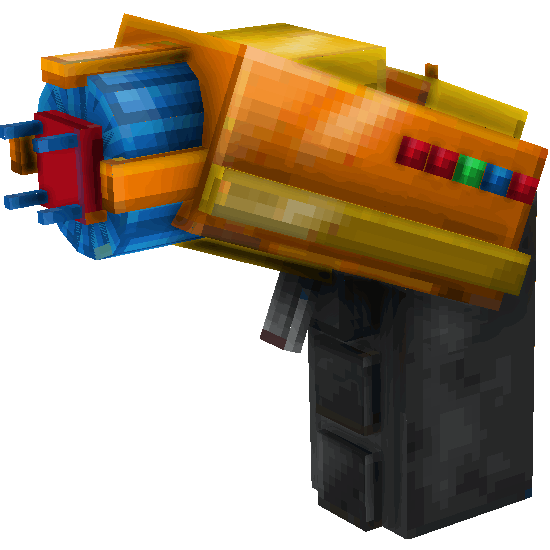
Caches static inventory previews for supported Immersive Engineering railguns.
Choose a version Pick your version below, then grab the matching file.
Quick answer
Which Lightweight Item Preview release should I use?
Latest stable file 1.0
Game version 1.20.1
Loader Forge
Lightweight Item Preview 1.0 targets 1.20.1 with Forge. The project page does not say whether this file belongs on the client, dedicated server, or both. No extra mods listed for this file.
Where it goes
Is Lightweight Item Preview required on the client, server, or both?
The project page does not say whether this file belongs on the client, dedicated server, or both.
Client Source doesn’t say
Dedicated server Source doesn’t say
Loader for this release Forge
Required install it here Optional supported, not mandatory Not supported do not install here Source doesn’t say do not assume
The source does not explicitly classify this release as client-only or server-only.
What else does Lightweight Item Preview 1.0 need?
1.0. Change the file and its required mods may change too.
This file does not list any required mods. Do not add a library just because a different file uses it.
This file does not list any required or optional mods.
Before you install it
Add Lightweight Item Preview without breaking your instance.
Built for Lightweight Item Preview 1.0. Pick another file and the loader, install side or required mods may change.
- 01
Stick to this file
Use 1.0. It targets 1.20.1 with Forge; another release may have different loader, side or dependency requirements.
- 02
Bring the mods it needs
This file does not list any required mods. Do not add a library just because a different file uses it.
- 03
Put it on the correct side
The project page does not say whether this file belongs on the client, dedicated server, or both.
- 04
Pick the file you checked
Use the “Get this file” button beside 1.0. It opens that exact file at the source.
About this project
What does Lightweight Item Preview add?
English
Lightweight Item Preview caches supported inventory item previews on the Forge 1.20.1 client. Version 1.0 supports the Immersive Engineering 1.20.1-10.2.0-183 railgun and its four standard upgrade appearances. Original rendering remains available through the Forge Mods configuration screen. Low-resolution thumbnails can soften fine details. Item counts, durability, cooldowns, held items and world rendering follow the game’s normal paths. Requires Java 17. The server does not need this mod.
In a fixed 54-slot benchmark with ImmediatelyFast installed, p95 slot-draw time dropped from 5.67–6.61 ms to 0.49–0.67 ms. Overall frame timing remained similar in this test. Generative AI was used in development and listing copy.
简体中文
复杂物品轻量显示为 Forge 1.20.1 客户端的已适配物品缓存静态预览。首版支持沉浸工程 1.20.1-10.2.0-183 磁轨炮的四种升级外观,原版背包、创造物品栏和普通箱子可用。附魔、未知外观和替换资产保留原渲染。手持、掉落、数量、耐久和冷却沿用游戏流程。
在「模组 → 复杂物品轻量显示 → 配置」内选择原样、静态缓存或低分辨率缩略图。总开关可立即回退。低分辨率模式会降低细边缘清晰度。
同装 ImmediatelyFast 的固定 54 格压力场景中,槽位绘制阶段 p95 从 5.67–6.61 ms 降到 0.49–0.67 ms。整体帧时间约 17.7–17.8 ms。这组数据仅对应该测试场景。需要 Java 17,服务端无需安装。
开发与项目文案使用了生成式 AI。页面的实机画面来自隔离客户端采集。
Project description from CurseForge.
Pick your setup
Lightweight Item Preview by Minecraft version and loader
Choose the version and loader you play, then open the matching release.
Check the dependencies, then try the file in a copied instance before changing a world you care about.
Recent files
Lightweight Item Preview versions and loaders
1.0
lightweight-item-gui-forge-1.20.1-1.0.jar
22 Nov 2026
Client Source doesn’t say Server Source doesn’t say Dependencies No extras listed Listed on Release listing
Check the 1.20.1 · Forge setup 1.20.1Forge release
Looking for an older file? The official CurseForge project page is in Resources.
 mod
CurseForge + Modrinth · Minecraft
Multi Builder Tool
Build Multiblocks with one click
 mod
CurseForge · Minecraft
geential
Instant co-op world hosting, friends & invites hub, custom profile switcher, 3D wardrobe studio (wings, capes, emotes, Mojang & .PNG skin importer), and weak-PC performance booster for Minecraft 1.20.1 (Forge & Fabric).
 mod
CurseForge · Minecraft
Smart Clean
SmartClean is an item cleaner and player-facing trash bin for Minecraft servers