Minecraft version
Back to mods 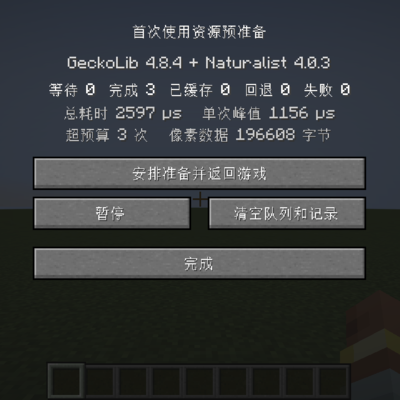
CurseForge · Minecraft mod
First Use Preparation
Prepare three Naturalist textures in idle frames and inspect their cost.
Choose a version Pick your version below, then grab the matching file.
Quick answer
Which First Use Preparation release matches 26.1.2 Forge?
Best match for your filters First Use Preparation 1.1.0 · Forge 26.1.2
Game version 26.1.2
Loader Forge
First Use Preparation 1.1.0 · Forge 26.1.2 targets 26.1.2 with Forge. The project page does not say whether this file belongs on the client, dedicated server, or both. No extra mods listed for this file.
Where it goes
Is First Use Preparation required on the client, server, or both?
The project page does not say whether this file belongs on the client, dedicated server, or both.
Client Source doesn’t say
Dedicated server Source doesn’t say
Loader for this release Forge
Required install it here Optional supported, not mandatory Not supported do not install here Source doesn’t say do not assume
The source does not explicitly classify this release as client-only or server-only.
What else does First Use Preparation 1.1.0 · Forge 26.1.2 need?
First Use Preparation 1.1.0 · Forge 26.1.2 on 26.1.2 Forge. Every mod below is checked against that same setup.
This file does not list any required mods. Do not add a library just because a different file uses it.
This file does not list any required or optional mods.
Before you install it
Add First Use Preparation without breaking your instance.
Built for First Use Preparation 1.1.0 · Forge 26.1.2 on 26.1.2 Forge. Pick another file and the loader, install side or required mods may change.
- 01
Stick to this file
Use First Use Preparation 1.1.0 · Forge 26.1.2. It targets 26.1.2 with Forge; another release may have different loader, side or dependency requirements.
- 02
Bring the mods it needs
This file does not list any required mods. Do not add a library just because a different file uses it.
- 03
Put it on the correct side
The project page does not say whether this file belongs on the client, dedicated server, or both.
- 04
Pick the file you checked
Use the “Get this file” button beside First Use Preparation 1.1.0 · Forge 26.1.2. It opens that exact file at the source.
About this project
What does First Use Preparation add?
First Use Preparation is an opt-in client utility for Minecraft 1.20.1 with Forge and Java 17. Its adapter is tested with GeckoLib 4.8.4 and Naturalist 4.0.3.
Enter a world, bind the First Use Preparation status key under Controls, and select “Schedule and return to game.” The mod checks the original rhinoceros, giraffe and hippo textures and prepares eligible textures one per frame using Minecraft’s texture manager. The status screen shows the queue, cache hits and actual preparation cost. You can pause or clear the queue. Changed resource-pack textures follow Minecraft’s ordinary loading path.
In three pairs of local client runs, the three textures were registered before the animals appeared. The tests did not show a consistent frame-time improvement. This tool is for explicitly moving that work to a time you choose. No setup is required on the server.
AI-assisted development and listing text are disclosed. The project image is a crop of an actual in-game status screen.
Project description from CurseForge.
Pick your setup
First Use Preparation by Minecraft version and loader
Choose the version and loader you play, then open the matching release.
Minecraft version
26.2
1 loader buildMinecraft version
26.1.2
1 loader buildMinecraft version
1.21.11
1 loader buildMinecraft version
1.21.10
1 loader buildMinecraft version
1.21.9
1 loader buildMinecraft version
1.21.8
1 loader buildMinecraft version
1.21.7
1 loader buildMinecraft version
1.21.6
1 loader buildMinecraft version
1.21.5
1 loader buildMinecraft version
1.21.4
1 loader buildMinecraft version
1.21.3
1 loader buildShowing the newest 12 of 19 game versions. Older files are in the list below.
Check the dependencies, then try the file in a copied instance before changing a world you care about.
Recent files
First Use Preparation versions and loaders
First Use Preparation 1.1.0 · Forge 26.1.2
first-use-preparation-26.1.2-1.1.0.jar
23 Nov 2026
Client Source doesn’t say Server Source doesn’t say Dependencies No extras listed Listed on Release listing
Check the 26.1.2 · Forge setup Forge26.1.2 release
Looking for an older file? The official CurseForge project page is in Resources.
 mod
CurseForge · Minecraft
Menu Smooth
Client-side caching and bounded background tag searches for the creative inventory.
 mod
CurseForge · Minecraft
Combat Effect Budget
Preserves supported combat telegraphs and reduces decorative particles under load.
 mod
Modrinth · Minecraft
ConfigGuard
Automatic snapshots of your config folder with a line-by-line diff and one-click restore. Undo any config change, on the client or on a server.