Minecraft version
Back to mods 
CurseForge · Minecraft mod
Render Distance Plus
Automates Chunky + Voxy workflow with a in-game GUI without having the player to run commands manually.
Choose a version Pick your version below, then grab the matching file.
Quick answer
Which Render Distance Plus release matches 26.2 Quilt?
Best match for your filters Render Distance+.jar
Game version 1.21.8, 1.21.9, 1.21.10
Loader Fabric, Quilt
Render Distance Plus Render Distance+.jar targets 1.21.8, 1.21.9, 1.21.10 with Fabric, Quilt. The project page does not say whether this file belongs on the client, dedicated server, or both. No extra mods listed for this file.
Where it goes
Is Render Distance Plus required on the client, server, or both?
The project page does not say whether this file belongs on the client, dedicated server, or both.
Client Source doesn’t say
Dedicated server Source doesn’t say
Loader for this release Fabric, Quilt
Required install it here Optional supported, not mandatory Not supported do not install here Source doesn’t say do not assume
The source does not explicitly classify this release as client-only or server-only.
What else does Render Distance Plus Render Distance+.jar need?
Render Distance+.jar on 26.2 Quilt. Every mod below is checked against that same setup.
This file does not list any required mods. Do not add a library just because a different file uses it.
This file does not list any required or optional mods.
Before you install it
Add Render Distance Plus without breaking your instance.
Built for Render Distance Plus Render Distance+.jar on 26.2 Quilt. Pick another file and the loader, install side or required mods may change.
- 01
Stick to this file
Use Render Distance+.jar. It targets 1.21.8, 1.21.9, 1.21.10 with Fabric, Quilt; another release may have different loader, side or dependency requirements.
- 02
Bring the mods it needs
This file does not list any required mods. Do not add a library just because a different file uses it.
- 03
Put it on the correct side
The project page does not say whether this file belongs on the client, dedicated server, or both.
- 04
Pick the file you checked
Use the “Get this file” button beside Render Distance+.jar. It opens that exact file at the source.
About this project
What does Render Distance Plus add?
Render Distance+
Render Distance+ is a powerful Minecraft datapack that completely overhauls the default render distance by leveraging the power of Voxy and Chunky. This datapack 100% automates the Chunky chunk loading workflow, saving you a lot of continuous command inputs.
- Fully customizable directly in-game
- Performance-friendly background loading
- Requires no high-end hardware to run efficiently
- Works seamlessly on Survival & Hardcore without enabling cheats
- User-Friendly GUI designed for effortless configuration
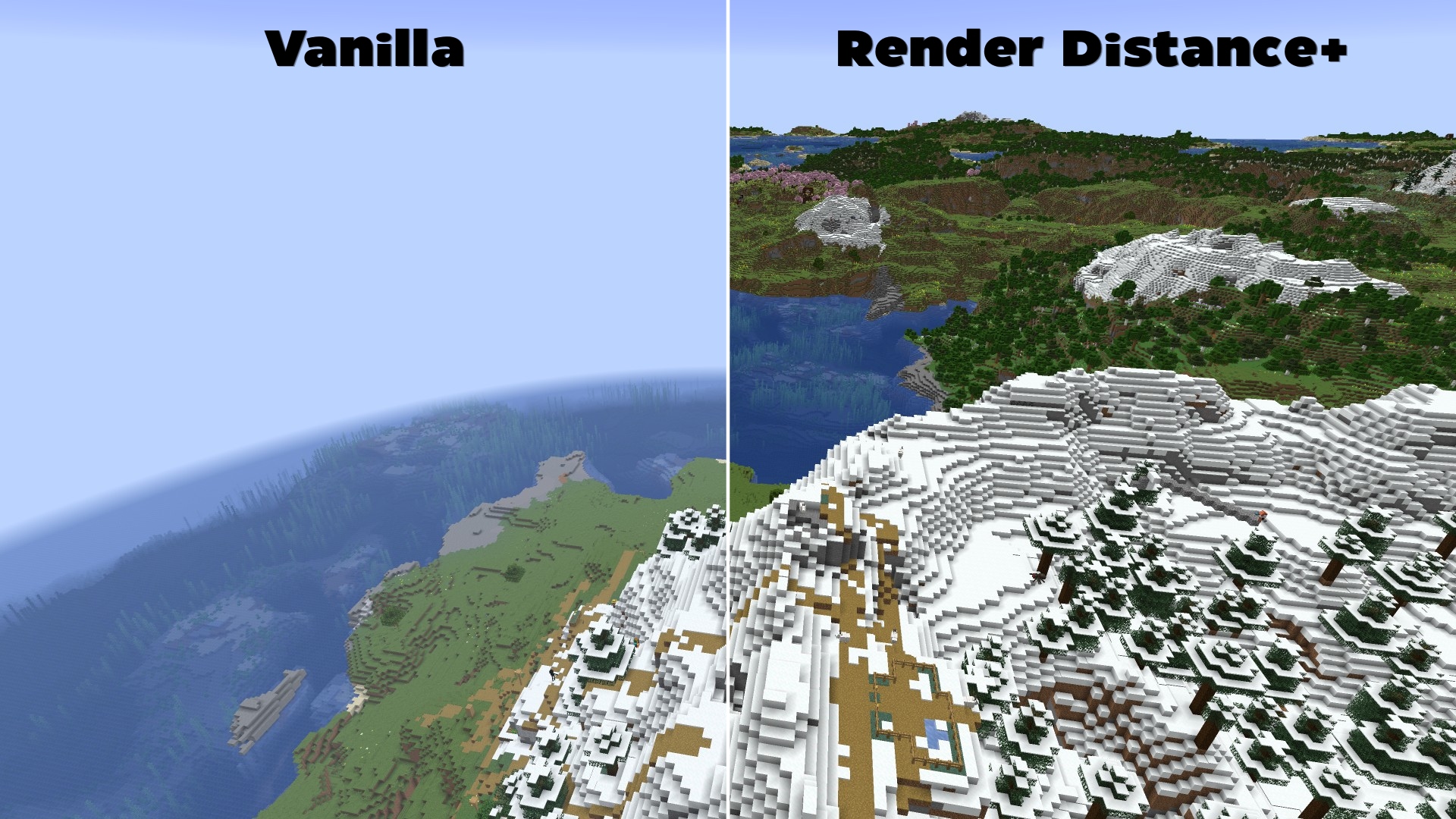
Features & Why Render Distance+ is Essential
To get the absolute most out of Voxy's rendering engine, users normally need to manually configure Chunky to pre-load chunks. Traditionally, this is a tedious and complex process involving multiple terminal commands, radius calculations, and constant server/world reloading.
Render Distance+ solves this problem entirely:
- 100% Automated Background Loading: The datapack dynamically handles all the heavy Chunky commands in the background while the player explores the world.
- Full Dimension Support: Works automatically across all vanilla dimensions (The Overworld, The Nether, and The End).
- In-Game Settings GUI: No need to edit config files. Change your generation speed, maximum target distance, and toggle features directly via an intuitive in-game interactive chat GUI.
How to Check if Render Distance+ is Installed Correctly
Once inside your world, open the chat and type: /reload
If the installation was successful, a custom text-based configuration GUI will immediately pop up in your chat, allowing you to begin your automated chunk-loading setup.
<details> <summary>Requirements (Mods)</summary>
- Chunky (Required for background generation)
- Voxy (Required for high render distances)
- Sodium (Required by Voxy)
</details>
🐛How to Report Issues
Please use the Issue Tracker or go to https://github.com/Kletterstein92/Render-Distance-Plus/issues to report any bugs or other errors
Project description from CurseForge.
Pick your setup
Render Distance Plus by Minecraft version and loader
Choose the version and loader you play, then open the matching release.
Minecraft version
26.2
2 loader buildsMinecraft version
26.1.2
2 loader buildsMinecraft version
26.1.1
2 loader buildsMinecraft version
26.1
2 loader buildsMinecraft version
1.21.11
2 loader buildsMinecraft version
1.21.10
2 loader buildsMinecraft version
1.21.9
2 loader buildsMinecraft version
1.21.8
2 loader buildsCheck the dependencies, then try the file in a copied instance before changing a world you care about.
Recent files
Render Distance Plus versions and loaders
Render Distance+.jar
Render-Distance.jar
22 Nov 2026
Client Source doesn’t say Server Source doesn’t say Dependencies No extras listed Listed on Release listing
Check the 26.2 · Quilt setup Fabric1.21.8Quilt1.21.9 release
Looking for an older file? The official CurseForge project page is in Resources.