Minecraft version
Back to mods 
CurseForge · Minecraft mod
Input Tweaks
Client-side Minecraft 1.21.x mod expanding the Key Binds screen with conflict management, priorities, radial menus, and cross-modpack profiles.
Choose a version Pick your version below, then grab the matching file.
Quick answer
Which Input Tweaks release matches 1.21.4 Forge?
Best match for your filters Input Tweaks Forge v1.0.0
Game version 1.21, 1.21.8, 1.21.5
Loader Forge
Input Tweaks Forge v1.0.0 targets 1.21, 1.21.8, 1.21.5 with Forge. The project page does not say whether this file belongs on the client, dedicated server, or both. No extra mods listed for this file.
Where it goes
Is Input Tweaks required on the client, server, or both?
The project page does not say whether this file belongs on the client, dedicated server, or both.
Client Source doesn’t say
Dedicated server Source doesn’t say
Loader for this release Forge
Required install it here Optional supported, not mandatory Not supported do not install here Source doesn’t say do not assume
The source does not explicitly classify this release as client-only or server-only.
What else does Input Tweaks Forge v1.0.0 need?
Input Tweaks Forge v1.0.0 on 1.21.4 Forge. Every mod below is checked against that same setup.
This file does not list any required mods. Do not add a library just because a different file uses it.
This file does not list any required or optional mods.
Before you install it
Add Input Tweaks without breaking your instance.
Built for Input Tweaks Forge v1.0.0 on 1.21.4 Forge. Pick another file and the loader, install side or required mods may change.
- 01
Stick to this file
Use Input Tweaks Forge v1.0.0. It targets 1.21, 1.21.8, 1.21.5 with Forge; another release may have different loader, side or dependency requirements.
- 02
Bring the mods it needs
This file does not list any required mods. Do not add a library just because a different file uses it.
- 03
Put it on the correct side
The project page does not say whether this file belongs on the client, dedicated server, or both.
- 04
Pick the file you checked
Use the “Get this file” button beside Input Tweaks Forge v1.0.0. It opens that exact file at the source.
About this project
What does Input Tweaks add?
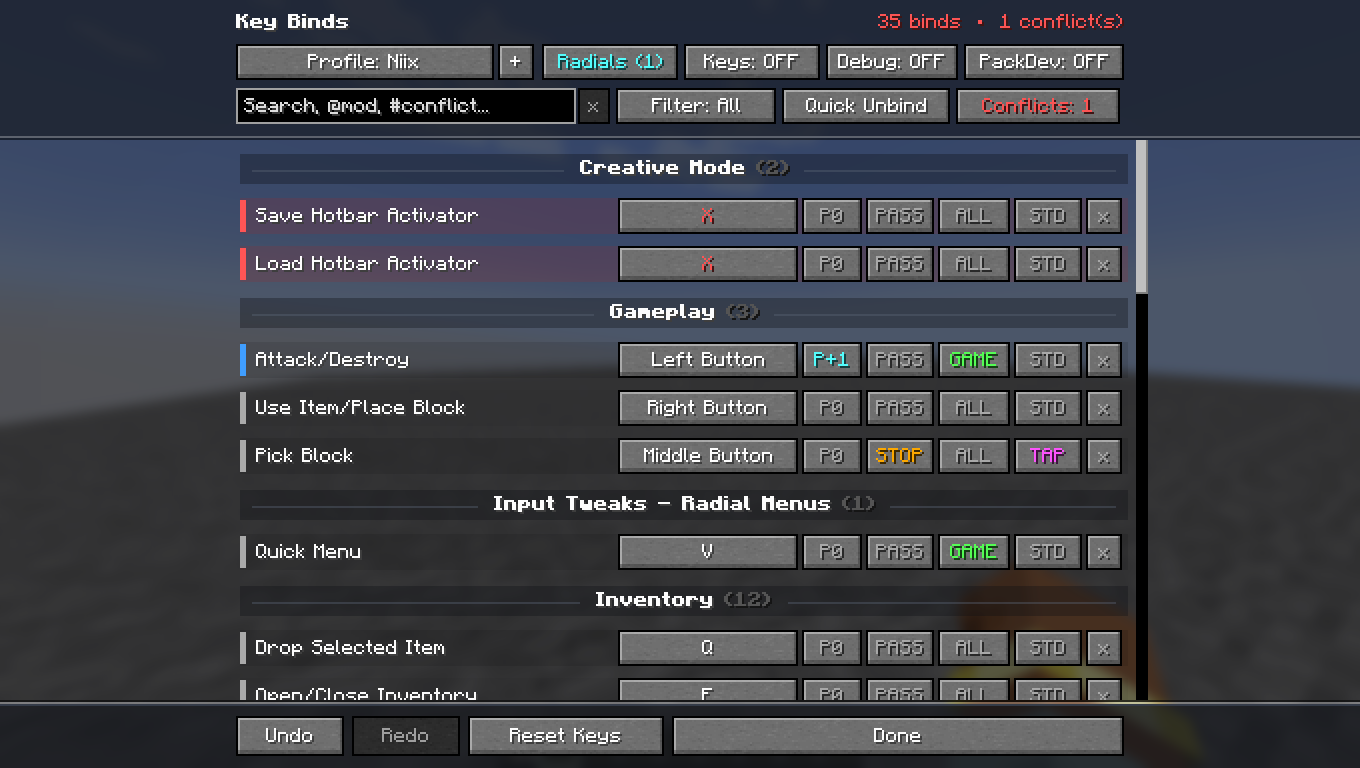
Input Tweaks is a client-side Minecraft mod for 1.21.x (Fabric & NeoForge) that expands the vanilla Key Binds screen with conflict management, priorities, contexts, trigger modes, visual radial menus, cross-modpack profiles, and tools for modpack creators.
It keeps the familiar layout of the vanilla Controls menu while adding practical tools for managing large modpacks on keyboard and mouse.
Features
Keybind Management & Conflict Handling
- Context-Aware Conflict Detection: Assign a context to any keybind (
ALL,GAME,GUI,RIDE,FLY,SNK). Keys that do not overlap (such as aGUIbind and anIN_GAMEbind, orTAPandHOLDon the same key) are not flagged as conflicts. - Priority Binds & Input Policy: Set a numeric priority (
P0,P+1,P-1, etc.) for binds sharing the same key, and choose betweenPASS(let lower-priority actions run too) orSTOP(consume the key press so lower-priority actions do not trigger). - Trigger Modes: Change how any keybind activates:
STD- Standard pressTAP- Quick tap (released within 240 ms)HOLD- Held key (held for at least 260 ms)2X- Double-tap (pressed twice within 320 ms)TOG- Forces any keybind to behave as a toggle
- Modifier Combos (Chords): Bind
Ctrl,Alt, orShiftcombined with any keyboard key or mouse button, while still allowing standalone modifier keys (such asLeft Shiftfor Sneak). - Quick Unbind: Click Quick Unbind and press any key or mouse button to unbind every action assigned to it at once.
- Conflict Wizard: Click Conflicts to step through real conflicting keys one by one.
- Undo / Redo & Safe Reset: Full
Ctrl+Z/Ctrl+Yhistory (up to 128 actions) and a 2-click confirmation on Reset All.
Visual Keyboard Heatmap
Toggle the interactive keyboard and mouse map (Keys: ON/OFF) above the controls list to see key usage at a glance:
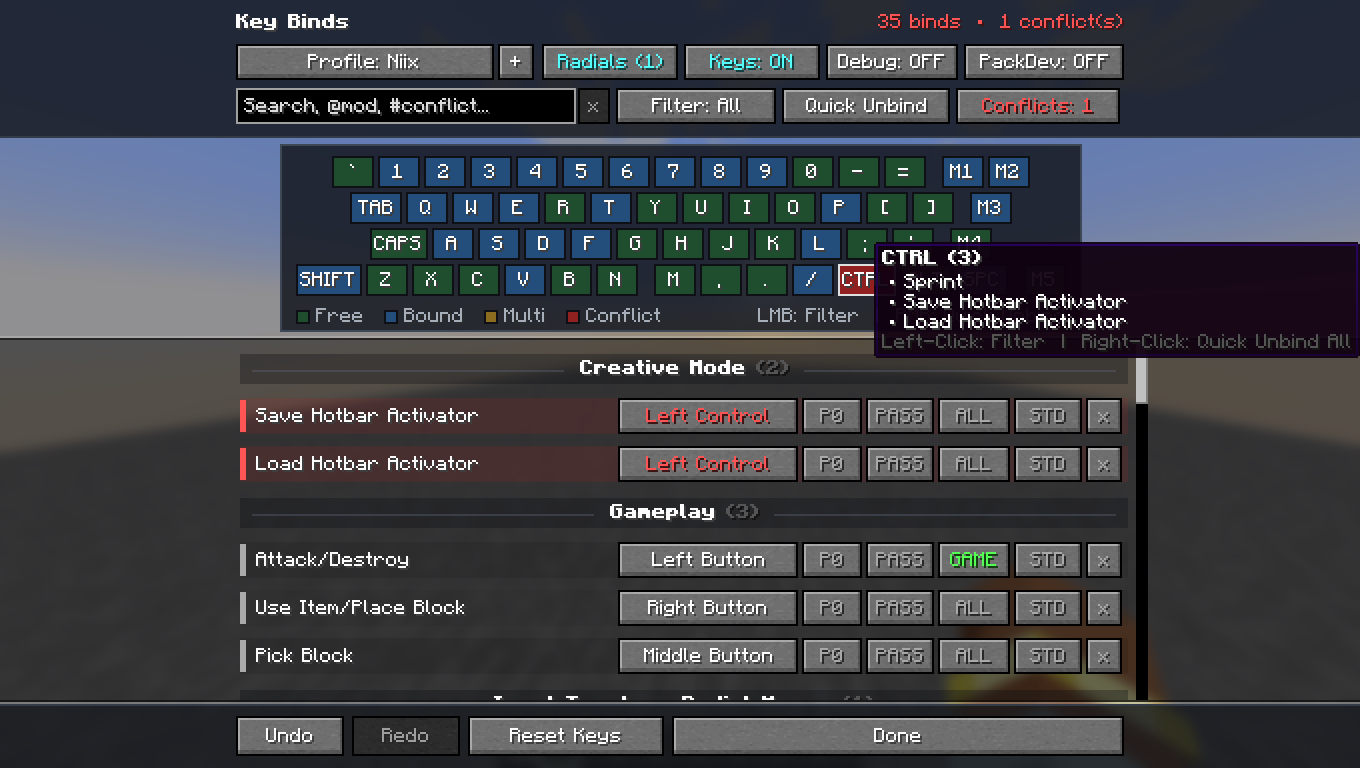
| Color | Meaning |
|---|---|
| Green | Free (no actions assigned) |
| Blue | Bound (single action) |
| Amber | Multi-context (multiple actions with no real conflict) |
| Red | Real conflict (overlapping contexts on the same key) |
- Left-Click a key to filter the list to that key.
- Right-Click a key to Quick Unbind all actions on it.
Radial Menus & In-Game Visual Editor
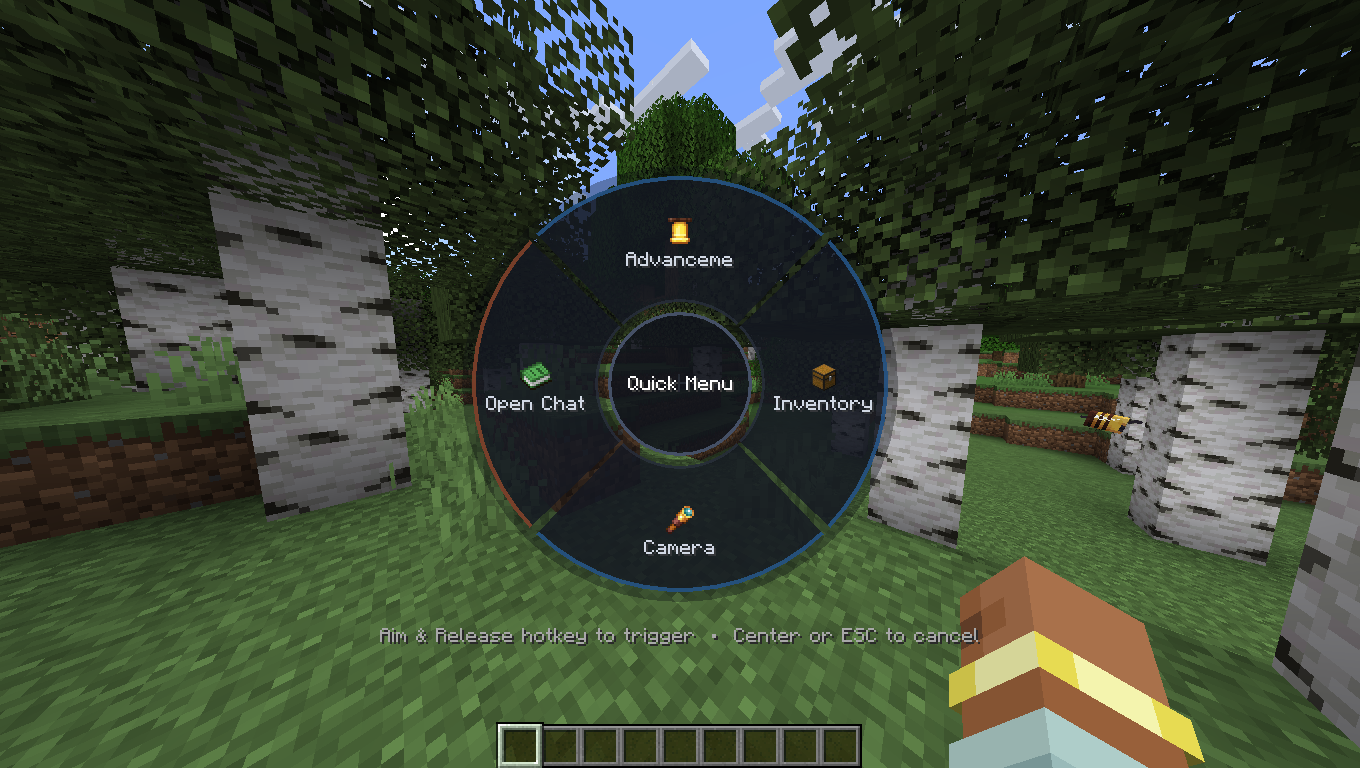
Group less-used keybinds (quest books, maps, menus, camera toggles) onto a single hotkey using circular radial menus:
- Circular Wheel Overlay: Animated wheel with item icons, colored slice borders, hover highlight, and a pointer arrow that follows the cursor.
- Two Activation Modes:
- Hold & Release: Hold the wheel hotkey, aim at a slice, and release to trigger.
- Toggle & Click: Press to open, left-click a slice to trigger (right-click or
ESCto cancel).
- Visual Editor (
Radialsbutton): Create and edit wheels (up to 12 slices each) with a live interactive circular preview, a searchable Keybind Picker, a searchable Item Icon Picker (supports vanilla and modded items), 8 accent colors, and a Test Wheel preview button. - Player & Modpack Scopes: Save personal wheels globally (My Radials) or author default wheels for a modpack (Pack Defaults).
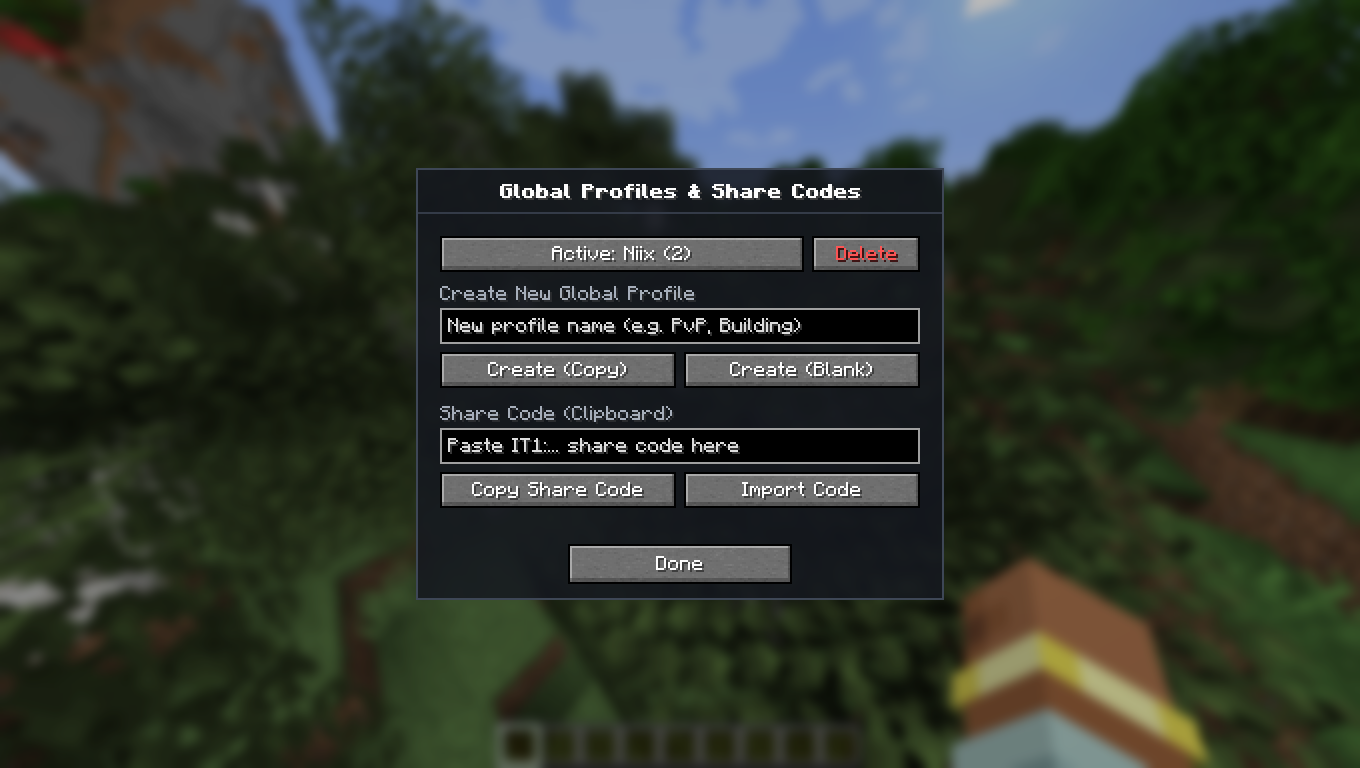
Global Profiles & Share Codes
- Cross-Modpack Global Profiles: Player profiles and personal radial menus are saved in your OS user configuration folder so they automatically appear in every modpack that includes Input Tweaks.
- Configuration Layering: Settings resolve cleanly in this order (higher overrides lower):
- Mod Default
- Modpack Rules (
config/inputtweaks/modpack_rules.json) - Global Profile (user config folder)
- Local Instance Override (
config/inputtweaks/local_overrides.json)
- Share Codes: Export or import any profile in one click as a compressed
IT1:...text code via clipboard.
Modpack Creator Tools (PackDev Mode)
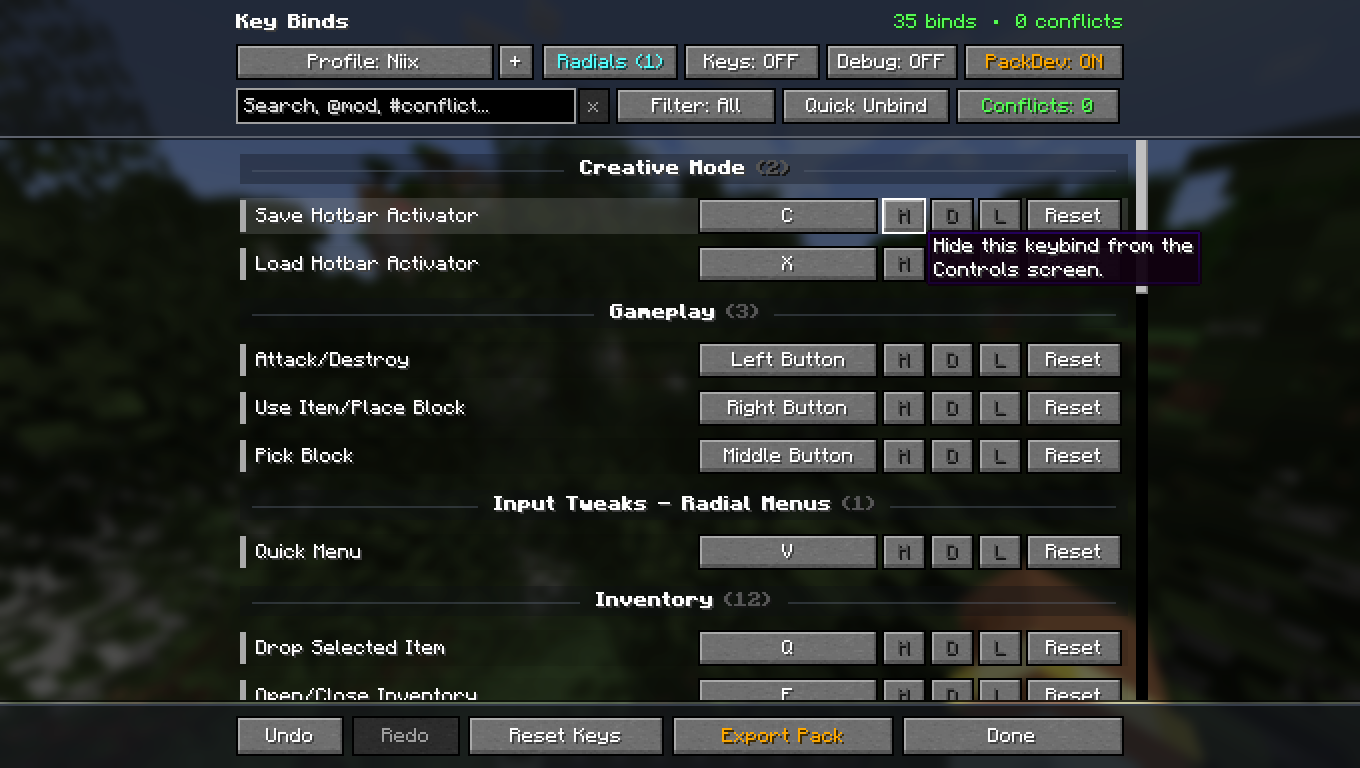
Toggle PackDev: ON in the Controls screen to manage noisy mod keybinds without editing JSON files by hand:
- Hide (
H): Hides a keybind from the Controls screen. - Hard-Disable (
D): Blocks a keybind completely in the input dispatcher. - Lock (
L): Prevents players from rebinding a keybind. - Export Pack: Saves all rules and Pack Default radial menus directly to
config/inputtweaks/modpack_rules.json.
Diagnostics & Usage Tracking
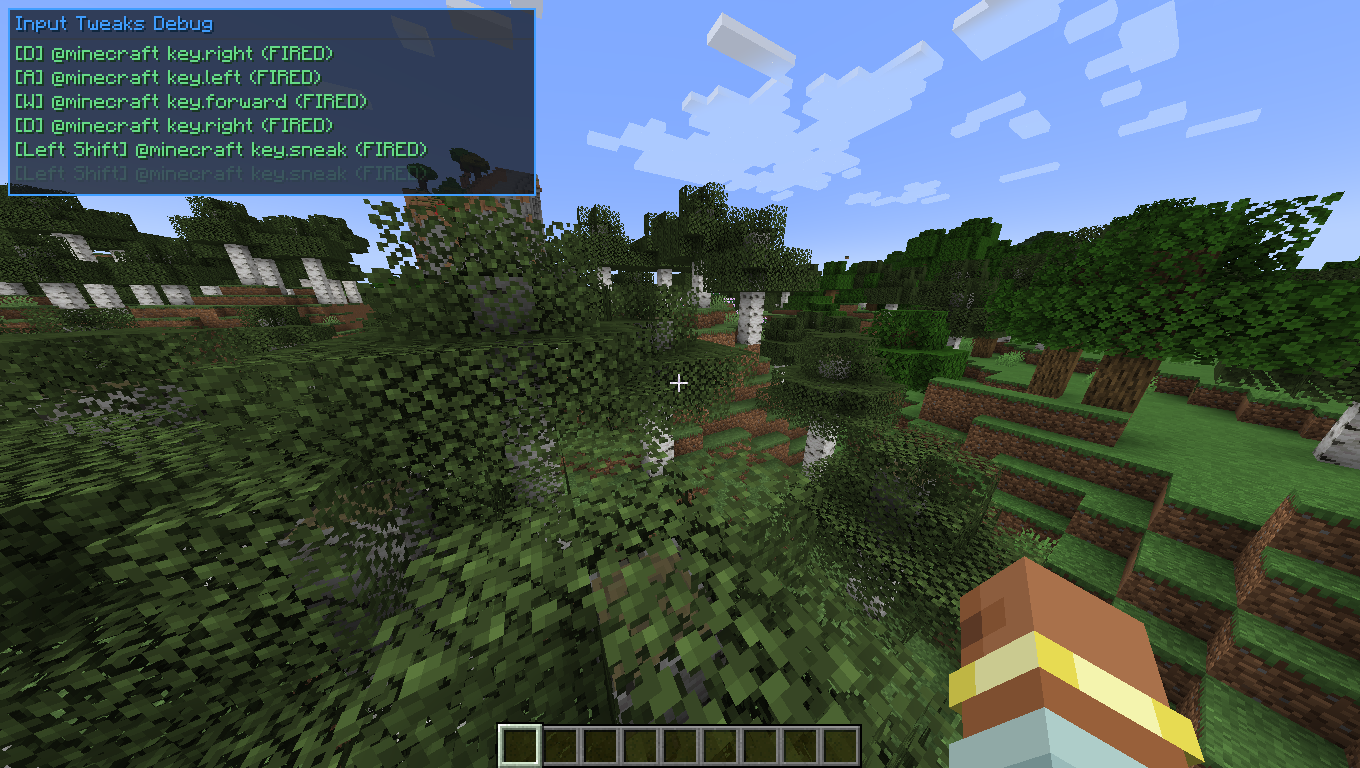
- Debug HUD (
Debug: ON/OFF): Displays a small live overlay in-game showing the pressed key,@modid, bind ID, and result (VANILLA,FIRED,CONSUMED,BLOCKED). - Unused Bind Tracker: Locally counts how many times each bind is triggered (
usage_stats.json) so you can filter unused binds with#unused.
Controls & Shortcuts Reference
Search Bar Syntax
| Query | Matches |
|---|---|
text |
Action name, category, bound key, mod ID, or bind ID |
@modid |
All keybinds belonging to a specific mod |
#conflict |
Keybinds with real conflicts |
#unbound |
Unbound keybinds |
#modified |
Keybinds changed from their defaults |
#unused or #dead |
Bound actions with 0 recorded uses |
#hidden |
Keybinds hidden or disabled by modpack rules |
Mouse & Keyboard Shortcuts in the Controls Screen
| Target | Left-Click | Right-Click / Modifier |
|---|---|---|
| Key Button | Capture new key / combo | Right-Click: Unbind |
Priority (P0) |
Increase priority (+1) |
Right-Click or Shift+Click: Decrease (-1) |
Policy (PASS/STOP) |
Toggle policy | Right-Click: Toggle policy |
Context (ALL, GAME, …) |
Next context | Right-Click or Shift+Click: Previous context |
Trigger (STD, TAP, …) |
Next trigger mode | Right-Click or Shift+Click: Previous mode |
Clear / Reset (x / R) |
Unbind (or reset if unbound) | Right-Click or Shift+Click: Reset to default |
| Heatmap Key | Filter list by key | Right-Click: Quick Unbind all actions on key |
| Screen | — | Ctrl+Z / Ctrl+Y: Undo / Redo |
File Locations & Data Privacy
Input Tweaks is 100% client-side and does not connect to the internet.
To allow your personal profiles and radial menus to carry over between different modpacks and launchers, Input Tweaks stores plain JSON files in your operating system's standard user configuration folder:
| Operating System | Global Profiles & Radials Directory |
|---|---|
| Windows | %APPDATA%\InputTweaks\ |
| macOS | ~/Library/Application Support/InputTweaks/ |
| Linux / Steam Deck | $XDG_CONFIG_HOME/InputTweaks/ (defaults to ~/.config/InputTweaks/) |
Inside that folder, only the following files are created:
profiles/<ProfileName>.json- Your global keybind profilesradials.json- Your personal global radial menus
Per-instance files are stored inside the standard Minecraft config directory:
config/inputtweaks/modpack_rules.json- Modpack creator rules & default radial menusconfig/inputtweaks/local_overrides.json- Optional instance-only overridesconfig/inputtweaks/active_profile.txt- Last selected profile name for this instanceconfig/inputtweaks/usage_stats.json- Local usage counters for the#unusedfilter
Modpack Configuration (modpack_rules.json)
You can generate this file in-game using PackDev Mode and the Radial Menu Editor, or edit config/inputtweaks/modpack_rules.json directly:
{
  "schemaVersion": 1,
  "rules": {
    "key.examplemod.unused_menu": {
      "hidden": true,
      "hardDisabled": true,
      "locked": false
    },
    "key.examplemod.ability": {
      "hidden": false,
      "hardDisabled": false,
      "locked": true,
      "defaultKey": "key:82",
      "defaultModifiers": ["key:342"],
      "categoryOverride": "key.categories.gameplay"
    }
  },
  "radialMenus": [
    {
      "id": "pack_utilities",
      "title": "Pack Menu",
      "defaultKey": "key:86",
      "activationMode": "HOLD_RELEASE",
      "slots": [
        {
          "label": "Advancements",
          "targetBindId": "key.advancements",
          "icon": "minecraft:knowledge_book",
          "color": "#409EFF"
        },
        {
          "label": "Perspective",
          "targetBindId": "key.togglePerspective",
          "icon": "minecraft:spyglass",
          "color": "#36CFC9"
        }
      ]
    }
  ]
}
- Key format:
"key:<GLFW_KEY_CODE>"(e.g.,"key:86"=V,"key:82"=R,"key:342"=Left Alt),"mouse:<BUTTON>"(e.g.,"mouse:3"=Mouse 4), or"unbound". - Activation modes:
"HOLD_RELEASE"or"CLICK".
Compatibility & FAQ
- Does this need to be installed on servers? No. Input Tweaks is completely client-side.
- Does it support controllers / gamepads? No. Input Tweaks focuses exclusively on keyboard and mouse input.
- Can I include Input Tweaks in my modpack? Yes! You are welcome to include it in any CurseForge or Modrinth modpack, and ship a custom
config/inputtweaks/modpack_rules.jsonwith your pack. - Will it work with other mods' keybinds? Yes, any mod that registers standard Minecraft
KeyMappingentries will appear automatically. Mods that read raw GLFW input directly inside custom screens may bypass priority/disable rules for those specific screens.
Links & Support
- Source Code: github.com/Niix-Dan/InputTweaks
- Issue Tracker: Report a Bug or Request a Feature
Project description from CurseForge.
Pick your setup
Input Tweaks by Minecraft version and loader
Choose the version and loader you play, then open the matching release.
Minecraft version
1.21.10
2 loader buildsMinecraft version
1.21.9
2 loader buildsMinecraft version
1.21.8
2 loader buildsMinecraft version
1.21.7
2 loader buildsMinecraft version
1.21.6
2 loader buildsMinecraft version
1.21.5
2 loader buildsMinecraft version
1.21.4
2 loader buildsMinecraft version
1.21.3
2 loader buildsMinecraft version
1.21.2
2 loader buildsMinecraft version
1.21.1
2 loader buildsMinecraft version
1.21
3 loader buildsCheck the dependencies, then try the file in a copied instance before changing a world you care about.
Recent files
Input Tweaks versions and loaders
Input Tweaks Forge v1.0.0
Input-Tweaks-forge-1.21-1.0.0.jar
22 Nov 2026
Client Source doesn’t say Server Source doesn’t say Dependencies No extras listed Listed on Release listing
Check the 1.21.4 · Forge setup 1.211.21.81.21.51.21.4 release
Looking for an older file? The official CurseForge project page is in Resources.
 mod
CurseForge · Minecraft
Hammers OG - 3x3 Mining Hammers & Excavators
3x3 mining hammers and excavators from stone to netherite: mine a 3x3 square on the face you hit, and see the whole square crack as you mine. Sneak to mine one block. Area mining for every tool tier.
 mod
CurseForge · Minecraft
Camera Unbound
Immersive camera perspectives, responsive fishing and movement, cinematic respawn, and customizable crosshairs.
 mod
CurseForge · Minecraft
Smart_Crafter_MCdestined
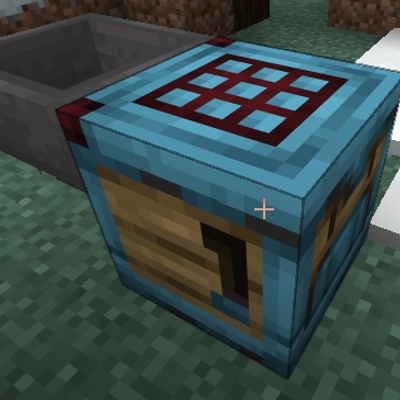
Smart Crafter is a lightweight, vanilla-friendly automation mod that upgrades the vanilla Crafter into a true set-and-forget auto-crafter—no redstone clocks required, and no more accidentally emptying your crafting template!