Mod Menu Optional for hud4u-mc26.2-fabric-1.0.1.jar
optionalMatching file found Matched file: v20.0.3 for 26.2
CurseForge · Minecraft mod
A customizable HUD with FPS, coordinates, keystrokes, ping, and more. drag-and-drop layout editor!
Quick answer
hud4u-mc26.2-fabric-1.0.1.jar targets 26.2 with Fabric. The project page does not say whether this file belongs on the client, dedicated server, or both. All 1 required mods have matching files.
Where it goes
The project page does not say whether this file belongs on the client, dedicated server, or both.
The source does not explicitly classify this release as client-only or server-only.
hud4u-mc26.2-fabric-1.0.1.jar on 26.2. Every mod below is checked against that same setup.
Install Fabric API first. We found matching files for this game-version and loader setup. 1 comes through another mod in the chain.
1 extra mod was pulled in by another dependency. Indented rows show who needs each one. We only count dependency files that match this setup. A file for another loader does not fill the gap.
Before you install it
Built for hud4u-mc26.2-fabric-1.0.1.jar on 26.2. Pick another file and the loader, install side or required mods may change.
Use hud4u-mc26.2-fabric-1.0.1.jar. It targets 26.2 with Fabric; another release may have different loader, side or dependency requirements.
Install Fabric API first. We found matching files for this game-version and loader setup. 1 comes through another mod in the chain.
The project page does not say whether this file belongs on the client, dedicated server, or both.
Use the “Get this file” button beside hud4u-mc26.2-fabric-1.0.1.jar. It opens that exact file at the source.
About this project
Hud4U is a client-side Fabric mod for Minecraft. Keep your coordinates in the corner while exploring, see how many uses your boots have left, or check your inventory without opening it. Pick the widgets you want and save their positions and settings together in a HUD profile.

Drag a widget to move it, or drag its bottom-right corner to resize it. Alignment guides help you line up neighboring widgets. Hold Left Ctrl to move or resize freely.
Hold Left Shift and select two edges to attach them. Pin Ping below FPS, for example, and you can still move it left or right. Right-click a widget to edit it, remove it from the layout, or choose which way it grows when the text gets wider.
Display XYZ on a single line or stack the axes vertically. Add your facing direction underneath to see both the compass heading and the axes you are moving toward, such as SW (-X, +Z).
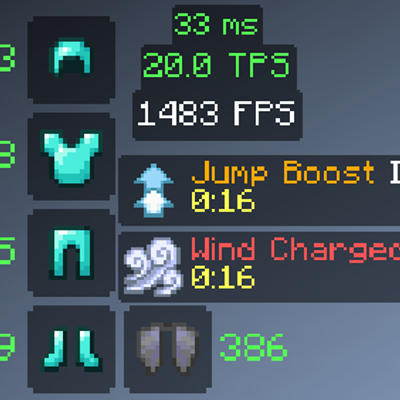
Show your four armor pieces and both held items in a horizontal or vertical layout. Choose remaining uses, a percentage, or Minecraft's durability bar. You can also hide durability and show just the items.
Display any of the three inventory rows with stack counts and optional durability bars. Hide empty slots to preserve item positions, or hide whole empty rows for a smaller HUD. Give armor upgrades, food, healing items, and rare finds such as elytra or beacons their own highlight colors.
See each active effect's icon, name, level, and remaining time. The timer blinks during its final ten seconds. You can color the timers by time remaining and use gold names for beneficial effects and red for harmful ones.
See your movement keys, space bar, and mouse buttons light up as you press them. Count clicks per second for the left button, the right button, or both. Show CPS with the mouse buttons or on a separate row.
Display your current frame rate. Adjust the text size and letter spacing, or turn off the background for a simple text counter.
See your latency to the server in milliseconds. Enable dynamic colors to make a jump in ping easier to spot.
Track the server's estimated ticks per second. With dynamic colors enabled, the number turns orange below 18 TPS and red below 15.
See the address and icon of the server you are playing on. You can show the port and add the server description when one is available.
Show the name and icon of your active resource pack. You can also show its description and adjust the icon size and spacing.
Look at a mob or player to see their name and health. Show health as hearts or numbers, add the entity type ID, and customize name colors for hostile mobs, passive mobs, and players.
A new profile copies your current layout, widget settings, and visibility. Keep a compact layout with coordinates and effects for exploration, then switch to another with armor and inventory for combat.
Press Right Shift in game if the key is free. You can also open Mod Menu, select Hud4U, and choose Configure > Open Editor. With MenuLab installed, the widgets and their settings are available in its HUD tab.
Project description from CurseForge.
Pick your setup
Choose the version and loader you play, then open the matching release.
Showing the newest 12 of 15 game versions. Older files are in the list below.
Check the dependencies, then try the file in a copied instance before changing a world you care about.
Recent files
24 Nov 2026
Looking for an older file? The official CurseForge project page is in Resources.
 mod
Additional shapes for any block, including modded ones
 mod
An API to add custom villager professions and villager biome types with custom trades without writing code.
 mod
Backup mod that keeps your worlds safe with automatic and manual backups, with an easy in-game UI to create, manage, and restore them.