ProjectE Needed by ProjectE Research 1.0.1 [Forge 1.20.1]
requiredMatching file found Matched file: ProjectE-1.20.1-PE1.0.1.jar

CurseForge · Minecraft mod
A ProjectE addon introducing an item research mechanic for transmutation.
Quick answer
ProjectE Research 1.0.1 [Forge 1.20.1] targets 1.20.1 with Forge. The project page does not say whether this file belongs on the client, dedicated server, or both. All 1 required mods have matching files.
Where it goes
The project page does not say whether this file belongs on the client, dedicated server, or both.
The source does not explicitly classify this release as client-only or server-only.
ProjectE Research 1.0.1 [Forge 1.20.1] on 1.20.1. Every mod below is checked against that same setup.
Install ProjectE first. We found matching files for this game-version and loader setup.
We only count dependency files that match this setup. A file for another loader does not fill the gap.
Before you install it
Built for ProjectE Research 1.0.1 [Forge 1.20.1] on 1.20.1. Pick another file and the loader, install side or required mods may change.
Use ProjectE Research 1.0.1 [Forge 1.20.1]. It targets 1.20.1 with Forge; another release may have different loader, side or dependency requirements.
Install ProjectE first. We found matching files for this game-version and loader setup.
The project page does not say whether this file belongs on the client, dedicated server, or both.
Use the “Get this file” button beside ProjectE Research 1.0.1 [Forge 1.20.1]. It opens that exact file at the source.
About this project
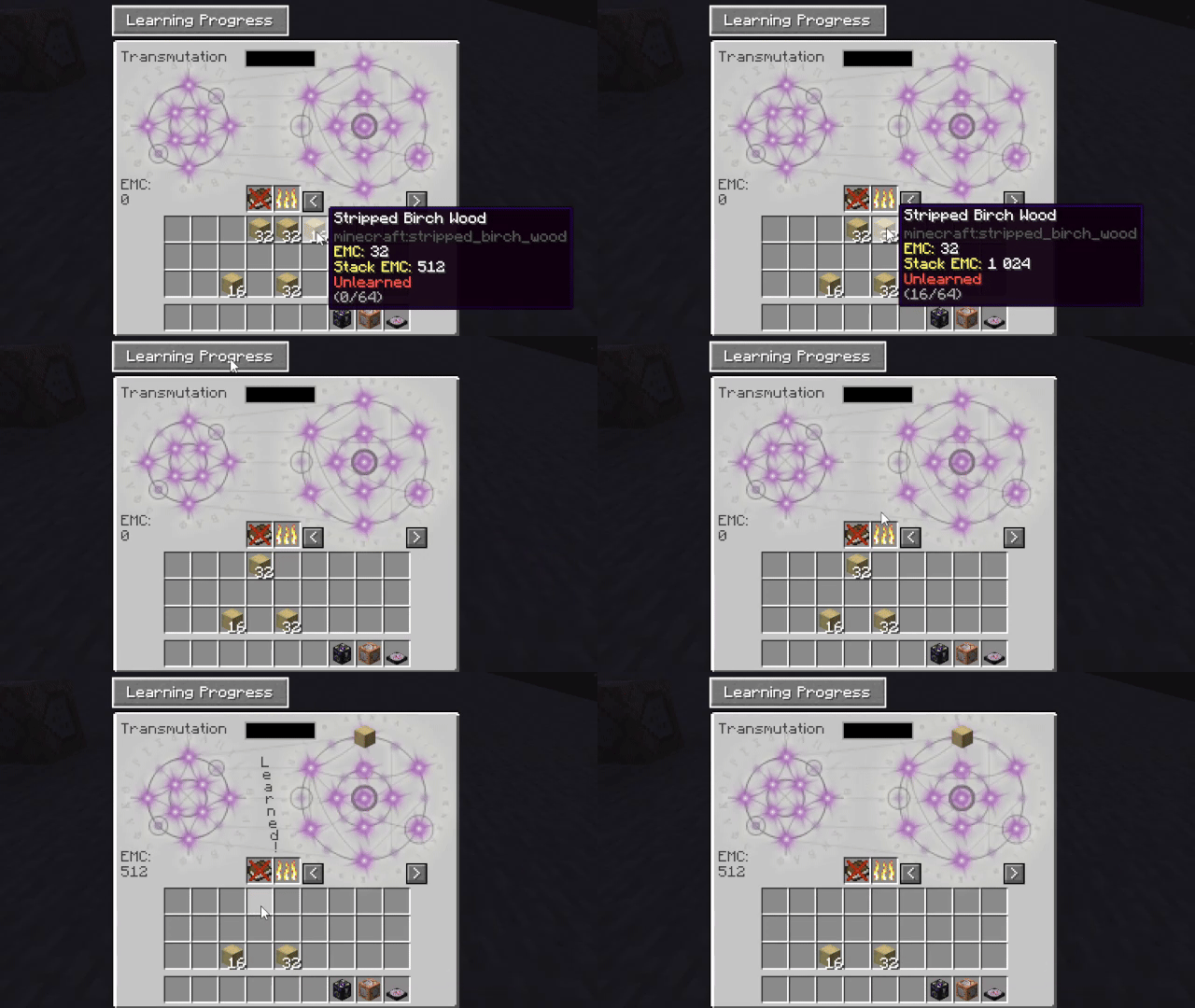
ProjectE is a fantastic mod, but having the ability to learn any item just by holding a single piece of it can make progression feel a bit too fast. ProjectE Research is a lightweight addon that changes this core mechanic. Instead of learning items instantly, you must now accumulate a specific amount of an item in the Transmutation Table to unlock it.
This makes the learning process much more meaningful and adds a great sense of progression to your world.
You can configure the requirements in config/projecte_research.json. You can set a global default, requirements for unstackable items, and specific rules for item tags or individual item IDs.
Commands (operator permission level 2 required)
/projecte_research set <player> <amount> [item] — Sets a player’s exact research progress for an item. If the amount meets or exceeds the required threshold, the player learns the item. A lower amount unlearns it. If [item] is omitted, the command uses the item in the target player’s main hand./projecte_research clear <player> all — Clears all research progress and learned items for the player./projecte_research clear <player> <item> — Clears research progress and unlearns the specified item for the player./projecte_research reload — Reloads the JSON config and syncs it to all online players./projecte_research config — Shows the current values of the four settings below./projecte_research config defaultRequired <amount> — Sets the default number of items required to learn an item./projecte_research config nonStackableRequired <amount> — Sets the number of items required to learn an item with a maximum stack size of 1./projecte_research config condenserRequiresLearned <true|false> — Controls whether players must learn an item before selecting it in an Energy Condenser./projecte_research config noEmcWhileLearning <true|false> — Set to true to suppress EMC for items spent on research, or false to award EMC for them./projecte_research requirement <item> <amount> — Sets a research threshold for a specific item. This overrides tag rules and the default thresholds. For example, /projecte_research requirement minecraft:diamond 128 requires 128 diamonds to learn diamonds.The three threshold commands accept whole numbers from 1 to 100,000,000 inclusive. Settings and item requirements take effect immediately and are saved to projecte_research.json
ProjectE Research is designed to be compatible with automation and storage mods. It includes specific integrations for:
.jar file into your mods folder.items list in the config file.Project description from CurseForge.
Pick your setup
Choose the version and loader you play, then open the matching release.
Check the dependencies, then try the file in a copied instance before changing a world you care about.
Recent files
projecte_research-1.0.1.jar
27 Nov 2026
projecte_research-1.0.0.jar
25 Nov 2026
Looking for an older file? The official CurseForge project page is in Resources.
 mod
Turn any food into custom sandwiches with ingredient-based hunger, saturation, and effects.
 mod
This part of an extensive mod adds the integration of Croptopia recipes with Farmer's Delight and their addons.
 mod
An ender chest that follows you with extra space