Minecraft version
Back to mods 
CurseForge · Minecraft mod
Create Webslinger
Swing, zip and flip through your world with a copper Web Backtank powered by Liquid Web from Create's mixer.
Choose a version Pick your version below, then grab the matching file.
Quick answer
Which Create Webslinger release should I use?
Latest stable file webslinger-forge-1.20.1-1.0.0.jar
Game version 1.20.1
Loader Forge
Create Webslinger webslinger-forge-1.20.1-1.0.0.jar targets 1.20.1 with Forge. The project page does not say whether this file belongs on the client, dedicated server, or both. No extra mods listed for this file.
Where it goes
Is Create Webslinger required on the client, server, or both?
The project page does not say whether this file belongs on the client, dedicated server, or both.
Client Source doesn’t say
Dedicated server Source doesn’t say
Loader for this release Forge
Required install it here Optional supported, not mandatory Not supported do not install here Source doesn’t say do not assume
The source does not explicitly classify this release as client-only or server-only.
What else does Create Webslinger webslinger-forge-1.20.1-1.0.0.jar need?
webslinger-forge-1.20.1-1.0.0.jar. Change the file and its required mods may change too.
This file does not list any required mods. Do not add a library just because a different file uses it.
This file does not list any required or optional mods.
Before you install it
Add Create Webslinger without breaking your instance.
Built for Create Webslinger webslinger-forge-1.20.1-1.0.0.jar. Pick another file and the loader, install side or required mods may change.
- 01
Stick to this file
Use webslinger-forge-1.20.1-1.0.0.jar. It targets 1.20.1 with Forge; another release may have different loader, side or dependency requirements.
- 02
Bring the mods it needs
This file does not list any required mods. Do not add a library just because a different file uses it.
- 03
Put it on the correct side
The project page does not say whether this file belongs on the client, dedicated server, or both.
- 04
Pick the file you checked
Use the “Get this file” button beside webslinger-forge-1.20.1-1.0.0.jar. It opens that exact file at the source.
About this project
What does Create Webslinger add?
Web Slinger
Swing through your world like never before. Web Slinger adds a copper Web Backtank that lets you shoot webs, swing between buildings, zip to ledges and pull off stunts mid-air, all powered by Liquid Web brewed in Create's mixer. It is a pure movement mod: no costume, no powers, just you, a backpack full of web and a lot of momentum.

Free Aim Web Swinging
Hold right-click and your web sticks exactly where you aim. No markers and no auto-targeting, so you decide every anchor yourself. Real pendulum physics turn every swing into an arc: pump with W at the bottom, steer left and right, then let go at the top to fly. Aim low or at the ground and the web pulls you toward the target instead, as long as you keep holding.

Web Zip
Left-click to zip straight to wherever you are looking. Hit the edge of a ledge or a roof and you will be launched up and over it in one smooth motion. Perfect for climbing buildings fast or getting out of a tight spot.
Stunts and Air Control
Let go of a swing while holding a direction and you flip or cartwheel out of it. Press Space in the air for spins and flips, and every new web gives you one small roll boost to keep your speed up. A or D plus Space performs a side dash once per air phase to dodge trees and corners. While airborne you can steer with WASD, brake with S or dive with sneak.
Ground Movement
Land with speed and keep it: the first jump after landing carries your momentum, and sneaking turns it into a slide. You get no fall damage while you are web swinging and for a short moment after, so a missed web will not end your run, but jumping off a tower without one still will.
The Web Backtank
The Web Backtank is a copper backpack with bracers and web nozzles on both arms. Wear it in your chest slot to start slinging, and it shows up in first person too. Place it on the ground as a block to refill it. It holds 4000 mB of Liquid Web, and its window shows how full it is.
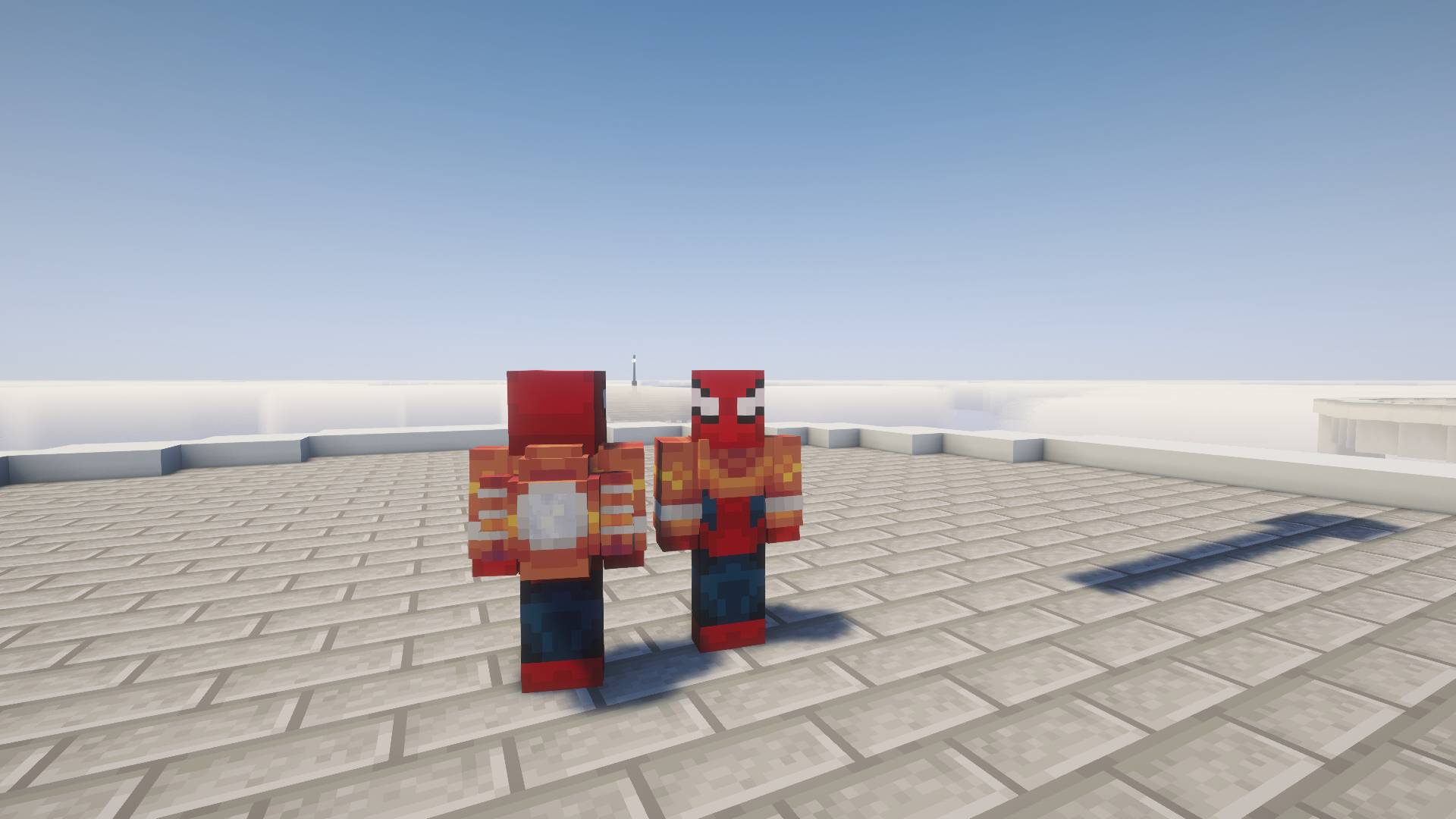
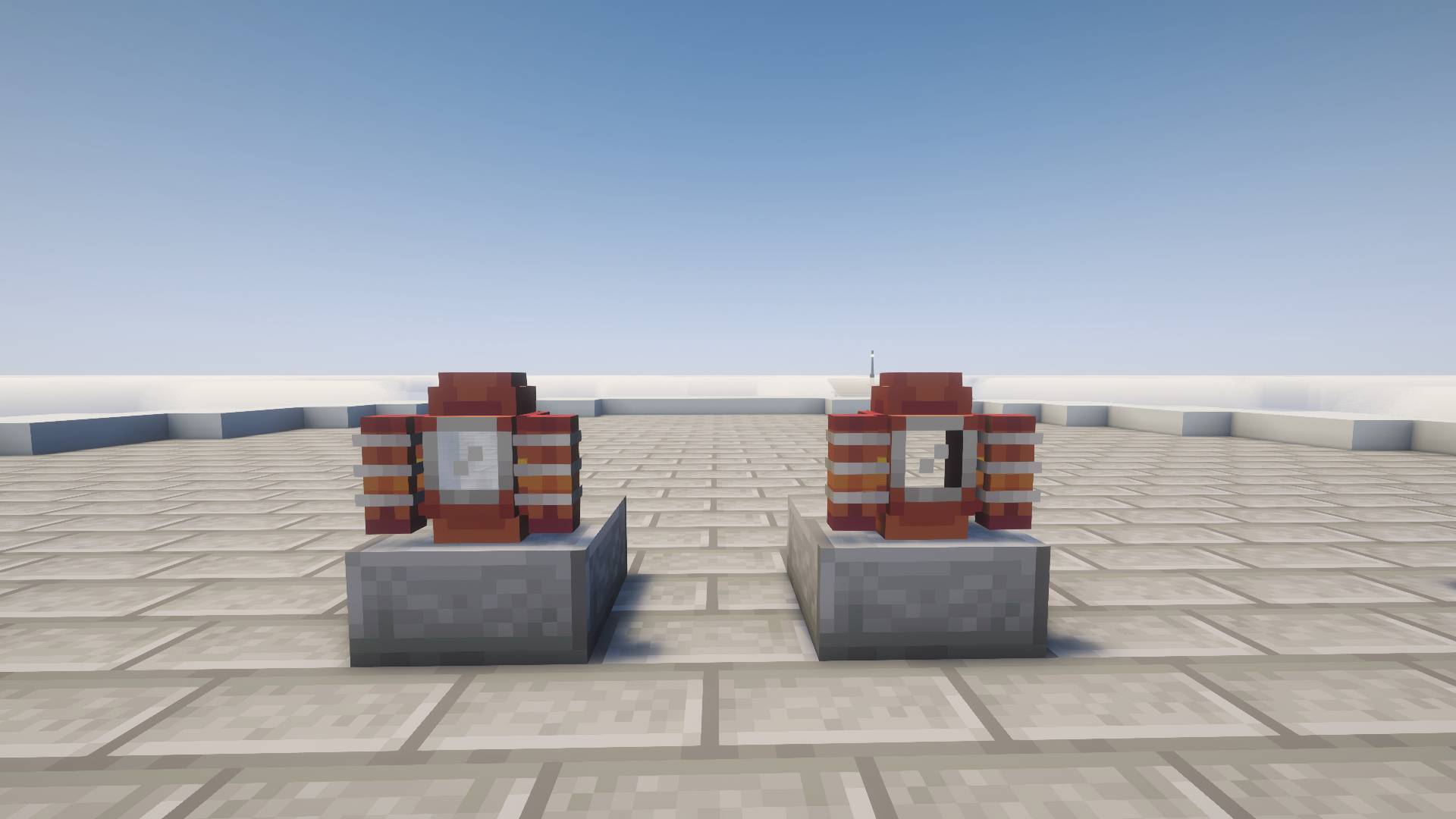
Liquid Web
Liquid Web is made in a Create mixer, and no heat is needed:
1 Cobweb = 250 mB Liquid Web
4 String = 100 mB Liquid Web
Pump it into the flat back side of a placed Web Backtank with a fluid pipe. That is the only way to fill it; buckets do not work. When you place the backpack next to a pipe, it automatically turns its back side toward the pipe. Put on Engineer's Goggles to see the exact fill level.


Fair Consumption
Every swing web costs 20 mB and every zip or pull costs 15 mB, so a full backpack gives you about 200 swings. You get a warning when you drop below 10 percent. Creative mode is free.
Controls
G – toggle web mode on and off (rebindable in Controls)
Right-click hold – swing (in web mode)
Left-click – web zip (in web mode)
Space in the air – stunts and roll boost
A or D + Space – side dash
W / S while swinging – pump / brake
Sneak – dive in the air, slide on the ground
While web mode is on, right-click and left-click are used only for webs, so you will not accidentally place or break blocks.
Hide the Backpack
Prefer a clean look? Click the small eye next to your chest slot in the inventory to hide the backpack and bracers. Everything still works, and other players will not see it either.
Crafting
Craft the Web Backtank at a crafting table:
Fluid Pipe on top, String – Copper Backtank – String in the middle, Precision Mechanism at the bottom.
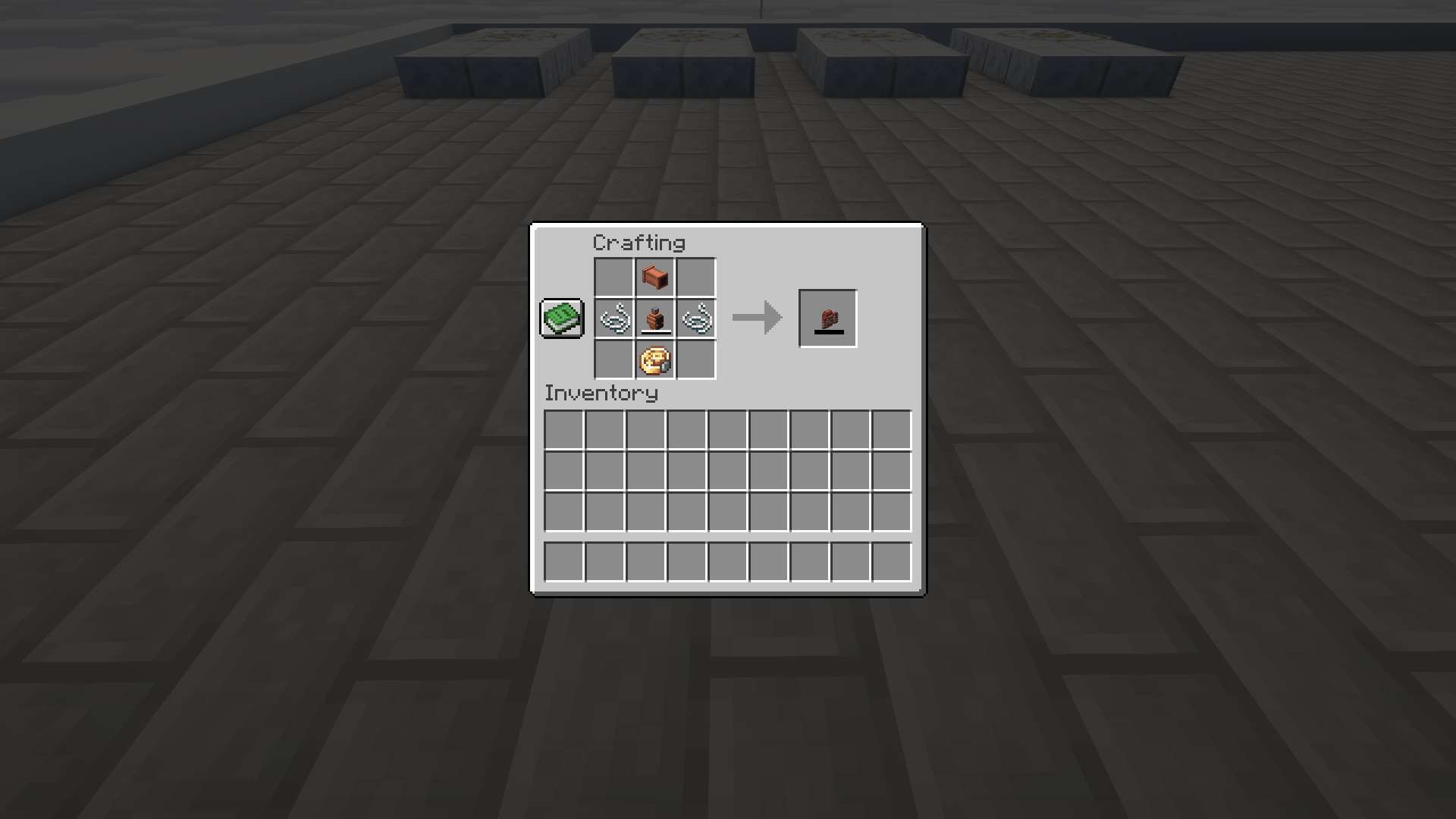
Project description from CurseForge.
Pick your setup
Create Webslinger by Minecraft version and loader
Choose the version and loader you play, then open the matching release.
Minecraft version
1.20.1
1 loader buildCheck the dependencies, then try the file in a copied instance before changing a world you care about.
Recent files
Create Webslinger versions and loaders
webslinger-forge-1.20.1-1.0.0.jar
29 Nov 2026
Client Source doesn’t say Server Source doesn’t say Dependencies No extras listed Listed on Release listing
Check the 1.20.1 · Forge setup 1.20.1Forge release
webslinger-NeoForge-1.0.0.jar
26 Nov 2026
Client Source doesn’t say Server Source doesn’t say Dependencies No extras listed Listed on Release listing
Check the 1.21.1 · NeoForge setup 1.21.1NeoForge release
Looking for an older file? The official CurseForge project page is in Resources.
 mod
CurseForge · Minecraft
Wonder of U Addon (JCraft Addon)
A JCraft addon featuring Wonder of U and D4C Love Train, adding stackable calamity levels, rideable cars, parallel world travel, and Saint's Remains.
 mod
CurseForge · Minecraft
Stones of infinity
İnfinity stones for mavel cinematic universe and the infinity gauntlet
 mod
CurseForge · Minecraft
Goety:Ladder
More Focuses and More Items