Minecraft version
Back to mods 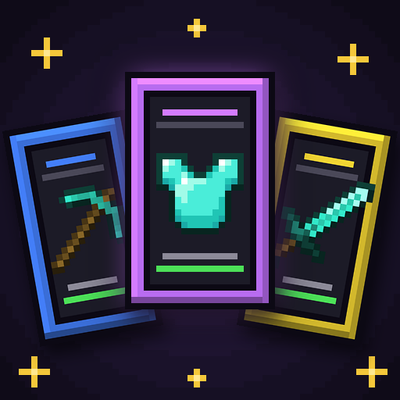
CurseForge · Minecraft mod
Roguelite Gear
Weapons, tools, armor and shields level up as you use them. Choose 1 of 3 upgrades each level.
Choose a version Pick your version below, then grab the matching file.
Quick answer
Which Roguelite Gear release should I use?
Latest stable file roguelitegear-fabric-1.20.1-1.0.0.jar
Game version 1.20.1
Loader Fabric
Roguelite Gear roguelitegear-fabric-1.20.1-1.0.0.jar targets 1.20.1 with Fabric. The project page does not say whether this file belongs on the client, dedicated server, or both. No extra mods listed for this file.
Where it goes
Is Roguelite Gear required on the client, server, or both?
The project page does not say whether this file belongs on the client, dedicated server, or both.
Client Source doesn’t say
Dedicated server Source doesn’t say
Loader for this release Fabric
Required install it here Optional supported, not mandatory Not supported do not install here Source doesn’t say do not assume
The source does not explicitly classify this release as client-only or server-only.
What else does Roguelite Gear roguelitegear-fabric-1.20.1-1.0.0.jar need?
roguelitegear-fabric-1.20.1-1.0.0.jar. Change the file and its required mods may change too.
This file does not list any required mods. Do not add a library just because a different file uses it.
This file does not list any required or optional mods.
Before you install it
Add Roguelite Gear without breaking your instance.
Built for Roguelite Gear roguelitegear-fabric-1.20.1-1.0.0.jar. Pick another file and the loader, install side or required mods may change.
- 01
Stick to this file
Use roguelitegear-fabric-1.20.1-1.0.0.jar. It targets 1.20.1 with Fabric; another release may have different loader, side or dependency requirements.
- 02
Bring the mods it needs
This file does not list any required mods. Do not add a library just because a different file uses it.
- 03
Put it on the correct side
The project page does not say whether this file belongs on the client, dedicated server, or both.
- 04
Pick the file you checked
Use the “Get this file” button beside roguelitegear-fabric-1.20.1-1.0.0.jar. It opens that exact file at the source.
About this project
What does Roguelite Gear add?
Your gear grows with you. Every sword swing, every block mined, every hit you take teaches your gear something. When it levels up, you choose how it gets stronger: pick 1 of 3 upgrades, and the other two are gone. No rerolls. Two diamond swords never end up the same.
Gameplay
Weapons, tools, armor and shields gain experience as you use them. When a piece of gear levels up you get a message in chat. Hold the item and press H, and a screen shows 3 upgrades for it. Pick one with its Select button.
The three offers are rolled once and saved on the item. Closing the screen and opening it again shows the same three, so there's no fishing for a better roll. If you'd rather wait, the level up stays until you spend it.
Everything is stored on the item itself. Levels, experience and upgrades stay with it when you drop it, put it in a chest or give it to a friend. Gear can reach level 20, and every level is one more upgrade.
How gear earns experience
| Gear | Earns experience by |
|---|---|
| Melee weapons swords, axes, spears, maces, tridents |
Dealing damage, plus a bonus for the killing blow |
| Ranged weapons bows, crossbows, tridents |
Damage dealt by their shots, plus a kill bonus. A thrown trident levels itself. |
| Tools pickaxes, shovels, axes, hoes |
Mining blocks they're made for. Harder blocks give more: stone 2, ores 3, obsidian 10. |
| Armor | Taking damage from mobs and players while you wear it. Every worn piece learns. |
| Shields | Blocking attacks |
An item can be more than one kind. An axe is a tool and a weapon, so it learns from both and can be offered upgrades from both. Gear is recognised by the vanilla enchantable tags, so modded weapons, tools and armor level up too.
Upgrades
There are 33 upgrades. Stat upgrades show up in the item's tooltip and work exactly like vanilla stats. Perks give the item something new. Every upgrade has several levels, so you can stack the ones you like.
Melee weapons
- Keen Edge: +0.5 attack damage per level
- Quick Strikes: +6% attack speed
- Long Reach: hit enemies from further away
- Heavy Blows: more knockback
- Sweeping Arc (swords): stronger sweep attacks
- Lifesteal: heal part of the damage you deal
Melee and ranged weapons
- Venom: hits poison the target
- Ignite: hits set the target on fire
- Executioner: extra damage to enemies below 30% health
- Bounty: kills drop more experience
- Power Shot (ranged only): +8% projectile damage per level
Tools
- Efficient: mine faster
- Long Arm: reach blocks further away
- Aqua Miner: mine faster underwater
- Smelting: mined blocks drop their smelted result
- Prospector: a chance to double ore drops
- Wisdom: mined blocks drop more experience
Armor
- Plating, Toughness, Vitality: more armor, armor toughness and max health
- Steadfast: knockback resistance (shields can get it too)
- Deep Breath (helmets), Swift Step (leggings), Feather Step (boots)
- Regeneration: slowly heal over time
- Retaliation: reflect part of the melee damage you take
- Fire Guard, Blast Guard: take less fire and explosion damage
Armor perks add up across every piece you wear, so a full set built around one perk is a real build.
Shields
- Spiked: reflect part of the blocked melee damage back at the attacker
- Recovery: heal part of the damage you block
Any gear
- Durable: +15% max durability per level
- Reinforced: a chance to repair itself as you use it
- Scholar: the item levels up faster
The upgrade screen
The screen shows the item, its level and an experience bar. Each offer is a card with the upgrade's name, its level change (for example Level II → III), what it will do and its max level. The upgrades the item already has are listed underneath.
The screen doesn't pause the game. Press Esc or H to close it. The item's tooltip always shows its level, experience and upgrades, and reminds you when a level up is waiting.
Commands
Admin commands (permission level 2). They act on the item in your main hand:
| Command | What it does |
|---|---|
/roguelitegear reload |
Re-read the config without a restart |
/roguelitegear info |
Show the item's level, experience, upgrades and current offers |
/roguelitegear addxp <amount> |
Give the item experience |
/roguelitegear setlevel <level> |
Set the item's level |
/roguelitegear reset |
Remove every level and upgrade from the item |
Config
Everything is in config/roguelitegear.toml, which is created the first time a world or server starts. Run /roguelitegear reload after editing it. Players get the server's settings when they join, so everyone sees the same numbers.
[leveling]
	max_level = 20
	base_xp = 40
	xp_per_level = 30

[experience]
	melee_percent = 100
	ranged_percent = 100
	kill_bonus_percent = 25
	mining_percent = 100
	armor_percent = 200
	shield_percent = 200
Project description from CurseForge.
Pick your setup
Roguelite Gear by Minecraft version and loader
Choose the version and loader you play, then open the matching release.
Minecraft version
26.2
3 loader buildsMinecraft version
26.1.2
3 loader buildsMinecraft version
1.21.11
3 loader buildsMinecraft version
1.21.1
3 loader buildsMinecraft version
1.20.1
2 loader buildsCheck the dependencies, then try the file in a copied instance before changing a world you care about.
Recent files
Roguelite Gear versions and loaders
roguelitegear-fabric-1.20.1-1.0.0.jar
27 Nov 2026
Client Source doesn’t say Server Source doesn’t say Dependencies No extras listed Listed on Release listing
Check the 1.20.1 · Fabric setup Fabric1.20.1 release
roguelitegear-forge-1.20.1-1.0.0.jar
27 Nov 2026
Client Source doesn’t say Server Source doesn’t say Dependencies No extras listed Listed on Release listing
Check the 1.20.1 · Forge setup 1.20.1Forge release
roguelitegear-fabric-1.21.1-1.0.0.jar
27 Nov 2026
Client Source doesn’t say Server Source doesn’t say Dependencies No extras listed Listed on Release listing
Check the 1.21.1 · Fabric setup Fabric1.21.1 release
roguelitegear-forge-1.21.1-1.0.0.jar
27 Nov 2026
Client Source doesn’t say Server Source doesn’t say Dependencies No extras listed Listed on Release listing
Check the 1.21.1 · Forge setup Forge1.21.1 release
roguelitegear-neoforge-1.21.1-1.0.0.jar
27 Nov 2026
Client Source doesn’t say Server Source doesn’t say Dependencies No extras listed Listed on Release listing
Check the 1.21.1 · NeoForge setup 1.21.1NeoForge release
roguelitegear-forge-1.21.11-1.0.0.jar
27 Nov 2026
Client Source doesn’t say Server Source doesn’t say Dependencies No extras listed Listed on Release listing
Check the 1.21.11 · Forge setup Forge1.21.11 release
roguelitegear-neoforge-1.21.11-1.0.0.jar
27 Nov 2026
Client Source doesn’t say Server Source doesn’t say Dependencies No extras listed Listed on Release listing
Check the 1.21.11 · NeoForge setup NeoForge1.21.11 release
roguelitegear-fabric-1.21.11-1.0.0.jar
27 Nov 2026
Client Source doesn’t say Server Source doesn’t say Dependencies No extras listed Listed on Release listing
Check the 1.21.11 · Fabric setup Fabric1.21.11 release
roguelitegear-neoforge-26.1.2-1.0.0.jar
27 Nov 2026
Client Source doesn’t say Server Source doesn’t say Dependencies No extras listed Listed on Release listing
Check the 26.1.2 · NeoForge setup NeoForge26.1.2 release
roguelitegear-forge-26.1.2-1.0.0.jar
27 Nov 2026
Client Source doesn’t say Server Source doesn’t say Dependencies No extras listed Listed on Release listing
Check the 26.1.2 · Forge setup Forge26.1.2 release
roguelitegear-fabric-26.1.2-1.0.0.jar
27 Nov 2026
Client Source doesn’t say Server Source doesn’t say Dependencies No extras listed Listed on Release listing
Check the 26.1.2 · Fabric setup Fabric26.1.2 release
roguelitegear-forge-26.2-1.0.0.jar
27 Nov 2026
Client Source doesn’t say Server Source doesn’t say Dependencies No extras listed Listed on Release listing
Check the 26.2 · Forge setup Forge26.2 release
Looking for an older file? The official CurseForge project page is in Resources.
 mod
CurseForge · Minecraft
CastigoInventory
A custom inventory interface for Castamir, with equippable backpacks and read-only inventory sharing with nearby players. Requires CastigoZaini on the server.
 mod
CurseForge · Minecraft
Witcher (RPG Series Plus)
Slay monsters like a Witcher! Spell Engine Add-On
 mod
CurseForge · Minecraft
Siftism Arsenal
Adds custom endgame weapons, a 3D shield, and two cursed endgame armor sets stronger than Netherite.