Quick answer
Which Tom's Digital Storage release should I use?
Latest stable file tomsdigitalstorage-1.0.2.jar
Game version 26.1.2
Loader NeoForge
Tom's Digital Storage tomsdigitalstorage-1.0.2.jar targets 26.1.2 with NeoForge. The project page does not say whether this file belongs on the client, dedicated server, or both. All 1 required mods have matching files.
Where it goes
Is Tom's Digital Storage required on the client, server, or both?
The project page does not say whether this file belongs on the client, dedicated server, or both.
Client Source doesn’t say
Dedicated server Source doesn’t say
Loader for this release NeoForge
Required install it here Optional supported, not mandatory Not supported do not install here Source doesn’t say do not assume
The source does not explicitly classify this release as client-only or server-only.
What else does Tom's Digital Storage tomsdigitalstorage-1.0.2.jar need?
tomsdigitalstorage-1.0.2.jar. Change the file and its required mods may change too.
Install Tom's Simple Storage Mod first. We found matching files for this game-version and loader setup. 21 come through another mod in the chain.
1 listed on this file 21 pulled in by those mods
Matching file found Matched file: [NeoForge] Tom's Storage 26.1-2.10.3
Matching file found Matched file: [NeoForge 26.1.2] v26.1.819
Matching file found Matched file: 29.54.0.123 for NeoForge 26.1.2
Matching file found Matched file: curios-neoforge-15.0.0+26.1.2.jar
Matching file found Matched file: sophisticatedstorage-26.1.2-1.5.134.2245.jar
No matching file
EMI Needed by Tom's Simple Storage Mod pulled inNo matching file
Matching file found Matched file: [NeoForge 26.1] v26.1.154
No matching file
Matching file found Matched file: [NeoForge 26.1.2] v20.2.19
Matching file found Matched file: MezzConfig 0.7.1 for NeoForge 26.1.2
Matching file found Matched file: MezzConfig GUI mc26.1.2-0.8.1 for NeoForge
Matching file found Matched file: sophisticatedcore-26.1.2-1.5.43.2501.jar
Matching file found Matched file: ItemBorders-26.1.2-neoforge-1.3.1.jar
Matching file found Matched file: craftingtweaks-neoforge-26.1.2-26.1.2.4.jar
Matching file found Matched file: trashslot-neoforge-26.1.2-26.1.2.5.jar
Quark Needed by Sophisticated Storage pulled inNo matching file
Chipped Needed by Sophisticated Storage pulled inNo matching file
Sawmill Needed by Sophisticated Storage pulled inMatching file found Matched file: sawmill-26.1.2-1.9.4-neoforge
Matching file found Matched file: Prism-26.1.2-neoforge-1.1.1.jar
Matching file found Matched file: Iceberg-26.1.2-neoforge-1.4.1.2.jar
Balm Needed by Crafting Tweaks pulled inMatching file found Matched file: balm-neoforge-26.1.2-26.1.2.15.jar
21
extra mods were pulled in by other dependencies.
Indented rows show who needs each one. We only count dependency files that match this setup. A file for another loader does not fill the gap.
Before you install it
Add Tom's Digital Storage without breaking your instance.
Built for Tom's Digital Storage tomsdigitalstorage-1.0.2.jar. Pick another file and the loader, install side or required mods may change.
- 01
Stick to this file
Use tomsdigitalstorage-1.0.2.jar. It targets 26.1.2 with NeoForge; another release may have different loader, side or dependency requirements.
- 02
Bring the mods it needs
Install Tom's Simple Storage Mod first. We found matching files for this game-version and loader setup. 21 come through another mod in the chain.
- 03
Put it on the correct side
The project page does not say whether this file belongs on the client, dedicated server, or both.
- 04
Pick the file you checked
Use the “Get this file” button beside tomsdigitalstorage-1.0.2.jar. It opens that exact file at the source.
About this project
What does Tom's Digital Storage add?
Tom's Digital Storage
Tom's Digital Storage is a lightweight digital item and fluid storage addon for Tom's Simple Storage Mod on Minecraft 26.1.2 (NeoForge). Replace sprawling rooms of chests, barrels, and fluid tanks with compact, tiered 3.5" Storage Disks, Fluid Storage Disks, 8-Bay Disk Drives, disk partitioning, automated disk migration, network fluid logistics, automated crafting, wireless network linking, and a wearable Portable Terminal Backpack—all seamlessly integrated into your existing Tom's Simple Storage network!
Requires: Tom's Simple Storage Mod for NeoForge 26.1+.
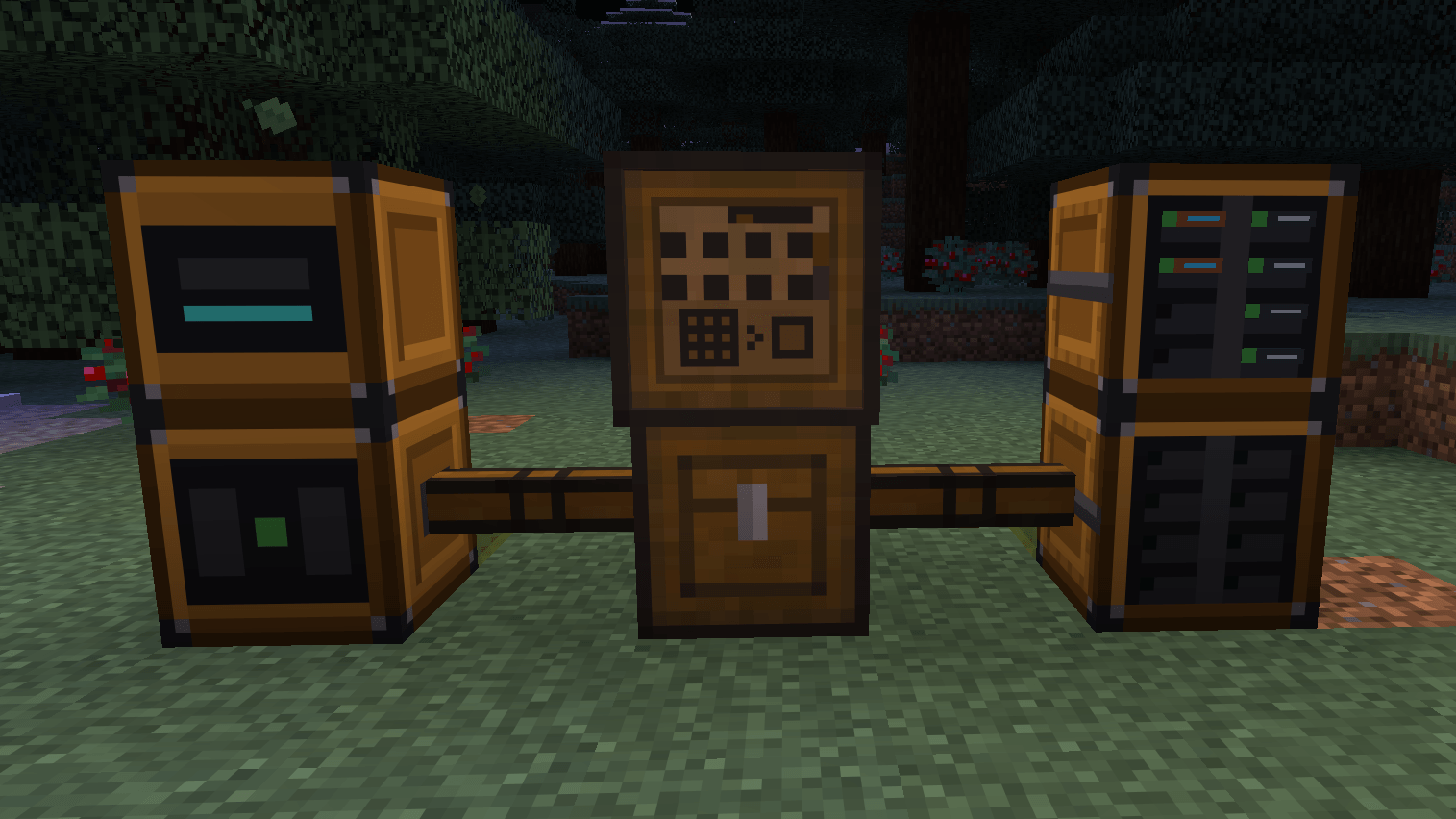
Features
Tiered Digital Item & Fluid Storage Disks
Craft Silicon by smelting or blasting Nether Quartz, assemble a Storage Housing or Fluid Storage Housing, and craft high-capacity Survival storage disks (plus Creative variants):
- Item Storage Disks: 1k (1,000 items), 4k (4,000 items), 16k (16,000 items), 64k (64,000 items), 256k, 1024k, and Creative (∞ capacity)
- Fluid Storage Disks: 1k, 4k, 16k, 64k, 256k, 1024k, and Creative (∞ capacity) — store liquids digitally inside your Disk Drives alongside regular item disks
- Lossless Disassembly: Empty disks can be crafted back into their Storage Part + Housing (or Shift + Right-Clicked in hand) so you never waste materials when upgrading!
8-Bay Disk Drive & Multi-Drive Racks
- 8 Disk Slots per drive holding any mix of Item Storage Disks and Fluid Storage Disks.
- Live 3D Bay LEDs & Disk Cartridges: Front-panel status lights update in real time—Green < 75%, Orange >= 75%, and Red 100% Full—paired with 3D rendered disk cartridges that visually distinguish regular item disks from fluid storage disks.
- Drive Priority (Lowest → Highest): Place multiple Disk Drives touching each other to form a unified multi-drive rack; higher-priority drives always fill first.
- Comparator Support: Emits a redstone comparator signal (0–15) proportional to total stored capacity.
Autocrafter (Item & Fluid Autocrafting)
- Automated 3×3 Crafting: Connects directly to your Tom's Simple Storage network to craft items automatically from your Disk Drives and connected chests.
- Three Crafting Modes: Switch between Keep Stock (1, 8, 16, 64, 256, or 1,024 items), Continuous, and Redstone (active while receiving a redstone signal).
- Digital Fluid Autocrafting: Automatically pulls fluid buckets directly from your Fluid Storage Disks and attached fluid tanks (1,000 mB of fluid + an empty bucket per bucket ingredient) and returns empty buckets back into your network.
- Live Status LED & JEI Pattern Transfer: Features an animated blinking red front LED while crafting and supports both JEI + recipe transfer and dragging & dropping ghost items directly into the 3×3 grid.
Wireless Connector & Interdimensional Upgrade
- Remote Network Bridging: Link remote farms, quarries, and outposts to your main storage network by inserting a bound Wireless Terminal or Advanced Wireless Terminal into a Wireless Connector.
- Full Two-Way Item & Fluid Access: Supports remote Storage Terminals, Fluid Terminals, Autocrafters, Fluid Hoppers, pipes, and hoppers across the wireless link.
- Range Limits & Interdimensional Upgrade: Enforces Tom's Simple Storage range limits by default (16m for Wireless Terminals, 64m for Advanced Wireless Terminals)—or install an Interdimensional Upgrade card into the Wireless Connector's upgrade slot for unlimited range and cross-dimensional linking (Overworld, Nether, End, and modded dimensions).
Portable Terminal (Wearable Storage Backpack)
- Works as a Digital Backpack: Carry your Storage Disks on the go—access, search, and craft with all items stored on your inserted disks from anywhere in the world without needing to place down a drive or terminal.
- Wearable & Hotkey Accessible: Equip the Portable Terminal in your Curios Back slot (with a custom 3D backpack model rendered on your player) or keep it in your inventory/hotbar and open it anytime with a keybind or Right-Click.
- Auto-Pickup Upgrade: Install an Auto-Pickup Upgrade into your Portable Terminal to automatically route items picked up off the ground directly into your inserted storage disks, keeping your main inventory clutter-free while mining and exploring.
Digital Fluid Storage & Logistics
- Storage Terminal "Fluids" Tab: Toggle between Items and Fluids directly inside Tom's Storage Terminals, with bucket filling/draining, Shift + Right-Click inventory bucket draining, and live search bar filtering (including "@modid" searches).
- Fluid Storage Terminal: Dedicated terminal block for viewing and interacting with fluids across your network.
- Fluid Inventory Hopper: Directional fluid transfer block matching Tom's Simple Storage aesthetics, connecting to tanks, machines, and inventory cables.
- Fluid Inventory Connector & Fluid Inventory Cable Connector: Expose external tanks and multi-block tank columns (such as Iron Tanks) directly to your digital storage network over inventory cables.
Disk Workbench (Partitioning & Void Overflow)
- Whitelist & Blacklist Filtering: Assign up to 18 ghost filter items per disk so bulk cobble, mob drops, or tools stay cleanly separated.
- Automatic Whitelist Precedence: Whitelisted disks automatically catch their matching items ahead of general-purpose disks.
- Void Overflow Toggle: Enable Void mode on partitioned disks to void excess matching items once full, preventing automated farms from jamming.
Disk Manager (Data Migration)
- Place an Input Disk and an Output Disk into the Disk Manager to smoothly transfer items or fluids from smaller disks onto upgraded high-capacity disks, complete with a live transfer progress bar.
- Toggle switch to transfer from disk directly into the network.
Built-In Mod Compatibility
- Tom's Simple Storage: Connects directly to Inventory Connectors, Inventory Cables, Storage Terminals, Crafting Terminals, Wireless Terminals, and Advanced Wireless Terminals.
- Curios API: Equip the Portable Terminal in the Curios Back slot with full 3D backpack rendering and keybind access.
- Tank & Fluid Mods: Full NeoForge Fluid Capability support for external fluid tanks and multi-block tank columns (tested with Iron Tanks).
- JEI (Just Enough Items): Full recipe and disassembly support, JEI + transfer and ghost drag-and-drop for the Autocrafter and Disk Workbench, and scrolling compatibility while in Terminal Fluids mode.
- Jade: Live HUD tooltips showing inserted disks, capacity percentage, drive priority, Disk Manager transfer status, Autocrafter recipe/mode/progress, and Wireless Connector link coordinates & range status.
- Survival Advancements: Dedicated advancement tab guiding you from your first Silicon to high-tier Storage Disks, Autocrafting, and Interdimensional Wireless Links.
Project description from CurseForge.
Pick your setup
Tom's Digital Storage by Minecraft version and loader
Choose the version and loader you play, then open the matching release.
Minecraft version
26.1.2
1
loader build Check the dependencies, then try the file in a copied instance before changing a world you care about.
Recent files
Tom's Digital Storage versions and loaders

 mod
 mod
 mod