Minecraft version
Back to mods 
CurseForge · Minecraft mod
Omni: Lib | Core Library & Central Hub
The core library for the Omni mod suite. It provides the Central Hub, Omni Lab, shared UI widgets, radial menus, and sounds for compatible Omni mods.
Choose a version Pick your version below, then grab the matching file.
Quick answer
Which Omni: Lib | Core Library & Central Hub release should I use?
Latest stable file OmniLib 1.0.0 (26.3 Fabric)
Game version 26.3
Loader Fabric
Omni: Lib | Core Library & Central Hub OmniLib 1.0.0 (26.3 Fabric) targets 26.3 with Fabric. The project page does not say whether this file belongs on the client, dedicated server, or both. No extra mods listed for this file.
Where it goes
Is Omni: Lib | Core Library & Central Hub required on the client, server, or both?
The project page does not say whether this file belongs on the client, dedicated server, or both.
Client Source doesn’t say
Dedicated server Source doesn’t say
Loader for this release Fabric
Required install it here Optional supported, not mandatory Not supported do not install here Source doesn’t say do not assume
The source does not explicitly classify this release as client-only or server-only.
What else does Omni: Lib | Core Library & Central Hub OmniLib 1.0.0 (26.3 Fabric) need?
OmniLib 1.0.0 (26.3 Fabric). Change the file and its required mods may change too.
This file does not list any required mods. Do not add a library just because a different file uses it.
This file does not list any required or optional mods.
Before you install it
Add Omni: Lib | Core Library & Central Hub without breaking your instance.
Built for Omni: Lib | Core Library & Central Hub OmniLib 1.0.0 (26.3 Fabric). Pick another file and the loader, install side or required mods may change.
- 01
Stick to this file
Use OmniLib 1.0.0 (26.3 Fabric). It targets 26.3 with Fabric; another release may have different loader, side or dependency requirements.
- 02
Bring the mods it needs
This file does not list any required mods. Do not add a library just because a different file uses it.
- 03
Put it on the correct side
The project page does not say whether this file belongs on the client, dedicated server, or both.
- 04
Pick the file you checked
Use the “Get this file” button beside OmniLib 1.0.0 (26.3 Fabric). It opens that exact file at the source.
About this project
What does Omni: Lib | Core Library & Central Hub add?

The core library for the Omni suite. Open your mods from one hub, reach their menus with radial shortcuts, and explore experimental features in Omni Lab.
Minecraft 1.20.1 • Forge
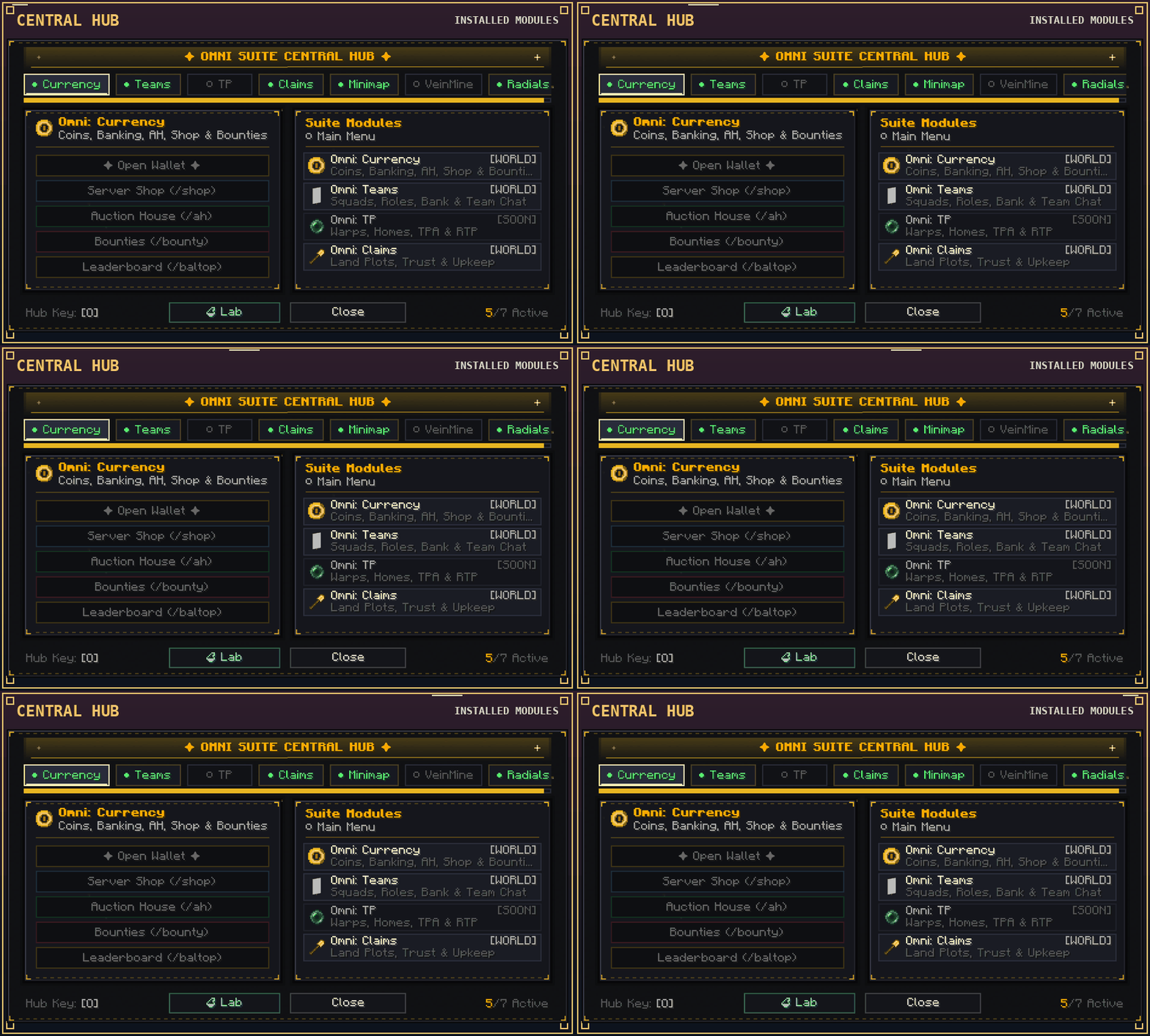
CENTRAL HUB
Press O by default to open the Hub. Pick an installed Omni module to see its shortcuts. With Omni: Currency installed, you can jump straight to your wallet, the server shop, or the Auction House.
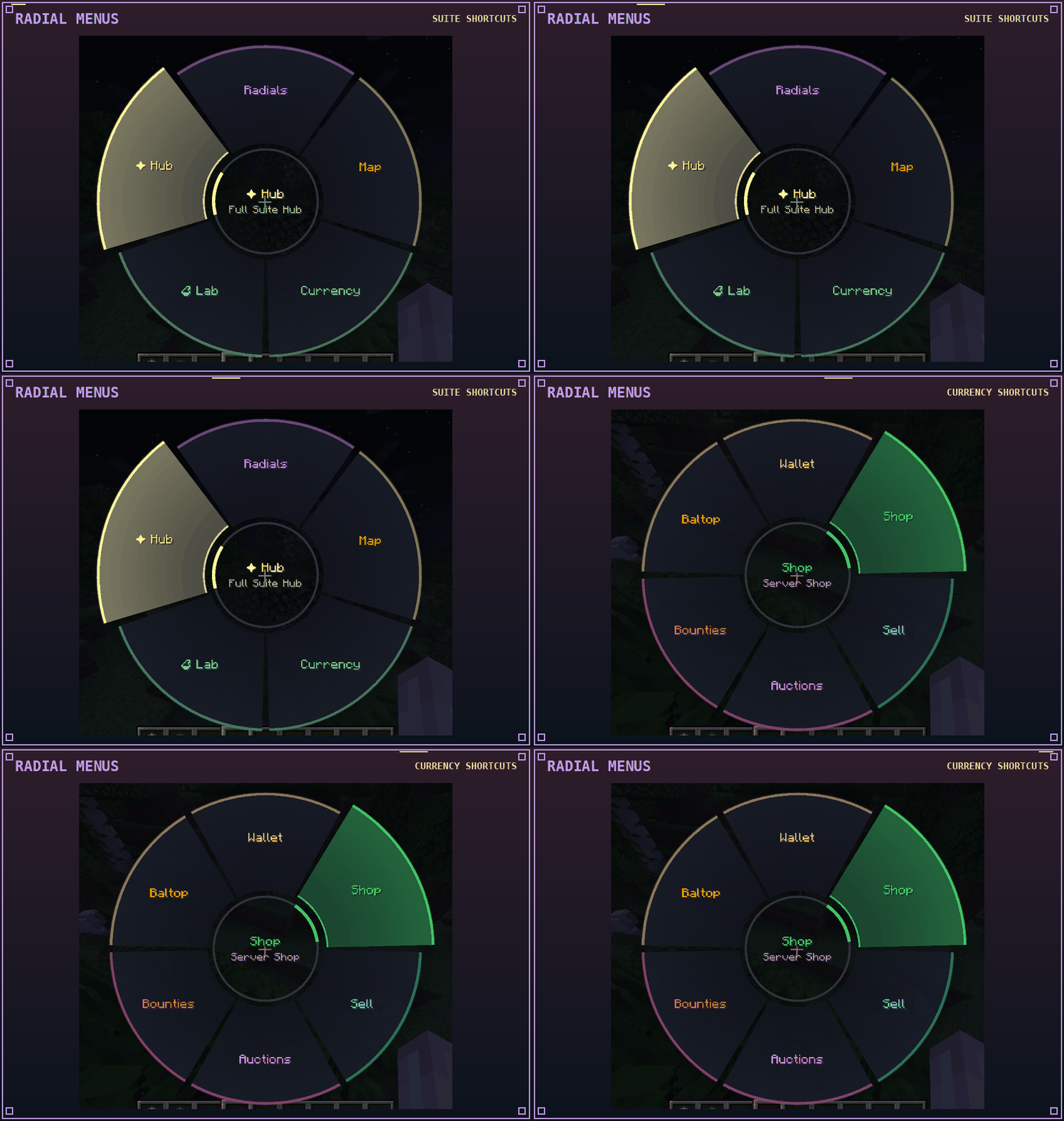
RADIAL MENUS
Open the Hub, the Lab, or a shortcut from a compatible module while you play. The Currency wheel puts your wallet, shop, sell menu, auctions, bounties, and leaderboard on one wheel.
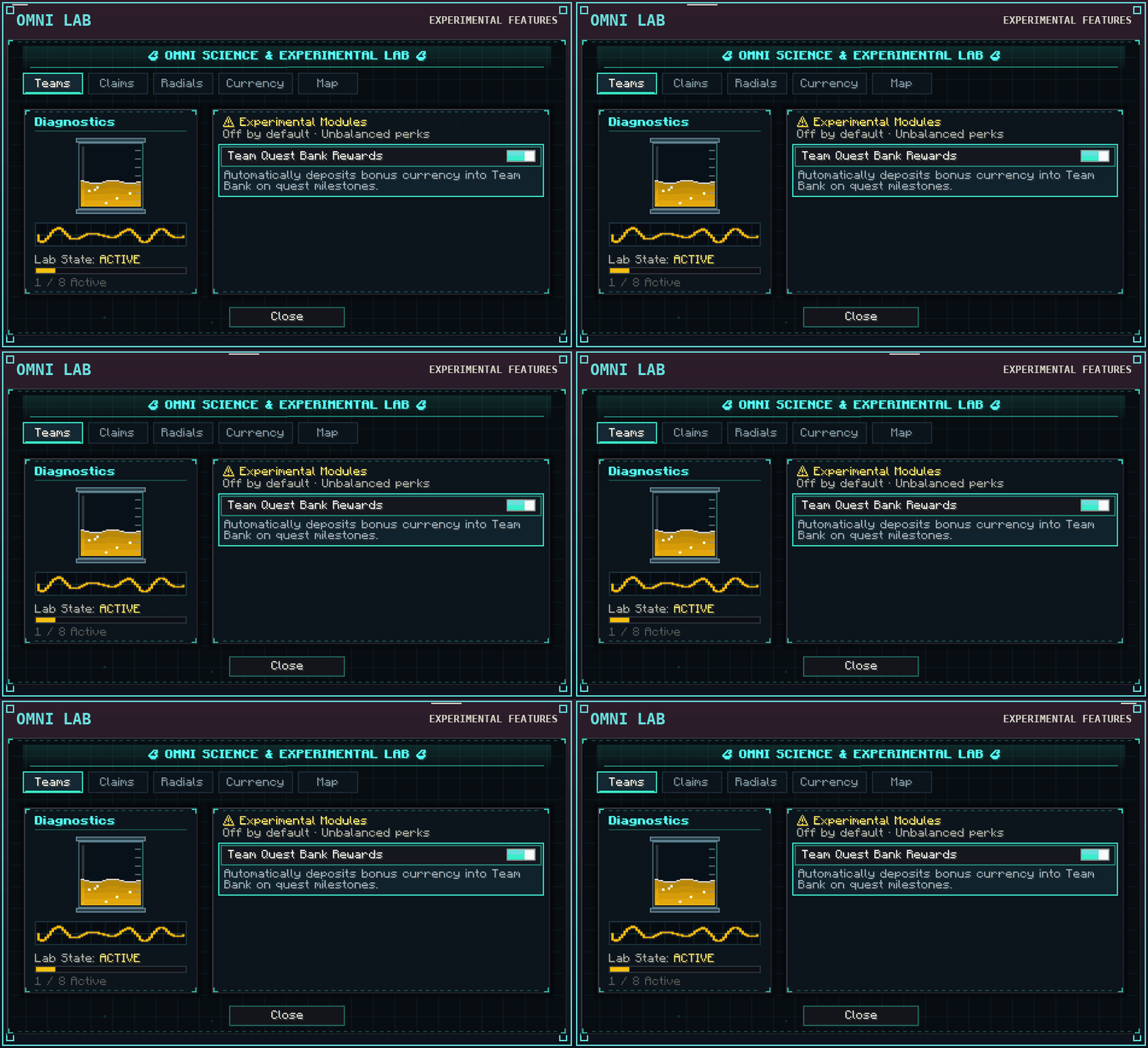
OMNI LAB
Open the Lab from the Hub to see the experiments offered by your installed modules. They’re off by default. One example is Team Quest Bank Rewards, which can add bonus currency to the team bank when your team reaches quest milestones.
BUILD YOUR OMNI SETUP
Omni: Lib provides the Central Hub, Omni Lab, shared UI widgets, radial menu framework, and sounds. Install it alongside the individual Omni mods you want to use. Currency and Teams are separate mods that other Omni modules can optionally integrate with. Claims, TP, Map, VeinMine, On a Stick, and Radials are separate modules you can add to your setup.

Project description from CurseForge.
Pick your setup
Omni: Lib | Core Library & Central Hub by Minecraft version and loader
Choose the version and loader you play, then open the matching release.
Minecraft version
1.21.11
2 loader buildsMinecraft version
1.21.1
2 loader buildsMinecraft version
1.20.1
1 loader buildCheck the dependencies, then try the file in a copied instance before changing a world you care about.
Recent files
Omni: Lib | Core Library & Central Hub versions and loaders
OmniLib 1.0.0 (26.3 Fabric)
omnilib-fabric-26.3-1.0.0.jar
28 Nov 2026
Client Source doesn’t say Server Source doesn’t say Dependencies No extras listed Listed on Release listing
Check the 26.3 · Fabric setup Fabric26.3 release
OmniLib 1.0.0 (26.3 NeoForge)
omnilib-neoforge-26.3-1.0.0.jar
28 Nov 2026
Client Source doesn’t say Server Source doesn’t say Dependencies No extras listed Listed on Release listing
Check the 26.3 · NeoForge setup NeoForge26.3 release
OmniLib 1.0.0 (1.21.11 Fabric)
omnilib-fabric-1.21.11-1.0.0.jar
28 Nov 2026
Client Source doesn’t say Server Source doesn’t say Dependencies No extras listed Listed on Release listing
Check the 1.21.11 · Fabric setup Fabric1.21.11 release
OmniLib 1.0.0 (1.21.11 NeoForge)
omnilib-neoforge-1.21.11-1.0.0.jar
28 Nov 2026
Client Source doesn’t say Server Source doesn’t say Dependencies No extras listed Listed on Release listing
Check the 1.21.11 · NeoForge setup NeoForge1.21.11 release
OmniLib 1.0.0 (1.21.1 Fabric)
omnilib-fabric-1.21.1-1.0.0.jar
28 Nov 2026
Client Source doesn’t say Server Source doesn’t say Dependencies No extras listed Listed on Release listing
Check the 1.21.1 · Fabric setup Fabric1.21.1 release
OmniLib 1.0.0 (1.21.1 NeoForge)
omnilib-1.0.0.jar
28 Nov 2026
Client Source doesn’t say Server Source doesn’t say Dependencies No extras listed Listed on Release listing
Check the 1.21.1 · NeoForge setup 1.21.1NeoForge release
Omni: Lib 1.0.0 (1.20.1 Forge)
omnilib-1.0.0.jar
27 Nov 2026
Client Source doesn’t say Server Source doesn’t say Dependencies No extras listed Listed on Release listing
Check the 1.20.1 · Forge setup 1.20.1Forge release
Omni: Lib 0.1.0 (1.20.1 Forge)
omnilib-0.1.0.jar
26 Nov 2026
Client Source doesn’t say Server Source doesn’t say Dependencies No extras listed Listed on Release listing
Check the 1.20.1 · Forge setup 1.20.1Forge release
Looking for an older file? The official CurseForge project page is in Resources.
 mod
CurseForge · Minecraft
Omni: TP | Teleportation, Homes, Warps & TPA
Save named homes, visit warps, send teleport requests, and explore with random teleport. Includes team homes, spawn, and /back
 mod
CurseForge · Minecraft
Omni: VeinMine | Vein Mining, 3x3 Tunnels & Staircases
Preview the blocks you’re about to mine, then break them instantly or gradually. Switch between vein mining, 3×3 tunnels, 1×2 strips, and staircases from a radial menu.
 mod
CurseForge · Minecraft
Omni: Claims | Land Claiming & Chunk Protection
Claim and protect chunks in Minecraft Forge 1.20.1. Manage player trust, set team protection rules, and see your territory with Omni: Map.