Minecraft version
Back to mods 
CurseForge · Minecraft mod
Retrorama
Randomizes the title screen panorama and menu music using those from other versions of the game
Choose a version Pick your version below, then grab the matching file.
Quick answer
Which Retrorama release matches 26.2?
Best match for your filters 1.0.3 for Fabric 26.1.2
Game version 26.1, 26.1.1, 26.1.2
Loader Fabric
Retrorama 1.0.3 for Fabric 26.1.2 targets 26.1, 26.1.1, 26.1.2 with Fabric. The project page does not say whether this file belongs on the client, dedicated server, or both. No extra mods listed for this file.
Where it goes
Is Retrorama required on the client, server, or both?
The project page does not say whether this file belongs on the client, dedicated server, or both.
Client Source doesn’t say
Dedicated server Source doesn’t say
Loader for this release Fabric
Required install it here Optional supported, not mandatory Not supported do not install here Source doesn’t say do not assume
The source does not explicitly classify this release as client-only or server-only.
What else does Retrorama 1.0.3 for Fabric 26.1.2 need?
1.0.3 for Fabric 26.1.2 on 26.2. Every mod below is checked against that same setup.
This file does not list any required mods. Do not add a library just because a different file uses it.
This file does not list any required or optional mods.
Before you install it
Add Retrorama without breaking your instance.
Built for Retrorama 1.0.3 for Fabric 26.1.2 on 26.2. Pick another file and the loader, install side or required mods may change.
- 01
Stick to this file
Use 1.0.3 for Fabric 26.1.2. It targets 26.1, 26.1.1, 26.1.2 with Fabric; another release may have different loader, side or dependency requirements.
- 02
Bring the mods it needs
This file does not list any required mods. Do not add a library just because a different file uses it.
- 03
Put it on the correct side
The project page does not say whether this file belongs on the client, dedicated server, or both.
- 04
Pick the file you checked
Use the “Get this file” button beside 1.0.3 for Fabric 26.1.2. It opens that exact file at the source.
About this project
What does Retrorama add?
Retrorama
Retrorama randomizes the title screen. Every time you launch the game, and each time you leave a world or server, it picks a panorama from other Minecraft versions, starting from 1.13, and plays the menu music from that same version.
You can choose which versions are included, preview each panorama, and shuffle to a new one at any time without restarting.
Features
- 17 panoramas, one for every major update since 1.13 (Update Aquatic).
- Matching menu music: each panorama comes with the menu tracks from its own version, using the same weights and volume as that version.
- Optional exclusive tracks mode: plays only the tracks introduced with each version and skips the C418 menu tracks that most versions share (Mutation, Moog City 2, Beginning 2, Floating Trees). Versions that only have those shared tracks (1.13–1.17) still play them.
- A config screen with a preview of every panorama. Click a preview to include or exclude that version. Changes and the Shuffle Now button apply immediately.
- The config screen opens from Mod Menu on Fabric, the Mods list on NeoForge, and a button on the vanilla Options screen. The Options screen button can be turned off.
- Resource packs and mods that replace the panorama replace the current game version's panorama only. All other versions still show their own panoramas.
- Every version of the mod can show every panorama. A 1.21.1 game can show the 26.3 panorama and play 26.3 music, for example.
Configuration
Open the config screen from Mod Menu (Fabric), the Mods list (NeoForge), or the Retrorama button in the bottom left corner of the Options screen.
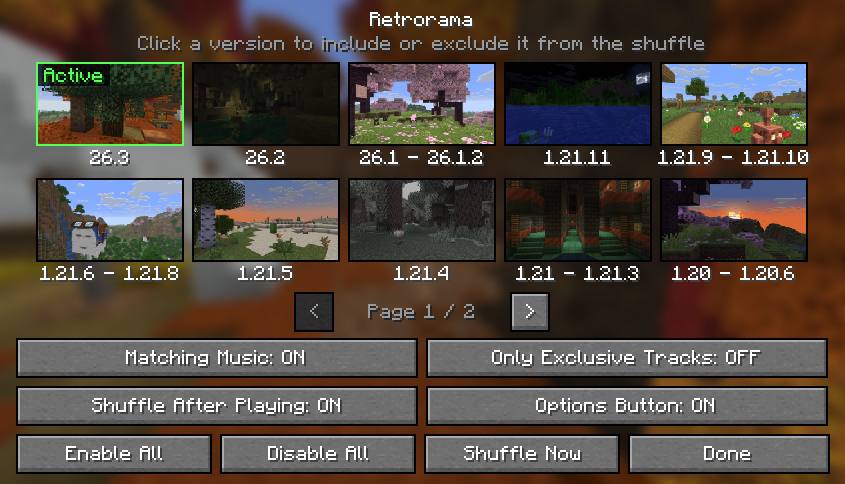
| Option | Default | Description |
|---|---|---|
| Version cards | All enabled | Click a card to include or exclude that version from the shuffle. |
| Matching Music | On | Play the selected version's menu music. When off, the current game's normal menu music plays. |
| Only Exclusive Tracks | Off | Skip the shared C418 menu tracks for versions that have tracks of their own. |
| Shuffle After Playing | On | Pick a new panorama when you leave a world or server. |
| Options Button | On | Show the Retrorama button on the Options screen. |
| Enable All / Disable All | Include or exclude every version. With every version disabled, the game's own panorama and music are used. | |
| Shuffle Now | Pick a new panorama from the enabled versions and apply it immediately. |
Settings are stored in config/retrorama.json. The file stores disabled versions, not enabled ones, so panoramas added in future updates are enabled automatically.
Network access and downloads
Retrorama downloads panoramas and music from other versions directly from Mojang's servers, and a list of available versions from its GitHub repository. Only images, audio and the version list are downloaded, nothing else.
The version list contains each version's file hashes, sizes, names and track titles. A copy is bundled with the mod. At most once a day, the mod downloads the latest copy from raw.githubusercontent.com and stores it in .minecraft/retrorama/versions.json, so new versions can be added without a mod update. A downloaded list is only used if it's valid, and it can only point to Mojang's servers - entries that point anywhere else are ignored. If the download fails, the cached or bundled copy is used.
Panoramas from 1.14+ and all music are downloaded from resources.download.minecraft.net, and only the 1.13 panorama is downloaded from piston-data.mojang.com, as it does not exist on the asset server. Every download address is built from the SHA-1 hashes and paths in the version list.
Every file is checked against the SHA-1 hash and size from the version list. Files are stored in .minecraft/retrorama/objects, using the same hash-based layout as the launcher's asset folder. Preview thumbnails are stored in .minecraft/retrorama/previews. Each file is downloaded once and reused on later launches. Delete the retrorama folder to clear the cache - files will be downloaded again when needed.
Project description from CurseForge.
Pick your setup
Retrorama by Minecraft version and loader
Choose the version and loader you play, then open the matching release.
Minecraft version
26.2
2 loader buildsMinecraft version
26.1.2
2 loader buildsMinecraft version
26.1.1
2 loader buildsMinecraft version
26.1
2 loader buildsMinecraft version
1.21.11
2 loader buildsMinecraft version
1.21.10
2 loader buildsMinecraft version
1.21.9
2 loader buildsMinecraft version
1.21.8
2 loader buildsMinecraft version
1.21.7
2 loader buildsMinecraft version
1.21.6
2 loader buildsMinecraft version
1.21.5
2 loader buildsShowing the newest 12 of 17 game versions. Older files are in the list below.
Check the dependencies, then try the file in a copied instance before changing a world you care about.
Recent files
Retrorama versions and loaders
1.0.3 for Fabric 26.1.2
retrorama-fabric-1.0.3-26.1.2.jar
28 Nov 2026
Client Source doesn’t say Server Source doesn’t say Dependencies No extras listed Listed on Release listing
Check the 26.2 · Fabric setup Fabric26.126.1.126.1.2 release
1.0.3 for NeoForge 26.1.2
retrorama-neoforge-1.0.3-26.1.2.jar
28 Nov 2026
Client Source doesn’t say Server Source doesn’t say Dependencies No extras listed Listed on Release listing
Check the 26.2 · NeoForge setup NeoForge26.126.1.126.1.2 release
1.0.2 for Fabric 26.1.2
retrorama-fabric-1.0.2-26.1.2.jar
27 Nov 2026
Client Source doesn’t say Server Source doesn’t say Dependencies No extras listed Listed on Release listing
Check the 26.2 · Fabric setup Fabric26.126.1.126.1.2 release
1.0.2 for NeoForge 26.1.2
retrorama-neoforge-1.0.2-26.1.2.jar
27 Nov 2026
Client Source doesn’t say Server Source doesn’t say Dependencies No extras listed Listed on Release listing
Check the 26.2 · NeoForge setup NeoForge26.126.1.126.1.2 release
1.0.1 for Fabric 26.1.2
retrorama-fabric-1.0.1-26.1.2.jar
26 Nov 2026
Client Source doesn’t say Server Source doesn’t say Dependencies No extras listed Listed on Release listing
Check the 26.2 · Fabric setup Fabric26.126.1.126.1.2 release
1.0.1 for NeoForge 26.1.2
retrorama-neoforge-1.0.1-26.1.2.jar
26 Nov 2026
Client Source doesn’t say Server Source doesn’t say Dependencies No extras listed Listed on Release listing
Check the 26.2 · NeoForge setup NeoForge26.126.1.126.1.2 release
1.0.0 for NeoForge 26.1.2
retrorama-neoforge-1.0.0-26.1.2.jar
26 Nov 2026
Client Source doesn’t say Server Source doesn’t say Dependencies No extras listed Listed on Release listing
Check the 26.2 · NeoForge setup NeoForge26.126.1.126.1.2 release
1.0.0 for Fabric 26.1.2
retrorama-fabric-1.0.0-26.1.2.jar
26 Nov 2026
Client Source doesn’t say Server Source doesn’t say Dependencies No extras listed Listed on Release listing
Check the 26.2 · Fabric setup Fabric26.126.1.126.1.2 release
Looking for an older file? The official CurseForge project page is in Resources.
 mod
CurseForge + Modrinth · Minecraft
Plague's Chat Timestamps
A Minecraft mod that adds customizable timestamps to chat!
 mod
CurseForge + Modrinth · Minecraft
Enchantment Transfer (Fabric/Forge/NeoForge)
Move enchantments from item to book using an anvil, on Fabric, Forge, and NeoForge!
 mod
CurseForge + Modrinth · Minecraft
CMD + Delete
Fix macOS text navigation shortcuts in chat/books/signs/etc & allows custom shortcuts: get native cmd + backspace, option + delete, cmd + arrows, and more!