Create Needed by [机械动力:触媒框架] Create: Catalyst Frame create_catalyst_frame-1.0.1-Neo1.21.1.jar
requiredMatching file found Matched file: Create 6.0.10 for mc1.21.1
CurseForge · Minecraft mod
Added a variety of Catalyst Frames that can be filled with Fan-Catalyst blocks and acquire the function of the catalyst.
Quick answer
[机械动力:触媒框架] Create: Catalyst Frame create_catalyst_frame-1.0.1-Neo1.21.1.jar targets 1.21.1 with NeoForge. The project page does not say whether this file belongs on the client, dedicated server, or both. All 1 required mods have matching files.
Where it goes
The project page does not say whether this file belongs on the client, dedicated server, or both.
The source does not explicitly classify this release as client-only or server-only.
create_catalyst_frame-1.0.1-Neo1.21.1.jar on 1.21.1 NeoForge. Every mod below is checked against that same setup.
Install Create first. We found matching files for this game-version and loader setup.
We only count dependency files that match this setup. A file for another loader does not fill the gap.
Before you install it
Built for [机械动力:触媒框架] Create: Catalyst Frame create_catalyst_frame-1.0.1-Neo1.21.1.jar on 1.21.1 NeoForge. Pick another file and the loader, install side or required mods may change.
Use create_catalyst_frame-1.0.1-Neo1.21.1.jar. It targets 1.21.1 with NeoForge; another release may have different loader, side or dependency requirements.
Install Create first. We found matching files for this game-version and loader setup.
The project page does not say whether this file belongs on the client, dedicated server, or both.
Use the “Get this file” button beside create_catalyst_frame-1.0.1-Neo1.21.1.jar. It opens that exact file at the source.
About this project
Provides a variety of "Catalyst Frames" for the Create fan catalysts. A Catalyst Frame is a block that can be filled with any catalyst, and then takes over that catalyst's function in fan processing.
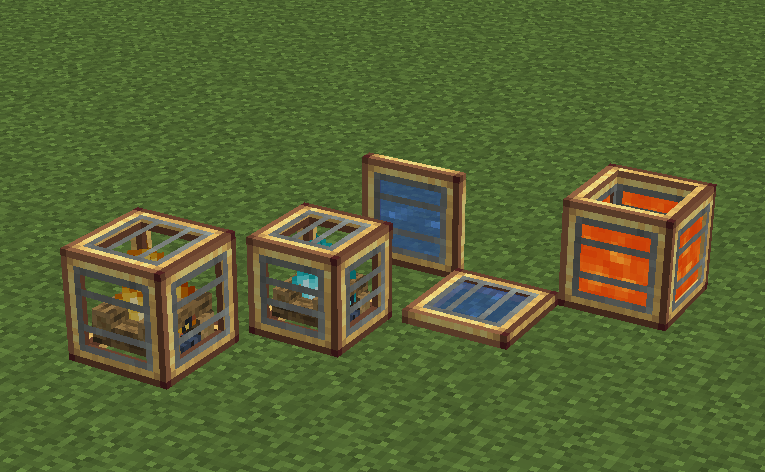
The mod provides several shapes of catalyst frames:
| Block | Description |
|---|---|
| Catalyst Frame | 16px per side, standard block collision box |
| Small Catalyst Frame | 14px per side, collision box shrunk by one ring; can be used in place of an empty blaze burner |
| Catalyst Frame Panel | Similar to framed panels, suited to being placed flat against a surface |
| Catalyst Frame Duct | A hollow duct with blocking walls on four sides |
This project is licensed under the MIT license.
为 机械动力(Create) 的鼓风机触媒提供了多样的“触媒框架”。 触媒框架,是一种可以向内填充任意触媒的方块,并承担其鼓风机加工触媒的功能。
本模组制作了多种形状的触媒框架:
| 方块 | 说明 |
|---|---|
| 触媒框架 | 边长16px,标准方块碰撞箱 |
| 小型触媒框架 | 边长14px,碰撞箱缩小一圈,可用作替代空燃烧室 |
| 触媒框架板 | 类似伪装板,适合贴面放置 |
| 触媒框架管 | 四面有阻挡的中空管道 |
本项目采用 MIT 许可协议。
Project description from CurseForge.
Pick your setup
Choose the version and loader you play, then open the matching release.
Check the dependencies, then try the file in a copied instance before changing a world you care about.
Recent files
28 Nov 2026
27 Nov 2026
Looking for an older file? The official CurseForge project page is in Resources.
 mod
A Minecraft mod that adds customizable timestamps to chat!
 mod
completely re-engineers flight dynamics, sound design, and balance for all Mekanism jetpacks (Standard Jetpack, Armored Jetpack, and MekaSuit Jetpack Unit). Fix floaty "flying armchairs" effects and remake sounds.
 mod
Overpowered Yamato katana and a White Monster easy to make that gives you more power