Fabric API Needed by stockframe-1.0.1+26.1.2-fabric.jar
requiredMatching file found Matched file: [26.1.2] Fabric API 0.155.3+26.1.2
CurseForge · Minecraft mod
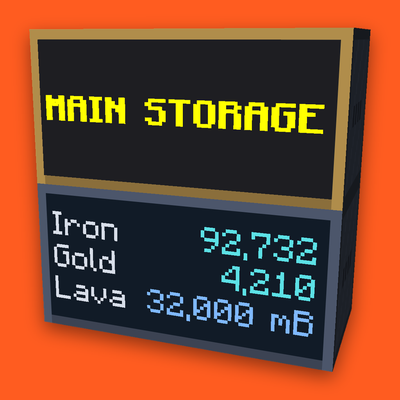
Live wall displays for your storage: link a screen to a chest, drawer or whole network and read items, fluids and energy at a glance.
Quick answer
stockframe-1.0.1+26.1.2-fabric.jar targets 26.1.2 with Fabric. The project page does not say whether this file belongs on the client, dedicated server, or both. All 1 required mods have matching files.
Where it goes
The project page does not say whether this file belongs on the client, dedicated server, or both.
The source does not explicitly classify this release as client-only or server-only.
stockframe-1.0.1+26.1.2-fabric.jar on Fabric. Every mod below is checked against that same setup.
Install Fabric API first. We found matching files for this game-version and loader setup.
We only count dependency files that match this setup. A file for another loader does not fill the gap.
Before you install it
Built for stockframe-1.0.1+26.1.2-fabric.jar on Fabric. Pick another file and the loader, install side or required mods may change.
Use stockframe-1.0.1+26.1.2-fabric.jar. It targets 26.1.2 with Fabric; another release may have different loader, side or dependency requirements.
Install Fabric API first. We found matching files for this game-version and loader setup.
The project page does not say whether this file belongs on the client, dedicated server, or both.
Use the “Get this file” button beside stockframe-1.0.1+26.1.2-fabric.jar. It opens that exact file at the source.
About this project
Wall screens that show what's in your storage. Link a screen to a chest, a drawer controller, a tank or a whole storage network, pick what it shows, and read your stock from across the room. Plus signs and to-do boards for the rest of your base.
Available for NeoForge, Forge and Fabric, on Minecraft 26.1.2, 1.21.1 and 1.20.1.
Every version reads standard storage: chests, barrels, drawers, tanks, batteries and modded machines that use the loader's normal item, fluid and energy storage. That covers most storage mods with no extra support needed (tested with Functional Storage, Sophisticated Storage, Tom's Simple Storage and Create fluid tanks). Mod chests that skip the standard storage, like Nautec's crates, are read too.
On top of that, StockFrame reads these mods directly:
| Mod | What a screen shows | Versions |
|---|---|---|
| Applied Energistics 2 | The whole network: link the controller, a drive or an energy cell | NeoForge 26.1.2 and 1.21.1, Forge 1.20.1, Fabric 1.20.1 |
| Refined Storage | The whole network and its energy: link the controller, a storage block or a cable | NeoForge 26.1.2 and 1.21.1, Fabric 1.21.1 and 26.1.2 |
| Mekanism | Chemicals in tanks and machines | NeoForge 1.21.1, Forge 1.20.1 |
| Mekanism QIO | A whole QIO frequency: link the dashboard, a drive array or any QIO block | NeoForge 1.21.1, Forge 1.20.1 |
| Ars Nouveau | Source in jars | NeoForge 1.21.1, Forge 1.20.1 |
| GregTech CEu | EU energy | Forge 1.20.1 |
| Team Reborn Energy | Energy from Fabric tech mods that use it | All Fabric versions |
Every one of these is optional. StockFrame works on its own and never needs another mod installed (Fabric needs Fabric API, as almost every Fabric mod does).
Screens in another dimension work too: link them to an AE2 network that reaches there through a Quantum Network Bridge (both ends of the bridge must stay loaded).
The Monitor Linker is also a wrench (from 1.0.1). It is in the common wrench tags, so mods and multitools that look for a wrench can use it. Linking always comes first. Mind your sneak: a mod that picks up its blocks when you sneak-right-click them with a wrench (Applied Energistics 2 does) does that with the Linker too.
Note Screens need no link: right-click one with an empty hand to write on it. Click a to-do to tick it, and sneak-right-click to edit a list.
Exact layouts are in the recipe book and in JEI, EMI or REI.
| Minecraft | Loader | Needs |
|---|---|---|
| 26.1.2 | NeoForge 26.1.2.126 or newer | Nothing else |
| 26.1.2 | Fabric Loader 0.18.4 or newer | Fabric API |
| 1.21.1 | NeoForge 21.1.251 or newer | Nothing else |
| 1.21.1 | Fabric Loader 0.15.11 or newer | Fabric API |
| 1.20.1 | Forge 47 or newer, or NeoForge for 1.20.1 (same file) | Nothing else |
| 1.20.1 | Fabric Loader 0.14.21 or newer | Fabric API |
Pick the file that matches both your Minecraft version and your loader.
Found a bug or have an idea? Report it on GitHub: https://github.com/kryptxplayz/StockFrame/issues (the form asks for your version, loader and steps, which makes bugs much faster to find). Made by KryptxPlayz, originally for a friend's FTB Evolution 2 server.
Project description from CurseForge.
Pick your setup
Choose the version and loader you play, then open the matching release.
Check the dependencies, then try the file in a copied instance before changing a world you care about.
Recent files
stockframe-1.0.1-26.1.2-fabric.jar
29 Nov 2026
stockframe-1.0.1-1.21.1-fabric.jar
29 Nov 2026
stockframe-1.0.1-1.20.1-fabric.jar
29 Nov 2026
stockframe-1.0.0-26.1.2-fabric.jar
28 Nov 2026
stockframe-1.0.0-1.21.1-fabric.jar
28 Nov 2026
stockframe-1.0.0-1.20.1-fabric.jar
28 Nov 2026
Looking for an older file? The official CurseForge project page is in Resources.
 mod
an immersive bodycam experience
 mod
Better User Experience, health bar, hunger bar, no more fire all over the screen, customize the HUD how ever you like and more.
 mod
The DiosesmonWiki inside the game: gyms, events, a breeding planner that reads your PC, an improved PC and a modern chat for the Diosesmon Cobblemon server.