Cloth Config API Optional for Auto Share 1.2-neoforge+26.1
optionalMatching file found Matched file: 26.3.159+neoforge

Modrinth · Minecraft mod
Automatically shares resource packs over LAN with no manual installation
Quick answer
Auto Share 1.2-neoforge+26.1 targets 26.1, 26.1.1-rc-1, 26.1.1 with NeoForge. Do not install it on the client. It must be installed on the dedicated server. No extra mods listed for this file.
Where it goes
Do not install it on the client. It must be installed on the dedicated server.
This file is marked server-only.
1.2-neoforge+26.1. Change the file and its required mods may change too.
This file does not list any required mods. Do not add a library just because a different file uses it.
We only count dependency files that match this setup. A file for another loader does not fill the gap.
Before you install it
Built for Auto Share 1.2-neoforge+26.1. Pick another file and the loader, install side or required mods may change.
Use 1.2-neoforge+26.1. It targets 26.1, 26.1.1-rc-1, 26.1.1 with NeoForge; another release may have different loader, side or dependency requirements.
This file does not list any required mods. Do not add a library just because a different file uses it.
Do not install it on the client. It must be installed on the dedicated server.
Use the “Get this file” button beside 1.2-neoforge+26.1. It opens that exact file at the source.
About this project
Auto Share is a Minecraft mod that allows the owner of a local network world to automatically distribute resource packs to everyone else, eliminating the need for each player to download and install them manually.
The link must be to a ZIP file. On most websites, simply copying the link to the download button is sufficient. Examples of obtaining links for Modrinth and CurseForge.
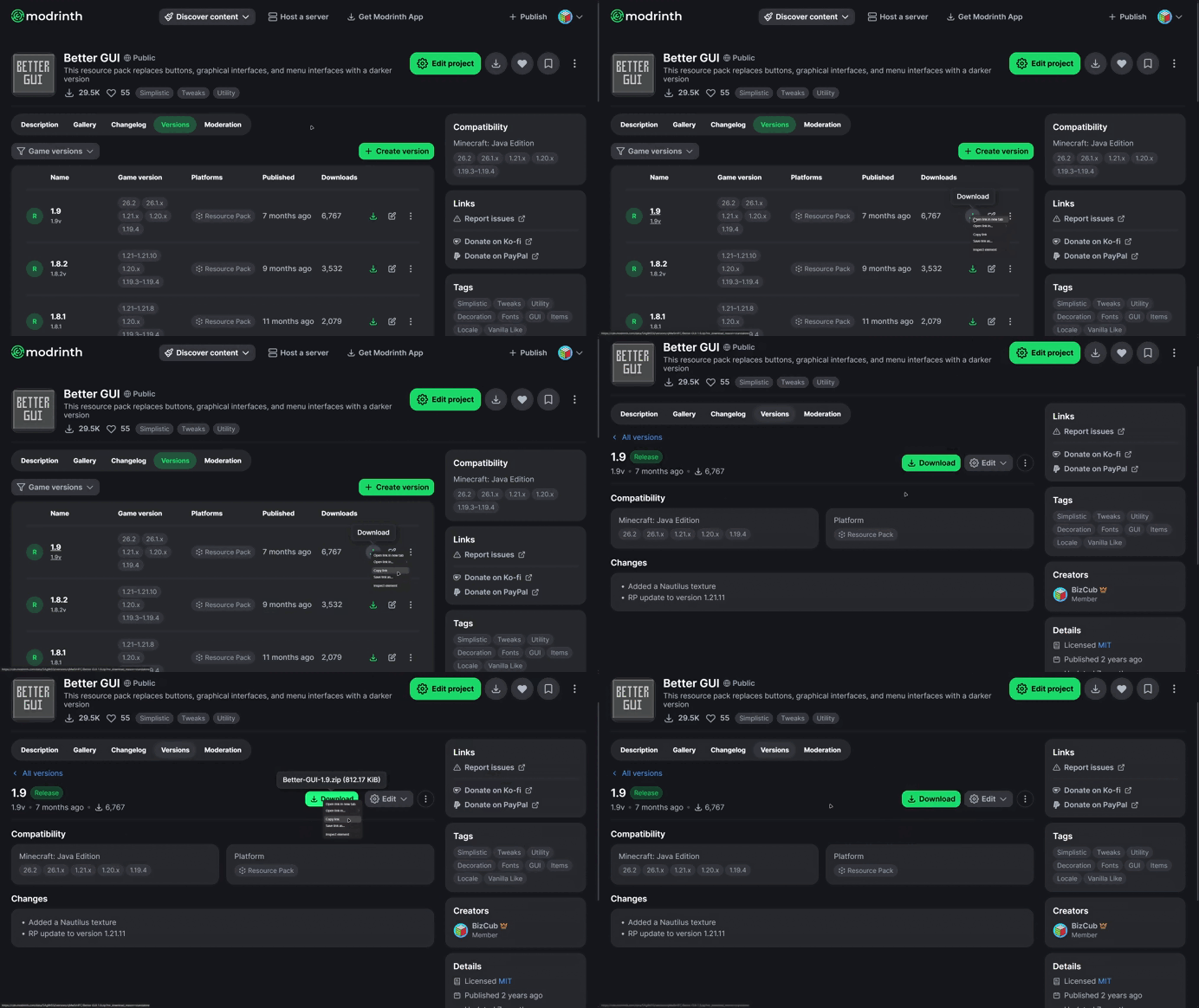
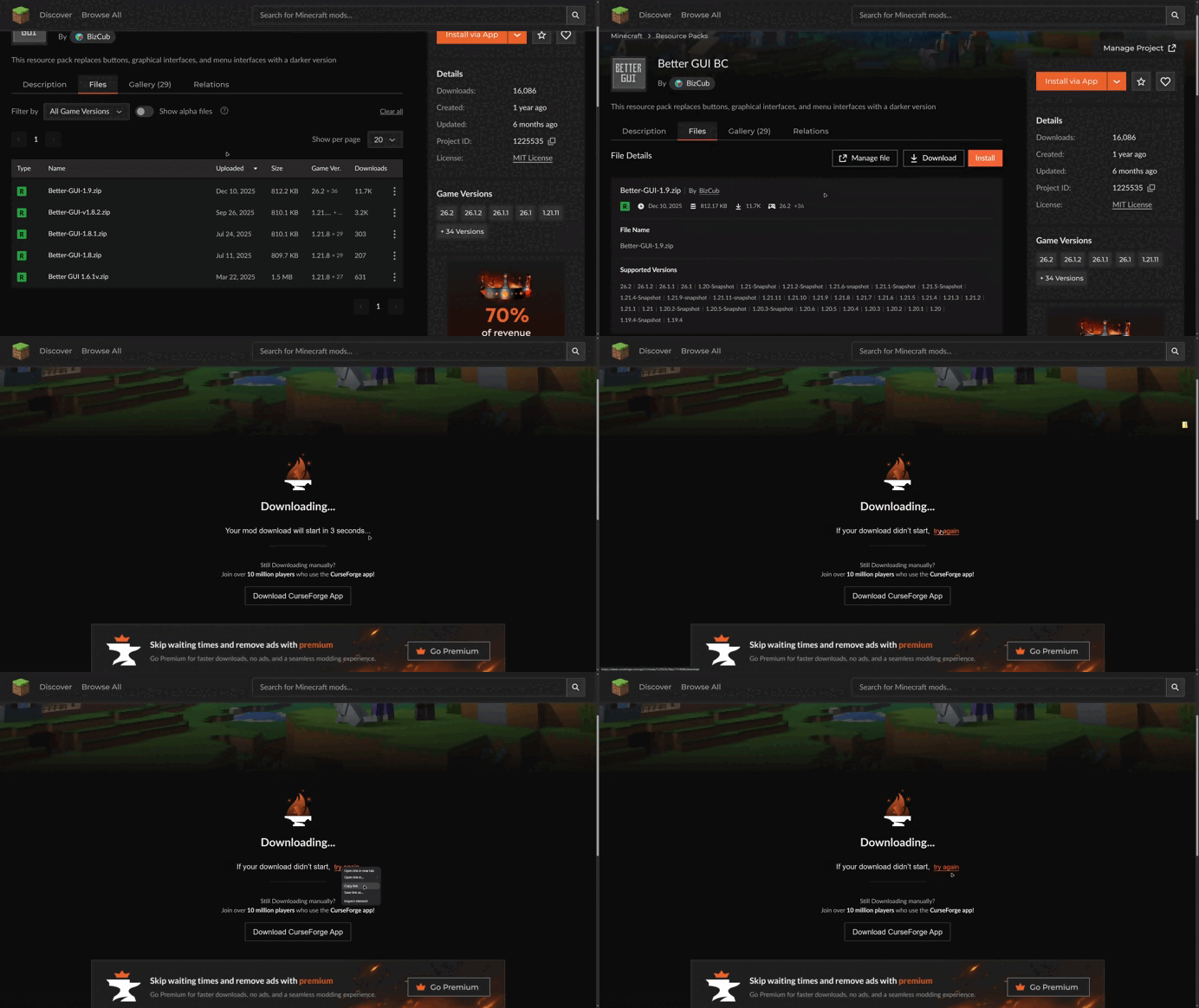
The links must then be specified in the mod's configuration.
You can also specify whether resource packs are required. In this case, the player will not be able to enter the world without downloading the resource pack.
Want to help create and develop my projects? Click the button below and make your contribution

Project description from Modrinth.
Pick your setup
Choose the version and loader you play, then open the matching release.
Showing the newest 12 of 158 game versions. Older files are in the list below.
Check the dependencies, then try the file in a copied instance before changing a world you care about.
Recent files
auto-share-1.2-neoforge+26.1.jar
19 Sept 2026
auto-share-1.2-forge+26.1.jar
19 Sept 2026
auto-share-1.2-fabric+26.1.jar
19 Sept 2026
auto-share-1.2-forge+1.21.6.jar
19 Sept 2026
auto-share-1.2-neoforge+1.21.jar
19 Sept 2026
auto-share-1.2-forge+1.20.6.jar
19 Sept 2026
auto-share-1.2-fabric+1.20.5.jar
19 Sept 2026
auto-share-1.2-forge+1.20.3-srg.jar
19 Sept 2026
auto-share-1.2-fabric+1.20.3.jar
19 Sept 2026
auto-share-1.2-forge+1.20.2-srg.jar
19 Sept 2026
auto-share-1.2-fabric+1.20.2.jar
19 Sept 2026
auto-share-1.2-fabric+1.20.jar
19 Sept 2026
Looking for an older file? The official Modrinth project page is in Resources.
 mod
modA mod inspired by Mite that recreates most of Mite's content.
 mod
modFlower-covered mooblooms and cluckblooms bring fresh color and life to your world!
 mod
modA different view of what the BBS mod is.