Minecraft version
Back to mods 
Modrinth · Minecraft mod
easyTeams
Teaming up with your Friends has never been easier!
Choose a version Pick your version below, then grab the matching file.
Quick answer
Which easyTeams release matches 1.21.4 datapack?
Best match for your filters 1.3
Game version 1.21.2, 1.21.3, 1.21.4
Loader datapack
easyTeams 1.3 targets 1.21.2, 1.21.3, 1.21.4 with datapack. Installation on the client is optional. Installation on the dedicated server is optional. No extra mods listed for this file.
Where it goes
Is easyTeams required on the client, server, or both?
Installation on the client is optional. Installation on the dedicated server is optional.
Client Optional
Dedicated server Optional
Loader for this release datapack
Required install it here Optional supported, not mandatory Not supported do not install here Source doesn’t say do not assume
The source marks this as usable on both the client and server.
What else does easyTeams 1.3 need?
1.3 on 1.21.4 datapack. Every mod below is checked against that same setup.
This file does not list any required mods. Do not add a library just because a different file uses it.
This file does not list any required or optional mods.
Before you install it
Add easyTeams without breaking your instance.
Built for easyTeams 1.3 on 1.21.4 datapack. Pick another file and the loader, install side or required mods may change.
- 01
Stick to this file
Use 1.3. It targets 1.21.2, 1.21.3, 1.21.4 with datapack; another release may have different loader, side or dependency requirements.
- 02
Bring the mods it needs
This file does not list any required mods. Do not add a library just because a different file uses it.
- 03
Put it on the correct side
Installation on the client is optional. Installation on the dedicated server is optional.
- 04
Pick the file you checked
Use the “Get this file” button beside 1.3. It opens that exact file at the source.
About this project
What does easyTeams add?

Team up with your Friends!
A Survival-Friendly Datapack/Mod that makes playing in Teams with your Friends super easy
There are a whopping 15 Teams included, meaning one Team for every Non-White Dye in the game.
Why join a Team?
- Your Name will have the Teams Color
- Friendly Fire is disabled (You won't accidentally hit your Teammates in group fights)
- Your Death Messages and your Nametag will only be visible for Team Members
- Chat with team members by using /teammsg
How to join a Team
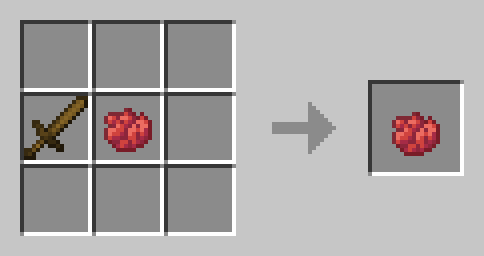
To join a Team, simply put a Wooden Sword and an according Dye (Red, Blue Green, Yellow, Pink, Orange etc.) in the crafting Grid and click on the Dye in the output box. You will automatically join the Team with the color of the Dye!
I don't like my Team!
To leave your Team, use White Dye instead :( You don't need to leave your Team to switch Teams.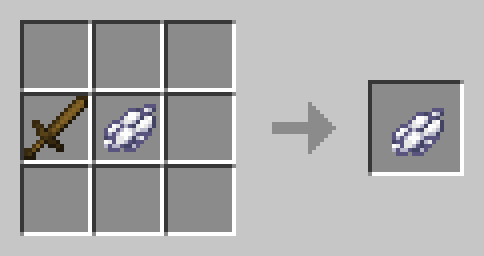
🛠️ Installation
Datapack Installation Guide
Copy the .zip archive into the ".minecraft/saves/yourworldname/datapacks" folder, where yourworldname is the name of your world.
Mod installation Guide
Copy the .jar archive into the folder your Mod Loader of choice provides.
❗Issues & Suggestions
If you encounter any Issues with this Datapack/Mod, please report them on my Discord
Project description from Modrinth.
Pick your setup
easyTeams by Minecraft version and loader
Choose the version and loader you play, then open the matching release.
Minecraft version
1.21.3
5 loader buildsMinecraft version
1.21.2
5 loader buildsMinecraft version
1.21.1
4 loader buildsMinecraft version
1.21
4 loader buildsMinecraft version
1.20.6
4 loader buildsMinecraft version
1.20.5
4 loader buildsCheck the dependencies, then try the file in a copied instance before changing a world you care about.
Recent files
easyTeams versions and loaders
1.3
easyTeams1.21.2-4.zip
20 Mar 2025
Client Optional Server Optional Dependencies No extras listed Listed on Release listing
Check the 1.21.4 · datapack setup 1.21.21.21.31.21.4datapack release
Looking for an older file? The official Modrinth project page is in Resources.
 mod
Modrinth · Minecraft
Terrestria
Terrestria is a detailed and vibrant biomes mod for Minecraft running on the Fabric mod loader.
 mod
Modrinth · Minecraft
Oxidized FPS counter
This is my first client side mod that adds a fps counter
 mod
Modrinth · Minecraft
Chat Tabs
Client-side Fabric mod that adds tabbed chat with automatic channel switching. Filter messages by Global, Local, and Private channels.