Fabric API Needed by Flashcards 1.9.1
requiredMatching file found Matched file: 0.155.3+26.1.2

Modrinth · Minecraft mod
Study while playing Minecraft!
Quick answer
Flashcards 1.9.1 targets 26.1, 26.1.1, 26.1.2 with Fabric. It must be installed on the client. Do not install it on the dedicated server. All 1 required mods have matching files.
Where it goes
It must be installed on the client. Do not install it on the dedicated server.
This file is marked client-only.
1.9.1 on 26.1.2. Every mod below is checked against that same setup.
Install Fabric API first. We found matching files for this game-version and loader setup.
We only count dependency files that match this setup. A file for another loader does not fill the gap.
Before you install it
Built for Flashcards 1.9.1 on 26.1.2. Pick another file and the loader, install side or required mods may change.
Use 1.9.1. It targets 26.1, 26.1.1, 26.1.2 with Fabric; another release may have different loader, side or dependency requirements.
Install Fabric API first. We found matching files for this game-version and loader setup.
It must be installed on the client. Do not install it on the dedicated server.
Use the “Get this file” button beside 1.9.1. It opens that exact file at the source.
About this project
Basically flashcards but inside Minecraft so you can study while playing.

Pressing the H key will open the config menu above. Here you can set the number of minutes between each question and toggle it on/off. When toggled off, you can press the G key (for 1.21.6+ this keybind may conflict with vanilla) to prompt a question on-demand. Pressing the "Edit Questions" button will open the screen below.
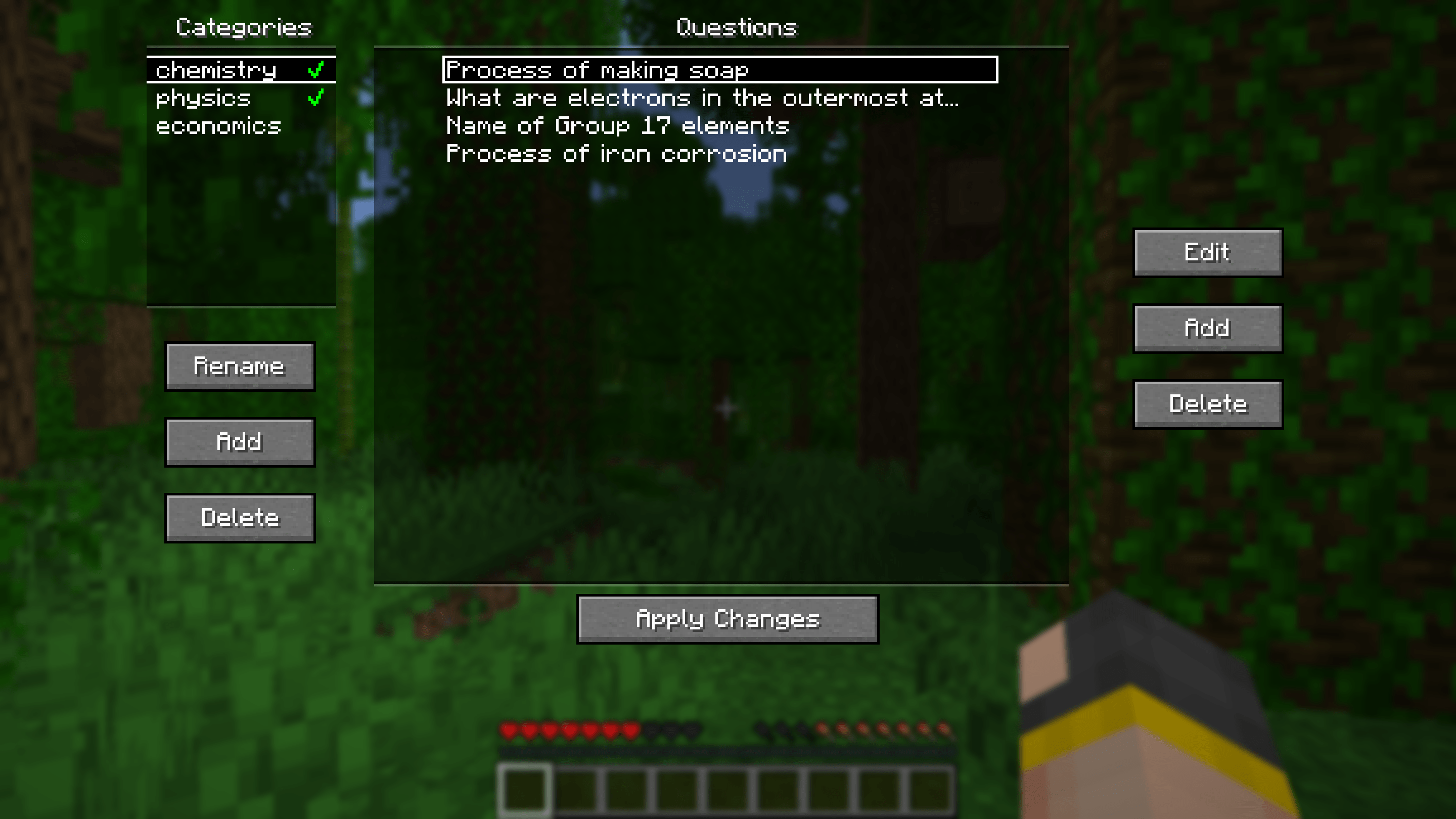
Here you can add, edit and delete questions. Questions can be seperated into different categories for organisational purposes. Clicking the green tick next to a category's name will enable/disable the questions in that category.

Pressing the "Additional Config..." button on the main config screen will open the menu above. Here you can set rewards/punishments for getting a question correct/wrong via commands. By default, there are no rewards/punishments set. You can do something simple like the image above or you can do something fancier. For example, you can create a loot table in a datapack and use the loot command to give you randomised loot each time you get a question correct.
For convenience, a default datapack with some presets is provided at .minecraft/config/flashcards/flashcards-dp.zip. To use it, copy the ZIP file into the datapacks folder of your world. The presets include:
.minecraft/config/flashcards/questions/ folder. On startup, the mod will automatically convert that TXT file into the mod's own JSON files. You can import multiple different Anki decks at once as long as the word "anki" is in the name of each TXT file.
.minecraft/config/flashcards/media/.
.minecraft/config/flashcards/questions/ folder. On startup, the mod will automatically convert these files into the mod's own JSON files. The format is as follows:QUESTION_TEXTANSWER_TEXTQUESTION_IMAGE_FILENAME
QUESTION_IMAGE_FILENAME is optional. Copy the corresponding images into .minecraft/config/flashcards/media/.
Credit to this Reddit post for the original idea of this mod.
Project description from Modrinth.
Pick your setup
Choose the version and loader you play, then open the matching release.
Showing the newest 12 of 17 game versions. Older files are in the list below.
Check the dependencies, then try the file in a copied instance before changing a world you care about.
Recent files
flashcards-1.9.1.jar
29 Oct 2026
flashcards-1.9.0.jar
24 Mar 2026
Looking for an older file? The official Modrinth project page is in Resources.
 mod
Allows players to adjust their flight speed in Creative and Spectator modes with dynamic mouse-scroll tuning, sprint momentum, and anti-rubberbanding.
 mod
Bed Chat Hider is a client-only Fabric mod that adds a simple "Hide Chat" / "Show Chat" toggle button next to the "Leave Bed" button while sleeping.
 mod
Enhances vanilla wolves with unique personalities (Aggressive, Pacifist, Normal), smarter AI, safety behaviors, and combat improvements.