Minecraft version
Back to mods 
CurseForge · Minecraft mod
Text Formatting Everywhere
Brings back the ability to use Minecraft's old formatting system.
Choose a version Pick your version below, then grab the matching file.
Quick answer
Which Text Formatting Everywhere release matches 1.21.9-pre3?
Best match for your filters Neoforge 2.0.4
Game version 1.21.2-Snapshot, 1.21, 1.21.6-snapshot
Loader NeoForge
Text Formatting Everywhere Neoforge 2.0.4 targets 1.21.2-Snapshot, 1.21, 1.21.6-snapshot with NeoForge. The project page does not say whether this file belongs on the client, dedicated server, or both. No extra mods listed for this file.
Where it goes
Is Text Formatting Everywhere required on the client, server, or both?
The project page does not say whether this file belongs on the client, dedicated server, or both.
Client Source doesn’t say
Dedicated server Source doesn’t say
Loader for this release NeoForge
Required install it here Optional supported, not mandatory Not supported do not install here Source doesn’t say do not assume
The source does not explicitly classify this release as client-only or server-only.
What else does Text Formatting Everywhere Neoforge 2.0.4 need?
Neoforge 2.0.4 on 1.21.9-pre3. Every mod below is checked against that same setup.
This file does not list any required mods. Do not add a library just because a different file uses it.
This file does not list any required or optional mods.
Before you install it
Add Text Formatting Everywhere without breaking your instance.
Built for Text Formatting Everywhere Neoforge 2.0.4 on 1.21.9-pre3. Pick another file and the loader, install side or required mods may change.
- 01
Stick to this file
Use Neoforge 2.0.4. It targets 1.21.2-Snapshot, 1.21, 1.21.6-snapshot with NeoForge; another release may have different loader, side or dependency requirements.
- 02
Bring the mods it needs
This file does not list any required mods. Do not add a library just because a different file uses it.
- 03
Put it on the correct side
The project page does not say whether this file belongs on the client, dedicated server, or both.
- 04
Pick the file you checked
Use the “Get this file” button beside Neoforge 2.0.4. It opens that exact file at the source.
About this project
What does Text Formatting Everywhere add?
Text Formatting Everywhere
Utility mod that returns an ability to use Minecraft's old formatting system.
In order to format text, you simply put section sign (§), followed by formatting code, followed by your desired text. For instance: §1Hello, will color Hello into blue
Places status:
Chat
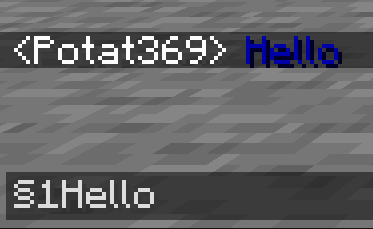
- Required on
- Client: Yes
- Server: Yes
Anvil
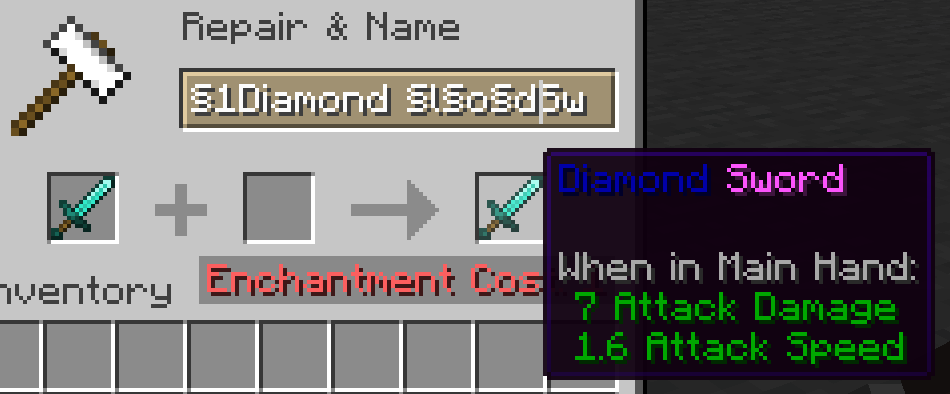
- Required on
- Client: Yes
- Server: Yes
Sign
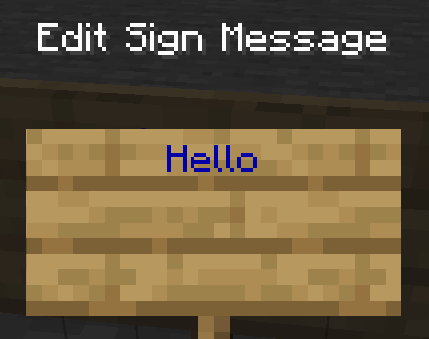
- Required on
- Client: No
- Server: Yes. However, there is a way to circumvent the requirement by doubling the code, like this:
§§11Hello.
> Note: formatting will disappear after opening and closing.
Book and Quill Body
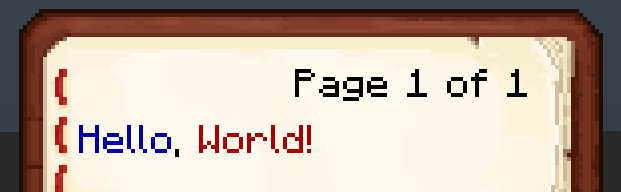
- Required on
- Client: Yes
- Server: No
Book and Quill Title
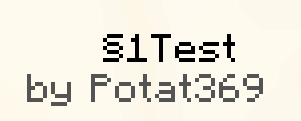
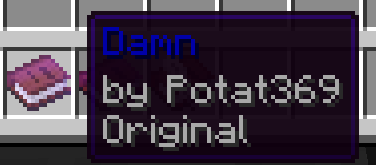
- Required on
- Client: Yes
- Server: No
Project description from CurseForge.
Pick your setup
Text Formatting Everywhere by Minecraft version and loader
Choose the version and loader you play, then open the matching release.
Minecraft version
25w45a
4 loader buildsMinecraft version
25w44a
4 loader buildsMinecraft version
25w43a
4 loader buildsMinecraft version
25w42a
4 loader buildsMinecraft version
25w41a
4 loader buildsMinecraft version
25w37a
4 loader buildsMinecraft version
25w36b
4 loader buildsMinecraft version
25w36a
4 loader buildsMinecraft version
25w35a
4 loader buildsMinecraft version
25w34b
4 loader buildsMinecraft version
25w34a
4 loader buildsShowing the newest 12 of 119 game versions. Older files are in the list below.
Check the dependencies, then try the file in a copied instance before changing a world you care about.
Recent files
Text Formatting Everywhere versions and loaders
Neoforge 2.0.4
textformattingeverywhere-neoforge-2.0.4.jar
7 Oct 2025
Client Source doesn’t say Server Source doesn’t say Dependencies No extras listed Listed on Release listing
Check the 1.21.9-pre3 · NeoForge setup 1.21.2-Snapshot1.211.21.6-snapshot1.21.1-Snapshot release
Forge 2.0.4
Text Formatting Everywhere-forge-1.21.4-2.0.4.jar
7 Oct 2025
Client Source doesn’t say Server Source doesn’t say Dependencies No extras listed Listed on Release listing
Check the 1.21.9-pre3 · Forge setup 1.21.2-Snapshot1.211.21.6-snapshot1.21.1-Snapshot release
Fabirc/Quilt 2.0.4
textformattingeverywhere-fabric-2.0.4.jar
7 Oct 2025
Client Source doesn’t say Server Source doesn’t say Dependencies No extras listed Listed on Release listing
Check the 1.21.9-pre3 · Fabric setup 1.21.2-Snapshot1.211.21.6-snapshot1.21.1-Snapshot release
Looking for an older file? The official CurseForge project page is in Resources.
 mod
mod Modrinth · Minecraft
Less Leaf Litter
Leaf Litter now has a 12.5% chance of dropping
 mod
mod Modrinth · Minecraft
Fix-level
Clean, readable enchantment levels. Replaces Roman numerals with clear numbers, even at extreme levels
 mod
mod Modrinth · Minecraft
Craftingg
Add new crafting recipes and items to Minecraft 1.20.x - 26.x