Minecraft version
Back to mods 
Modrinth · Minecraft mod
BGM Fields
BGM Fields lets you place Realm Blocks that create server-authoritative “BGM zones” (Realms).
Choose a version Pick your version below, then grab the matching file.
Quick answer
Which BGM Fields release matches 1.20.3 Forge?
Best match for your filters 1.4.0
Game version 1.20.1, 1.20.2, 1.20.3
Loader Forge
BGM Fields 1.4.0 targets 1.20.1, 1.20.2, 1.20.3 with Forge. Installation on the client is optional. Installation on the dedicated server is optional. No extra mods listed for this file.
Where it goes
Is BGM Fields required on the client, server, or both?
Installation on the client is optional. Installation on the dedicated server is optional.
Client Optional
Dedicated server Optional
Loader for this release Forge
Required install it here Optional supported, not mandatory Not supported do not install here Source doesn’t say do not assume
The source marks this as usable on both the client and server.
What else does BGM Fields 1.4.0 need?
1.4.0 on 1.20.3 Forge. Every mod below is checked against that same setup.
This file does not list any required mods. Do not add a library just because a different file uses it.
This file does not list any required or optional mods.
Before you install it
Add BGM Fields without breaking your instance.
Built for BGM Fields 1.4.0 on 1.20.3 Forge. Pick another file and the loader, install side or required mods may change.
- 01
Stick to this file
Use 1.4.0. It targets 1.20.1, 1.20.2, 1.20.3 with Forge; another release may have different loader, side or dependency requirements.
- 02
Bring the mods it needs
This file does not list any required mods. Do not add a library just because a different file uses it.
- 03
Put it on the correct side
Installation on the client is optional. Installation on the dedicated server is optional.
- 04
Pick the file you checked
Use the “Get this file” button beside 1.4.0. It opens that exact file at the source.
About this project
What does BGM Fields add?
BGM Fields (Forge 1.20.1)
🎥 **Watch the BGM Fields demo:**
https://www.youtube.com/shorts/meaJewowPdg
BGM Fields lets you place Realm Blocks that create server-authoritative “BGM zones” (Realms). When a player is inside a Realm, the Realm can:
- Switch BGM (single track or playlist)
- Apply “Vision” visuals (fog / overlay / sky-only tint / particles / colored precipitation)
- Optionally render a glowing boundary ring (visible from inside and outside)
This mod does not send .ogg audio files over the network. Music is referenced by Sound Event IDs; you provide the actual audio via a client resource pack (per-player) or a server-pushed resource pack.
Multiplayer: install the mod on both the server and all clients.
Getting Started
- Craft and place a Realm Block.
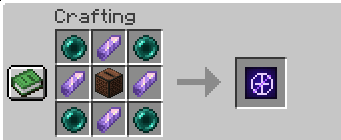
- Right-click the Realm Block to open the settings screen.
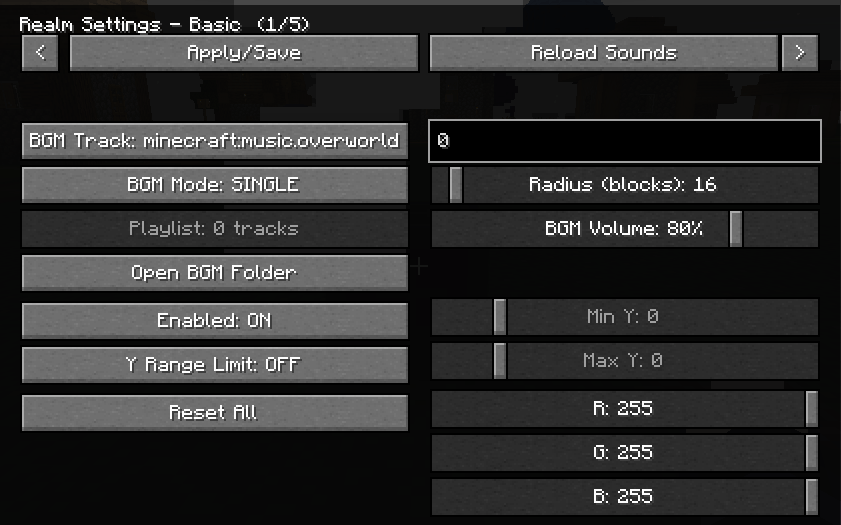
- Set:
- Radius (max 300)
- Y-range (optional; you can limit the realm vertically)
- Realm color (used by visuals)
- BGM settings (track or playlist)
- Per-realm BGM volume (0–100, default 80)
Only the owner can edit the Realm. OPs (permission level 2) can also edit.
Realm Placement Rules
- If another player’s Realm overlaps the new one, placement is denied.
- Even for the same owner, partial overlap is denied.
- Full nesting is allowed (one Realm completely inside the other).
BGM: How Tracks Work
A track is a Sound Event ID (namespace:path). Examples:
- Vanilla music:
minecraft:music.overworld - User BGM generated by this mod:
bgmfieldmod:bgm.my_song
BGM Modes:
- Single: play one Sound Event.
- Playlist: multiple entries; each entry has:
track(Sound Event ID)loop(true/false)
Add Your Own Music (Client-side, per player)
BGM Fields auto-creates a folder resource pack called:
BGMFields_UserBGM
Put your .ogg files under:
resourcepacks/BGMFields_UserBGM/assets/bgmfieldmod/sounds/bgm/
Then reload resources (in-game “Reload” button or F3+T).
You do not need to write sounds.json yourself; BGM Fields generates it automatically.
Sound ID mapping:
my_song.ogg→bgmfieldmod:bgm.my_songdungeon/boss.ogg→bgmfieldmod:bgm.dungeon.boss
Notes:
- Filenames are sanitized to valid resource paths (spaces, uppercase, etc. are converted).
- The resource pack still needs to be enabled in Minecraft’s Resource Packs menu (that is vanilla behavior). There is also an optional client config that can attempt to auto-enable it.
Provide Music to Everyone (Server Resource Pack Push)
BGM Fields can ask clients to apply a server resource pack on join.
Two modes:
- external-url: set
serverResourcePack.urlto a public URL to a.zipresource pack. - internal-http: leave
serverResourcePack.urlempty; the server hosts the.zipvia a built-in HTTP server.
Config keys (in the Forge common config):
serverResourcePack.enabledserverResourcePack.requiredserverResourcePack.publicHostserverResourcePack.urlserverResourcePack.portserverResourcePack.packFileserverResourcePack.sha1serverResourcePack.prompt
Zip requirements:
pack.mcmetaandassets/must be at the zip root (zipping the parent folder often breaks this).
Vision (Visual Effects)
Each Realm has a “Vision” visual module (server-authoritative settings synced to nearby clients). You can control:
- Master enable
- Strength (0–100)
- Ramp up/down (fade in/out)
- Fog
- Overlay
- Sky Tint (sky-only)
- Gradient is optional
- Can follow the realm color or use an independent RGB
- Particles
- Colored precipitation (rain/snow via custom particles)
- Boundary visualization (glowing ring)
Realm Vision Keybind (Owner Utility)
There is a client keybind:
V= toggle “Realm Vision” ON/OFF
This is used for owners to reveal the real Realm Block when the Realm is disguised:
- Owner + Realm Vision ON + Sneak (Shift) → show the real block
Commands (OP)
/bgmfields_rp start/bgmfields_rp stop/bgmfields_rp send/bgmfields_rp reload
Notes / Tips
- If your particle setting is “Minimal”, some Vision particles/precipitation may be hard to see.
- The boundary ring is designed to be visible both from inside and outside the Realm (useful for large radii).
Project description from Modrinth.
Pick your setup
BGM Fields by Minecraft version and loader
Choose the version and loader you play, then open the matching release.
Minecraft version
1.20.5
1 loader buildMinecraft version
1.20.4
1 loader buildMinecraft version
1.20.3
1 loader buildMinecraft version
1.20.2
1 loader buildMinecraft version
1.20.1
1 loader buildCheck the dependencies, then try the file in a copied instance before changing a world you care about.
Recent files
BGM Fields versions and loaders
1.4.0
BgmField 1.4.0.jar
16 Feb 2026
Client Optional Server Optional Dependencies No extras listed Listed on Release listing
Check the 1.20.3 · Forge setup 1.20.11.20.21.20.31.20.4 release
1.3.0
BgmField 1.3.0.jar
12 Feb 2026
Client Optional Server Optional Dependencies No extras listed Listed on Release listing
Check the 1.20.3 · Forge setup 1.20.11.20.21.20.31.20.4 release
1.2.0
BgmField 1.2.0.jar
6 Feb 2026
Client Optional Server Optional Dependencies No extras listed Listed on Release listing
Check the 1.20.3 · Forge setup 1.20.11.20.21.20.31.20.4 release
1.1.0
BgmField 1.1.0.jar
3 Feb 2026
Client Optional Server Optional Dependencies No extras listed Listed on Release listing
Check the 1.20.3 · Forge setup 1.20.11.20.21.20.31.20.4 release
1.0.0
BgmField 1.0.0.jar
31 Jan 2026
Client Optional Server Optional Dependencies No extras listed Listed on Release listing
Check the 1.20.3 · Forge setup 1.20.11.20.21.20.31.20.4 release
Looking for an older file? The official Modrinth project page is in Resources.
 mod
Modrinth · Minecraft
Dungeon Train: A Lore-Rich Roguelite RPG Adventure
Adventure time inspired dungeon crawler on a train. Procedurally generated carriages on a infinite sable physics train. Rich narrative, with custom made mods for a completely unique experience.
 mod
CurseForge + Modrinth · Minecraft
Underground Villages, Stoneholm (Fabric/Forge/NeoForge)
((✓ Forge, ✓ Neoforge and ✓ fabric ) Stoneholm is a Forge & Fabric mod adds underground villages to the world. Inspired by Strongholds and Villages.
 mod
Modrinth · Minecraft
Hearthwood
Build with timber beams, palisades, braces, patterned frames and log piles in the wood types available in your game. Light them with braziers, chandeliers, sconces and candelabras.